1. 서론
Welcome to your new OMEGA OWLR151U 150 Mbps Wi-Fi Router. This device is designed to provide a reliable and efficient wireless network for your home or small office. It integrates the functions of a router, wireless access point, 4-port switch, and firewall into a single unit. This manual will guide you through the installation, configuration, and maintenance of your router to ensure optimal performance.
2. 제품 오버view
The OMEGA OWLR151U router supports the IEEE 802.11n wireless standard, offering wireless speeds of up to 150 Mbps on the 2.4 GHz frequency band. It features one WAN port for internet connection and four LAN ports for wired devices, along with a fixed 5 dBi antenna for enhanced signal coverage. The integrated firewall provides basic network security.

그림 2.1: 앞쪽 view of the OMEGA OWLR151U Wi-Fi Router, showing its compact design and single antenna.
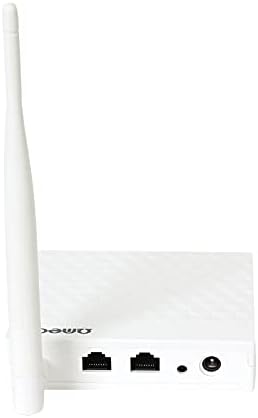
그림 2.2: 뒤쪽 view of the OMEGA OWLR151U Wi-Fi Router, highlighting the WAN port, LAN ports, and power input.
3. 설정
3.1 패키지 내용
- OMEGA OWLR151U Wi-Fi Router
- 전원 어댑터
- 이더넷 케이블
- 빠른 설치 가이드(포함된 경우)
3.2 하드웨어 연결
- 전원 연결: Connect the provided power adapter to the router's power port and then plug it into an electrical outlet. Ensure the power LED on the router illuminates.
- WAN 연결: Connect an Ethernet cable from your modem (or internet service provider's wall jack) to the 핏기 없는 라우터의 포트.
- LAN 연결(선택 사항): To connect a computer or other wired device, use an Ethernet cable to connect it to one of the 랜 라우터의 포트.
3.3 초기 구성
- 액세스 라우터 인터페이스: 열기 web browser (e.g., Chrome, Firefox) on a computer or device connected to the router (either via Wi-Fi or Ethernet).
- IP 주소를 입력하세요: In the browser's address bar, type the router's default IP address (commonly
192.168.1.1or192.168.0.1). Refer to the label on the bottom of your router for the exact IP address and login credentials. - 로그인: 기본 사용자 이름과 비밀번호를 입력하세요(예:
admin/adminoradmin/password). - 설치 마법사를 따르세요: Once logged in, you will typically be guided through a Quick Setup Wizard. Follow the on-screen instructions to configure your internet connection and Wi-Fi settings (SSID and password).
- 설정 저장: 설정을 완료한 후 설정을 저장하고, 메시지가 표시되면 라우터를 재시작하십시오.
4. 운영
4.1 장치 연결
- Wi-Fi 연결: On your wireless device (smartphone, tablet, laptop), search for available Wi-Fi networks. Select the SSID (network name) you configured during setup and enter the Wi-Fi password.
- 이더넷 연결: For wired devices, simply connect an Ethernet cable from the device to any of the router's available LAN ports.
4.2 Accessing Router Settings
To modify advanced settings, such as port forwarding, parental controls, or security options, access the router's web interface using the IP address and login credentials as described in Section 3.3.
5. 유지관리
5.1 펌웨어 업데이트
정기적으로 제조업체의 공식을 확인하십시오. website for available firmware updates. Firmware updates can improve performance, add new features, and enhance security. Follow the instructions provided by the manufacturer for the update process.
5.2 공장 초기화
If you encounter persistent issues or forget your login credentials, you can perform a factory reset. With the router powered on, use a paperclip or a thin object to press and hold the reset button (usually a small pinhole on the back or bottom) for approximately 5-10 seconds. The router will restart with its factory default settings.
5.3 청소
Use a soft, dry cloth to clean the exterior of the router. Do not use liquid cleaners, aerosols, or solvents, as these can damage the device.
6. 문제 해결
6.1 인터넷 접속 불가
- 연결 확인: Ensure all cables (power, WAN, LAN) are securely connected.
- 장치 재시작: 모뎀과 라우터의 전원을 끄고 30초간 기다린 후 모뎀의 전원을 먼저 켜세요. 모뎀이 완전히 연결되면 라우터의 전원을 켜세요.
- Verify WAN Settings: 라우터에 로그인 web interface and check the WAN settings to ensure your internet connection type (e.g., DHCP, PPPoE) is correctly configured.
6.2 Wi-Fi Not Visible or Cannot Connect
- Wi-Fi 사용: Confirm that the wireless function is enabled in the router's web 인터페이스.
- 올바른 비밀번호: 와이파이 비밀번호를 정확하게 입력했는지 다시 한번 확인하세요 (대소문자 구분).
- 채널 간섭: In the router settings, try changing the Wi-Fi channel to a less congested one (e.g., 1, 6, or 11).
6.3 느린 연결 속도
- 라우터 배치: Position the router in a central location, away from obstructions and other electronic devices that may cause interference.
- 펌웨어: 라우터의 펌웨어가 최신인지 확인하세요.
- 연결된 장치: Too many devices connected simultaneously can reduce speed. Consider limiting usage or upgrading your internet plan.
7. 사양
- 모델: OWLR151U
- 무선 표준 : IEEE 802.11n, compatible with 802.11 b/g
- 무선 속도: 최대 150Mbps
- 주파수 대역: 2.4GHz
- WAN 포트: 1 x 10/100Mbps
- LAN 포트 : 4 x 10/100Mbps
- 안테나: 1 x 5 dBi fixed antenna
- 보안 프로토콜: WEP (Note: WEP is an older security protocol. For enhanced network security, consider using WPA2 or WPA3 if supported by your devices and network.)
- 특별 기능: Integrated Router, Wireless Access Point, 4-Port Switch, Firewall
- 호환 장치: Personal Computer, Tablet, Smart Television
- 운영 체제: RouterOS (as specified by manufacturer)
8. 보증 정보
Information regarding the product warranty for the OMEGA OWLR151U Wi-Fi Router is not available in the provided details. Please refer to your purchase documentation, the product packaging, or contact the retailer where you purchased the device for specific warranty terms and conditions.
9. 지원
For technical assistance, troubleshooting beyond the scope of this manual, or further inquiries, please refer to the contact information provided with your purchase. Specific support contact details for Omega products are not available in the provided information. You may also visit the official Omega product support web가능한 경우 사이트.


