소개
This manual provides instructions for the HAVIT HV-KB366L RGB Backlit Mechanical Gaming Keyboard. This keyboard features blue mechanical switches, full anti-ghosting, and customizable RGB backlighting, designed for reliable performance.
설치 지침
키보드 연결
- 컴퓨터에서 사용 가능한 USB 포트를 찾습니다.
- Connect the USB cable from the HAVIT HV-KB366L keyboard to the USB port on your computer.
- 키보드는 플러그 앤 플레이 방식이므로 운영 체제에서 자동으로 인식됩니다.
시스템 호환성
- Compatible with Windows 10 and other Windows operating systems.
- Mac OS supports 6-key rollover only.
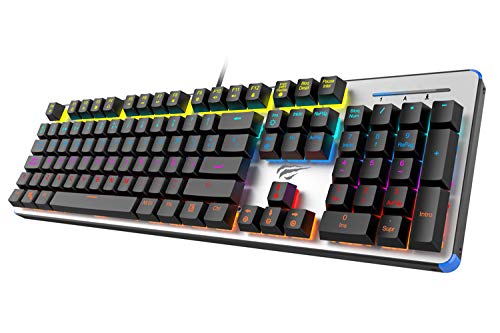
Figure 1: HAVIT HV-KB366L RGB Backlit Mechanical Gaming Keyboard. An overhead view 키보드의, 쇼casing its full layout with RGB lighting on the keys and a white frame.
작동 지침
기계식 키 스위치
The keyboard is equipped with blue mechanical switches, providing tactile feedback and an audible click with each keystroke. This design is intended for precise input during typing and gaming.
안티 고스트 기능
The full key anti-ghosting mechanism ensures that all key presses are registered accurately, even when multiple keys are pressed simultaneously. This feature is beneficial for fast-paced gaming.
백라이트 조정
- To change the backlight color or mode, press the Fn 동시에 키를 누르세요 백라이트 key. Repeated presses will cycle through available modes and colors.
- Marquee Mode: In 7-color backlit mode (non-breathing), press the 백라이트 key once to activate marquee mode. Press the 백라이트 key again to deactivate marquee mode and return to 7-color backlit mode.
- 밝기 레벨: The backlight offers 4 levels of brightness adjustment.
- 호흡률: The breathing effect has 10 adjustable levels.
유지
키보드 청소
- 청소하기 전에 키보드를 컴퓨터에서 분리하세요.
- 부드럽고 마른 천으로 키보드 표면을 닦으세요.
- 키 사이의 먼지와 이물질을 제거하려면 압축 공기를 사용하세요.
- 강한 화학 물질이나 연마재는 마감재나 키캡을 손상시킬 수 있으므로 사용하지 마세요.
내구성
The keyboard features an aluminum top housing with a sanded finish and a metal base, contributing to its overall durability and stable performance.
문제 해결
키보드가 응답하지 않음
- USB 케이블이 키보드와 컴퓨터에 모두 단단히 연결되어 있는지 확인하세요.
- 키보드를 컴퓨터의 다른 USB 포트에 연결해보세요.
- Test the keyboard on another computer to determine if the issue is with the keyboard or the computer's USB port.
백라이트가 작동하지 않거나 잘못되었습니다
- Verify that the keyboard is properly connected and receiving power.
- 누르다 Fn + Backlit key to cycle through backlight modes and ensure it is not turned off or set to a very low brightness.
- Refer to the "Backlight Adjustment" section for detailed instructions on changing modes and brightness.
명세서
| 상표 | 하빗 |
| 모델 번호 | HV-KB366L |
| 제조업체 | 하빗 |
| 제품 치수 | 50.5 x 17.6 x 6 센티미터 |
| 품목 무게 | 1.33kg |
| 연결 기술 | 유선 (USB) |
| 키보드 설명 | 게임 기계식 키보드 |
| 특징 | RGB Backlit, Anti-Ghosting |
| 하드웨어 플랫폼 | 노트북, PC |
| 운영 체제 | Windows 10 (and compatible), Mac OS (6-key rollover) |
| 권tage | 5 볼트 |
| 포함된 구성 요소 | USB 케이블 |
보증 및 지원
보증 정보
Specific warranty details for the HAVIT HV-KB366L keyboard are not provided in the product data. Please refer to the product packaging or contact HAVIT directly for warranty terms and conditions.
고객 지원
For technical assistance, troubleshooting, or further inquiries, please contact HAVIT customer support through their official web구매 시 제공된 사이트 또는 연락처 정보.


