1. 서론
Thank you for choosing the La Crosse Technology WS9162IT-SIL Wireless Temperature Station. This device provides accurate indoor and outdoor temperature readings, featuring a quartz clock and 24-hour time format. It utilizes 868 MHz IT+ technology for reliable wireless transmission up to 100 meters in open fields. This manual will guide you through the setup, operation, and maintenance of your temperature station.
2. 안전 정보
- 장치를 작동하기 전에 모든 지침을 읽으십시오.
- 본체를 극한 온도, 직사광선 또는 습기에 노출시키지 마십시오.
- 실외용 센서는 실외 사용을 위해 설계되었지만, 수명 연장을 위해 비와 눈에 직접 노출되지 않도록 보호해야 합니다.
- Use only the specified battery type (AA LR6). Do not mix old and new batteries or different battery types.
- 사용한 배터리는 현지 규정에 따라 책임감 있게 폐기하십시오.
- 기기를 어린이의 손이 닿지 않는 곳에 보관하세요.
3. 패키지 내용
- La Crosse Technology WS9162IT-SIL Main Temperature Station Unit
- 무선 실외 온도 센서
- 사용 설명서
4. 제품 오버view
The La Crosse Technology WS9162IT-SIL consists of a main display unit and a wireless outdoor sensor. The main unit features an LCD screen displaying indoor and outdoor temperatures, as well as the current time. It can be mounted on a wall or placed on a tabletop. The outdoor sensor transmits temperature data wirelessly to the main unit.
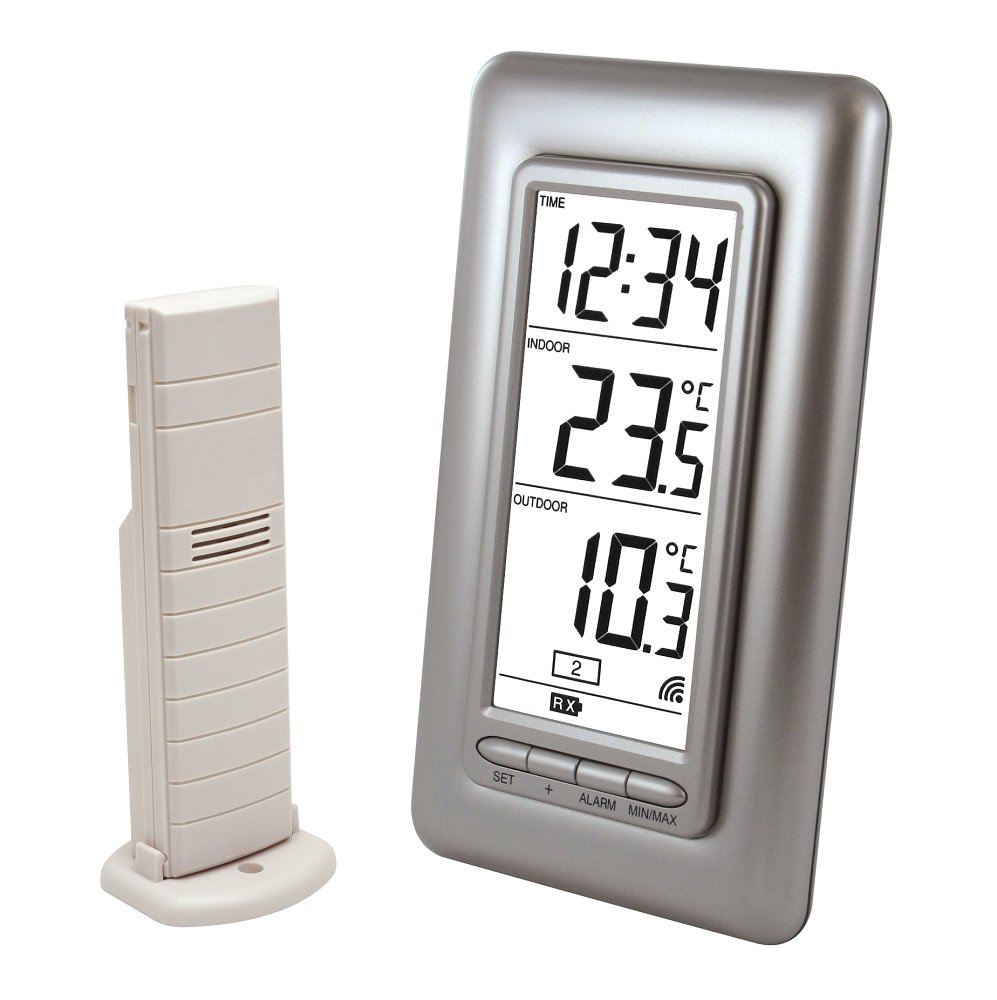
Image 1: La Crosse Technology WS9162IT-SIL Wireless Temperature Station. This image shows the main display unit and the accompanying wireless outdoor sensor, both in a silver finish. The main unit has an LCD screen for displaying temperature and time information.
5. 설정
5.1 배터리 설치
- 무선 실외 센서의 경우: Open the battery compartment on the back of the outdoor sensor. Insert the required batteries (typically 2 x AA LR6, not included) according to the polarity markings (+/-). Close the compartment securely.
- For the Main Temperature Station Unit: Open the battery compartment on the back of the main unit. Insert 2 x AA LR6 batteries (not included) according to the polarity markings (+/-). Close the compartment securely.
중요한: Always insert batteries into the outdoor sensor ~ 전에 inserting them into the main unit to ensure proper synchronization.
5.2 센서 배치
- 정확한 온도 측정을 위해 실외 센서를 직사광선과 열원을 피해 그늘진 곳에 설치하세요.
- 센서가 비와 눈에 직접 닿지 않도록 보호하세요.
- Position the sensor within 100 meters (328 feet) of the main unit, ensuring there are minimal obstructions (e.g., thick walls, metal objects) that could interfere with the 868 MHz wireless signal.
5.3 초기 동기화
After inserting batteries into both units, the main station will automatically search for the outdoor sensor. This process may take a few minutes. Once connected, the outdoor temperature will appear on the main unit's display. If the outdoor temperature does not appear, refer to the Troubleshooting section.
6. 사용 설명서
6.1 디스플레이 정보
LCD 디스플레이에는 다음 정보가 표시됩니다.
- 현재 시간: Displayed in 24-hour format.
- 실내 온도: The temperature measured by the main unit.
- 야외 온도: The temperature transmitted from the wireless sensor.
- 배터리 부족 표시기: Icons will appear to indicate low battery for either the main unit or the outdoor sensor.
6.2 온도 단위 선택(°C/°F)
To switch between Celsius (°C) and Fahrenheit (°F), locate the °C/°F button (usually on the back or side of the main unit) and press it. The display will update to the selected unit.
6.3 Minimum/Maximum Temperature Display
The station records the minimum (MIN) and maximum (MAX) indoor and outdoor temperatures. Press the 'MIN/MAX' button (or similar, refer to specific button labels on your unit) to cycle through the current, minimum, and maximum temperature readings. To reset the MIN/MAX records, press and hold the 'MIN/MAX' button for a few seconds.
6.4 시간 설정
The time is typically set automatically via a quartz clock. If manual adjustment is needed, refer to the buttons on the back of the unit (e.g., 'SET', 'MODE', '+', '-') to enter time setting mode and adjust the hours and minutes. The time format is 24-hour.
7. 유지관리
7.1 배터리 교체
When the low battery indicator appears on the display, replace the batteries in the respective unit (main station or outdoor sensor). Always replace all batteries in a unit at the same time with new, fresh batteries of the specified type (AA LR6). Follow the battery installation steps in Section 5.1.
7.2 청소
디스플레이와 c를 청소하세요asing of the main unit and sensor with a soft, damp 천으로 닦으세요. 연마성 세제나 용제는 기기를 손상시킬 수 있으므로 사용하지 마세요.
8. 문제 해결
| 문제 | 가능한 해결책 |
|---|---|
| No outdoor temperature display or '---' shown. |
|
| 온도 판독값이 부정확합니다. |
|
| 디스플레이가 어둡거나 아무것도 표시되지 않습니다. |
|
| Outdoor sensor stops working after some time. |
|
9. 사양
- 모델: WS9162IT-SIL
- 시간: Quartz clock, 24-hour format
- 실내 온도 범위: -9.9°C ~ +59.9°C(14.2°F ~ 139.8°F)
- 실외 온도 범위: -39.9°C ~ +59.9°C (-39.8°F ~ 139.8°F)
- 온도 분해능: 0.1°C(0.2°F)
- Indoor Temperature Reading Interval: 15초마다
- 빈도: 868MHz
- 전송 범위: 열린 들판에서 최대 100미터(328피트)
- 기술: IT+
- 디스플레이 유형: 액정표시장치
- Power Source (Main Station): 2 x AA LR6 batteries (not included)
- 전원(실외 센서): Batteries (type not specified, typically 2 x AA LR6, not included)
- 배터리 부족 표시기: 예
- 장착 옵션: Wall mountable or tabletop placement
- 스테이션 크기: 80 x 150 x 29.4mm(3.15 x 5.91 x 1.16인치)
- 제품 무게: 260g(0.57파운드)
10. 보증 및 지원
La Crosse Technology products are designed for reliability and performance. For specific warranty information, please refer to the warranty card included with your purchase or visit the official La Crosse Technology website. For technical support or further assistance, please contact La Crosse Technology customer service through their official channels.


