소개
The ASTRO Gaming A40 TR Headset and MixAmp Pro TR are designed to provide a high-fidelity audio experience for gaming on PlayStation 4 and PC. The A40 TR headset offers user customization, allowing transformation from an open-back to a closed-back noise-canceling headset with optional Mod Kits. The MixAmp Pro TR features all-digital components for clear, interference-free audio and voice communication, with customizable settings via the ASTRO Command Center software.

Image: The ASTRO Gaming A40 TR Headset and MixAmp Pro TR, showcasing both components together. The headset is black with gold accents, and the MixAmp is a compact black unit with control dials.
패키지 내용
아래 나열된 모든 품목이 제품 포장에 포함되어 있는지 확인하세요.
- ASTRO A40 TR Headset
- ASTRO MixAmp Pro TR
- A40 TR Inline Mute Cable (2.0m)
- TOSlink Optical Cable (3.0m)
- Micro-USB Cable (3.0m)
- Digital Daisy Chain Cable (0.5m)
- Swappable Microphone
설정
PlayStation 4(PS4)에 연결
- 연결하다 TOSlink Optical Cable from the MixAmp Pro TR's OPTICAL port to the PS4's Optical Out port.
- 연결하다 마이크로 USB 케이블 from the MixAmp Pro TR's USB port to an available USB port on the PS4.
- 연결하다 A40 TR Inline Mute Cable from your A40 TR Headset to the headset port on the front of the MixAmp Pro TR.
- PS4에서 다음 경로로 이동하세요. Settings > Sound and Screen > Audio Output Settings.
- 세트 기본 출력 포트 에게 디지털 출력(광).
- 선택하다 Dolby Digital (Bitstream) for the audio format.
- 이동하다 설정> 장치> 오디오 장치.
- 세트 입력 장치 에게 USB Headset (ASTRO MixAmp Pro TR).
- 세트 출력 장치 에게 USB Headset (ASTRO MixAmp Pro TR).
- 조정하다 볼륨 조절(헤드폰) 최대로.
- 세트 헤드폰으로 출력 에게 채팅 오디오 or 모든 오디오 as preferred.
PC에 연결하기
- 연결하다 마이크로 USB 케이블 from the MixAmp Pro TR's USB port to an available USB port on your PC.
- 연결하다 A40 TR Inline Mute Cable from your A40 TR Headset to the headset port on the front of the MixAmp Pro TR.
- On your PC, ensure the MixAmp Pro TR is selected as the default playback and recording device in your sound settings.
- 다운로드하고 설치하세요 ASTRO Command Center software from the official ASTRO Gaming website to customize settings, update firmware, and manage EQ presets.
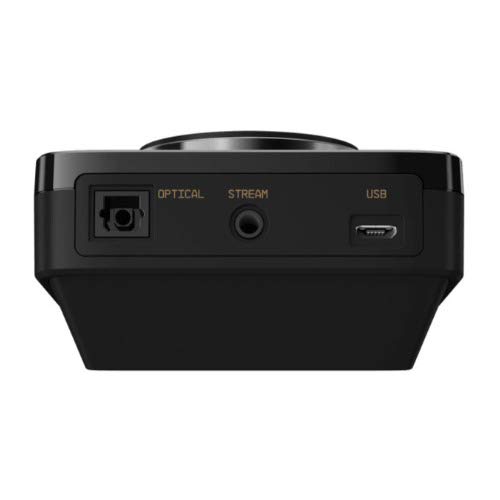
이미지: 후면 view of the ASTRO MixAmp Pro TR, highlighting the Optical, USB, AUX, and Stream ports for various connections.
Operating the MixAmp Pro TR
믹스Amp Pro TR provides intuitive controls for managing your audio experience:
- Master Volume Dial: The large dial on the left controls the overall volume of your headset. Rotate clockwise to increase volume, counter-clockwise to decrease.
- Game/Voice Balance Dial: The smaller dial on the right allows you to adjust the balance between game audio and voice chat.
- Rotate towards "GAME" to prioritize game audio.
- Rotate towards "VOICE" to prioritize voice chat.
- EQ Presets Button: Located in the center, this button cycles through four customizable equalizer presets. The active preset is indicated by the illuminated icon (star, headphone, etc.). These presets can be configured using the ASTRO Command Center software.
- Dolby Button: Activates or deactivates Dolby Surround Sound. When active, the Dolby logo will illuminate.
- 마이크 음소거 버튼: Located on the A40 TR Inline Mute Cable, this switch mutes or unmutes your microphone. When muted, the MixAmp's volume dials will typically glow red.
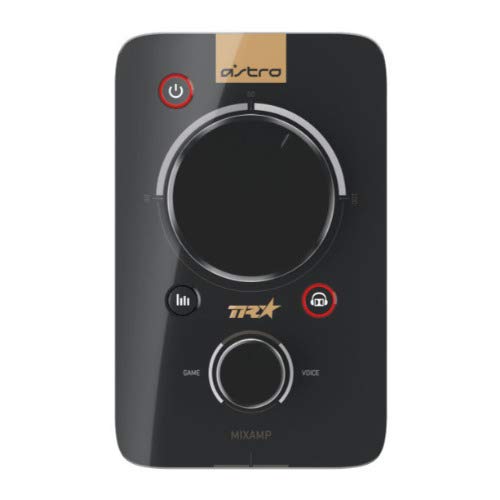
이미지: 상단 view of the ASTRO MixAmp Pro TR, showing the large master volume dial, the smaller game/voice balance dial, and the EQ preset buttons.
유지
- 청소: Use a soft, dry cloth to clean the headset and MixAmp. 연마성 세척제나 용제는 사용하지 마세요.
- 저장: Store the headset and MixAmp 직사광선과 극한의 온도를 피해 시원하고 건조한 곳에 보관하세요.
- 케이블 관리: 케이블 손상을 방지하기 위해 조심스럽게 다루십시오. 급격하게 구부리거나 과도하게 당기지 마십시오.
- 귀 쿠션: Periodically check ear cushions for wear and tear. Replacement cushions are available from ASTRO Gaming.
문제 해결
If you encounter issues with your ASTRO Gaming A40 TR Headset or MixAmp Pro TR, try the following solutions:
| 문제 | 해결책 |
|---|---|
| 헤드셋에서 소리가 나지 않습니다. |
|
| 마이크가 작동하지 않습니다. |
|
| 왜곡되거나 오디오 품질이 좋지 않습니다. |
|
For more detailed troubleshooting, please refer to the official ASTRO Gaming support resources.
명세서
- 모델 번호: 939-001511
- 주파수 응답: 20~20,000Hz
- 공칭 임피던스: 48옴
- 머리띠 압력: 2.6N
- 제품 크기: 9.06 x 13.87 x 4.33 인치
- 품목 무게: 1.06파운드
- 연결성: 광학, USB
- 호환성: 플레이스테이션4, PC
보증 및 지원
For detailed warranty information and product support, please visit the official ASTRO Gaming web사이트를 방문하거나 제공된 문서를 참조하세요.
Ensure you register your product on the ASTRO Gaming website for the latest updates and support.


