1. 서론
The Alpine IVA-W520E is a full-featured 2DIN DVD player solution designed for in-car entertainment and media. It integrates advanced video and audio technologies, including a 7-inch LED touchscreen and a Burr-Brown 24-bit DAC, to deliver high-quality sound and clear images. This manual provides essential information for the proper installation, operation, and maintenance of your IVA-W520E unit.
2. 안전 정보
Please read all safety instructions carefully before installing or operating the unit. Failure to follow these instructions may result in injury or damage to the unit or vehicle.
- 전문 설치 권장: Due to the complexity of car audio-visual systems, professional installation is highly recommended to ensure proper wiring and functionality.
- 전원: 본 기기는 12V DC 네거티브 접지 전원 공급 장치에만 연결하십시오.
- 주의 산만을 피하세요: 기기의 제어 장치를 조작하지 마십시오. view video content while driving, as this can lead to accidents. Always pull over to a safe location before making adjustments.
- 통풍: 과열을 방지하기 위해 장치 주변에 충분한 환기를 유지하세요. 환기구를 막지 마세요.
- 수분 및 액체: Keep the unit away from moisture and liquids. Do not expose it to rain or water.
- 청소: 부드럽고 마른 천으로 닦아주세요. 연마성 세제나 용제는 사용하지 마세요.
3. 패키지 내용
설치를 진행하기 전에 패키지에 모든 품목이 들어 있는지 확인하세요.
- Alpine IVA-W520E Head Unit
- 전원/스피커 하네스
- 장착 하드웨어(나사, 브래킷)
- 트림 링
- 사용 설명서 (본 문서)
- 보증 정보
4. 설정 및 설치
4.1. 설치 지침
올바른 설치는 최적의 성능과 안전에 매우 중요합니다. 자격을 갖춘 전문가에게 설치를 의뢰하는 것을 강력히 권장합니다.
- 배터리 분리: 전기 작업을 시작하기 전에 차량의 배터리 음극 단자를 분리하여 단락을 방지하세요.
- 설치: Securely mount the unit in the vehicle's double-DIN opening using the provided mounting brackets and screws. Ensure it is stable and does not obstruct any vehicle controls.
- 배선: Connect the power harness, speaker wires, and other input/output cables according to the wiring diagram provided in the separate installation guide. Pay close attention to ground connections.
- Antenna and External Devices: Connect the radio antenna and any external devices such as a reverse camera or external amp정수기.
4.2. 초기 설정
After installation, reconnect the battery and power on the unit for the first time.
- 언어 선택: 화면의 지시에 따라 원하는 언어를 선택하세요.
- 시간과 날짜: Set the correct time and date for accurate display.
- 오디오 설정: Adjust basic audio settings such as volume, balance, and fader.
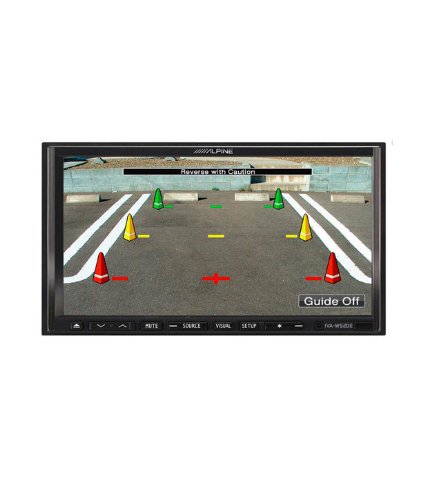
그림 4.1: 예ample of the IVA-W520E displaying a reverse camera feed, showing parking guidelines. This feature aids in safe vehicle maneuvering.
5. 장치 작동
5.1. 터치스크린 및 버튼 제어
The IVA-W520E features a responsive 7-inch LED touchscreen for primary control, supplemented by physical buttons for quick access to common functions.
- 터치스크린: Navigate menus, select sources, and control playback by touching the screen.
- 볼륨 조절: Use the dedicated volume buttons or on-screen controls to adjust audio levels.
- 소스 버튼 : Press to cycle through available audio/video sources (Radio, DVD, USB, iPod, AUX, Bluetooth).
- 음소거 버튼: 오디오 출력을 일시적으로 음소거합니다.
- 설정 버튼: 시스템 설정 메뉴에 접근합니다.
5.2. 오디오 재생
The unit supports various audio formats and sources, enhanced by its Burr-Brown 24-bit DAC for superior sound quality.
- USB 오디오 오디오가 포함된 USB 장치를 연결하세요 files. The unit will display track information and allow navigation through folders.
- iPod/iPhone 연결: Connect your iPod or iPhone for direct audio playback and control.
- DVD/CD 재생: Insert a DVD or CD into the disc slot for audio or video playback.
- 라디오 튜너: AM/FM 라디오 방송을 청취하세요.
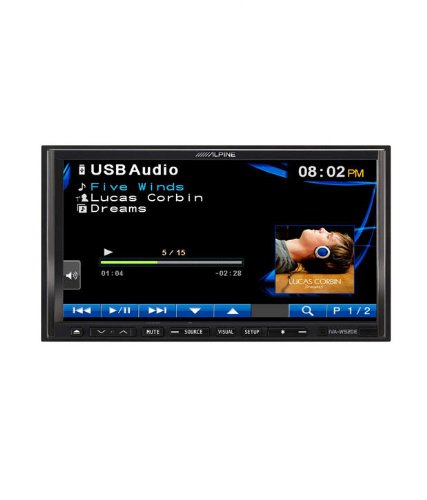
Figure 5.1: The IVA-W520E displaying the USB Audio interface, showing current track, artist, and playback controls. This allows for easy navigation of digital music files.
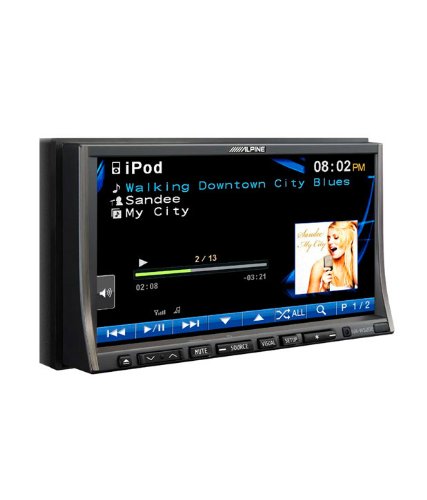
Figure 5.2: The IVA-W520E displaying the iPod interface, showing a list of songs and album art. This demonstrates seamless integration with Apple devices for music playback.
5.3. 비디오 재생
The 7-inch LED screen provides enhanced image quality with higher resolution, better contrast, and improved color reproduction compared to standard LCD screens.
- DVD Video: Insert a video DVD for playback. Ensure the parking brake safety wire is correctly connected for video to display while the vehicle is stationary.
- External Video Input: The unit supports external video sources, such as a reverse camera or other video devices.
5.4. 블루투스 연결
The IVA-W520E is upgradable for Bluetooth hands-free system functionality, allowing for safe and convenient communication while driving.
- 편성: Refer to the separate Bluetooth module manual (if applicable) for pairing instructions with your mobile phone.
- 핸즈프리 통화: 기기를 통해 직접 전화를 걸고 받을 수 있습니다.
- 오디오 스트리밍 : 블루투스 지원 기기에서 오디오를 스트리밍하세요.
5.5. Navigation System (Upgradable)
The unit is designed to be upgradable with a navigation system. Consult your Alpine dealer for compatible navigation modules and installation.
6. 유지관리
Regular maintenance helps ensure the longevity and optimal performance of your Alpine IVA-W520E.
- 화면 청소: Gently wipe the touchscreen with a soft, lint-free cloth. For stubborn smudges, slightly dampen the cloth with water or a screen-specific cleaner. Do not spray cleaner directly onto the screen.
- 디스크 슬롯: Keep the disc slot free of dust and debris. Avoid inserting bent, scratched, or irregular discs.
- 일반 청소: Use a soft, dry cloth to wipe the unit's exterior. Avoid harsh chemicals or abrasive materials.
7. 문제 해결
If you encounter issues with your IVA-W520E, refer to the following common problems and solutions:
| 문제 | 가능한 원인 | 해결책 |
|---|---|---|
| 전원이 없습니다 | 퓨즈 단선, 잘못된 배선, 연결 불량. | Check vehicle fuses and unit's fuse. Verify power and ground wiring connections. Ensure battery is connected. |
| 소리가 나지 않습니다 | 볼륨이 너무 작거나, 음소거가 활성화되었거나, 스피커 배선 문제이거나, 소스가 잘못 선택되었을 수 있습니다. | 볼륨을 높이세요. 음소거를 해제하세요. 스피커 연결을 확인하세요. 올바른 오디오 소스를 선택하세요. |
| 디스크 오류 | 더럽거나 긁혔거나 호환되지 않는 디스크입니다. | Clean the disc. Try a different, known-good disc. Ensure disc format is supported. |
| Video Not Displaying (while driving) | Parking brake safety wire not connected or incorrectly connected. | This is a safety feature. Video playback is disabled while the vehicle is in motion. Ensure the parking brake wire is correctly connected to the vehicle's parking brake circuit. |
| 블루투스 페어링 문제 | Bluetooth module not connected, phone not in pairing mode, interference. | Ensure optional Bluetooth module is correctly installed. Put phone in pairing mode. Move closer to the unit. |
If the problem persists after trying these solutions, please contact your authorized Alpine dealer or customer support.
8. 사양
Key technical specifications for the Alpine IVA-W520E:
- 모델: IVA-W520E
- 디스플레이 크기: 7 인치 (18cm)
- 디스플레이 유형: LED LCD Touchscreen
- 해결: 480 x 272 픽셀
- 오디오 DAC: Burr-Brown 24-bit
- 호환 장치: Smartphone (via USB/iPod, Bluetooth upgradable)
- 특별 기능: Touchscreen, Bluetooth (upgradable)
- 오디오 출력 모드: 스피커
- 제조업체: 알파인
- 첫 번째 이용 가능: 20년 2015월 XNUMX일
9. 보증 및 지원
For detailed warranty information, please refer to the warranty card included with your product package or visit the official Alpine web사이트. 구매 증빙 자료로 구매 영수증을 보관하세요.
For technical support, service, or inquiries about compatible accessories and upgrades (such as navigation modules or Bluetooth kits), please contact your authorized Alpine dealer or visit the Alpine customer support portal online.
알파인 공식 Web대지: www.alpine.com


