소개
The Coby CVR-22 Portable Cassette Recorder is designed for simple and convenient audio recording and playback. Featuring one-touch recording, a built-in microphone, and a retractable handle, this device offers excellent portability for capturing audio wherever you go. Rediscover your classic tape collection or record new content with ease.
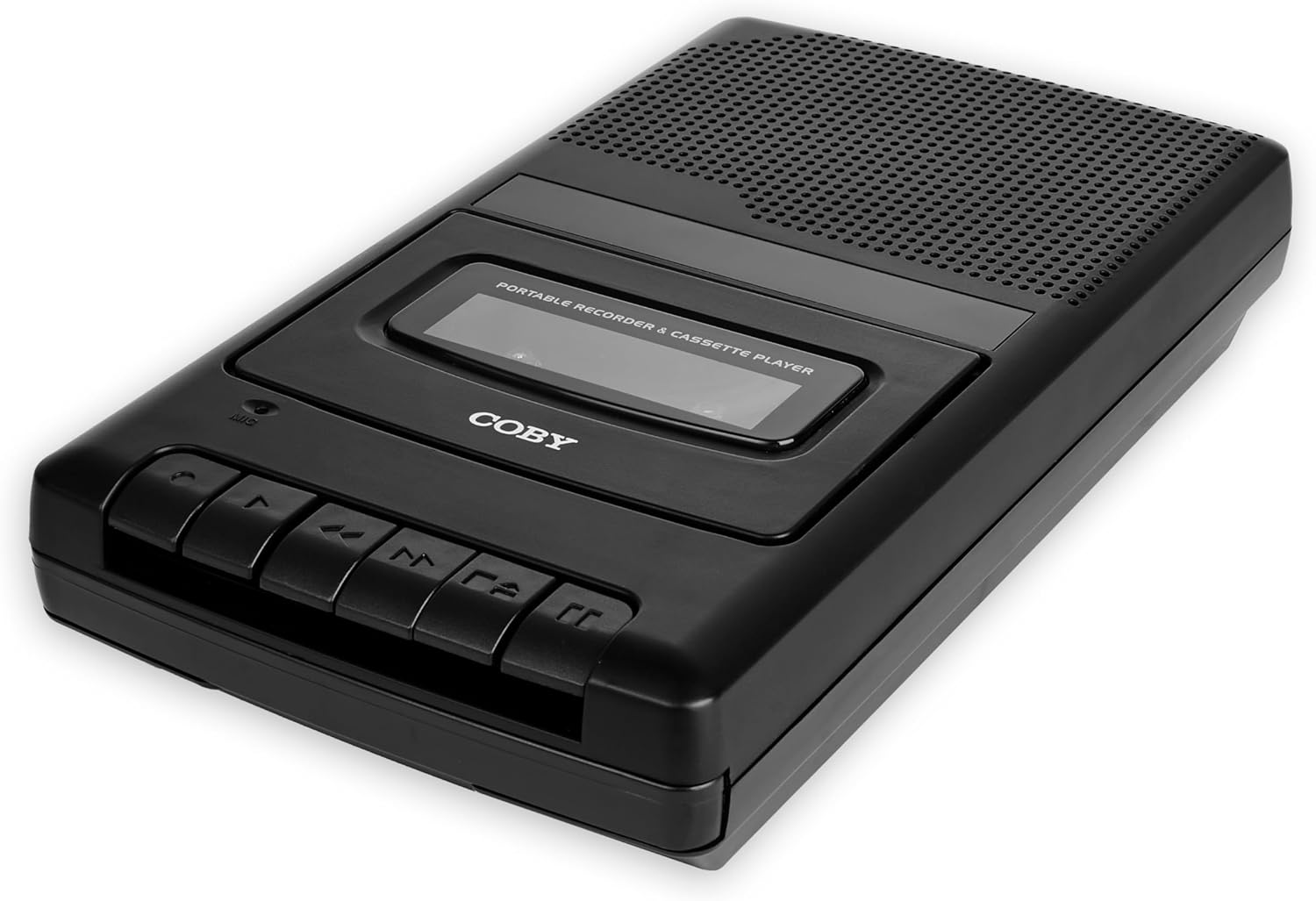
Image: The Coby CVR-22 Portable Cassette Recorder, showcasin컴팩트한 디자인과 제어 버튼이 특징입니다.
설정
장치 전원 공급
The CVR-22 operates on two (2) AA batteries. Ensure batteries are inserted correctly according to polarity markings inside the battery compartment.
- Locate the battery compartment on the underside or rear of the unit.
- 배터리 덮개를 엽니다.
- Insert two AA batteries, matching the positive (+) and negative (-) terminals as indicated.
- 배터리 덮개를 단단히 닫으세요.

Image: The Coby CVR-22 showing a cassette being inserted and indicating its 2x AA battery power requirement.
작동 지침
카세트 테이프 삽입하기
- 를 누르세요 중지/꺼내기 카세트 칸 문을 여는 버튼입니다.
- Insert a standard audio cassette tape with the open edge facing upwards and the tape side facing the unit.
- 카세트 칸 덮개를 딸깍 소리가 나면서 닫힐 때까지 살살 닫아주세요.
재생
- 카세트 테이프가 제대로 삽입되었는지 확인하십시오.
- 를 누르세요 놀다 버튼을 누르세요. 테이프가 재생되기 시작합니다.
- Adjust the volume using the volume control dial, typically located on the side of the unit.
- 재생을 중지하려면 중지/꺼내기 단추.
- 빨리 감으려면 FF (빨리 감기) 단추.
- 되감으려면 REW(되감기) 단추.

Image: A user holding the Coby CVR-22, illustrating the joy of rediscovering a classic tape collection.
녹음
The CVR-22 features one-touch recording and a built-in microphone for convenient audio capture.
- Ensure a blank or recordable cassette tape is inserted.
- 를 누르세요 기록 button (usually red). The 놀다 버튼도 동시에 작동합니다.
- The built-in microphone will begin recording audio. Position the recorder appropriately for optimal sound capture.
- 녹음을 중지하려면 중지/꺼내기 단추.

Image: The Coby CVR-22 being used in a classroom setting, highlighting its utility for recording classes and lectures.

Image: The Coby CVR-22 positioned on a meeting table, demonstrating its suitability for recording meetings with its one-touch record button.
외부 연결
The CVR-22 includes a 3.5mm headphone jack for private listening and potentially an external microphone input (check your specific unit for microphone input if needed, as the built-in mic is standard).
- 헤드폰 잭: Connect standard 3.5mm headphones for personal audio playback.
- External Microphone Input (if available): For higher quality recordings or specific recording scenarios, an external microphone can be connected to the designated input jack.

Image: The Coby CVR-22 connected to an external microphone setup, illustrating its built-in audio input/output ports for versatile use.
유지
장치 청소
- 부드럽고 마른 천으로 장치 외부를 닦으세요.
- 연마성 세제나 용제는 마감재를 손상시킬 수 있으므로 사용하지 마십시오.
- Periodically clean the tape head and pinch roller using a specialized cassette head cleaner or a cotton swab lightly dampened with isopropyl alcohol. This helps maintain optimal sound quality.
배터리 관리
- 장기간 사용하지 않을 경우 배터리 누출을 방지하기 위해 배터리를 제거하세요.
- 사용한 배터리는 현지 규정에 따라 책임감 있게 폐기하십시오.
문제 해결
| 문제 | 가능한 원인 | 해결책 |
|---|---|---|
| 장치의 전원이 켜지지 않습니다. | 배터리가 방전되었거나 잘못 삽입되었습니다. | 배터리를 새 배터리로 교체할 때 극성을 반드시 확인하십시오. |
| 재생 중에 소리가 나지 않습니다. | Volume too low; headphones not connected properly; tape head dirty. | Increase volume; ensure headphones are fully inserted; clean tape head. |
| Recording is distorted or unclear. | Microphone too far from sound source; tape head dirty; faulty tape. | Move closer to sound source; clean tape head; try a different tape. |
| 테이프가 움직이거나 걸리지 않습니다. | Tape is tangled or damaged; unit mechanism issue. | Carefully remove and inspect tape; try a different tape. If issue persists, contact support. |
명세서
| 특징 | 세부 사항 |
|---|---|
| 상표 | 코비 |
| 모델 번호 | TRC-22 |
| 색상 | 검은색 |
| 전원 | 2 x AA Batteries (Not rechargeable) |
| 기록 매체 | 카세트 테이프 |
| 녹음 기능 | One-Touch Recording, Built-in Microphone, Auto-Stop |
| 재생 기능 | 자동 정지 |
| 오디오 출력 | Built-in Speaker, 3.5mm Headphone Jack |
| 치수(D x W x H) | 14.8cm x 25.9cm x 5cm (대략) |
| 핸들 | 수납식 |
보증 및 지원
Specific warranty information for the Coby CVR-22 Portable Cassette Recorder is not available in this manual. Please refer to the product packaging or the manufacturer's official web자세한 보증 약관은 해당 사이트에서 확인하세요.
For technical support or service inquiries, please contact Coby customer service through their official channels. Keep your purchase receipt as proof of purchase.
Manufacturer: Summit Electronics, US


