1. 서론
This manual provides detailed instructions for the installation, operation, and maintenance of your Pyle PLVW92U 9-inch In-Wall/In-Vehicle Video Monitor. Please read this manual thoroughly before using the product to ensure proper function and longevity.

Image 1: Pyle PLVW92U 9-inch video monitor with its remote control, showcasing its display capabilities with multiple camera feeds.
2. 제품 특징
- Full HD 1080p Support: Features a widescreen LCD display with full HD 1080p support, providing vivid and crisp picture quality. Suitable for surveillance display applications.
- 범용 마운트: Designed for in-wall or in-console mounting. Includes a removable decorative frame for a clean installation and convenient access to front panel controls.
- 다중 입력 : Equipped with HDMI, VGA, and two RCA video input connectors. Also includes RCA (L/R) audio output jacks for external sound system connection.
- Front Panel Buttons & Remote Control: Control the monitor using either the front panel buttons (mode, analog -/+, menu, power) or the included wireless remote control.
- 내구성이 뛰어난 강철 프레임: Features a rugged steel monitor housing frame with cut-out holes for easy mounting. The frame is stain-resistant and paintable.
3. 상자 안에 무엇이 들어있나요?
설치를 진행하기 전에 모든 구성 요소가 있는지 확인하세요.
- Pyle PLVW92U Flat Panel Monitor
- 원격 제어
- RCA Video/Audio Cables
- HDMI 케이블
- VGA 케이블
- Decorative Frame Cover
- 장착 나사
- Power Supply Cable (Note: Power supply adapter sold separately)

Image 2: Visual representation of the items included with the Pyle PLVW92U monitor. The power supply is explicitly marked as a separate purchase.
4. 설정 및 설치
The Pyle PLVW92U monitor is designed for versatile installation, including in-wall or in-vehicle applications. The steel frame provides durability and features cut-out holes for secure mounting.
4.1 장착 옵션
- 벽면 매립 설치: The monitor can be flush-mounted into a wall. Use the provided template (if included) to mark and cut the appropriate opening. The decorative frame covers the housing for a finished look.
- 차량 내 설치: For vehicle use, the monitor can be integrated into the console or mounted to a headrest (ensure proper fit and secure mounting).

Image 3: The Pyle PLVW92U monitor seamlessly integrated into a wall, demonstrating its use as a surveillance display.
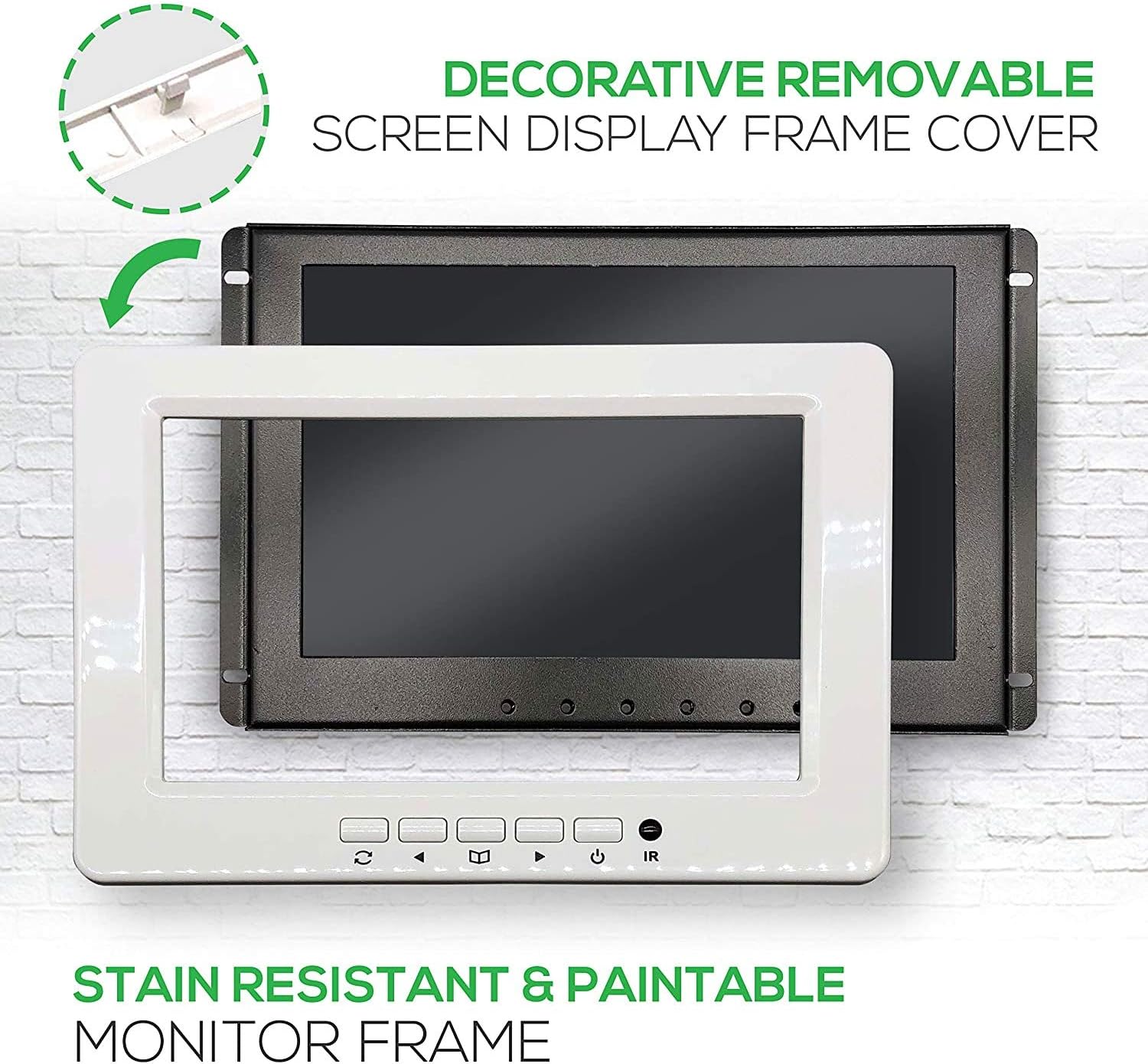
Image 4: The monitor's robust metal panel and the removable decorative frame, which can be painted to match surroundings.
4.2 전원 연결
The monitor operates on 12V DC power. For in-vehicle use, it can be wired directly to a 12V power source (e.g., cigarette lighter circuit) or an ignition-switched power line. For home use, a 12V DC power adapter (sold separately) is required.
The power cable includes an in-line fuse for protection. Ensure proper polarity when connecting: red wire for positive (+), black wire for negative (-).
4.3 비디오 및 오디오 연결
- HDMI : Connect an HDMI cable from your video source to the monitor's HDMI input for high-definition digital video and audio.
- VGA : Use a VGA cable to connect to a computer or other VGA-compatible device for analog video input.
- RCA Video (2 Inputs): Connect composite video sources using RCA cables (yellow connector).
- RCA 오디오 출력(L/R): For audio, connect the RCA (red/white) audio output jacks to an external sound system or amplifier, as the monitor does not have built-in speakers.
5. 사용 설명서
The monitor can be operated using the front panel buttons or the included wireless remote control.
5.1 전면 패널 컨트롤
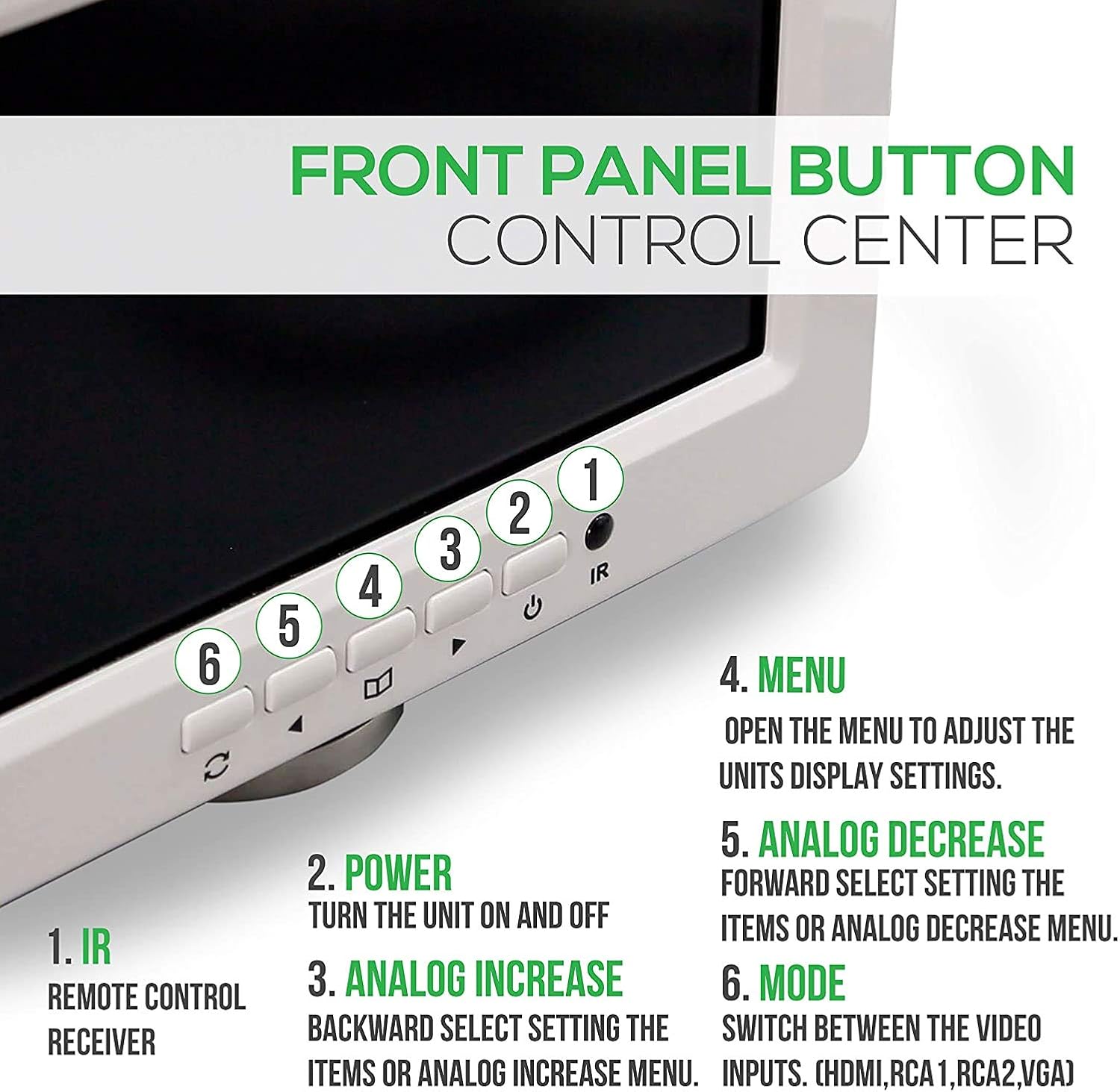
이미지 5: 상세 view of the front panel buttons and their corresponding functions for direct control.
- 영어: 리모콘용 적외선 수신기.
- 전원 버튼: 장치를 켜거나 끕니다.
- Analog - (Decrease): Navigates backward through menu items or decreases analog settings.
- 메뉴 버튼: Opens the on-screen display (OSD) menu to adjust settings.
- Analog + (Increase): Navigates forward through menu items or increases analog settings.
- 모드 버튼: Switches between available video input sources (HDMI, RCA1, RCA2, VGA).
5.2 리모컨

Image 6: The wireless remote control, providing convenient access to all monitor functions from a distance.
The remote control duplicates most functions of the front panel buttons, allowing for convenient operation. Point the remote directly at the IR receiver on the monitor's front panel.
- 전원 스위치: 모니터를 켜거나 끕니다.
- Analog Increase/Decrease: Adjusts settings within the menu or changes values.
- HDMI/RCA/VGA Switch: 입력 소스를 순환합니다.
- 메뉴: OSD 메뉴에 접근합니다.
- 방법: Selects different display modes or aspect ratios.
5.3 메뉴 탐색
Press the "Menu" button to access the on-screen display. Use the "Analog -" and "Analog +" buttons to navigate through options and adjust values. Press "Menu" again to exit.
6. 유지관리
To ensure optimal performance and longevity of your Pyle PLVW92U monitor, follow these maintenance guidelines:
- 청소: 부드럽고 마른 천으로 화면과 외부를 닦으세요. 잘 지워지지 않는 얼룩은 가볍게 두드려 닦아주세요.amp천에 물이나 순하고 마모성이 없는 화면 세척제를 묻혀 닦으세요. 강한 화학 물질은 피하세요.
- 통풍: Ensure adequate airflow around the monitor, especially if it's in an enclosed space, to prevent overheating.
- 환경 조건: 모니터를 극한 온도, 장시간 직사광선 또는 높은 습도에 노출시키지 마십시오.
- 케이블 관리 : Periodically check all cables for secure connections and signs of wear or damage.
7. 문제 해결
If you encounter issues with your Pyle PLVW92U monitor, refer to the following common troubleshooting steps:
- 전원 없음:
- 모든 전원 연결부가 단단히 고정되어 있는지 확인하십시오.
- Verify the power source is active (e.g., vehicle ignition on, wall outlet working).
- Inspect the in-line fuse on the power cable. Replace if blown.
- If using a separate power adapter, ensure it is the correct voltage (12V DC) and functioning.
- 비디오 신호 없음:
- Ensure the correct input source is selected using the "Mode" button or remote.
- Check all video cables (HDMI, VGA, RCA) for secure connections at both the monitor and the source device.
- Verify the video source device is powered on and outputting a signal.
- 문제를 격리하려면 다른 비디오 케이블이나 소스 장치를 시도해 보세요.
- No Audio (from external system):
- Confirm the RCA (L/R) audio output cables are correctly connected to your external sound system.
- Check the external sound system's power and input selection.
- Adjust the volume on your external sound system.
- 화질이 좋지 않음:
- 케이블 연결 부분이 느슨하거나 손상되었는지 확인하세요.
- Adjust display settings (brightness, contrast, color) via the OSD menu.
- Ensure the video source is outputting a compatible resolution.
If the issue persists after attempting these steps, contact Pyle customer support for further assistance.
8. 사양
| 특징 | 사양 |
|---|---|
| 상표 | 파일 |
| 모델 번호 | PLVW92U |
| 화면 크기 | 9 인치 |
| 해결 지원 | Full HD 1080p, HD |
| 종횡비 | 1.33:1 (Displaying 16:9) |
| 입력 커넥터 | HDMI, VGA, 2x RCA Video |
| 출력 커넥터 | RCA (L/R) Audio |
| 전력 소비 | 5.5 와트 미만 |
| 전원 공급 장치 | 12V DC (Adapter sold separately) |
| 품목 무게 | 4파운드 |
| 제품 치수 | 12.2 x 11.1 x 17.9 인치 |
| 화면 표면 | 광택있는 |

Image 7: Visual representation of the monitor's physical dimensions and weight.
9. 보증 및 지원
Pyle 제품은 뛰어난 신뢰성과 성능을 위해 설계되었습니다. 보증 정보는 제품에 동봉된 보증 카드를 참조하거나 Pyle 공식 웹사이트를 방문하십시오. web본 사이트는 기술 지원 또는 서비스 관련 문의를 위한 사이트가 아닙니다. Pyle 고객 서비스 센터로 문의해 주십시오.
Web대지: www.pyleusa.com
제안 65 경고: 이 제품에는 캘리포니아주에서 암과 선천적 결함 또는 기타 생식적 피해를 일으키는 것으로 알려진 화학 물질이 포함되어 있습니다.


