1. 제품 오버view
The ORIENT NEO70's Horizon Solar Chronograph Watch (Model WV0021TY) is a sophisticated timepiece designed for reliability and precision. Featuring a solar-powered quartz movement and chronograph functionality, this watch offers both style and practical utility. Its robust construction and 30-meter water resistance make it suitable for daily wear.

Image 1: The ORIENT NEO70's Horizon Solar Chronograph Watch displayed on a wrist, illustrating its size and appearance when worn.
2. 특징
- Solar Powered Movement: Utilizes light energy for operation, eliminating the need for regular battery replacement.
- 크로노그래프 기능: 경과 시간을 정확하게 측정할 수 있습니다.
- 30미터 방수: Suitable for daily use, such as hand washing or light rain. Not suitable for swimming or diving.
- 아날로그 디스플레이: Classic multi-hand analog display with Arabic numerals for clear time reading.
- 내구성 있는 구조: Features a round case and a silver-colored bracelet-type band.
3. 설정
3.1 초기 충전
Before initial use, or if the watch has stopped, expose the watch dial to a bright light source (natural sunlight is ideal) for several hours. This will charge the internal solar cell and allow the watch to operate correctly. Avoid placing the watch in direct sunlight for extended periods in extremely hot environments to prevent damage.
3.2 시간 및 날짜 설정
- 왕관을 빼세요: Gently pull the crown (located on the side of the watch) to the second click position.
- 시간 설정: Rotate the crown to move the hour and minute hands to the desired time. Ensure the AM/PM is correctly set if your watch has a 24-hour indicator or date change mechanism.
- 날짜를 설정하십시오. Push the crown back to the first click position. Rotate the crown to adjust the date. Avoid setting the date between 9 PM and 3 AM, as this may interfere with the automatic date change mechanism.
- 크라운을 누르세요: 시간과 날짜를 설정한 후에는 용두를 시계 케이스 안쪽의 원래 위치로 다시 밀어 넣어 시계를 작동시키고 방수 기능을 확인하십시오.

이미지 2: 측면 view of the watch, highlighting the crown and chronograph pushers used for setting time, date, and operating the chronograph.
4. 운영
4.1 Using the Chronograph Function
The chronograph allows you to measure elapsed time. The watch features two pushers, typically located at 2 o'clock (A) and 4 o'clock (B).
- 시작: A 버튼을 눌러 크로노그래프를 시작하세요. 크로노그래프 초침이 움직이기 시작합니다.
- 중지: 크로노그래프를 멈추려면 A 버튼을 다시 누르십시오. 경과 시간은 크로노그래프 바늘로 표시됩니다.
- 재설정 : After stopping, press pusher B to reset all chronograph hands to their zero positions.
- 분할 시간(해당되는 경우): Some chronographs allow for split time measurement. Consult the full manufacturer's manual for advanced features.
5. 유지관리
5.1 시계 청소
정기적인 청소는 시계의 외관을 유지하고 수명을 연장하는 데 도움이 됩니다.
- For the case and metal band, wipe gently with a soft, dry cloth.
- 완고한 먼지의 경우 약간 damp 천을 사용한 후 마른 천으로 닦아낼 수 있습니다.
- 화학 세척제, 용제 또는 연마재는 시계의 마감을 손상시킬 수 있으므로 사용하지 마십시오.
5.2 방수 시 주의사항
Your watch is rated for 30-meter water resistance. To maintain this rating:
- Ensure the crown is always pushed in completely against the case.
- 시계가 젖었거나 물에 잠겨 있는 동안에는 용두나 푸셔를 조작하지 마십시오.
- Avoid exposing the watch to sudden temperature changes (e.g., hot shower followed by cold water), which can compromise seals.
- Water resistance is not a permanent condition and may decrease over time due to wear and tear. Have the water resistance checked periodically by a qualified service center.
5.3 Solar Cell Care
To ensure continuous operation, expose the watch to light regularly. If the watch is stored in darkness for extended periods, it may stop. A full charge can last for several months in darkness, but frequent exposure to light is recommended.
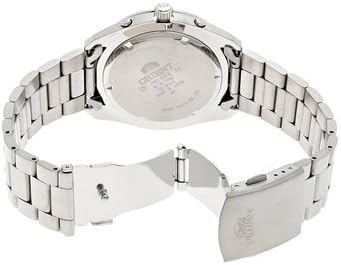
Image 3: The reverse side of the watch, showing the case back with engraved details and the clasp mechanism of the metal bracelet.
6. 문제 해결
- 시계가 멈췄습니다: Expose the watch to bright light for several hours to recharge the solar cell. If it still does not start, contact customer support.
- 시간이 잘못되었습니다: Refer to Section 3.2 to reset the time. Ensure the crown is fully pushed in after setting.
- 날짜가 잘못되었습니다. Refer to Section 3.2 to reset the date. Remember to adjust the date manually for months with fewer than 31 days.
- 크로노그래프 바늘이 0으로 재설정되지 않습니다. If the chronograph hands are misaligned, consult the full manufacturer's manual for specific calibration instructions, or contact customer support.
- 시계 내부에 습기가 차는 현상: This indicates a potential breach in water resistance. Immediately contact a service center for inspection.
7. 사양
| 특징 | 사양 |
|---|---|
| 상표 | 동양 |
| 모델 번호 | WV0021TY (Manufacturer Ref: spi0010092459) |
| 디스플레이 유형 | Multi-hand Analog |
| 움직임 | Quartz (Solar Powered) |
| 특별 기능 | Chronograph, Arabic Numerals |
| 방수성 | 30 Meters (Daily Life Waterproof) |
| 케이스 모양 | 둥근 |
| 케이스 직경 | 42mm (XNUMXmm) |
| 밴드 소재 | Stainless Steel (Bracelet Type) |
| 밴드 색상 | 은 |
| 대역폭 | 22mm (XNUMXmm) |
| 연령대 | 성인 |
8. 보증 및 지원
This ORIENT watch is covered by a manufacturer's warranty against defects in materials and workmanship. The specific terms and duration of the warranty may vary by region and retailer. Please retain your proof of purchase for warranty claims.
For warranty service, technical support, or to inquire about authorized service centers, please refer to the warranty card included with your purchase or visit the official ORIENT web본 사이트를 참조하십시오. 시계를 직접 열거나 수리하려고 시도하지 마십시오. 보증이 무효화될 수 있습니다.
Image 4: The product box for the ORIENT watch, typically containing the watch, warranty information, and additional documentation.


