1. 서론
This manual provides comprehensive instructions for the safe and efficient operation, setup, and maintenance of your Sealey SDH70 Industrial Dehumidifier. Please read this manual thoroughly before operating the unit and retain it for future reference. The Sealey SDH70 is designed for professional use in various industrial and commercial environments to effectively control humidity levels.
2. 안전 지침
화재, 감전 또는 부상의 위험을 줄이려면 항상 다음 안전 예방 조치를 준수하세요.
- 전원 공급 장치가 볼륨과 일치하는지 확인하십시오.tag제습기 등급 라벨에 지정되어 있습니다.
- Do not operate the unit with a damaged power cord or plug. Contact qualified service personnel for repair.
- Place the dehumidifier on a stable, level surface to prevent tipping.
- Maintain adequate clearance around the unit for proper airflow (at least 20 cm from walls or other objects).
- 공기 흡입구 또는 배출구에 물건을 넣지 마십시오.
- Unplug the unit before cleaning, performing maintenance, or moving it.
- 본 기기는 신체적, 감각적 또는 정신적 능력이 저하된 사람(어린이 포함)이나 경험 및 지식이 부족한 사람이 사용하도록 의도된 것이 아니며, 안전을 책임질 사람으로부터 기기 사용에 관한 감독이나 지시를 받은 경우에만 사용할 수 있습니다.
- 가연성 액체나 가스가 저장된 장소에서는 제습기를 사용하지 마십시오.
- The unit contains R290 refrigerant. Servicing should only be performed by qualified personnel.
3. 제품 오버view
Familiarize yourself with the components of your Sealey SDH70 Industrial Dehumidifier.

그림 3.1: 정면 view of the Sealey SDH70 Industrial Dehumidifier. This image shows the robust red and black casing, the control panel on the side, and the durable wheels for portability.
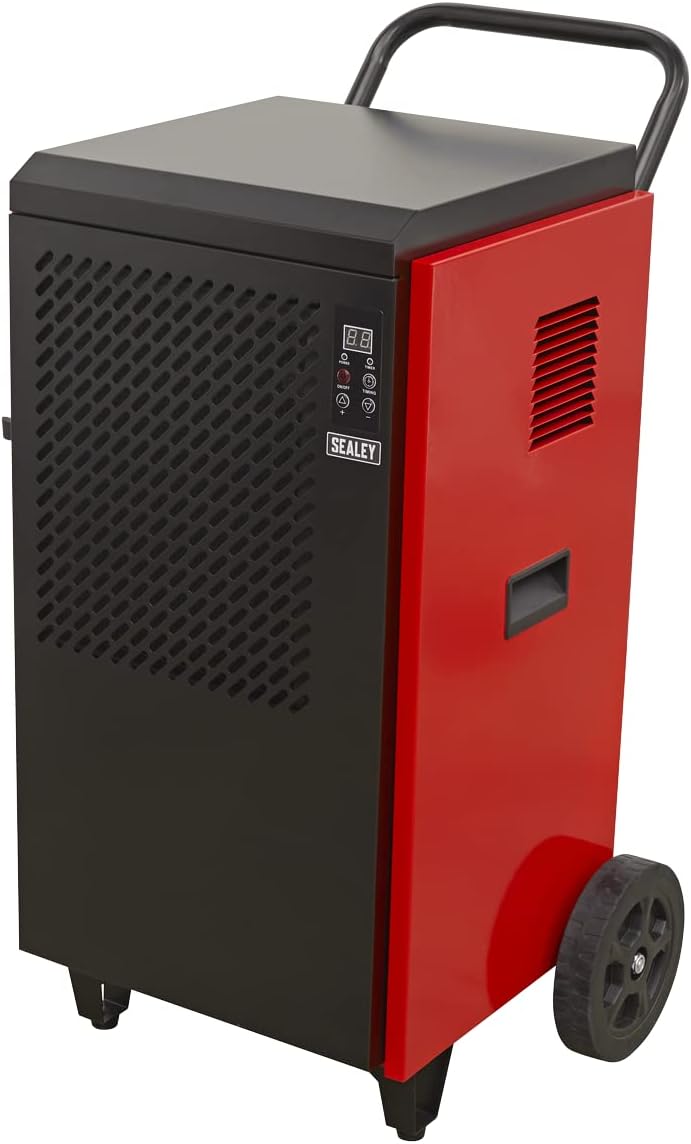
그림 3.2: 옆 view of the dehumidifier, highlighting the continuous drainage hose connection point at the bottom. The hose allows for direct water removal without manual emptying.

그림 3.3: 상세한 view of the digital control panel. It features a digital display for humidity readings, power button, full tank indicator, timer indicator, and up/down buttons for setting desired humidity levels and timer functions.
4. 설정
- 짐 풀기: Carefully remove the dehumidifier from its packaging. Inspect for any shipping damage. Retain packaging for future transport or storage.
- 놓기: Position the unit on a firm, level surface in the area requiring dehumidification. Ensure there is at least 20 cm (8 inches) of clear space around all sides of the unit to allow for proper air circulation. Do not block the air inlet or outlet.
- 배수 설정: The SDH70 is designed for continuous drainage. Connect the provided drainage hose to the drainage outlet at the bottom of the unit. Route the hose to a suitable drain or collection container, ensuring it is sloped downwards to allow gravity flow. Ensure the hose is not kinked or blocked.
- 전원 연결: 전원 코드를 용량에 맞는 접지된 전기 콘센트에 연결하세요.tage 장치의 요구 사항.
5. 사용 설명서
- 전원 켜기/끄기: 를 누르세요 힘 button on the control panel to turn the unit on or off. The digital display will illuminate.
- 원하는 습도 설정:
- When the unit is running, the display shows the current room humidity.
- 를 누르세요 UP (▲) 또는 아래에 (▼) buttons to adjust the desired humidity level. The setting range is typically between 30% and 90% Relative Humidity (RH).
- The unit will operate until the set humidity level is reached, then cycle off. It will restart automatically if the humidity rises above the set level.
- 타이머 기능:
- 를 누르세요 타이밍 button to set the auto-off timer. Each press increases the timer by one hour, up to 24 hours.
- The unit will automatically shut off after the set number of hours.
- 타이머를 취소하려면 타이밍 button until "00" is displayed.
- 연속 작업: For continuous dehumidification, set the desired humidity level to the lowest possible setting (e.g., 30% RH). The unit will run continuously, provided the drainage hose is properly set up.
6. 유지관리
정기적인 유지관리를 통해 최적의 성능을 보장하고 제습기의 수명을 연장할 수 있습니다.
- 공기 필터 청소:

그림 6.1: Demonstrates the removal of the washable air filter from the side of the dehumidifier for cleaning.
- The air filter should be cleaned every two weeks or more frequently depending on the operating environment.
- Unplug the unit before attempting to clean the filter.
- Locate the air filter access panel (typically on the side or rear). Remove the filter.
- 필터를 따뜻한 비눗물로 씻으세요. 깨끗이 헹구고 완전히 말린 후 다시 끼우세요. 식기세척기는 사용하지 마세요.
- A clean filter ensures efficient operation and prevents dust buildup inside the unit.
- 외부 청소: 부드러운 천으로 기기 외부를 닦아주세요.amp 천으로 닦으세요. 강한 화학 물질, 연마제 또는 용제를 사용하지 마세요.
- 저장: If storing the unit for an extended period, ensure it is clean and dry. Coil the power cord neatly. Store in a cool, dry place, preferably in its original packaging.
7. 문제 해결
고객 지원팀에 문의하기 전에 다음 표를 참조하여 일반적인 문제와 해결 방법을 확인하세요.
| 문제 | 가능한 원인 | 해결책 |
|---|---|---|
| 기기가 켜지지 않습니다. | No power supply; Power cord loose; Circuit breaker tripped. | 콘센트를 확인하십시오. 전원 코드가 제대로 꽂혀 있는지 확인하십시오. 회로 차단기를 재설정하십시오. |
| 제습기가 물을 모으지 못합니다. | Humidity setting too high; Room temperature too low; Air filter clogged; Drainage hose kinked/blocked. | Lower humidity setting; Ensure room temperature is above 5°C (41°F); Clean air filter; Check drainage hose for obstructions. |
| 이 장치는 시끄럽습니다. | Unit not level; Air filter clogged; Internal components loose. | 평평한 곳에 놓으십시오. 공기 필터를 청소하십시오. 소음이 계속되면 서비스 센터에 문의하십시오. |
| 공기 흐름이 약합니다. | 공기 필터가 막혔습니다. 공기 흡입구/배출구가 막혔습니다. | Clean air filter; Ensure no obstructions around air vents. |
8. 사양
Technical specifications for the Sealey SDH70 Industrial Dehumidifier.
| 특징 | 세부 사항 |
|---|---|
| 상표 | 실리 |
| 모델 번호 | SDH70 |
| 색상 | 빨간색 |
| 제품 크기(L x W x H) | 49 x 60 x 105cm |
| 품목 무게 | 46.7 킬로그램 |
| 용량 | 70 Litres (dehumidification capacity per day) |
| 냉각제 | R290 (친환경) |

그림 8.1: The R290 Eco Friendly logo, indicating the type of refrigerant used in the SDH70 dehumidifier.
9. 보증 및 지원
Your Sealey SDH70 Industrial Dehumidifier comes with a manufacturer's warranty.

그림 9.1: Sealey 1 Year Guarantee logo, indicating the product warranty.
Sealey products are manufactured to a high standard and are guaranteed for 1 year from the date of purchase against manufacturing defects. This guarantee is subject to the terms and conditions available on the official Sealey website or from your retailer.
For technical support, spare parts, or warranty claims, please contact your authorized Sealey dealer or visit the official Sealey website for contact information. When contacting support, please have your model number (SDH70) and purchase details ready.


