제품 끝view
The SIIG Single Monitor Desk Mount (Model CE-MT1H12-S1) is a height-adjustable, gas spring-assisted full-motion desktop mount designed for monitors ranging from 15 inches to 27 inches and weighing up to 17.6 lbs (8 kg). It provides smooth and effortless viewing angle adjustments for optimal ergonomic positioning. The VESA plate supports both portrait and landscape monitor orientations, offering flexibility for various tasks and preferences.
중요 안전 지침
- Read all instructions carefully before installation and use to ensure proper setup and prevent damage.
- 최대 하중 8kg(17.6lbs)을 초과하지 마십시오. 과부하는 불안정성을 유발하고 부상을 초래할 수 있습니다.
- Ensure the mounting surface (desk) is strong enough to support the combined weight of the mount and monitor.
- Use only the provided hardware. If any parts are missing or damaged, contact SIIG customer support immediately.
- Keep children and pets away from the installation area during assembly to prevent accidents.
- 제안 65 경고: 이 제품에는 캘리포니아주에서 암과 선천적 결함 또는 기타 생식적 피해를 일으키는 것으로 알려진 화학 물질이 포함되어 있습니다.
패키지 내용
Verify that all components are present and undamaged before beginning installation. If any items are missing or appear damaged, please contact SIIG customer support.
- 모니터 암 어셈블리(가스 스프링 암)
- 책상 기둥
- VESA 플레이트
- C-Clamp 베이스
- 그로밋 마운트 베이스
- Mounting Hardware (various screws, washers)
- Allen Keys (for assembly and tension adjustment)
- 케이블 관리 클립
This image displays the individual components of the monitor mount, including the gas spring arm, desk pole, C-clamp, and various mounting hardware.
설정 및 설치
Step 1: Choose Mounting Method
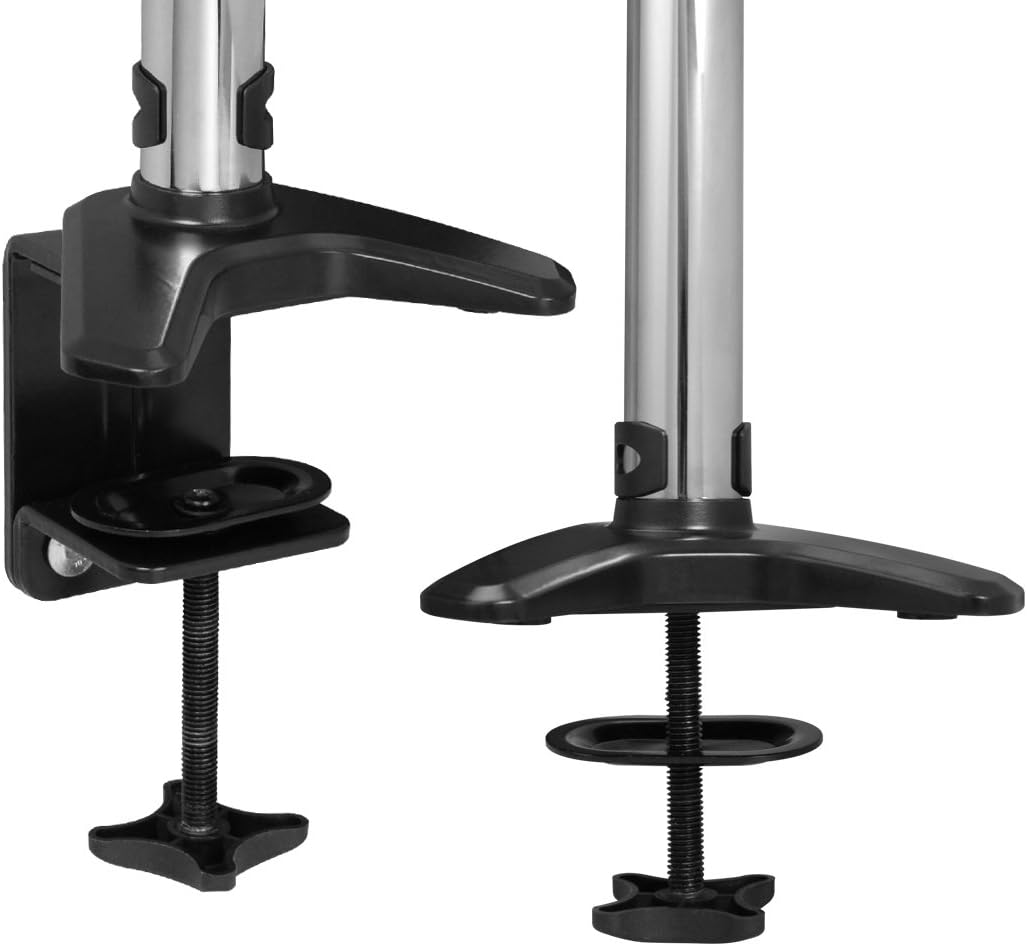
The monitor mount offers two installation options: C-clamp for desk edges or grommet mount for desks with existing holes.

This image illustrates the two available mounting options: the C-clamp for desk edges and the grommet mount for desks with existing holes.
C-Clamp 설치
- C-cl을 부착하세요amp base to the bottom of the desk pole.
- cl 위치amp on the edge of your desk and tighten the screw until the base is securely fastened.
그로밋 마운트 설치
- If your desk has a grommet hole, use the grommet mount base.
- Insert the desk pole through the grommet hole and secure it from underneath the desk with the provided hardware.
2단계: 모니터를 VESA 플레이트에 부착합니다.
- Carefully align the VESA plate with the mounting holes on the back of your monitor.
- Secure the monitor to the VESA plate using the appropriate screws provided in the hardware kit. Ensure they are tightened firmly but do not overtighten.
3단계: 모니터 암을 기둥에 장착합니다.
- Slide the monitor arm assembly onto the desk pole.
- Adjust the arm to your desired initial height and tighten the collar screw on the pole to secure it in place.
4단계: 케이블 관리
Route monitor cables (power, video, etc.) through the integrated cable management clips located on the arm and along the pole. This helps maintain a tidy and organized workspace.
Installation and Adjustment Video
This video demonstrates the complete installation process for the SIIG Single Monitor Desk Mount, including attaching the clamp, mounting the monitor, routing cables, and adjusting the arm's movement.
작동 지침
높이 조정
The gas spring mechanism allows for smooth and effortless vertical adjustment. Gently push or pull the monitor to the desired height. The arm provides up to 13 inches of vertical adjustment from its lowest to highest point.

This image shows the vertical adjustment range of the monitor arm, highlighting the 13-inch height capability.
장력 조정
If the monitor sags or rises too easily, the gas spring tension needs adjustment. Use the included 6mm Allen key:
- 회전하다 시계 방향으로 가벼운 모니터의 장력을 줄이기 위해.
- 회전하다 반 시계 방향 더 무거운 모니터의 경우 장력을 높이기 위해.
Multiple turns may be needed to achieve the desired tension. Test the adjustment by moving the monitor after each set of turns.
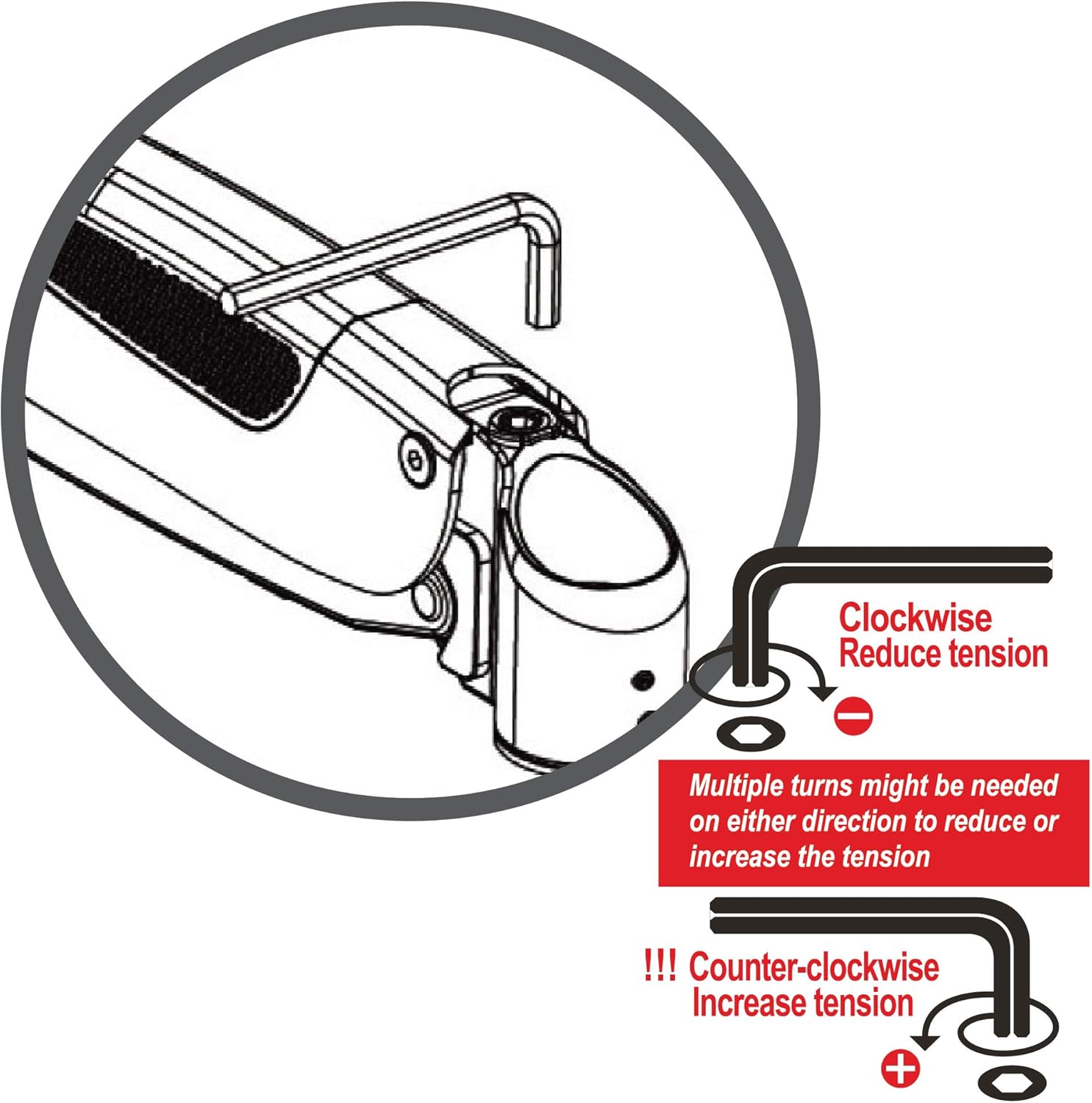
This diagram provides instructions on how to adjust the gas spring tension using the provided Allen key to accommodate different monitor weights.
기울기, 회전 및 좌우 회전
The VESA plate and arm joints provide extensive movement capabilities:
- 경사: Adjust the monitor screen up or down by up to 90 degrees.
- 받침: Rotate the monitor horizontally 360 degrees around the pole.
- 회전: Rotate the monitor 360 degrees at the VESA plate for easy switching between portrait and landscape orientations.
- 팔 뻗기: The arm can extend up to 22 inches from the mounting pole, allowing you to pull the monitor closer or push it further away.

This image demonstrates the maximum extension of the monitor arm, which is 22 inches from the base.
관리 및 유지 보수
- Regularly check all screws and connections to ensure they are tight and secure. Loose connections can affect stability and performance.
- 마운트를 부드러운 천으로 닦으십시오.amp 천을 사용하십시오. 연마성 세제, 용제 또는 강한 화학 물질은 마감재를 손상시킬 수 있으므로 사용하지 마십시오.
- Do not attempt to lubricate the gas spring mechanism. It is designed to be maintenance-free.
문제 해결
모니터가 처지거나 제자리에 고정되지 않습니다.
해결책:
Adjust the gas spring tension. Use the 6mm Allen key and turn counter-clockwise to increase tension for heavier monitors. Continue adjusting until the monitor holds its position.
Monitor is Difficult to Move
해결책:
Adjust the gas spring tension. Use the 6mm Allen key and turn clockwise to reduce tension for lighter monitors. Continue adjusting until the monitor moves smoothly.
Mount is Unstable or Wobbles
해결책:
C-cl을 확인하십시오amp or grommet mount is securely tightened to the desk. Verify that the desk surface itself is stable and not prone to wobbling. Re-tighten all connection points on the arm and pole.
제품 사양
| 특징 | 세부 사항 |
|---|---|
| 모델 번호 | CE-MT1H12-S1 |
| 호환되는 화면 크기 | 15인치에서 27인치까지 |
| 중량 용량 | 최대 17.6kg(8파운드) |
| VESA 호환성 | 75x75mm, 100x100mm |
| 이동 유형 | Articulating, Gas Spring Assisted |
| 기울기 각도 | 최대 90도 |
| 받침 | 360도 |
| 회전 | 360도 |
| 팔 연장 | 최대 22인치 |
| 높이 조정 | 최대 13인치 |
| 장착 유형 | Tabletop (C-clamp 또는 그로밋) |
| 재료 | 알류미늄 |
| 색상 | 흑백 |
보증 정보
For detailed warranty information regarding your SIIG Single Monitor Desk Mount, please refer to the official SIIG website or contact SIIG customer support directly. Keep your proof of purchase for warranty claims.
고객 지원
If you encounter any issues, have questions, or require further assistance with your SIIG Single Monitor Desk Mount, please visit the SIIG Store on Amazon or contact SIIG customer service through their official channels. Our support team is ready to help.


