1. 서론
This manual provides essential instructions for the setup, operation, and maintenance of your Cisco Remanufactured IP Conference Phone 8831. This device is designed to deliver high-quality audio conferencing for medium to large conference rooms.
주요 특징은 다음과 같습니다.
- 360도 범위: Optimized for rooms up to 1140 square feet.
- Full-Duplex Wideband Audio (G.722): Ensures superior high-definition audio performance for clear two-way communication.
- 분리형 제어판: Allows for flexible placement and viewing of the display independently from the speaker unit.
- 강화된 보안: Utilizes 128K Advanced Encryption Standard (AES) for private and secure business-grade audio communications.
2. 중요한 안전 정보
Please read and follow these safety guidelines to prevent damage to the device and ensure user safety:
- 휴대전화를 물이나 습기에 노출시키지 마십시오.
- 휴대전화를 열원 근처나 직사광선에 노출시키지 마십시오.
- Use only the power adapter and cables supplied with the device.
- 휴대전화를 직접 열거나 수리하려고 하지 마십시오. 모든 서비스는 자격을 갖춘 전문가에게 맡기십시오.
- 장치 주변의 적절한 환기를 보장하십시오.
3. 패키지 내용
패키지에 다음 품목이 포함되어 있는지 확인하십시오.
- Cisco IP Conference Phone 8831 main unit (CP-8831-K9-RF)
- 분리형 제어판
- 연결 케이블
- Power Adapter (if applicable, or designed for Power over Ethernet)
4. 제품 구성품
The Cisco IP Conference Phone 8831 consists of a main speaker unit and a detachable control panel.
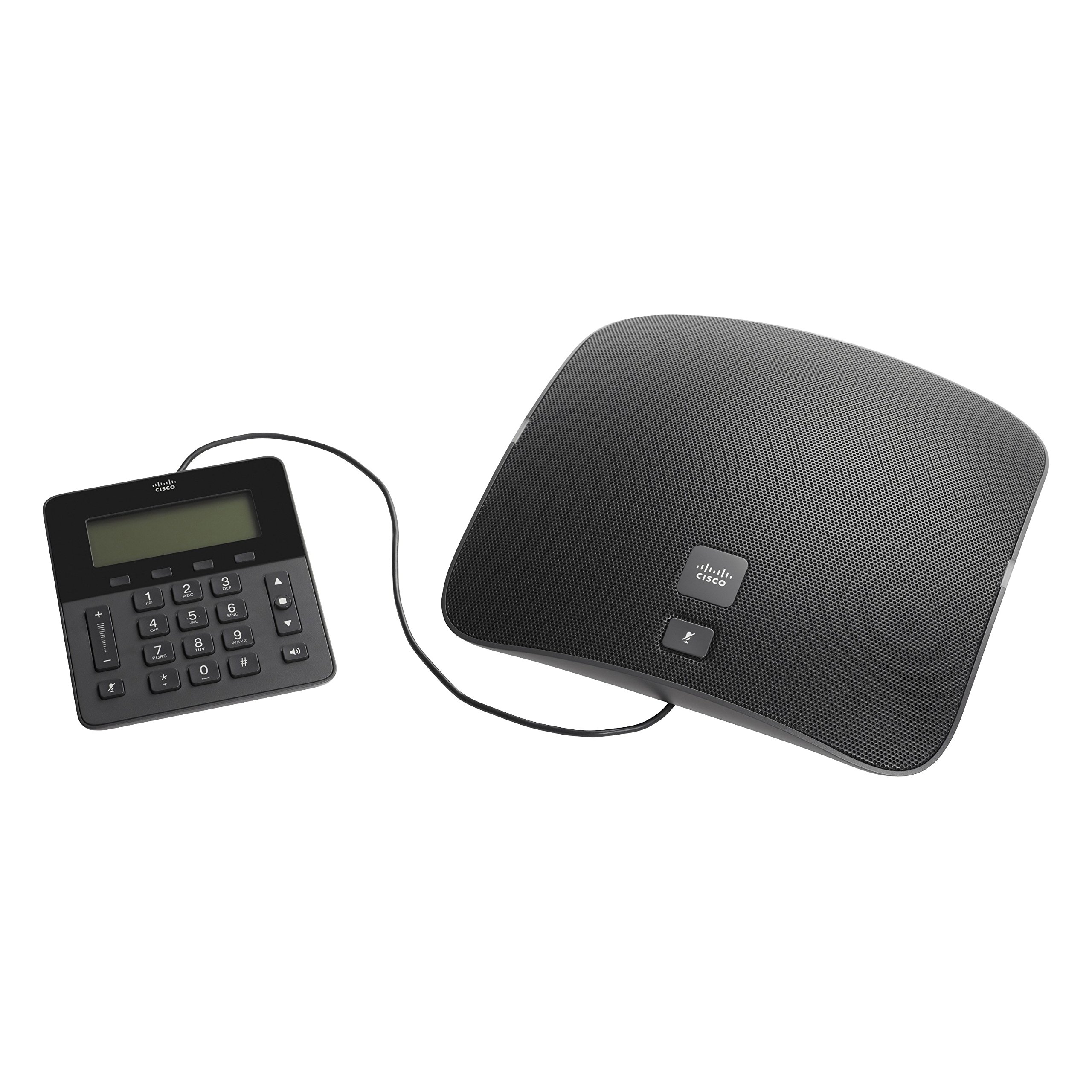
Figure 1: Cisco IP Conference Phone 8831 Overview
This image displays the Cisco IP Conference Phone 8831, consisting of two main parts: the large, oval-shaped speaker unit on the right and the smaller, rectangular control panel on the left. Both components are black and connected by a cable. The speaker unit features a perforated grille for audio output and a Cisco logo with a mute button. The control panel includes a digital display, a numeric keypad, navigation buttons, volume controls, and a mute button.
4.1. Main Speaker Unit
The main speaker unit houses the primary microphone and speaker components, providing 360-degree audio coverage. It typically includes a mute button and the Cisco branding.
4.2. 제어판
The detachable control panel features a display screen, a numeric keypad for dialing, navigation buttons, and dedicated buttons for call control (e.g., volume up/down, mute, speakerphone). This panel connects to the main unit via a cable, allowing for flexible placement.
5. 설정 및 설치
Follow these steps to set up your Cisco IP Conference Phone 8831:
- 풀다: 포장에서 모든 구성 요소를 조심스럽게 제거합니다.
- 연결 제어판: Connect the control panel to the main speaker unit using the provided cable.
- 전원 연결:
- If using Power over Ethernet (PoE), connect an Ethernet cable from a PoE-enabled switch or injector to the Ethernet port on the main unit.
- If using an AC power adapter, connect the adapter to the main unit and then plug it into a power outlet.
- 네트워크 연결 : Connect an Ethernet cable from your network to the Ethernet port on the main unit.
- 초기 부팅: The phone will power on and begin its boot-up sequence. This may take a few minutes as it connects to your network and registers with your Cisco Unified Communications Manager or SIP-based VoIP service.
- 구성: Once registered, the phone is ready for use. Additional configuration may be required by your system administrator.
6. 기본 동작
6.1. 전화 걸기
- Lift the control panel (if applicable) or ensure the speakerphone is active.
- 숫자 키패드를 사용하여 원하는 번호를 누르세요.
- 를 누르세요 부르다 button (or equivalent on-screen prompt).
6.2. 전화 받기
전화가 울리면 누르세요 답변 button (or equivalent on-screen prompt) to accept the call.
6.3. 볼륨 조절
사용하세요 볼륨 업(+) 그리고 볼륨 작게 (-) buttons on the control panel to adjust the speaker volume during a call or the ringer volume when idle.
6.4. 마이크 음소거
를 누르세요 무음 button (microphone icon) on either the main speaker unit or the control panel to mute your microphone. Press it again to unmute.
6.5. 통화 종료
를 누르세요 통화 종료 button (or equivalent on-screen prompt) to terminate an active call.
7. 관리 및 유지 보수
To ensure the longevity and optimal performance of your conference phone:
- 청소: Use a soft, dry, lint-free cloth to clean the exterior surfaces. Do not use liquid cleaners, aerosols, or solvents.
- 저장: 휴대폰은 직사광선과 극한의 온도를 피해 서늘하고 건조한 곳에 보관하세요.
- 손질: Handle the device with care to avoid dropping or physical damage.
8. 문제 해결
If you encounter issues with your Cisco IP Conference Phone 8831, refer to the following common solutions:
| 문제 | 가능한 해결책 |
|---|---|
| 전화기의 전원이 켜지지 않습니다. |
|
| 전화음이 나지 않거나 전화를 걸 수 없습니다. |
|
| 오디오 품질이 좋지 않습니다. |
|
| Control panel display is blank. |
|
9. 기술 사양
| 특징 | 세부 사항 |
|---|---|
| 모델 번호 | CP-8831-K9-RF |
| 상표 | 시스코 |
| 품목 무게 | 5.05파운드(약 2.29kg) |
| 제품 치수 | 0.39 x 0.39 x 0.39인치(약 1 x 1 x 1cm) - 참고: 이 치수는 임시 값이며 실제 제품 크기와 다를 수 있습니다. |
| 색상 | 검은색 |
| 전화 유형 | Corded IP Conference Phone |
| 전원 | Corded Electric (PoE or AC Adapter) |
| 호환 장치 | Cisco Unified Communications Manager, Business Edition, SIP-based VoIP services |
| 컨퍼런스 콜 기능 | 기초적인 |
| 오디오 기능 | Full-Duplex Two-Way Wideband (G.722) Hands-Free Speaker |
| 적용 범위 | Up to 1140 square feet (360-degree) |
| 보안 | 128K Advanced Encryption Standard (AES) |
| 원산지 | 중국 |
| 첫 번째 이용 가능 날짜 | 22년 2014월 XNUMX일 |
10. 보증 및 지원
10.1. 제한적 하드웨어 보증
This Cisco Remanufactured IP Conference Phone 8831 typically comes with a 1년 제한 하드웨어 보증. Please refer to your purchase documentation for specific terms and conditions regarding warranty coverage.
10.2. 기술 지원
For technical assistance, troubleshooting beyond this manual, or warranty claims, please contact Cisco support or your authorized reseller. You can find more information and support resources on the official Cisco web대지:


