1. 서론
This manual provides comprehensive instructions for the Monoprice MS-WN513N2 Wireless N300 4-Port Broadband Router. This device is designed to provide a high-speed wireless network connection for your home or small office, offering reliable internet access and advanced security features. Please read this manual thoroughly before operating the device.
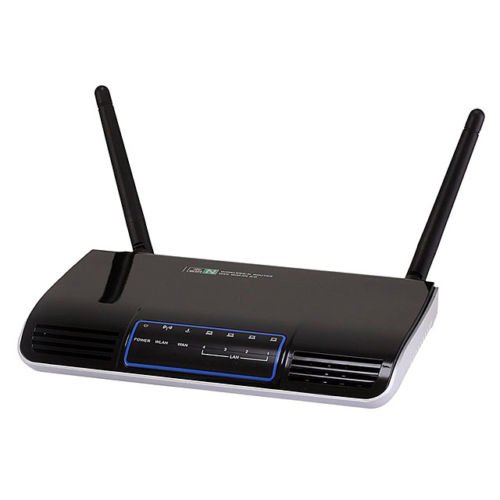
이미지 1.1: 앞면 view of the Monoprice MS-WN513N2 Wireless N300 Router. The router is black with indicator lights on the front panel.
2. 특징
The Monoprice MS-WN513N2 router offers a range of features to enhance your network experience:
- Wireless N300 Performance: Complies with 802.11b/g/n standards, offering wireless transmission speeds up to 300 Mbps.
- 4-Port Broadband Router: Includes four (4) LAN ports for wired connections.
- 고급 보안: Supports 64-bit/128-bit WEP, WPA/WPA2, and WPA-PSK/WPA2-PSK authentication.
- IPv6 지원: Compatible with Internet Protocol Version 6.
- 서비스 품질(QoS): Bandwidth control for prioritizing network traffic.
- WPS(Wi-Fi 보호 설정): Simplifies wireless security configuration.
- 다양한 작동 모드: Can be configured as a Gateway, Wireless Bridge, or Wireless ISP (WISP).
- 동적 DNS(DDNS): Supports dynamic domain name system configuration.
- UPnP Support: Universal Plug and Play for easy device discovery.
- 방화벽: Integrated firewall for network protection.
- Automatic MDI/MDIX: Automatic cable detection for Ethernet ports.
3. 패키지 내용
패키지에 모든 품목이 들어 있는지 확인하세요.
- Monoprice MS-WN513N2 Wireless N300 Router
- 전원 어댑터(DC 5V)
- 이더넷 케이블
- 빠른 설치 가이드(포함된 경우)
4. 신체적 이상view
4.1 전면 패널 표시등
전면 패널에는 상태 정보를 제공하는 LED 표시등이 있습니다.
- 전원 LED: 라우터 전원이 켜져 있는지 여부를 나타냅니다.
- WAN LED: 인터넷 연결 상태를 나타냅니다.
- LAN LED(1-4): 각 유선 LAN 포트의 활동을 표시합니다.
- WLAN LED: 무선 네트워크 활동을 나타냅니다.
4.2 후면 패널 포트 및 버튼
The rear panel contains all physical connection points:
- DC 5V 전원 포트: 포함된 전원 어댑터에 연결합니다.
- WAN 포트: 모뎀 또는 인터넷 서비스 제공업체의 네트워크에 연결됩니다.
- LAN 포트(1-4): Connect to wired devices such as computers, gaming consoles, or switches.
- WPS 버튼: 간편한 무선 연결을 위해 Wi-Fi Protected Setup을 시작합니다.
- 재설정 구멍: Used to restore the router to factory default settings. Insert a paperclip and hold for 5-10 seconds.
- 안테나 포트: Two (2) ports for connecting the external antennas.
5. 설정
5.1 하드웨어 연결
- 안테나 연결: Screw the two external antennas onto the antenna ports on the rear panel.
- 모뎀 연결: 이더넷 케이블의 한쪽 끝을 모뎀의 LAN 포트에 연결하고 다른 쪽 끝을 에 연결하십시오. 핏기 없는 라우터의 포트.
- 전원 연결: 라우터에 전원 어댑터를 연결하세요 DC 5V 전원 포트 and plug the adapter into a power outlet.
- 전원 켜기: Wait for the router to power on. The Power LED should illuminate. Allow a few minutes for the router to boot up and establish a connection.
- 컴퓨터 연결 (선택 사항): For initial configuration, it is recommended to connect a computer directly to one of the router's 랜 이더넷 케이블을 사용하여 포트에 연결합니다.
5.2 초기 구성 (Web 상호 작용)
- 액세스 라우터: 열기 web browser on a connected computer. In the address bar, type the router's default IP address (commonly
192.168.1.1or192.168.0.1) and press Enter. Refer to the label on the bottom of your router for the exact IP address and default login credentials. - 로그인: 기본 사용자 이름과 비밀번호를 입력하세요(예:
admin(둘 다 해당). - 설치 마법사를 실행하세요: 라우터의 web interface will typically present a Quick Setup Wizard. Follow the on-screen prompts to configure your internet connection type (e.g., PPPoE, Dynamic IP, Static IP) and basic wireless settings (SSID, password).
- 기본 자격 증명 변경: For security, it is highly recommended to change the default login username and password for the router's web 인터페이스.
6. 운영
6.1 무선 네트워크 구성
To configure your wireless network:
- 로 이동합니다 무선 설정 섹션에 web 인터페이스.
- SSID : Change the default Wireless Network Name (SSID) to a unique name.
- 보안 모드: 선택하다 WPA2-PSK as the recommended security mode.
- 비밀번호: Set a strong, unique password (at least 8 characters, including letters, numbers, and symbols).
- 채널: The router can automatically select the best 2.4 GHz channel. You can also manually select a fixed channel (e.g., 1, 6, or 11) to avoid interference.
- 변경 사항을 저장합니다.
6.2 보안 설정
The router provides various security features:
- 방화벽: The built-in firewall helps protect your network from external threats. Ensure it is enabled.
- MAC 필터링: You can restrict network access to specific devices based on their MAC addresses.
- 보호자 관리: Some routers offer features to block specific websites or limit internet access times for certain devices.
- WPS : Use the WPS button for quick, secure connections with WPS-compatible devices.
6.3 고급 기능
Explore the advanced settings in the web interface for more control:
- 서비스 품질(QoS): Prioritize bandwidth for applications like gaming or video streaming.
- 포트 포워딩 : Configure specific ports to allow external access to devices on your local network (e.g., for gaming servers).
- 동적 DNS(DDNS): If you have a dynamic public IP address, DDNS allows you to access your network using a consistent domain name.
- IPv6: Configure IPv6 settings if your ISP supports it.
- 작동 모드: Change the router's mode to Wireless Bridge or WISP if needed for specific network setups.
7. 유지관리
7.1 펌웨어 업데이트
Monoprice를 주기적으로 확인하세요 website for firmware updates. Firmware updates can improve performance, add new features, and fix security vulnerabilities. Follow the instructions provided with the firmware update carefully to avoid damaging the device.
7.2 라우터 재설정
If you forget your login password or experience persistent issues, you can restore the router to its factory default settings:
- 라우터 전원이 켜진 상태에서 다음을 찾으십시오. 구멍 재설정 후면 패널에.
- Use a paperclip or a thin, pointed object to press and hold the reset button inside the hole for approximately 5-10 seconds.
- 라우터의 LED가 깜빡이거나 재시작되면 버튼에서 손을 떼세요.
- The router will reboot with factory default settings. You will need to reconfigure it using the web 인터페이스.
8. 문제 해결
일반적인 문제에 대한 해결책은 다음과 같습니다.
- 인터넷 접속 불가:
- Check if the WAN LED is lit. If not, ensure the Ethernet cable from the modem is securely connected to the router's WAN port.
- 모뎀과 라우터를 다시 시작하세요.
- 라우터의 인터넷 연결 설정을 확인하세요. web 인터페이스.
- 접근할 수 없습니다 Web 인터페이스:
- 컴퓨터가 이더넷 또는 Wi-Fi를 통해 라우터에 연결되어 있는지 확인하십시오.
- 라우터의 IP 주소를 확인하세요.
192.168.1.1or192.168.0.1. - 브라우저 캐시를 지우거나 다른 브라우저를 사용해 보세요.
- If you forgot the password, perform a factory reset.
- 느린 무선 속도:
- Ensure your devices support 802.11n for optimal speeds.
- Check for interference from other 2.4 GHz devices (cordless phones, microwaves). Try changing the wireless channel.
- 라우터가 중앙에 위치하고 장애물이 없는지 확인하십시오.
- 장치의 무선 어댑터 드라이버를 업데이트하세요.
- 무선 연결 끊김:
- 신호 강도와 간섭 여부를 확인하십시오.
- 라우터의 펌웨어가 최신인지 확인하세요.
- Verify that the wireless security settings are correctly configured.
9. 사양
| 특징 | 사양 |
|---|---|
| 모델 | MS-WN513N2 |
| 무선 표준 | IEEE 802.11n (Draft 2.0), IEEE 802.11g, IEEE 802.11b |
| Wireless Signal Rates (802.11n) | Up to 300 Mbps (270, 243, 216, 162, 135, 130, 108, 81, 65, 54, 40.5, 27, 13.5 Mbps) |
| Wireless Signal Rates (802.11g) | 54, 48, 36, 24, 18, 12, 9, 6Mbps |
| Wireless Signal Rates (802.11b) | 11, 5.5, 2, 1Mbps |
| 주파수 범위 | 2.4 - 2.4835GHz |
| 무선 송신 전력 | 최대 20dBm |
| 변조 기술 | DBPSK, DQPSK, CCK, OFDM, 16-QAM, 64-QAM |
| 포트 | 4x LAN Ports, 1x WAN Port, 2x Antenna Ports, 1x DC 5V Power Port |
| 버튼 | WPS Button, Reset Hole |
| 보안 | 64/128비트 WEP, WPA/WPA2, WPA-PSK/WPA2-PSK |
| 전원 공급 장치 | 직류 5V |
| 지원되는 프로토콜 | IPv6, PPPoE |
10. 보증 및 지원
보증 정보 및 기술 지원에 대해서는 공식 Monoprice를 참조하세요. web사이트를 방문하거나 Monoprice 고객 서비스에 직접 문의하세요. 보증 청구를 위해 구매 영수증을 보관하세요.
모노프라이스 Web대지: www.monoprice.com