1. 서론
This manual provides detailed instructions for the proper use, setup, and maintenance of your Genius HS-920BT Bluetooth Headset. Please read this manual thoroughly before using the device to ensure optimal performance and longevity.
The Genius HS-920BT is a versatile Bluetooth headset designed for wireless audio streaming and hands-free communication with compatible devices such as smartphones, tablets, and PCs.
2. 패키지 내용
패키지에 모든 품목이 들어 있는지 확인하세요.
- Genius HS-920BT Bluetooth Headset
- USB 충전 케이블
- Multi-language User Manual (this document)
3. 제품 오버view
The HS-920BT headset features an adjustable headband and comfortable earcups, integrating controls for audio playback and call management.
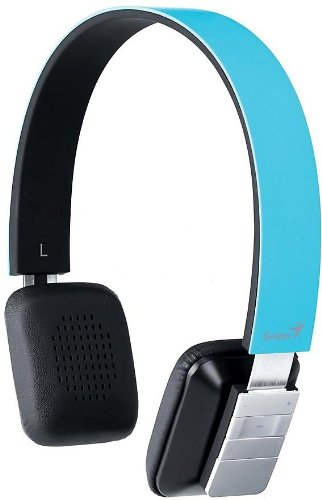
Figure 1: Genius HS-920BT Bluetooth Headset (Blue)
This image displays the Genius HS-920BT Bluetooth Headset in blue, viewed from an angle, highlighting its adjustable headband and earcup design.
주요 특징:
- Wireless Bluetooth connectivity for audio and calls (A2DP support)
- Integrated rechargeable Lithium-Ion battery
- 핸즈프리 통신을 위한 내장 마이크
- On-ear controls for volume adjustment, track skipping (AVRCP support)
- 편안한 착용감을 위한 조절 가능한 헤드밴드
- 40 mm driver units for clear sound
4. 설정
4.1 헤드셋 충전
Before initial use, fully charge the headset. Use the provided USB charging cable.
- USB 충전 케이블의 작은 쪽 끝을 헤드셋의 충전 포트에 연결하세요.
- USB 케이블의 큰 쪽 끝을 전원이 공급되는 USB 포트(예: 컴퓨터, USB 벽면 어댑터)에 연결합니다.
- The LED indicator on the headset will illuminate during charging and change color or turn off when fully charged. Refer to the headset's LED behavior for specific indications.
일반적으로 완전 충전에는 약 2~3시간이 걸립니다.
4.2 블루투스 기기와 페어링
To use the HS-920BT wirelessly, you must pair it with your Bluetooth-enabled device.
- 전원 켜기: Press and hold the Power button on the headset until the LED indicator flashes, usually alternating blue and red, indicating pairing mode.
- 블루투스 활성화: On your smartphone, tablet, or PC, enable Bluetooth functionality.
- 검색 장치: In your device's Bluetooth settings, search for available devices. The headset should appear as "HS-920BT".
- 선택하고 짝을 지으세요: Select "HS-920BT" from the list. If prompted for a passcode, enter "0000" (four zeros).
- 확인: Once paired, the headset's LED indicator will typically flash blue slowly, and your device will confirm the connection.
The headset will automatically attempt to reconnect to the last paired device when powered on, if that device's Bluetooth is active and within range.
5. 사용 설명서
The HS-920BT features intuitive controls located on the earcup.

Figure 2: Earcup Controls of HS-920BT
This image shows a close-up of the right earcup of the Genius HS-920BT Bluetooth Headset, detailing the control buttons for power, volume, and track navigation.
5.1 전원 켜기/끄기
- 전원 켜기: LED 표시등이 파란색으로 깜박일 때까지 약 3초 동안 전원 버튼을 길게 누릅니다.
- 전원 끄기 : LED 표시등이 꺼질 때까지 약 3초 동안 전원 버튼을 길게 누릅니다.
5.2 음악 재생
- 재생/일시 중지: 재생/일시정지 버튼을 한 번 누르세요.
- 다음 트랙: Press the "Next Track" button (usually marked with a forward arrow).
- 이전 트랙 : Press the "Previous Track" button (usually marked with a backward arrow).
5.3 통화 관리
- 전화 받기/종료: Press the Multi-function button (often the same as Play/Pause) once during an incoming call to answer, or once during a call to end it.
- 전화 거부: 전화가 걸려오는 동안 다기능 버튼을 약 2초 동안 길게 누르십시오.
- 마지막 번호 재다이얼: 통화 중이 아닐 때는 다기능 버튼을 두 번 누르세요.
5.4 볼륨 조절
- 볼륨 증가: 볼륨 높이기 버튼(+)을 누르세요.
- 볼륨 감소: 볼륨 낮추기 버튼(-)을 누르세요.
6. 유지관리
Proper care ensures the longevity of your headset.
- 청소: 부드럽고 마른 천을 사용하여 헤드셋을 닦으세요. 연마성 세제나 용제는 사용하지 마세요.
- 저장: 헤드셋은 직사광선과 극한의 온도를 피해 서늘하고 건조한 곳에 보관하세요.
- 배터리 관리 : 배터리 수명을 연장하려면 배터리를 자주 완전히 방전시키지 마십시오. 장기간 사용하지 않더라도 헤드셋을 정기적으로 충전하십시오.
- 물 노출: 헤드셋은 방수가 되지 않습니다. 물이나 과도한 습기에 노출되지 않도록 주의하세요.
7. 문제 해결
If you encounter issues with your HS-920BT headset, refer to the following common solutions:
| 문제 | 가능한 해결책 |
|---|---|
| 헤드셋의 전원이 켜지지 않습니다. | Ensure the battery is charged. Connect the headset to a power source using the USB cable. |
| 헤드셋을 기기와 페어링할 수 없습니다. |
|
| 소리가 나지 않거나 볼륨이 작습니다. |
|
| 통화 품질이 좋지 않습니다. |
|
8. 사양
| 모델 이름: | HS-920BT |
| 무선 기술: | 블루투스 |
| 드라이버 유닛: | 40mm (XNUMXmm) |
| 배터리: | 충전식 리튬 이온 내장 |
| 제어 유형: | Volume Control, Track Navigation, Call Management |
| 마이크로폰: | 내장형 |
| 지원되는 프로files: | A2DP, AVRCP |
| 하드웨어 플랫폼 : | PC, 스마트폰, 태블릿 |
| 품목 무게: | 110그램 |
| 크기(가로x세로x높이): | 13.6 x 17.3 x 2.9cm |
9. 보증 및 지원
For warranty information and technical support, please refer to the warranty card included with your product or visit the official Genius web사이트. 구매 증빙 자료로 구매 영수증을 보관하세요.
For further assistance, you may contact Genius customer service through their official channels.


