소개
This manual provides comprehensive instructions for the setup, operation, and maintenance of your Genius SW-2.1 355 Speaker System. Please read this manual thoroughly before using the product to ensure proper functionality and to maximize your listening experience.
안전 정보
기기 손상이나 부상 방지를 위해 다음 안전 예방 조치를 준수하세요.
- 스피커를 물이나 습기에 노출시키지 마세요.
- 스피커를 열원 근처나 직사광선이 비치는 곳에 두지 마십시오.
- 과열을 방지하려면 서브우퍼 주변의 통풍이 잘 되도록 하세요.
- 장치와 함께 제공된 전원 어댑터만 사용하십시오.
- 직접 기기를 열거나 수리하지 마십시오. 모든 정비는 자격을 갖춘 기술자에게 맡기십시오.
- 어린이의 손이 닿지 않는 곳에 보관하세요.
패키지 내용
패키지에 모든 품목이 들어 있는지 확인하세요.
- 서브우퍼 유닛 1개
- 2 x 위성 스피커
- 1 x Audio input cable (3.5mm stereo jack)
- 1 x 전원 어댑터
- 1 x 사용자 매뉴얼(이 문서)
제품 끝view
The Genius SW-2.1 355 Speaker System consists of a subwoofer and two satellite speakers designed to deliver clear audio and powerful bass for your multimedia needs.
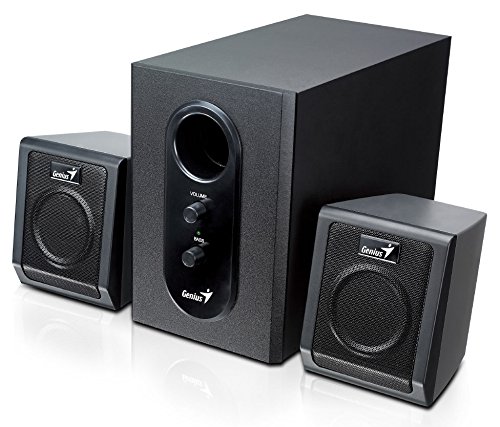
This image displays the Genius SW-2.1 355 Speaker System. It features a central, larger subwoofer unit with volume and bass control knobs on its front panel, and two smaller satellite speakers positioned on either side. All components are black.
구성 요소:
- 서브 우퍼 : The main unit housing the bass driver and control panel.
- 위성 스피커: Two compact speakers for mid-range and high-frequency audio.
- 제어판: Located on the subwoofer, featuring Volume and Bass adjustment knobs.
설정
- 스피커 위치: Place the subwoofer on the floor or a sturdy surface. Position the satellite speakers on either side of your listening area, facing towards you for optimal stereo separation.
- 위성 스피커 연결하기: Connect the cables from the two satellite speakers to the corresponding output jacks on the rear of the subwoofer unit. Ensure a secure connection.
- 오디오 소스 연결 중: Connect one end of the 3.5mm audio input cable to the "Audio In" jack on the subwoofer. Connect the other end to the audio output jack (e.g., headphone jack) of your computer, MP3 player, smartphone, or other audio source.
- 전원 연결: Plug the power adapter into the DC input jack on the subwoofer. Then, plug the power adapter into a standard electrical outlet.
- 전원 켜기: Turn on the speaker system using the power switch, usually integrated with the volume knob.
작업
- 전원 켜기/끄기 및 볼륨 조절: The main knob on the subwoofer controls both power and overall volume. Rotate clockwise to turn on and increase volume; rotate counter-clockwise to decrease volume and turn off.
- 베이스 조정: Use the "Bass" knob on the subwoofer to adjust the level of low-frequency sound. Rotate clockwise to increase bass, and counter-clockwise to decrease it, according to your preference.
- 오디오 소스 볼륨: For optimal sound quality, set the volume on your audio source (computer, phone, etc.) to about 75% and then use the speaker system's volume control for fine adjustments.
유지
- 청소: 스피커 표면은 부드럽고 마른 천으로 닦으십시오. 액체 세척제나 연마성 재료는 사용하지 마십시오.
- 저장: 스피커를 장기간 보관할 경우 전원을 끄고 서늘하고 건조한 곳에 보관하세요.
- 케이블 관리 : 케이블이 엉키거나 끼이지 않도록 하여 손상을 방지하십시오.
문제 해결
| 문제 | 가능한 원인 | 해결책 |
|---|---|---|
| 소리가 나지 않습니다 |
|
|
| 왜곡된 소리 |
|
|
| 약한 베이스 |
|
|
명세서
| 특징 | 세부 사항 |
|---|---|
| 모델명 | SW-2.1 355 |
| 스피커 유형 | 2.1 Channel Multimedia Speaker System (Bookshelf, Satellite, Subwoofer) |
| 총 출력 전력 | 10 Watts RMS (5W Subwoofer + 2.5W x 2 Satellites) |
| 재료 | 우드(서브우퍼) |
| 연결 기술 | 유선 (3.5mm 오디오 입력) |
| 호환 장치 | MP3 Player, Personal Computer, Smartphones, Tablets, Televisions |
| 통제 수단 | 볼륨, 베이스 |
| 전원 | DC |
| 품목 무게 | 2.78kg |
| 패키지 크기 | 39.6 x 25 x 18.4cm |
보증 및 지원
Genius products are designed for reliability and performance. For information regarding warranty coverage, technical support, or service inquiries, please refer to the warranty card included with your product or visit the official Genius web사이트. 구매 증빙 자료로 구매 영수증을 보관하세요.


