1. 서론
This manual provides essential instructions for the safe operation and maintenance of your QFX PBX-410204BTD PA Speaker. Please read this manual thoroughly before using the device and retain it for future reference.
1.1. 제품 오버view
The QFX PBX-410204BTD is a versatile battery-powered PA speaker system featuring dual 10-inch woofers and dual 1-inch tweeters. It includes multiple audio input options such as Bluetooth, USB, SD card, FM radio, and DVD playback. Additional features include a disco light and karaoke functionality, making it suitable for various entertainment and public address applications. The unit operates on a 12V 12AH rechargeable battery and supports AC 100-240V input.
1.2. 안전 지침
- 전원: 전원 공급 장치가 볼륨과 일치하는지 확인하십시오.tage requirements (AC 100-240V or DC 12V).
- 통풍: 환기구를 막지 마십시오. 공기가 원활하게 흐르도록 장치 주변에 충분한 공간을 확보하십시오.
- 물과 습기: 제품을 비, 습기 또는 액체에 노출시키지 마십시오.
- 열원: 장치를 라디에이터, 난방 조절기, 스토브 또는 기타 열을 발생시키는 기기와 같은 열원으로부터 멀리 두십시오.
- 청소: Disconnect the power before cleaning. Use a dry cloth.
- 서비스: 이 제품을 직접 수리하려고 하지 마십시오. 모든 서비스는 자격을 갖춘 서비스 담당자에게 문의하십시오.
- 배터리: The unit contains a rechargeable battery. Follow proper disposal guidelines for batteries. Do not expose to excessive heat.
2. 패키지 내용
다음 품목이 패키지에 포함되어 있는지 확인하세요.
- QFX PBX-410204BTD PA Speaker Unit
- 전원 어댑터/케이블
- 리모콘(포함된 경우)
- 마이크(포함된 경우)
- 사용 설명서 (본 문서)
3. 컨트롤 및 기능
Familiarize yourself with the various controls and connection ports on your PA speaker.
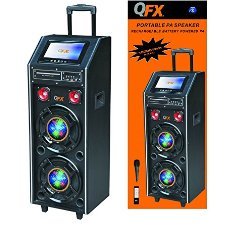
그림 1: 전면 view of the QFX PBX-410204BTD PA Speaker. This image displays the speaker's front panel, including the dual 10-inch woofers, the central control panel with various buttons and knobs, and the integrated disco light.
3.1. 제어판 오버view
- 전원 스위치: 기기를 켜거나 끕니다.
- 볼륨 조절: 마스터 볼륨을 조정합니다.
- 마이크 입력: Connects a wired microphone.
- 에코/마이크 볼륨: Adjusts microphone volume and echo effect.
- USB 포트: USB 플래시 드라이브 재생용입니다.
- SD 카드 슬롯: SD 카드 재생용입니다.
- 모드 버튼: Switches between input modes (Bluetooth, USB, SD, FM, DVD).
- 재생/일시 정지 버튼: 미디어 재생을 제어합니다.
- 이전/다음 트랙 버튼: Navigates media tracks or FM stations.
- FM 안테나: FM 라디오 수신 성능 향상을 위해.
- Disco Light Switch: Turns the disco light ON/OFF.
- DVD 플레이어: Integrated DVD disc slot and controls.
- AC 입력: Connects the power adapter for charging and AC operation.
- DC 12V Input/Output: For external 12V power source or output.
4. 설정
4.1. 초기 충전
Before first use, fully charge the internal battery. Connect the power adapter to the AC input on the speaker and plug it into a standard wall outlet. The charging indicator will illuminate. Charging typically takes several hours. The indicator will change or turn off once fully charged.
4.2. 배치
Place the speaker on a stable, flat surface. Ensure there is adequate space around the unit for ventilation. Avoid placing it near direct sunlight, heat sources, or areas with high humidity.
5. 사용 설명서
5.1. 전원 켜기/끄기
To power on the unit, toggle the Power Switch to the "ON" position. To power off, toggle it to "OFF".
5.2. 블루투스 연결
- Turn on the speaker and press the "Mode" button until "Bluetooth" mode is selected.
- Enable Bluetooth on your mobile device or audio player.
- 검색 "QFX PBX-410204BTD" (or similar name) in your device's Bluetooth settings.
- 페어링할 스피커를 선택하세요. 연결에 성공하면 확인음이 울립니다.
- 이제 스피커를 통해 기기의 오디오를 재생할 수 있습니다.
5.3. USB/SD 카드 재생
- USB 플래시 드라이브 또는 SD 카드를 해당 슬롯에 삽입하십시오.
- Press the "Mode" button to select "USB" or "SD" mode. The unit will automatically begin playing compatible audio files.
- 재생/일시 정지, 이전, 다음 버튼을 사용하여 재생을 제어합니다.
5.4. FM 라디오
- Press the "Mode" button to select "FM" mode.
- 수신 감도를 높이려면 FM 안테나를 연장하십시오.
- Press and hold the Play/Pause button to auto-scan and save available FM stations.
- 저장된 역들을 탐색하려면 이전/다음 버튼을 사용하세요.
5.5. DVD 재생
- Insert a DVD disc into the DVD slot.
- Press the "Mode" button to select "DVD" mode.
- Use the integrated DVD controls or the remote control to manage playback.
5.6. 노래방 기능
- Connect a microphone to the Microphone Input jack.
- Adjust the Microphone Volume and Echo controls to your preference.
- Play music from any source (Bluetooth, USB, SD, DVD) and sing along.
5.7. 디스코 라이트
Toggle the Disco Light Switch to activate or deactivate the integrated disco light feature.
6. 유지관리
6.1. 청소
Wipe the exterior of the unit with a soft, dry cloth. Do not use abrasive cleaners, waxes, or solvents. Ensure the unit is powered off and unplugged before cleaning.
6.2. 배터리 관리
To prolong battery life, fully charge the unit before storing it for extended periods. Recharge the battery at least once every 3 months if not in regular use. Avoid completely draining the battery frequently.
6.3. 보관
스피커는 직사광선과 극한의 온도를 피해 서늘하고 건조한 곳에 보관하세요.
7. 문제 해결
| 문제 | 가능한 원인 | 해결책 |
|---|---|---|
| 전원이 없습니다 | Unit not plugged in; Power switch off; Battery drained. | Check power connection; Turn power switch ON; Charge the battery. |
| 소리가 나지 않습니다 | 볼륨이 너무 낮습니다. 입력 모드가 올바르지 않습니다. 기기가 페어링되지 않았습니다(블루투스). | 볼륨을 높이세요. 올바른 입력 모드를 선택하세요. 블루투스 장치를 다시 페어링하세요. |
| 블루투스가 연결되지 않습니다 | 스피커가 블루투스 모드가 아닙니다. 기기가 너무 멀리 떨어져 있습니다. 간섭이 발생하고 있습니다. | Ensure speaker is in Bluetooth mode; Move device closer; Avoid obstacles. |
| USB/SD 카드가 재생되지 않습니다 | 잘못된 file 포맷 오류; USB/SD 카드 손상; 잘못된 모드. | 보장하다 files are compatible (e.g., MP3); Try another USB/SD card; Select correct mode. |
| FM 라디오 수신 불량 | 안테나가 확장되지 않았습니다. 신호가 약합니다. | FM 안테나를 완전히 펼치십시오. 기기의 위치를 조정해 보십시오. |
8. 사양
- 모델: PBX-410204BTD
- 스피커 유형: 배터리 구동 PA 스피커
- 우퍼 크기: 2 x 10 인치
- 트위터 크기 : 2 x 1 인치
- 연결성: Bluetooth, USB, SD, FM Radio, DVD
- 특별 기능: Disco Light, Karaoke
- 배터리: 12V 12AH 충전식 배터리
- AC 입력: 100-240V
- DC 입력/출력: 12V
- 출력 와트tage: 346 와트
- 소포 크기: 100.33 x 43.18 x 43.18cm(39.5 x 17 x 17인치)
- 품목 무게: 29.94kg(66파운드)
9. 보증 및 지원
For warranty information and technical support, please refer to the warranty card included with your product or contact QFX customer service directly. Keep your purchase receipt as proof of purchase.
참고: 구체적인 보증 조건은 지역 및 소매업체에 따라 다를 수 있습니다.


