소개
This manual provides detailed instructions for the setup, operation, and maintenance of your La Crosse Technology Model 302-604R-TBP Indoor Digital Thermometer and Hygrometer Station. Please read this manual thoroughly before using the device to ensure proper function and longevity.
특징
- Indoor Temperature Display (Fahrenheit/Celsius)
- Indoor Humidity Display (%RH)
- Minimum/Maximum Value Records for Temperature and Humidity
- Comfort Level Icon Indicator
- Manual Set Time (12/24 Hour Format)
- Compact Tabletop or Wall-Mount Design
제품 끝view
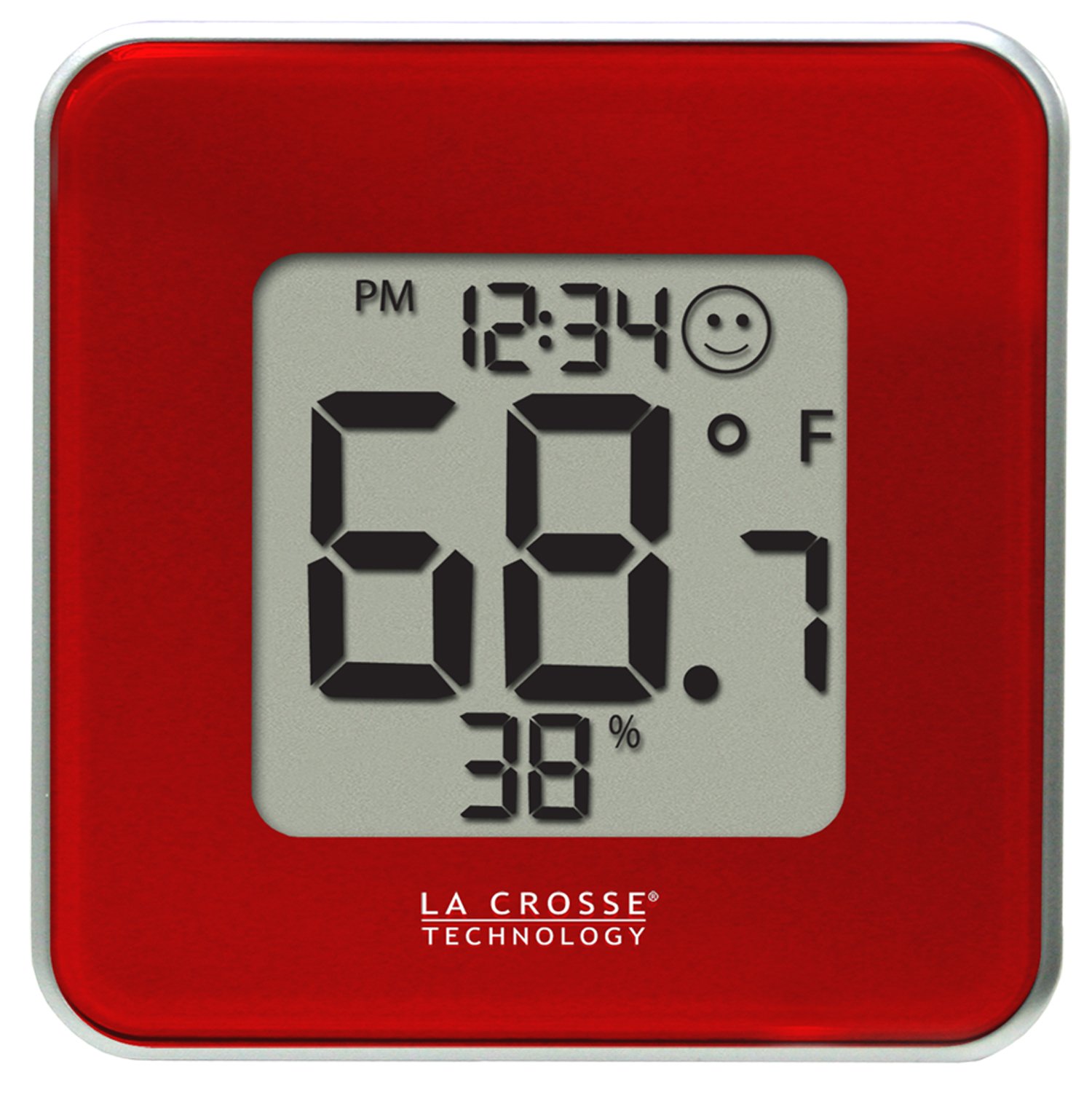
그림 1: 앞쪽 view of the La Crosse Technology 302-604R-TBP station. The display shows the current time, indoor temperature, indoor humidity, and a comfort level indicator. The device is red with a silver trim.
설정
1. 배터리 설치
- 장치 뒷면에서 배터리 칸을 찾으세요.
- 배터리 덮개를 제거합니다.
- CR2032 배터리 1개를 삽입할 때, 극성(+/-)을 정확히 확인하십시오.
- 배터리함 덮개를 다시 닫으십시오. 그러면 기기가 자동으로 켜집니다.
2. 배치
The 302-604R-TBP can be placed on a tabletop using its integrated stand or mounted on a wall. Choose a location away from direct sunlight, heat sources, or vents for accurate readings.
작업
The device features three buttons on the back: SET/CF, 스위치, 그리고 최대/최소.
시간 설정
- 를 누르고 계세요 SET/CF 버튼을 약 3초간 누르면 시간 설정 모드로 들어갑니다. 시 숫자가 깜빡입니다.
- 를 누르세요 스위치 버튼을 눌러 시간을 조정합니다.
- 를 누르세요 SET/CF button again to confirm the hour and move to minute setting. The minute digit will flash.
- 를 누르세요 스위치 버튼을 눌러 분을 조정합니다.
- 를 누르세요 SET/CF button again to confirm the minute and exit time setting mode.
12시간/24시간 형식 변경
While in time setting mode (hour flashing), press the 최대/최소 button to toggle between 12-hour (with AM/PM) and 24-hour time formats.
Changing Temperature Units (Fahrenheit/Celsius)
를 누르세요 SET/CF button briefly (not held) to switch between Fahrenheit (°F) and Celsius (°C) temperature display.
Viewing Minimum/Maximum Values
- 를 누르세요 최대/최소 버튼을 한 번 누르면 기록된 최고 온도와 습도가 표시됩니다.
- 를 누르세요 최대/최소 button a second time to display the minimum recorded temperature and humidity.
- 를 누르세요 최대/최소 버튼을 세 번째 누르면 현재 측정값으로 돌아갑니다.
- MIN/MAX 기록을 지우려면 다음을 길게 누릅니다. 최대/최소 button for 3 seconds while the MIN or MAX values are displayed.
편안함 수준 아이콘
The display includes a comfort level icon (a smiley face) that indicates the general comfort level based on current temperature and humidity. This is an approximate indicator and not a precise measurement.
유지
배터리 교체
When the battery indicator appears on the display, replace the CR2032 battery as described in the "Battery Installation" section. Old batteries should be disposed of according to local regulations.
청소
부드러운 천으로 장치를 청소하십시오. damp 천을 사용하십시오. 연마성 세척제나 용제를 사용하지 마십시오. 디스플레이나 케이스가 손상될 수 있습니다.asing. 배터리 칸이나 기타 개구부에 습기가 들어가지 않도록 하십시오.
문제 해결
| 문제 | 해결책 |
|---|---|
| 화면이 안 나오거나 아주 희미하게 나옵니다. | CR2032 배터리를 교체하십시오. 극성을 반드시 확인하십시오. |
| 온도/습도 측정값 오류 | Ensure the unit is not in direct sunlight, near heat sources, or in a draft. Allow 20-30 minutes for readings to stabilize after initial setup or relocation. |
| 버튼이 응답하지 않습니다 | Remove and reinsert the battery to perform a soft reset. If the issue persists, replace the battery. |
명세서
- 모델: 302-604R-TBP
- 상표: 라크로스 테크놀로지
- 실내 온도 범위: Not specified in provided data, typical range is 0°C to 50°C (32°F to 122°F).
- 실내 습도 범위: Not specified in provided data, typical range is 10% to 99% RH.
- 전력 요구 사항: 1 x CR2032 배터리(포함)
- 치수: 4.13 x 1.15 x 4.13인치(10.49 x 2.92 x 10.49cm)
- 품목 무게: 4 온스(113.4그램)
- 장착 유형: 탁상용 또는 벽걸이형
보증 및 지원
For warranty information or technical support, please refer to the documentation included with your product packaging or visit the official La Crosse Technology web사이트. 고객 서비스 연락처 정보는 일반적으로 제조업체에서 제공됩니다. web대지.


