소개
This manual provides comprehensive instructions for the setup, operation, maintenance, and troubleshooting of your Nixplay Original 18 Inch Digital WiFi Photo Frame, Model W18A. Please read this manual thoroughly before using your device to ensure optimal performance and longevity.

이미지: 앞면 view of the Nixplay Original 18 Inch Digital WiFi Photo Frame, showcasing a vibrant image of a family.
상자 안에 무엇이 들어있나요?
Upon unboxing your Nixplay Digital Photo Frame, verify that all components are present:
- Digital Photo Frame (Nixplay Original 18 Inch)
- 전원 어댑터
- 원격 제어
- 서다

이미지: 각도 view of the Nixplay Original 18 Inch Digital WiFi Photo Frame, highlighting its slim profile 그리고 표시합니다.
설정
1. 스탠드 부착
Locate the circular stand. Align the stand with the mounting point on the back of the frame. Insert and rotate the stand until it securely locks into place. This stand allows for both landscape and portrait orientation.
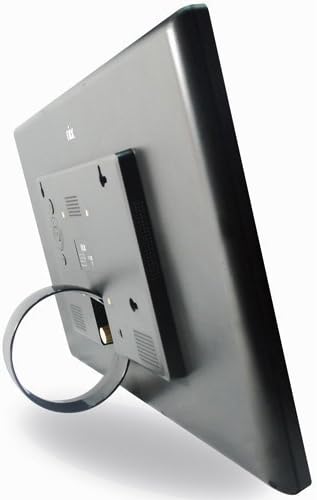
이미지: 후면 view of the Nixplay Digital Photo Frame, illustrating the attachment point for the circular stand.
2. 프레임 전원 켜기
- 전원 어댑터를 프레임 뒷면의 DC IN 포트에 연결하십시오.
- 전원 어댑터를 벽면 콘센트에 꽂으세요.
- The frame will automatically power on and display the Nixplay logo.
3. 초기 Wi-Fi 연결
Follow the on-screen prompts to connect your frame to a Wi-Fi network. You will need your Wi-Fi network name (SSID) and password. Use the remote control to navigate the on-screen keyboard.
4. Creating a Nixplay Account
To manage your frame and upload photos, you will need to create a Nixplay account. This can be done via the Nixplay mobile app (available for iOS and Android) or through the Nixplay website. Follow the instructions provided by the app or website to link your frame to your account.
프레임 작동하기
사진 및 비디오 업로드
Photos and videos can be uploaded to your Nixplay frame through several methods:
- Nixplay 모바일 앱: Easily upload photos and short videos directly from your smartphone.
- 이메일: Each Nixplay frame has a unique email address. Send photos directly to your frame via email.
- 닉스플레이 Web대지: Access your account online to upload, organize, and manage playlists. Integration with Google Photos, Dropbox, Facebook, and Instagram is supported.
- USB 드라이브/SD 카드: The frame supports local playback from USB drives and SD cards. Insert the storage device into the corresponding port on the frame.
재생 목록 관리
Organize your content into playlists using the Nixplay app or website. You can assign specific playlists to display on your frame. Multiple playlists can be active simultaneously, and you can switch between them using the remote control.
모션 센서 기능
The Nixplay W18A features a motion sensor that automatically turns the frame on when motion is detected and off when no motion is detected for a set period. This feature helps conserve energy. You can enable or disable this function and adjust its sensitivity through the frame's settings menu or the Nixplay app.

Image: The Nixplay Digital Photo Frame seamlessly integrated into a home environment, placed on a shelf.
리모컨 사용
The included remote control allows you to navigate menus, adjust settings, switch playlists, and control playback. Ensure the remote is pointed towards the sensor on the frame for proper operation.
유지
프레임 청소
화면을 청소하려면 부드럽고 보풀이 없는 천으로 부드럽게 닦으세요. 잘 지워지지 않는 얼룩은 가볍게 닦아주세요.ampen the cloth with water or a screen-safe cleaning solution. Avoid using harsh chemicals or abrasive materials. Clean the frame's body with a dry, soft cloth.
소프트웨어 업데이트
Nixplay regularly releases software updates to improve performance and add new features. Ensure your frame is connected to Wi-Fi to receive these updates automatically. You can check for updates manually through the frame's settings menu.
문제 해결
| 문제 | 가능한 원인 | 해결책 |
|---|---|---|
| 프레임의 전원이 켜지지 않습니다. | 전원 어댑터가 연결되지 않았거나 콘센트에 결함이 있습니다. | 전원 어댑터가 프레임과 전원 콘센트에 제대로 연결되어 있는지 확인하세요. 다른 콘센트를 사용해 보세요. |
| Wi-Fi에 연결할 수 없습니다. | 비밀번호가 잘못되었거나, 신호가 약하거나, 네트워크 문제가 있습니다. | Double-check the Wi-Fi password. Move the frame closer to the router. Restart your router. |
| 사진이 표시되지 않습니다. | No photos uploaded, incorrect playlist selected, or network issue. | Verify photos are uploaded to your Nixplay account and assigned to an active playlist. Ensure the frame is connected to Wi-Fi. |
| 리모컨이 작동하지 않습니다. | Low battery or obstructed sensor. | Replace the remote control battery (1 Lithium Metal battery required). Ensure no obstructions between the remote and the frame's sensor. |
명세서
- 모델: W18A
- 화면 크기: 18.5 인치
- 해결: 720p
- 제품 크기: 18.39 x 1.3 x 11.42 인치
- 품목 무게: 6.17파운드
- 호환 장치: Smartphone (via Nixplay App)
- 연결성: 와이파이
- 저장: 10GB Online Storage (with Nixplay account), supports USB Drive and SD Card
- 특징: 모션 센서
- 힘: AC 전원 어댑터
- 원격 배터리: 1 Lithium Metal battery (required for remote)

Image: Technical diagram illustrating the precise dimensions of the Nixplay Digital Photo Frame.
보증 및 지원
보증 정보
For detailed warranty information regarding your Nixplay Original 18 Inch Digital WiFi Photo Frame, please refer to the warranty card included with your product or visit the official Nixplay web사이트. 보증 약관은 지역에 따라 다를 수 있습니다.
고객 지원
Should you encounter any issues not covered in this manual or require further assistance, please contact Nixplay Customer Service. Support resources, including FAQs and contact information, are available on the official Nixplay web대지:


