The Pyle PMX840BT is an 8-channel, 800-watt Bluetooth stage powered mixer designed for professional audio applications. This versatile system offers multi-source audio control, built-in Bluetooth for wireless streaming, and various input/output options for comprehensive sound management.
주요 특징:
8-Channel Audio Mixer System: Provides extensive control over multiple audio sources.
최대 출력 800와트: Delivers powerful sound performance.
블루투스 무선 음악 스트리밍: Simple and hassle-free pairing with modern devices.
디지털 LCD 디스플레이: For clear visual feedback and control.
MP3/USB/SD Readers: Supports digital audio file playback from various media.
다중 입력 : Includes 3-Pin Low Impedance Balanced Microphone Inputs, 1/4'' Line/High Impedance Balanced Inputs, Aux (3.5mm) Input Jack, and RCA inputs.
Master 5-Band Graphic Equalizer: For precise sound tuning.
독립 채널 제어: Volume, EQ, and Effects adjustment for each channel.
내장형 냉각 팬: Ensures stable operation during extended use.
편리한 운반 손잡이: 간편한 휴대를 위해.
2. 안전 지침
이 기기를 작동하기 전에 모든 안전 지침을 읽고 이해하십시오. 나중에 참조할 수 있도록 이 설명서를 보관하십시오.
전원: 본 기기는 지정된 전원 공급 장치에만 연결하십시오.tage.
통풍: Ensure proper ventilation. Do not block ventilation openings. The built-in cooling fan requires clear airflow.
수분: 기기를 비나 습기에 노출시키지 마십시오. 기기 위에 액체가 담긴 물건을 올려놓지 마십시오.
열: 장치를 라디에이터, 난방 조절기, 스토브 또는 열을 발생시키는 기타 장치와 같은 열원으로부터 멀리 두십시오.
서비스: 이 장치를 직접 수리하려고 하지 마십시오. 모든 수리는 자격을 갖춘 서비스 담당자에게 맡기십시오.
청소: 마른 천으로만 닦으십시오.
놓기: 안정되고 평평한 표면에 장치를 놓으십시오.
3. 패키지 내용
패키지에 모든 품목이 포함되어 있는지 확인하세요.
Pyle PMX840BT 8-Channel 800-Watt Bluetooth Stage 파워드 믹서
전원 케이블
Figure 3.1: Pyle PMX840BT mixer and included power cable.
This image displays the Pyle PMX840BT 8-Channel Bluetooth Stage Powered Mixer alongside its power cable, illustrating the complete package contents.
4. 제품 오버view
The Pyle PMX840BT features a robust design with clearly labeled controls and connectivity options for intuitive operation.
그림 4.1: 상단 전면 view of the Pyle PMX840BT 8-Channel Powered Mixer.
이 이미지는 포괄적인 정보를 제공합니다. view of the mixer's top and front panels, showcasing all input channels, controls, and the integrated USB/SD player section.
4.1 전면 패널 컨트롤
The front panel houses all primary controls and input jacks for each of the 8 channels, along with the master section and media player controls.
그림 4.2: 상세 view of the Pyle PMX840BT front panel.
This image highlights the front panel of the mixer, detailing the individual channel controls for gain, EQ (bass, mid, treble), effects send, and volume, as well as the master section and media player interface.
4.2 후면 패널 연결
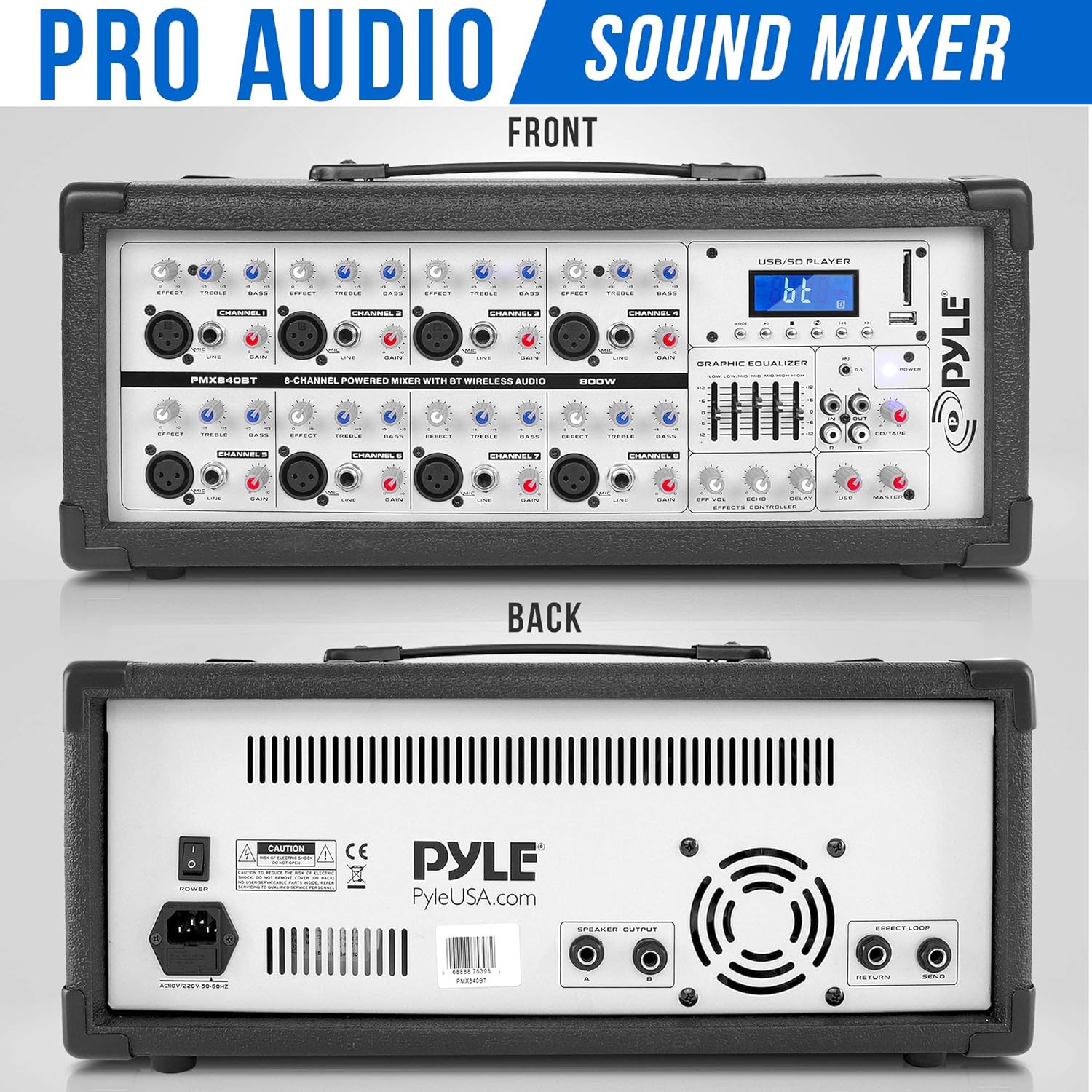
The rear panel provides essential connections for power, speaker outputs, and effects loop.
그림 4.3: 전면 및 후면 views of the Pyle PMX840BT mixer.
This image shows both the front and rear panels of the mixer, providing a complete view of all controls and connection points, including the power input, speaker outputs, and effects loop connectors on the rear.
5. 설정
Follow these steps to set up your Pyle PMX840BT mixer:
놓기: Position the mixer on a stable, flat surface, ensuring adequate ventilation around the unit.
전원 연결: Connect the supplied power cable to the mixer's power input on the rear panel, then plug the other end into a suitable AC power outlet.
스피커 연결: Connect your passive speakers to the 1/4'' speaker outputs on the rear panel. Ensure the impedance of your speakers matches the mixer's output impedance (8 Ohm).
초기 전원 켜기: Before turning on the mixer, ensure all channel volume knobs and the master volume fader are set to their minimum positions to prevent sudden loud noises.
6. 사용 설명서
6.1 전원 켜기/끄기
To power on, flip the POWER switch on the rear panel to the 'ON' position. The digital LCD display will illuminate.
To power off, ensure all audio levels are at minimum, then flip the POWER switch to the 'OFF' position.
6.2 마이크 연결
The mixer features 3-Pin Low Impedance Balanced Microphone Inputs (XLR) for professional microphones.
Connect your microphone to an available XLR input on the front panel.
Slowly increase the corresponding channel's volume knob.
Adjust the Master Volume fader to the desired overall output level.
6.3 라인 입력 연결
Use the 1/4'' Line/High Impedance Balanced Inputs for instruments or other line-level devices, and the Aux (3.5mm) Input for smartphones or MP3 players.
Connect your line-level device to the appropriate 1/4'' or 3.5mm input.
Slowly increase the corresponding channel's volume knob.
Adjust the Master Volume fader to the desired overall output level.
6.4 블루투스 연결
블루투스 지원 기기에서 무선으로 오디오를 스트리밍하세요.
Figure 6.1: Illustration of Bluetooth connectivity with the Pyle PMX840BT.
This image demonstrates the mixer's Bluetooth connectivity feature, showing a smartphone wirelessly paired with the unit for music streaming. The mixer's digital display indicates Bluetooth mode.
외부 기기(스마트폰, 태블릿 등)에서 블루투스를 활성화하세요.
On the mixer's digital LCD display, select the Bluetooth input mode. The display will show 'AC46XX' as the network name.
검색 'AC46XX' on your device and pair.
Once paired, you can stream audio wirelessly. Adjust the MP3/USB/SD volume control and the Master Volume fader for desired output.
6.5 USB/SD 재생
MP3 디지털 오디오 재생 fileUSB 플래시 드라이브 또는 SD 메모리 카드에서 직접 가져옵니다.
Insert a USB flash drive or SD card containing MP3 file해당 슬롯에 넣습니다.
The digital LCD display will show playback information. Use the control buttons (play/pause, skip, mode) to navigate your music.
Adjust the MP3/USB/SD volume control and the Master Volume fader for desired output.
6.6 이퀄라이제이션(EQ) 조정
The mixer features independent channel EQ and a Master 5-Band Graphic Equalizer for precise sound shaping.
Figure 6.2: Close-up of the Pyle PMX840BT Master 5-Band Graphic Equalizer.
이 이미지는 자세한 내용을 제공합니다. view of the mixer's Master 5-Band Graphic Equalizer, showing the individual faders for adjusting different frequency ranges to fine-tune the overall sound output.
채널 EQ: Use the HIGH, MID, and LOW knobs on each channel to adjust the treble, midrange, and bass frequencies of that specific input.
Master Graphic EQ: Use the faders on the Master 5-Band Graphic Equalizer to boost or cut specific frequency ranges (60Hz, 250Hz, 1KHz, 4KHz, 12KHz) for the overall mix.
6.7 Using Effects (EFFX)
The mixer includes built-in Echo and Reverb effects.
Use the EFFX knob on each channel to send a portion of that channel's signal to the effects processor.
Adjust the Master EFFX Control knobs (Level, Echo, Reverb) to control the overall intensity and characteristics of the effects.
7. 사양
특징
사양
전력 출력
800W MAX
Impedance (Each Channel)
8옴
라인 레벨 임피던스
-10dBv에서 10K옴
Mono Microphone Inputs
XLR: 전자적으로 균형 잡힌 개별 입력 회로
게인 범위(마이크)
+10 - +60dB
Max. Input Level (Mic)
+12dBu @ +10dB 게인
임피던스(마이크)
Approx. 2.6k Ω Balanced
신호 대 잡음 비율
110dB / 112dB, A-가중치
왜곡(THD+N)
0.005% / 0.004%, A-가중
Channel Equalization Control Range (High)
@ 10K +/-15dB
Channel Equalization Control Range (Low)
@ 60K +/-15dB
마스터 EQ 주파수(Hz)
60, 250, 1K, 4K, 12K
Master EQ Boost/Cut Control
+/-12dB
Effects Loop & Send Connectors
1/4'' TS Unbalanced
Effects Loop Impedance
약 1kΩ -10dBv
블루투스 버전
2.1+EDR
블루투스 무선 범위
30피트 이상
품목 무게
21.8파운드
제품 치수
13 x 20.75 x 9.75 인치
8. 문제 해결
If you encounter issues with your PMX840BT, refer to the following common problems and solutions:
전원 없음: 전원 케이블이 믹서와 작동하는 전원 콘센트에 단단히 연결되어 있는지 확인하세요. 전원 스위치 위치를 확인하세요.
사운드 출력 없음: Verify that the Master Volume fader is raised and individual channel volumes are not at minimum. Check speaker connections and ensure speakers are powered (if active) or correctly connected (if passive).
No Sound from a Specific Channel: Check the input cable connection for that channel. Ensure the channel's volume knob is raised and its EQ/EFFX settings are not muting the sound.
블루투스 페어링 문제: Ensure the mixer is in Bluetooth mode and your device's Bluetooth is enabled and searching. Confirm you are selecting the correct device name ('AC46XX'). Try restarting both the mixer and your Bluetooth device.
왜곡된 소리: Reduce the input gain for the affected channel or the Master Volume. Check for loose cable connections. Ensure speaker impedance matches the mixer.
USB/SD Playback Failure: Ensure the USB drive or SD card contains compatible MP3 files. Try reformatting the storage device or using a different one.
9. 유지관리
적절한 유지 관리는 믹서의 수명 연장과 최적의 성능을 보장합니다.
청소: Regularly wipe the unit with a soft, dry cloth. Avoid using abrasive cleaners, waxes, or solvents.
통풍: Keep the ventilation grilles clear of dust and debris. Use a soft brush or vacuum cleaner to remove any build-up.
저장: 장기간 사용하지 않을 경우 믹서를 직사광선과 극한 온도 변화를 피해 서늘하고 건조한 곳에 보관하십시오.
케이블 관리: Inspect all cables regularly for signs of wear or damage. Replace faulty cables immediately to prevent performance issues or safety hazards.
10. 보증 및 지원
For warranty information or technical support, please refer to the documentation provided with your purchase or contact Pyle customer service. Keep your proof of purchase for any warranty claims.