1. 서론
구매해주셔서 감사합니다asing the Lloytron MIP System B7505WH-C MiP2 32 Melody Plug-in Door Chime. This low-energy, portable, and wireless doorbell system is designed for ease of use and reliable performance. The system allows for wireless communication between the doorbell push button and the chime receiver, offering a range of up to 150 meters (unobstructed).
The MIP (Modular-Intelligent-Programmable) System enables the door chime to automatically learn frequencies from other MIP SYSTEM modules, supporting up to four additional doorbell transmitters and four chime receivers. With 32 selectable melodies, variable volume control, and a flashing strobe light indicator, this system provides a versatile and accessible solution for your home or office.
2. 안전 정보
- 사용 전에 모든 지침을 주의 깊게 읽고 나중에 참조할 수 있도록 보관하십시오.
- Do not expose the chime unit to water or excessive moisture. It is designed for indoor use only.
- Ensure the doorbell push button is installed in a location protected from direct heavy rain to prolong battery life and functionality.
- Only use the specified battery type (1 x A23) for the doorbell push button.
- 오래된 건전지와 새 건전지, 다른 종류의 건전지를 혼용하지 마세요.
- 사용한 배터리는 현지 규정에 따라 책임감 있게 폐기하십시오.
- 제품을 직접 열거나 수리하려고 하지 마십시오. 모든 서비스는 자격을 갖춘 전문가에게 맡기십시오.
- 어린이의 손이 닿지 않는 곳에 보관하세요.
3. 패키지 내용
패키지에 모든 품목이 들어 있는지 확인하세요.
- 1 x Lloytron MIP System Plug-in Chime Receiver (White)
- 1 x Lloytron MIP System Battery-Powered Doorbell Push Button (White)
- 1 x A23 Battery (for doorbell push button)
- Mounting accessories (adhesive pad, screws)
- 1 x 창 스티커
- 1 x Installation and Troubleshooting Manual (this document)
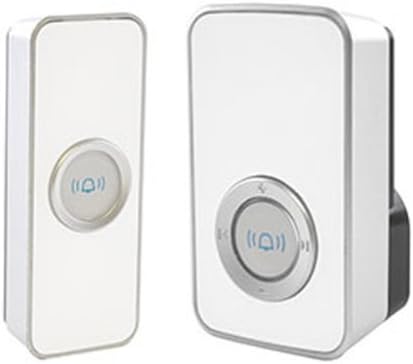
Image 1: The Lloytron MIP System B7505WH-C includes a plug-in chime receiver (right) and a battery-powered doorbell push button (left). Both units are white with silver accents.
4. 설정
4.1 Installing the Doorbell Push Button
- 배터리 삽입: Open the battery compartment of the doorbell push button. Insert the supplied A23 battery, ensuring correct polarity (+/-). Close the compartment securely.
- 위치를 선택하십시오 : Select a suitable location near your door, ensuring it is protected from direct heavy rain. The surface should be clean and dry.
- 장착 옵션:
- 접착 패드: Peel off the protective film from the adhesive pad and firmly press the doorbell push button onto the chosen surface for at least 30 seconds.
- 나사: If using screws, mark the desired drilling points, drill pilot holes, and secure the doorbell push button using the provided screws.
4.2 Setting up the Chime Receiver
- 플러그인: Plug the chime receiver into a standard electrical outlet within your home. Ensure it is within the wireless range of the doorbell push button (up to 175m unobstructed).
- 초기 페어링: The system is typically pre-programmed from the factory. Press the doorbell push button once. The chime receiver should sound, indicating successful pairing.
- 수동 페어링(필요한 경우): If the chime does not sound, refer to the "Troubleshooting" section for instructions on manual pairing.
5. 사용 설명서
5.1 멜로디 변화
The chime receiver offers 32 high-quality melodies. To change the melody:
- Locate the melody selection button on the chime receiver. This is often indicated by musical notes or an arrow icon.
- Press the melody selection button repeatedly to cycle through the available tunes.
- Once you hear the desired melody, stop pressing the button. The selected melody will be saved.
- To hear the currently selected melody, press the "playback" button (if available, often indicated by a play icon).
5.2 볼륨 조절
The chime receiver features variable volume control, up to 80 dB. To adjust the volume:
- Locate the volume control button(s) on the chime receiver. These are typically marked with '+' and '-' symbols or a speaker icon.
- Press the '+' button to increase the volume or the '-' button to decrease it.
- The chime will sound at the new volume level to confirm the adjustment.
5.3 Strobe Light Indicator
The chime receiver includes a flashing strobe light indicator, which is particularly useful for individuals with hearing impairments. When the doorbell push button is pressed, the chime will sound, and the strobe light will flash simultaneously.
5.4 Expanding Your MIP System
The Lloytron MIP 2 system is expandable. You can link up to 12 different MIP accessories, such as additional doorbell push buttons, extra chime receivers, magnetic sensors, or PIR motion detectors. Refer to the specific instructions provided with each MIP accessory for pairing procedures.
6. 유지관리
6.1 청소
Wipe the surfaces of both the doorbell push button and the chime receiver with a soft, dry cloth. Do not use abrasive cleaners, solvents, or harsh chemicals, as these may damage the finish or internal components.
6.2 Battery Replacement (Doorbell Push Button)
If the doorbell push button stops transmitting a signal or its range significantly decreases, the A23 battery may need replacement.
- Open the battery compartment on the back of the doorbell push button.
- 기존 A23 배터리를 제거하세요.
- Insert a new A23 battery, observing the correct polarity (+/-).
- 배터리 칸을 단단히 닫으세요.
- 초인종이 제대로 작동하는지 확인하기 위해 테스트해 보세요.
7. 문제 해결
| 문제 | 가능한 원인 | 해결책 |
|---|---|---|
| 버튼을 눌러도 차임벨 소리가 나지 않습니다. |
|
|
| 무선 범위가 줄어들었습니다. |
|
|
| Chime sounds randomly. |
|
|
7.1 Manual Pairing / System Reset
If your units lose connection or you wish to pair new MIP accessories, follow these steps to reset and re-pair:
- Clear Memory (Chime Receiver): Unplug the chime receiver from the power outlet. While holding down the melody selection button (or the main function button), plug the chime receiver back into the outlet. Continue holding the button until you hear a short beep or see an indicator light flash, then release. This clears the memory.
- 페어링 모드 시작: Briefly press the melody selection button (or main function button) on the chime receiver. The receiver should enter pairing mode, often indicated by a flashing light.
- 송신기 활성화: Within 10 seconds, press the doorbell push button once. The chime receiver should sound, indicating successful pairing.
- 시험: Press the doorbell push button again to confirm the pairing.
- 다중 송신기: Repeat steps 2-3 for any additional MIP doorbell push buttons or transmitters you wish to pair.
8. 사양
| 특징 | 세부 사항 |
|---|---|
| 모델 번호 | B7505WH |
| 상표 | Lloytron |
| 무선 범위 | 최대 175미터(장애물 없을 시) |
| 멜로디 | 32개의 선택 가능한 멜로디 |
| 볼륨 조절 | Variable, up to 80 dB |
| 전원(차임) | Plug-in (Mains powered) |
| 전원 공급 장치(초인종) | 1 x A23 Battery (included) |
| 치수(제품) | 20.2 x 16.3 x 3.7cm |
| 무게(제품) | 231.33그램 |
| 플러그 형식 | G - 3핀 영국식 |
| 특별 기능 | Flashing strobe light indicator, MIP System compatibility |
9. 보증 및 지원
For warranty information and customer support, please refer to the documentation provided with your purchase or visit the official Lloytron web사이트. 보증 청구를 위해 구매 증빙 자료를 보관하세요.
If you encounter issues not covered in this manual, or require further assistance, please contact Lloytron customer service.


