1. 서론
This manual provides essential information for the safe and efficient operation of your InFocus IN2126a WXGA Network Projector. Please read this manual thoroughly before using the projector and retain it for future reference. The InFocus IN2126a is designed for versatile use in various environments, offering high brightness and network capabilities.
2. 안전 정보
프로젝터 손상을 방지하고 사용자의 안전을 확보하려면 다음 안전 예방 조치를 준수하세요.
- 환기구를 막지 마십시오. 프로젝터 주변에 공기가 충분히 흐르도록 하십시오.
- l을 사용할 때 프로젝터 렌즈를 직접 쳐다보지 마십시오.amp 켜져 있습니다. 밝은 빛은 눈에 손상을 줄 수 있습니다.
- 프로젝터를 직사광선이 비치는 곳, 열원 근처, 습도가 높거나 먼지가 많은 환경에 두지 마십시오.
- 프로젝터에 제공된 전원 코드만 사용하십시오.
- 모든 정비는 자격을 갖춘 서비스 담당자에게 맡기십시오. 프로젝터를 직접 열거나 수리하지 마십시오.
3. 제품 오버view
Familiarize yourself with the components and features of your InFocus IN2126a projector.
3.1 프로젝터 구성 요소
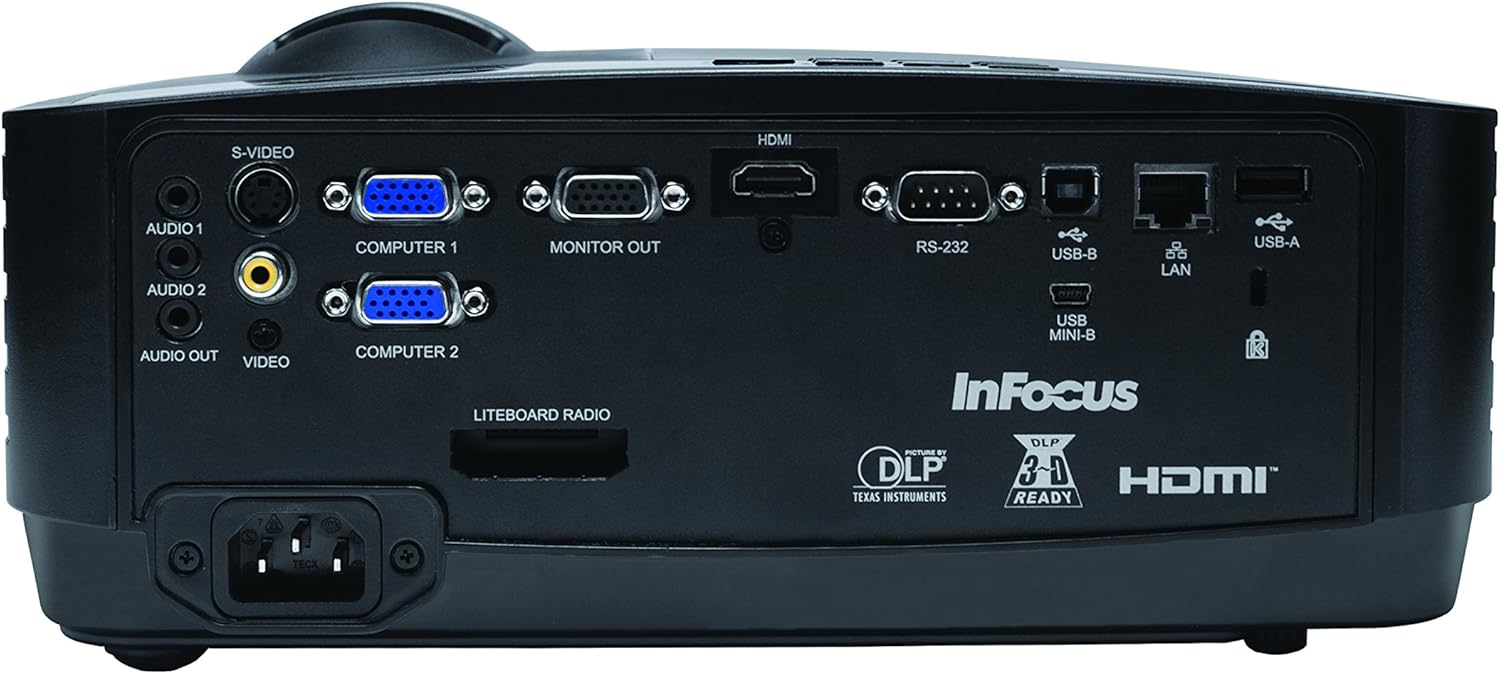
그림 1: 전면 view of the InFocus IN2126a projector, showing the lens and ventilation.

그림 2: 측면 view of the InFocus IN2126a projector, highlighting the ventilation grilles.
3.2 후면 패널 연결
후면 패널에는 외부 장치 연결을 위한 다양한 입력 및 출력 포트가 있습니다.
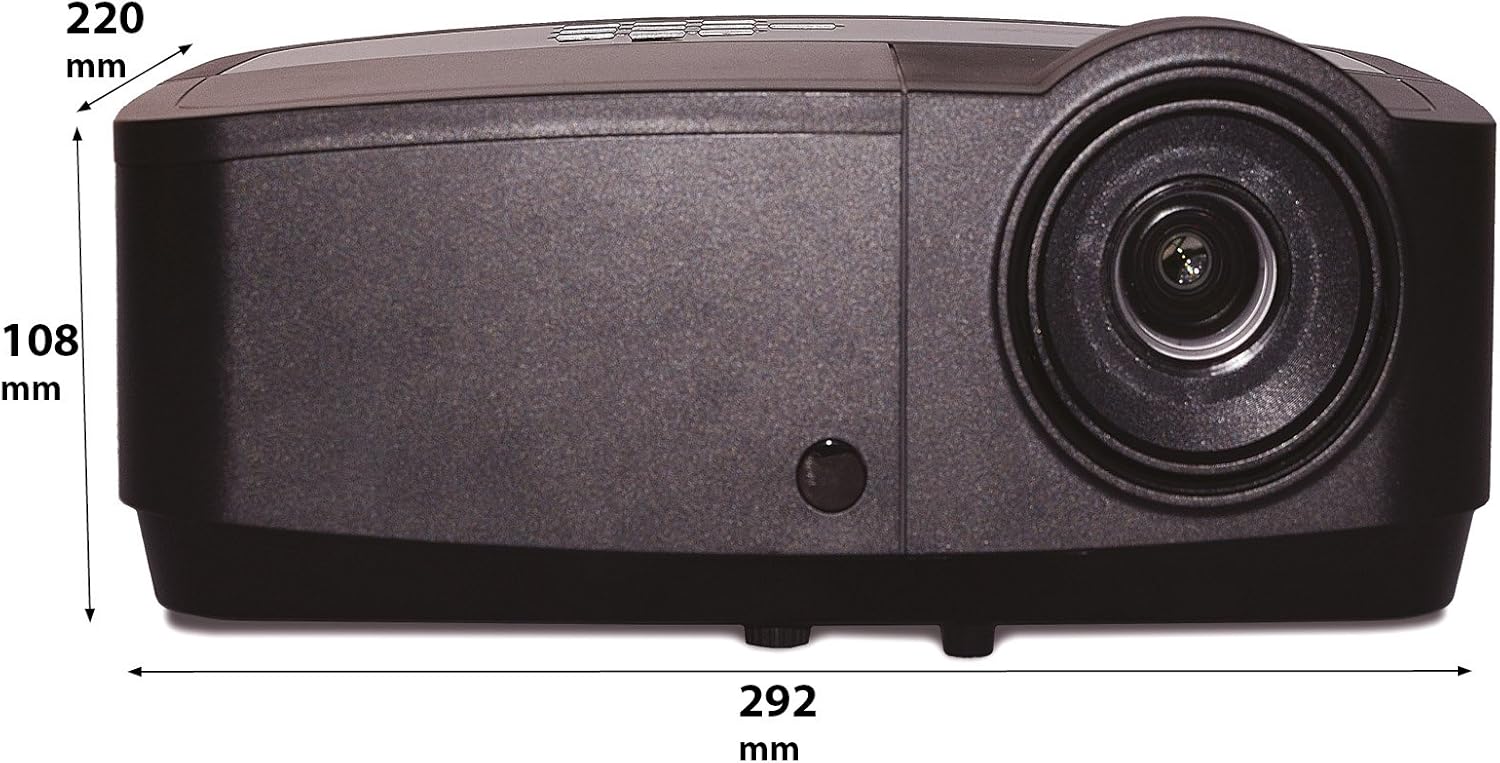
Figure 3: Rear panel of the InFocus IN2126a projector, displaying various connectivity ports including HDMI, VGA, USB, and LAN.
- HDMI : 디지털 비디오 및 오디오 입력용입니다.
- COMPUTER 1 / COMPUTER 2 (VGA): 컴퓨터의 아날로그 비디오 입력용입니다.
- MONITOR OUT (VGA): 외부 모니터를 연결하기 위한 것입니다.
- USB-B / USB Mini-B: For service or specific USB functions.
- USB-A: For connecting USB devices, such as a wireless adapter.
- 랜(RJ45): 네트워크 연결을 위해.
- RS-232 : 직렬 제어용입니다.
- AUDIO 1 / AUDIO 2 (RCA): 오디오 입력용.
- 오디오 출력 : 외부 오디오 시스템을 연결하는 데 사용됩니다.
- 비디오(RCA): 합성 비디오 입력용.
- S-비디오: S-Video 입력용입니다.
- 전원 인렛: 전원 코드를 연결합니다.
3.3 상단 패널 컨트롤
The top panel features controls for basic projector functions and image adjustments.

Figure 4: Top panel of the InFocus IN2126a projector, showing the control buttons and focus/zoom rings.
- 전원 버튼: 프로젝터를 켜거나 끕니다.
- Menu/Exit Button: Accesses or exits the on-screen display (OSD) menu.
- 탐색 버튼(위, 아래, 왼쪽, 오른쪽): 메뉴 옵션을 탐색합니다.
- 입력 버튼: 메뉴에서 선택한 내용을 확인합니다.
- 소스 버튼 : 입력 소스를 선택합니다.
- Blank Button: 일시적으로 화면을 비웁니다.
- 자동 버튼: 이미지 설정을 자동으로 조정합니다.
- 초점 링: 이미지 선명도를 조정합니다.
- 줌 링: 이미지 크기를 조정합니다.
3.4 치수
Understanding the physical dimensions is important for installation and placement.

Figure 5: Diagram illustrating the dimensions of the InFocus IN2126a projector (292mm length, 220mm width, 108mm height).
4. 설정
4.1 프로젝터 배치
Place the projector on a stable, flat surface or mount it securely. Ensure the projector is positioned at an appropriate distance from the screen to achieve the desired image size. Maintain sufficient space around the projector for proper ventilation.
4.2 장치 연결
- 전원 연결: 프로젝터의 전원 입력 단자에 전원 코드를 연결한 다음 접지된 콘센트에 연결하십시오.
- 비디오 출처:
- For digital sources (e.g., Blu-ray player, laptop), use an HDMI cable to connect to the HDMI port.
- For analog computer sources, use a VGA cable to connect to the COMPUTER 1 or COMPUTER 2 port.
- For other video sources, use the appropriate S-VIDEO or VIDEO (RCA) connections.
- 오디오 소스: If your video source does not transmit audio via HDMI, connect audio cables to the AUDIO 1 or AUDIO 2 ports.
- 네트워크 연결 : 유선 네트워크에 접속하려면 이더넷 케이블을 LAN 포트에 연결하십시오.
- 무선 연결 : If using a compatible wireless adapter (sold separately), insert it into the USB-A port.
4.3 전원 켜기/끄기
- 전원을 켜려면: Press the Power button on the projector's top panel or the remote control. The power indicator light will illuminate.
- 전원을 끄려면: Press the Power button again. The projector will enter a cooling cycle before shutting down completely. Do not unplug the projector during the cooling cycle.
5. 프로젝터 작동
5.1 소스 선택
After powering on, the projector may automatically detect an active input source. If not, or to switch sources:
- 를 누르세요 원천 프로젝터나 리모컨의 버튼을 누르세요.
- Use the navigation buttons to highlight the desired input source (e.g., HDMI, Computer 1, Video).
- 누르다 입력하다 소스를 선택합니다.
5.2 이미지 조정
- 집중하다: 회전하다 집중하다 프로젝터 렌즈의 링을 이미지가 선명하고 깨끗하게 나타날 때까지 조정하십시오.
- 줌: 회전하다 줌 ring on the projector lens to adjust the image size to fit your screen.
- 키스톤 보정: If the image appears trapezoidal, use the keystone correction feature in the OSD menu to square the image.
5.3 온스크린 디스플레이(OSD) 메뉴
The OSD menu allows you to configure various projector settings.
- 를 누르세요 메뉴 OSD 메뉴를 열려면 버튼을 클릭하세요.
- 사용하세요 위/아래 navigation buttons to select a menu category.
- 사용하세요 왼쪽/오른쪽 navigation buttons to adjust settings or enter sub-menus.
- 누르다 입력하다 변경 사항을 확인합니다.
- 누르다 출구 OSD 메뉴를 닫으려면.
5.4 무선 연결
The IN2126a is wireless-ready. To enable wireless display, a compatible InFocus wireless adapter (sold separately) must be connected to the USB-A port. Refer to the wireless adapter's specific instructions for setup and connection procedures.
5.5 3D 기능
The projector supports 3D content. To view 3D content, you will need a compatible 3D source, 3D glasses, and appropriate 3D content. Refer to the projector's OSD menu for 3D settings and ensure your source device is configured for 3D output.
6. 유지관리
정기적인 유지관리를 통해 최적의 성능을 보장하고 프로젝터의 수명을 연장할 수 있습니다.
6.1리터amp 대사
프로젝터 lamp has a limited lifespan (approximately 4000 hours). When the lamp 표시등이 켜지거나 이미지 밝기가 현저히 감소하면 lamp needs replacement. Always use an authorized InFocus replacement lamp자세한 내용은 전체 서비스 매뉴얼을 참조하세요.amp replacement instructions or contact customer support.
6.2 필터 청소
Dust accumulation on the air filter can impede airflow and cause overheating. Regularly clean the air filter to maintain proper ventilation. Turn off and unplug the projector before cleaning. Use a soft brush or vacuum cleaner to remove dust from the filter cover.
6.3 일반 청소
- 프로젝터 Casing: 부드럽고 보풀이 없는 천을 사용하십시오. dampened with a mild, non-abrasive cleaner. Do not use harsh chemicals.
- 렌즈: Use a lens cleaning cloth and specialized lens cleaning solution. Avoid touching the lens surface with your fingers.
7. 문제 해결
프로젝터에 문제가 발생하면 다음의 일반적인 문제와 해결 방법을 참조하세요.
| 문제 | 가능한 원인 | 해결책 |
|---|---|---|
| 화면에 이미지가 없습니다. | 잘못된 입력 소스가 선택되었습니다. 케이블 연결이 느슨합니다. 프로젝터가 대기 모드입니다. | Verify input source; Check all cable connections; Press power button to wake from standby. |
| 이미지가 흐릿함 | 초점이 조정되지 않았습니다. 프로젝터가 스크린에서 너무 가깝거나 멀리 떨어져 있습니다. | Adjust the focus ring; Reposition the projector and adjust zoom. |
| 이미지는 사다리꼴입니다 | 프로젝터가 화면에 수직이 아닙니다. | OSD 메뉴에서 키스톤 보정 기능을 사용하십시오. |
| 오디오 없음 | Audio cables not connected; Volume too low; Muted. | Check audio cable connections; Adjust volume; Unmute projector. |
| 프로젝터가 과열되어 꺼집니다 | 환기구가 막혔거나, 공기 필터가 더러워졌습니다. | Ensure clear airflow around projector; Clean the air filter. |
For more detailed troubleshooting, consult the complete user manual or contact InFocus customer support.
8. 사양
Key technical specifications for the InFocus IN2126a WXGA Network Projector:
- 모델 이름: IN2126a
- 디스플레이 유형: 디엘피(DLP)
- 네이티브 해상도: 1280 x 800 (WXGA)
- 명도: 3500루멘
- 대비율: 15000시 1분
- 색상 재현: 30억 7천만 색상(10비트)
- 광원 작동 수명: 4000시간
- 연결 기술 : Wireless-ready, HDMI 1.4, VGA (x2), USB (Type-A, Mini-B, Type-B), LAN (RJ45), RS-232, Audio In (x2), Audio Out, Video (RCA), S-Video
- 특별 기능: 3D-Ready, Network Projector
- 폼 팩터: 가지고 다닐 수 있는
- 장착 유형: 탁상 마운트
- 품목 무게: 7.1 파운드
9. 보증 및 지원
For information regarding your product's warranty, please refer to the warranty card included with your purchase or visit the official InFocus website. For technical support, service, or to purchase accessories, please contact InFocus customer service through their official channels.


