소개
This manual provides essential information for the safe and efficient operation of your InFocus IN124a XGA Wireless-Ready Projector. Please read this manual thoroughly before using the projector and retain it for future reference. This projector is designed for displaying content with XGA (1024 x 768) native resolution, offering 3500 lumens of brightness and a 15000:1 contrast ratio.
안전 정보
- 전기 안전: Always connect the projector to a grounded power outlet. Do not use damaged power cords. Disconnect power before cleaning or servicing.
- 열과 환기: Ensure adequate ventilation around the projector. Do not block ventilation openings. Avoid placing the projector near heat sources.
- Lamp 안전: 프로젝터 lamp operates at high temperatures and pressures. Allow the projector to cool down before moving or replacing the lamp. Do not look directly into the lens when the lamp 켜져있습니다.
- 손질: 프로젝터를 조심스럽게 다루십시오. 떨어뜨리거나 강한 충격을 가하지 마십시오.
- 수분: 프로젝터를 비, 습기 또는 과도한 습도에 노출시키지 마십시오.
패키지 내용
패키지에 모든 품목이 들어 있는지 확인하세요.
- InFocus IN124a Projector
- HDMI 케이블
- VGA 케이블
- 전원 코드
- 리모컨 (명시적으로 명시되어 있지는 않지만 기본 제공)
- Optional USB adapter for wireless connectivity (if purchased separately)
제품 끝view
Familiarize yourself with the physical components and connections of your InFocus IN124a projector.

This image displays the rear panel of the InFocus IN124a projector, highlighting various connectivity options including HDMI, VGA (Computer 1 and 2), Monitor Out, S-Video, Video, Audio In (1 and 2), Audio Out, RS-232, USB-B, USB Mini-B, and USB-A ports. The power input is located on the lower left.

The top panel of the InFocus IN124a projector is shown, featuring the control buttons for power, menu navigation (up, down, left, right, enter), source selection, blank screen function, and indicators for temperature and lamp status. The focus and zoom adjustment rings are also visible.

정면 view of the InFocus IN124a projector, showing the main projection lens and the power indicator light. The focus and zoom rings are visible near the lens.

이 이미지는 측면을 나타냅니다. view of the InFocus IN124a projector, emphasizing the ventilation grilles designed for heat dissipation, crucial for maintaining optimal operating temperature.
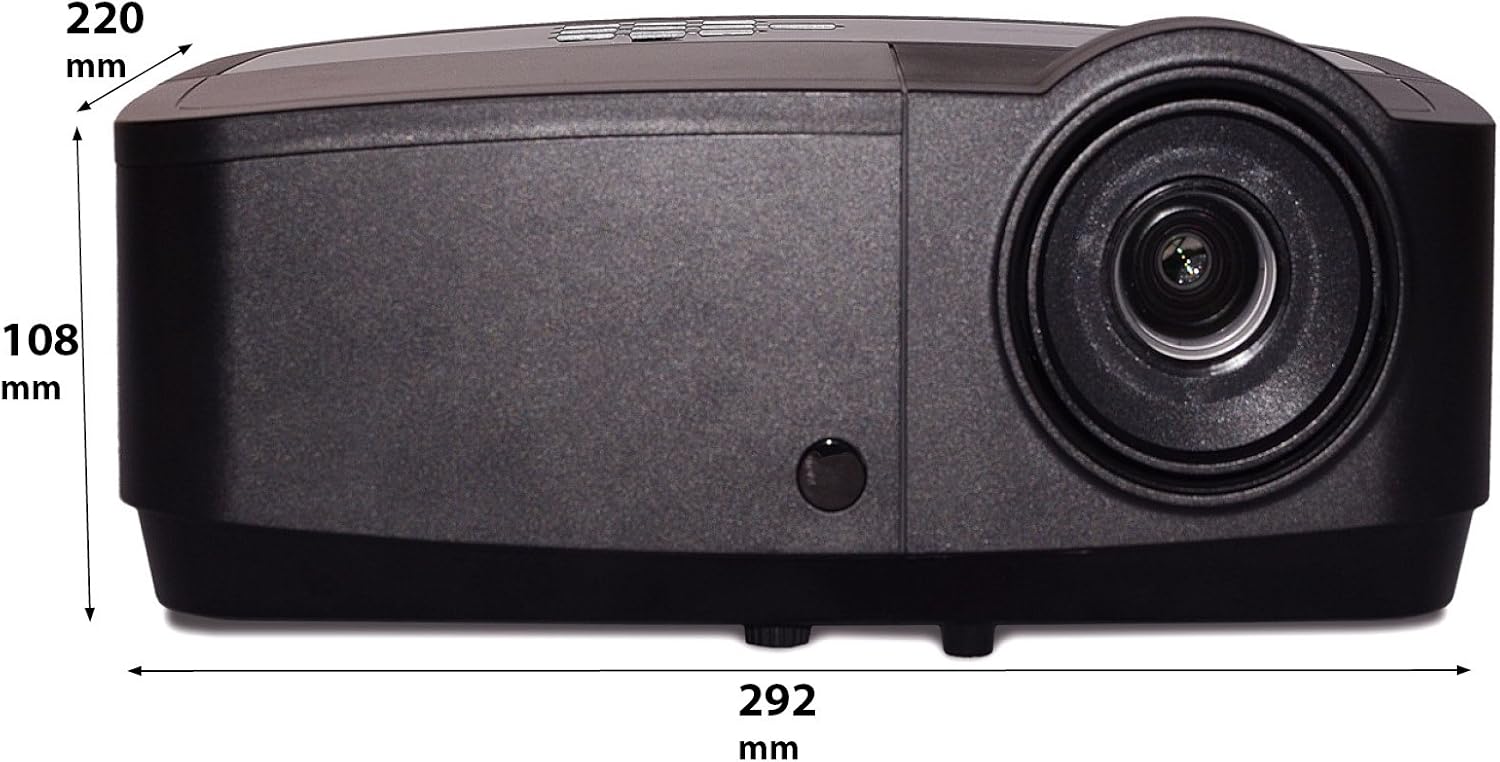
이 이미지는 측면 프로를 보여줍니다.file of the InFocus IN124a projector, illustrating its physical dimensions: approximately 292 mm in length, 108 mm in height, and 220 mm in width.
설정
1. 배치
Position the projector on a stable, flat surface or mount it securely. Ensure the projector is at an appropriate distance from the screen to achieve the desired image size. Avoid direct sunlight or strong ambient light on the screen for optimal view주고받음.
2. 전원 연결하기
- 전원 코드를 프로젝터의 전원 입력 단자에 연결합니다.
- 전원 코드의 다른 쪽 끝을 접지된 전기 콘센트에 꽂습니다.
3. 비디오 소스 연결
The IN124a offers multiple connectivity options:
- HDMI : 소스 기기(예: 노트북, 블루레이 플레이어)와 프로젝터의 HDMI 포트를 HDMI 케이블로 연결하세요.
- VGA (컴퓨터 1/2): Use a VGA cable to connect your computer to either the 'COMPUTER 1' or 'COMPUTER 2' port.
- S-비디오/비디오: For older devices, connect S-Video or composite video cables to the respective ports.
- USB: The USB-A port can be used for displaying content directly from a USB drive. The USB-B port supports USB display functionality.
- 오디오: Connect external audio sources to 'AUDIO 1' or 'AUDIO 2' inputs, and use 'AUDIO OUT' for external speakers if needed.
4. Wireless Setup (Optional)
For wireless connectivity, an optional USB adapter is required. Insert the wireless USB adapter into the designated USB port on the projector. Refer to the adapter's specific instructions for software installation and connection procedures on your source device.
운영
1. 전원 켜기 / 끄기
- 전원 켜기: Press the 'Power' button on the projector's control panel or remote control. The power indicator light will turn steady blue.
- 전원 끄기 : Press the 'Power' button again. A confirmation message may appear. Press 'Power' a second time to confirm shutdown. The fan will continue to run briefly to cool the lamp before shutting down completely.
2. 이미지 조정
- 집중하다: 이미지가 선명하고 깨끗해질 때까지 렌즈 주위의 초점 링을 돌립니다.
- 줌: Rotate the zoom ring around the lens to adjust the image size without moving the projector.
- 키스톤 보정: 이미지가 사다리꼴로 나타나면 프로젝터 메뉴의 키스톤 보정 기능을 사용하여 이미지를 정사각형으로 만드세요.
3. 소스 선택
Press the 'Source' button on the control panel or remote control repeatedly to cycle through available input sources (HDMI, Computer 1, Computer 2, S-Video, Video, USB). The projector will automatically detect an active signal.
4. 메뉴 탐색
Press the 'Menu' button to access the On-Screen Display (OSD) menu. Use the arrow buttons to navigate through options and 'Enter' to select. Press 'Menu' or 'Exit' to close the OSD.
5. 3D 모드
The InFocus IN124a is 3D-Ready. To utilize 3D functionality, you will need compatible 3D content, a 3D-capable source device, and active 3D glasses. Refer to your 3D source device's manual for specific setup instructions. The projector will automatically detect a 3D signal when available.
유지
1. 엘amp 대사
프로젝터 lamp 수명은 최대 7,000시간입니다.amp 수명이 다 되어갈 때 경고 메시지가 나타나거나 lamp indicator light will illuminate. Only replace the lamp with an authorized InFocus replacement lamp. Always allow the projector to cool completely before attempting lamp 대사.
2. 청소
- 프로젝터 Casing: 부드럽고 보풀이 없는 천을 사용하십시오. dampened with a mild, non-abrasive cleaner. Do not use harsh chemicals.
- 렌즈: Gently wipe the lens with a lens cleaning cloth or lens tissue. Avoid touching the lens surface with your fingers.
- 통풍구: Periodically check and clean the air vents to prevent dust buildup, which can lead to overheating. Use a soft brush or compressed air to clear obstructions.
문제 해결
프로젝터에 문제가 발생하면 다음의 일반적인 문제와 해결 방법을 참조하세요.
| 문제 | 가능한 원인 | 해결책 |
|---|---|---|
| 이미지가 표시되지 않음 | Power not connected; Incorrect input source; Source device not active. | Check power connection; Select correct input source; Ensure source device is on and outputting signal. |
| 이미지가 흐릿하거나 초점이 맞지 않습니다. | Lens focus not adjusted; Projector too close/far from screen. | Adjust the focus ring on the lens; Adjust projector distance or use zoom ring. |
| 리모컨이 작동하지 않습니다 | Batteries depleted; Obstruction between remote and projector; Remote sensor blocked. | Replace batteries; Remove obstructions; Ensure remote sensor on projector is clear. |
| 프로젝터가 과열되어 꺼집니다 | Blocked ventilation; Dusty air filter. | Ensure vents are clear; Clean air filter (if applicable) and vents. |
명세서
| 특징 | 사양 |
|---|---|
| 네이티브 해상도 | XGA(1024 x 768) |
| 명도 | 3500루멘 |
| 대비율 | 15000시 1분 |
| Lamp 삶 | 최대 7,000시간(에코 모드) |
| 연결 기술 | Wireless (with optional adapter), HDMI, USB video |
| 특징 | 3D 지원 |
| 제품 치수 | 14.25 x 12 x 7.75인치(36.2 x 30.5 x 19.7cm) |
| 품목 무게 | 5.4파운드(2.45kg) |
| 추천 용도 | 실내/실외 |
보증 및 지원
보증 정보 및 기술 지원은 제품에 동봉된 보증 카드를 참조하거나 InFocus 공식 웹사이트를 방문하십시오. web사이트. 보증 청구를 위해 구매 증빙 자료로 구매 영수증을 보관하세요.


