소개
This user manual provides comprehensive instructions for the setup, operation, and maintenance of your Reloop RP-8000 Advanced Hybrid Torque Turntable. The RP-8000 combines traditional direct-drive turntable functionality with advanced digital control features, making it a versatile tool for DJs and audio enthusiasts.
기기를 올바르게 사용하고 성능과 수명을 극대화하려면 기기를 작동하기 전에 이 설명서를 자세히 읽어보세요.
안전 지침
- 전원 공급 장치가 볼륨과 일치하는지 확인하십시오.tag해당 장치에 명시된 요구 사항.
- 본 제품을 비, 습기 또는 극한의 온도에 노출시키지 마십시오.
- 장치를 열원 근처나 직사광선에 노출시키지 마십시오.
- c를 열지 마세요asing; 모든 서비스는 자격을 갖춘 인력에게 의뢰하세요.
- Always disconnect the power cable before cleaning or moving the unit.
- 어린이의 손이 닿지 않는 곳에 보관하세요.
패키지 내용
패키지에 모든 품목이 들어 있는지 확인하세요.
- 메인 턴테이블 유닛
- 전원 케이블
- USB 케이블
- RCA Cable (with ground wire)
- 슬립매트
- 균형추
- Headshell (cartridge not included)
- 사용 설명서 (본 문서)
제품 끝view
Familiarize yourself with the various components of your Reloop RP-8000 turntable.
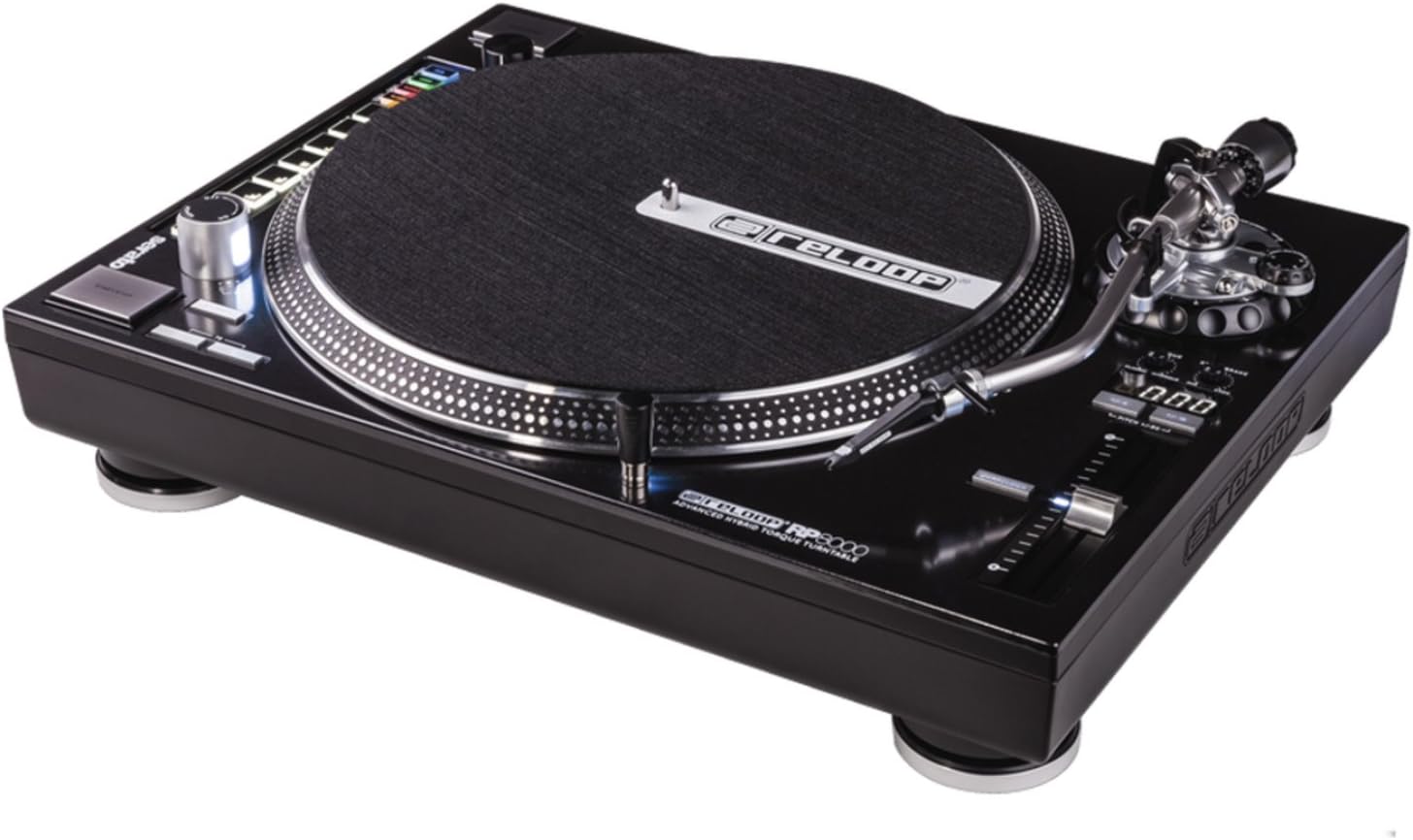
그림 1: 위에서 아래로 view of the Reloop RP-8000 turntable, showcasing the platter, tone arm, pitch fader, and MIDI control section with performance pads.

그림 2: 각진 view of the Reloop RP-8000, highlighting the robust construction, the illuminated platter edge, and the integrated MIDI controls on the left side.

그림 3: Rear panel of the Reloop RP-8000, showing the audio output (Phono/Line), USB ports (USB A and TT Link), power input, and power switch. Note the additional start/stop button for vertical setup.
주요 구성 요소:
- 플래터: 레코드를 놓는 회전 표면.
- 톤암: Holds the cartridge and stylus, tracking the record's grooves.
- 피치 페이더 : Adjusts the playback speed (BPM).
- 시작/중지 버튼: Controls platter rotation. An additional button is provided for battle setup.
- MIDI Control Section: Features a Trax encoder, 8 backlit drum pads, and mode selection buttons for software control.
- Phono/Line Output: RCA jacks for audio output, with a switch to select between phono (turntable level) and line (mixer/amp level) output.
- USB 포트: For connecting to a computer and linking multiple turntables.
설정
1. 풀기 및 배치
- 턴테이블을 포장에서 조심스럽게 꺼내세요.
- Place the unit on a stable, level surface away from direct vibrations.
- 장치 주변에 적절한 환기가 이루어지도록 하세요.
2. Tone Arm and Cartridge Assembly
- Attach your preferred headshell and cartridge (sold separately) to the tone arm.
- Install the counterweight onto the rear of the tone arm.
- Adjust the counterweight to balance the tone arm horizontally. Refer to your cartridge's instructions for recommended tracking force.
- 안티스케이트 다이얼을 트래킹 포스에 맞춰 설정하십시오.
3. 연결
- 오디오 연결: Connect the RCA cables from the turntable's PHONO/LINE output to your mixer or amp리퍼.
- If connecting to a PHONO input on your mixer/amp, set the turntable's PHONO/LINE switch to 포노.
- If connecting to a LINE input, set the turntable's PHONO/LINE switch to 선.
- Connect the ground wire to the ground terminal on your mixer/amp to reduce hum.
- USB 연결: Connect the USB cable from the turntable's USB port to your computer for MIDI control and DVS (Digital Vinyl System) functionality.
- Turntable Link (TT Link): For linking multiple RP-8000 units, connect them in series using standard USB cables. Only one turntable needs to be connected to the computer.
- 전원 연결: Connect the power cable to the turntable and then to a suitable power outlet.
작동 지침
1. 기본 재생
- Place a record on the platter and put the slipmat on top.
- Select the desired speed (33, 45, or 78 RPM) using the speed selection buttons.
- 턴테이블 회전을 시작하려면 시작/정지 버튼을 누르십시오.
- Carefully lower the tone arm onto the record using the cue lever.
- Adjust the pitch using the pitch fader as needed.
2. 피치 컨트롤
- The pitch fader allows for precise adjustment of playback speed.
- Use the Pitch Range buttons (+/-8%, +/-16%, +/-50%) to select the desired pitch adjustment range.
- The LCD display shows the current pitch percentage.
- Press the Quartz Lock button to return the pitch to 0% (nominal speed).
3. MIDI Control and Performance Modes
The RP-8000 features an integrated MIDI control section for seamless integration with DJ software.
- Trax Encoder: Use this large encoder to browse through playlists and load tracks in your DJ software.
- 성능 패드 : The 8 backlit drum pads offer various performance modes:
- 핫 큐 모드: Trigger up to 8 hot cue points.
- 루프 모드: Set and trigger loops.
- Samp르 모드: Access and play samp레.
- 사용자 모드 : Freely assign MIDI functions to the pads and other control elements.
- Dual Performance Mode: Activate two modes simultaneously (e.g., Hot Cue and Loop) by pressing their respective buttons. The pads will be split to control both functions.
- Turntable Link Mode: Connect up to four RP-8000 turntables via USB. The units automatically assign themselves to available decks in your DJ software, requiring only one USB connection to your computer.
- 리버스 버튼: Instantly reverses platter rotation.
- Adjustable Start/Stop Time: Use the dedicated dials to fine-tune the platter's start and brake times for customized performance.
유지
- 청소: 부드럽고 마른 천으로 제품을 닦아주세요. 잘 지워지지 않는 얼룩은 약간 거친 천으로 닦아주세요.amp cloth can be used, but ensure no liquid enters the unit. Avoid abrasive cleaners.
- 스타일러스 관리: Regularly clean your stylus with a soft brush designed for this purpose. Replace the stylus when it shows signs of wear to prevent damage to your records.
- 먼지 커버: Use a dust cover (if available) when the turntable is not in use to protect it from dust and debris.
문제 해결
| 문제 | 가능한 원인 | 해결책 |
|---|---|---|
| 소리가 나지 않거나 볼륨이 작음 | Incorrect PHONO/LINE switch setting; loose RCA cables; faulty cartridge/stylus. | Ensure PHONO/LINE switch matches input; check cable connections; inspect/replace cartridge/stylus. |
| 윙윙거리는 소리 | 접지선이 연결되지 않았습니다. 다른 전자 기기에서 발생하는 간섭이 있습니다. | Connect ground wire to mixer/amp; move turntable away from other electronic devices. |
| 접시가 회전하지 않음 | Power not connected; power switch off; START/STOP button not pressed. | Check power cable; ensure power switch is ON; press START/STOP button. |
| MIDI controls not responding | USB cable not connected; incorrect software settings; outdated firmware. | Ensure USB cable is connected; check DJ software MIDI settings; update turntable firmware if available. |
위 해결 방법을 시도한 후에도 문제가 지속되면 Reloop 고객 지원팀에 문의하십시오.
명세서
| 특징 | 세부 사항 |
|---|---|
| 모델명 | RP-8000 MK2 (AMS-RP-8000) |
| 모터 유형 | AC Motor, Quartz-driven Direct Drive |
| 품목 무게 | 22파운드(약 9.98kg) |
| 제품 크기(L x W x H) | 20.66 x 16.53 x 7.48인치(약 52.5 x 42 x 19cm) |
| 연결 기술 | Wired (RCA, USB 2.0) |
| 전원 | 코드식 전기 |
| 권tage | 220 Volts (Note: Check specific unit for local voltag호환성) |
| 하드웨어 인터페이스 | USB 2.0 |
| 호환 장치 | 개인용 컴퓨터 |
| 신호 형식 | 디지털 |
보증 및 지원
For information regarding warranty coverage, please refer to the warranty card included with your product or visit the official Reloop website. Reloop offers various protection plans for extended coverage, which may be purchased separately.
For technical support, troubleshooting assistance beyond this manual, or spare parts, please contact Reloop customer service through their official web사이트 또는 공인 유통업체에 문의하십시오. 보증 청구를 위해 구매 증빙 자료로 구매 영수증을 보관하십시오.
메모: The user manual (PDF) is also available for download at https://manuals.plus/m/8eb0b60ccb1c6d10ac93577b129a938bfbac889fdb461902d354afc8d19b78dd.


