1. 서론
This manual provides comprehensive instructions for the setup, operation, and maintenance of your A4tech Natural A Ergonomic Keyboard, model KRS-85. Designed with patented A-Shape keys and round-edged keycaps, this keyboard aims to promote a natural typing position, thereby helping to prevent Repetitive Strain Injury (RSI).
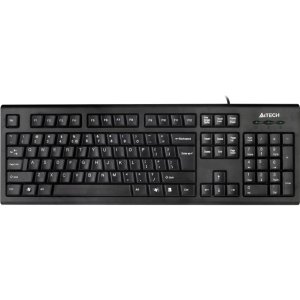
Figure 1: A4tech Natural A Ergonomic Keyboard (KRS-85). This image displays the full layout of the black wired keyboard, highlighting its ergonomic design with A-Shape keys and round keycaps.
2. 설정
2.1 시스템 요구 사항
- IBM or Compatible Systems
- Windows 2000 / XP (X64) / 2003 (X64) / Vista
2.2 키보드 연결
- 컴퓨터에서 사용 가능한 USB 포트를 찾습니다.
- Insert the USB connector of the A4tech KRS-85 keyboard firmly into the USB port.
- 운영 체제가 필요한 드라이버를 자동으로 감지하고 설치합니다. 이 과정은 다소 시간이 걸릴 수 있습니다.
- 설치가 완료되면 키보드를 바로 사용할 수 있습니다.
3. 사용 설명서
The A4tech Natural A Keyboard is designed for comfortable and efficient typing. Its unique features are intended to enhance your typing experience and reduce strain.
3.1 주요 특징
- Patented A-Shape Keys: The layout of the keys is designed to align with the natural position of your hands and wrists, promoting a more relaxed posture.
- Round Edged Keycaps: These keycaps provide a smooth and comfortable typing surface.
- 표준 레이아웃: The keyboard features a full-size layout including a numeric keypad, function keys (F1-F12), and navigation keys.
3.2 기본 사용법
Use the keyboard as you would any standard computer keyboard for typing, navigating, and executing commands. The ergonomic design is intended to provide comfort during extended use.
4. 유지관리
적절한 유지관리는 키보드의 수명과 최적의 성능을 보장합니다.
4.1 청소
- 청소하기 전에 키보드를 컴퓨터에서 분리하세요.
- 부드럽고 털이 없는 천을 살짝 사용하세요.amp물이나 순한 세척액을 사용하여 키보드 표면을 닦으세요.
- 강한 화학 물질, 연마성 세제 또는 과도한 습기를 사용하지 마세요.
- 키 사이를 청소할 때는 압축 공기를 사용하여 먼지와 이물질을 제거하십시오.
5. 문제 해결
If you encounter issues with your A4tech Natural A Keyboard, please refer to the following common solutions.
5.1 키보드가 응답하지 않음
- Ensure the USB cable is securely connected to a working USB port on your computer. Try a different USB port.
- 컴퓨터를 다시 시작하세요.
- 컴퓨터의 장치 관리자(Windows)에서 키보드가 인식되는지, 드라이버에 문제가 있는지 확인하십시오.
5.2 Specific Key Combinations Not Working (e.g., Ctrl-Alt-Del)
- Some users have reported that certain key combinations, such as Ctrl-Alt-Del, may not function as expected on this keyboard with Windows operating systems. This is a known compatibility limitation for some configurations.
- If this issue persists, consider using alternative methods for these functions within your operating system, or consult A4tech support for potential workarounds or driver updates if available.
6. 사양
| 특징 | 세부 사항 |
|---|---|
| 제품 이름 | Natural_A Rounded Edge Keyboard |
| 모델 번호 | KRS-85 |
| 연결 기술 | 케이블(USB) |
| 키보드 설명 | 인체공학적 |
| 키의 개수 | 85 |
| 제품 치수 | 19.69 x 7.87 x 1.97 인치 |
| 품목 무게 | 2.2파운드 |
| 제조업체 | ERGOGUYS (A4tech Co., Ltd) |
| 첫 번째 이용 가능 날짜 | 31년 2013월 XNUMX일 |
7. 보증 정보
The A4tech Natural A Ergonomic Keyboard (KRS-85) comes with a 1년 한정 보증 제조업체에서 제공하는 보증입니다. 이 보증은 정상적인 사용 중에 발생하는 재료 및 제조상의 결함을 보장합니다.
Please retain your proof of purchase for warranty claims. For detailed terms and conditions, refer to the warranty documentation provided with your product or contact the manufacturer directly.
8. 지원
For further assistance, technical support, or warranty inquiries, please contact the manufacturer or your point of purchase. Ensure you have your product model number (KRS-85) and proof of purchase ready when contacting support.