유로타임 LCD 디지털 알람 시계 모델 23708-00 사용 설명서
모델 : 23708-00
소개
This manual provides instructions for the setup, operation, and maintenance of your Eurotime LCD Digital Alarm Clock, Model 23708-00. Please read this manual thoroughly before using the product to ensure proper function and longevity.
The Eurotime LCD Digital Alarm Clock features an LCD display, 7-color changing LED lighting, multiple natural alarm tones, and displays time, date, day of the week, and indoor temperature. It also includes a snooze function and a countdown feature.
안전 정보
- 장치를 물과 높은 습도에서 멀리 두십시오.
- 직사광선이나 극한의 온도에 장치를 노출시키지 마십시오.
- 지정된 배터리 종류(1.5V AAA 배터리 3개)만 사용하십시오.
- 오래된 건전지와 새 건전지, 다른 종류의 건전지를 혼용하지 마세요.
- 사용한 배터리는 현지 규정에 따라 책임감 있게 폐기하십시오.
- 직접 기기를 분해하거나 수리하지 마십시오. 정비를 받으려면 자격을 갖춘 기술자에게 문의하십시오.
패키지 내용
- Eurotime LCD Digital Alarm Clock (Model 23708-00)
- 3 x 1.5V AAA 배터리
- 사용 설명서 (본 문서)
제품 끝view
알람시계의 구성 요소와 작동 방식을 숙지하세요.
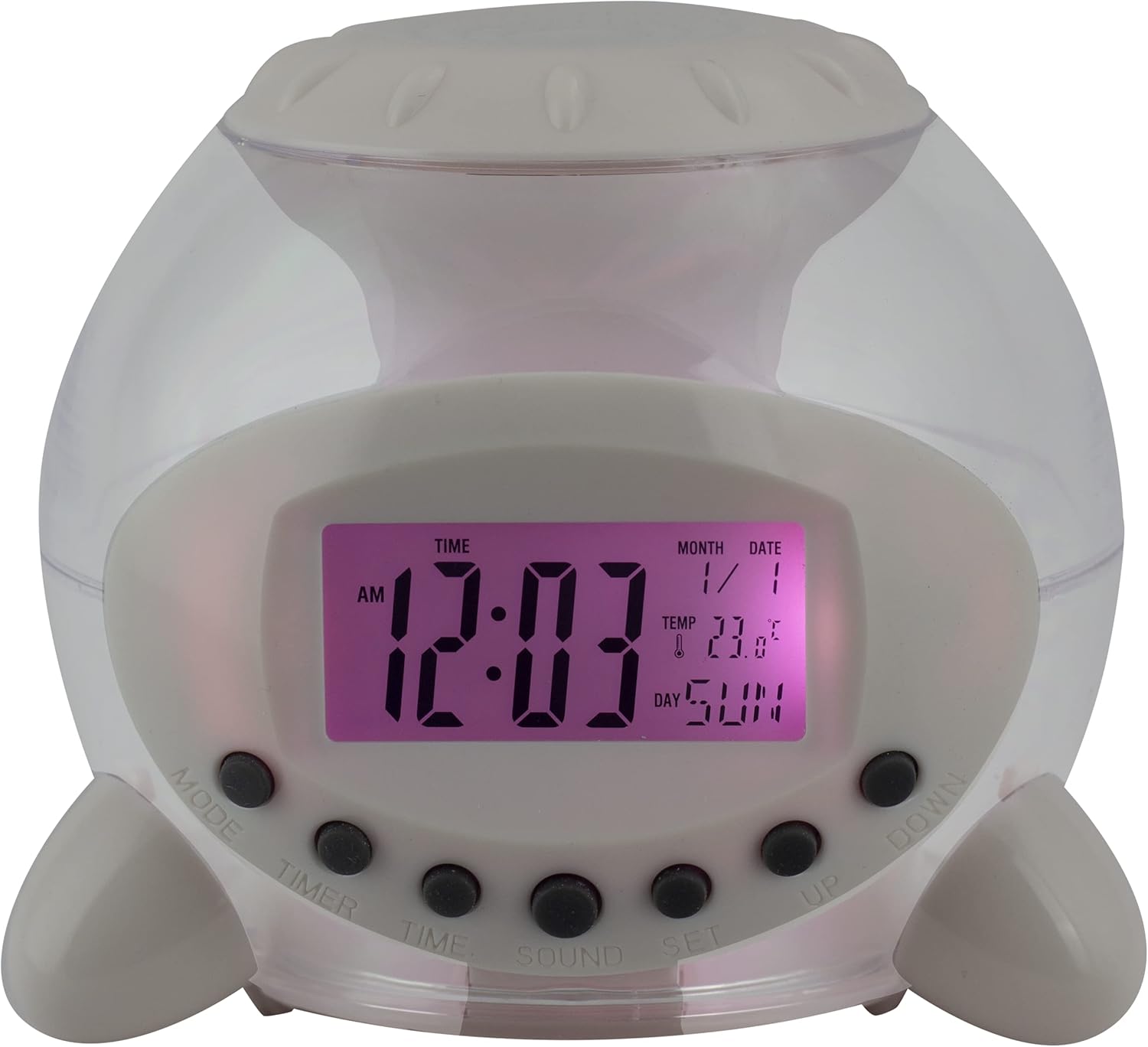
그림 1: 전면 View 알람시계의. This image displays the front of the Eurotime LCD Digital Alarm Clock, highlighting its transparent plastic housing and the central LCD screen. The screen shows the time (12:03 AM), month (1), date (1), temperature (23.8°C), and day (SUN). Below the screen are control buttons labeled MODE, TIMER, TIME, SOUND, and SET, along with UP and DOWN buttons.

그림 2: 측면 View with Control Buttons. This image shows a side perspective of the alarm clock, emphasizing the array of control buttons located on the front-bottom edge. The transparent housing allows a glimpse of the internal structure and the LED lighting effect. The buttons are clearly visible for user interaction.

그림 3: 측면 View with Internal Lighting. 이 이미지는 또 다른 측면을 보여줍니다. view, illustrating the transparent housing and the internal LED lighting. The light emanates from the base, creating a soft glow within the clock's structure, demonstrating its color-changing feature.
제어 버튼:
- 오시는 길 : Switches between time display, alarm setting, and countdown timer.
- 시간제 노동자: Activates and sets the countdown timer.
- 시간: Used to set the current time and date.
- 소리: Selects alarm tones or natural sounds.
- 세트: 설정을 확인하거나 설정 모드로 들어갑니다.
- 위아래: Adjusts values during setting modes.
설정
1. 배터리 설치
- 알람시계 아래쪽에 있는 배터리함을 찾으세요.
- 배터리 덮개를 엽니다.
- 1.5V AAA 배터리 3개를 삽입할 때, 극성(+/-)을 정확히 확인하십시오.
- 배터리 덮개를 단단히 닫으세요.
메모: The clock will automatically power on after battery installation. The display may flash, indicating it's ready for time setting.
작동 지침
1. 시간 및 날짜 설정
- 일반 시간 표시 모드에서 시간 버튼을 한 번 누르세요. 시 숫자가 깜빡입니다.
- 사용하세요 UP or 아래에 버튼으로 시간을 조정합니다.
- 누르다 시간 again to move to minute setting. Adjust with UP or 아래에.
- 계속 누르기 시간 연도, 월, 날짜 설정을 순환하며 각각을 조정합니다. UP or 아래에.
- 날짜를 설정한 후 누르세요 시간 one last time or wait a few seconds for the settings to be saved and return to normal display.
2. 알람 설정
- 를 누르세요 방법 button until "ALARM" appears on the display (or an alarm icon).
- 를 누르세요 세트 버튼을 누릅니다. 알람 시간 숫자가 깜빡입니다.
- 사용하세요 UP or 아래에 알람 시간을 조정하는 버튼입니다.
- 누르다 세트 again to move to minute setting. Adjust with UP or 아래에.
- 누르다 세트 one last time to confirm the alarm time.
- 알람을 활성화/비활성화하려면 다음을 누르세요. UP button in alarm display mode. An alarm icon will appear/disappear.
3. 스누즈 기능
알람이 울리면 아무 버튼이나 누르세요 (단, 다음 제외) 세트 or 방법) to activate the snooze function. The alarm will pause and sound again after a few minutes (duration is adjustable, refer to advanced settings if available).
알람을 완전히 끄려면 버튼을 누르세요. 세트 소리가 날 때 버튼을 누르세요.
4. Color Changing LED Lighting
The alarm clock features a 7-color changing LED light. This function typically activates automatically when the alarm sounds or can be manually toggled. Refer to the 방법 or 세트 button for specific controls related to the lighting, if available.
5. Natural Alarm Tones
To select an alarm tone:
- In alarm setting mode (after pressing 방법 to display alarm time), press the 소리 단추.
- 사용하세요 UP or 아래에 buttons to cycle through the available natural alarm tones.
- 누르다 세트 선택을 확인하세요.
6. Countdown Feature
카운트다운 타이머를 사용하려면:
- 를 누르세요 방법 button until "TIMER" appears on the display.
- 를 누르세요 시간제 노동자 단추. 시간 숫자가 깜박입니다.
- 사용 UP or 아래에 to set the desired countdown hour.
- 누르다 시간제 노동자 again to set minutes, then seconds.
- 누르다 세트 카운트다운을 시작합니다.
- To pause or resume, press 세트. 재설정하려면 누르세요. 방법.
유지
청소
- 부드럽고 마른 천으로 시계를 닦으세요.
- Do not use abrasive cleaners or solvents, as they may damage the plastic housing or display.
배터리 교체
When the display dims or functions become erratic, it is time to replace the batteries. Follow the "Battery Installation" steps in the Setup section.
문제 해결
| 문제 | 가능한 원인 | 해결책 |
|---|---|---|
| 디스플레이가 비어 있거나 어둡습니다. | 배터리가 부족하거나 방전되었습니다. 배터리가 잘못 설치되었습니다. | Replace batteries with new 1.5V AAA batteries. Ensure correct polarity. |
| 알람이 울리지 않습니다. | 경보가 작동하지 않습니다. 경보음이 너무 작습니다(조절 가능한 경우). | 경보 아이콘이 표시되는지 확인하십시오. 경보 설정을 확인하십시오. |
| 시간/날짜가 올바르지 않습니다. | Not set correctly after battery installation or power interruption. | Follow "Setting Time and Date" instructions to reset. |
| 색상 변경 조명이 작동하지 않습니다. | Feature not activated or malfunction. | Check operating instructions for light activation. If problem persists, contact support. |
명세서
- 상표: Eurotime
- 모델 번호: 23708-00
- 제품 크기: 8.99 x 8.99 x 8cm
- 무게: 120g
- 재료: 플라스틱
- 디스플레이 유형: 디지털 LCD
- 특별 기능: Calendar display, Snooze, Alarm, 7-Color Changing LED, Natural Alarm Tones, Countdown Feature, Indoor Temperature Display
- 전원: 1.5V AAA 배터리 3개(포함)
보증 및 지원
For warranty information or technical support, please refer to the retailer where the product was purchased or visit the official Eurotime web사이트. 구매 증빙 자료로 구매 영수증을 보관하세요.


