1. 서론
The iHome iDL100 is a versatile Lightning Dock FM Clock Radio designed to enhance your bedside experience. It features triple charging capabilities, allowing you to charge up to three devices simultaneously via two flexible Lightning docks and a universal USB port. Enjoy waking up or falling asleep to your favorite iPad, iPhone, iPod, a custom playlist, or FM radio. The clock also includes an auto-sync feature for seamless time setting with your iPhone and a 7-5-2 alarm system for flexible scheduling.
2. 제품 오버view

그림 1: 전면 view of the iHome iDL100 with multiple Apple devices docked and charging.
The iHome iDL100 is designed for convenience and multi-device compatibility. Its sleek design integrates seamlessly into any bedroom or office environment. The top panel features intuitive controls for alarm settings, radio functions, and display adjustments.

그림 2: 측면 view highlighting the dual Lightning docks and overall compact design.
주요 특징은 다음과 같습니다.
- Dual flexible Lightning docks for iPhone/iPad/iPod.
- One universal USB port for additional device charging.
- FM radio with programmable presets.
- Dual alarms with 7-5-2 scheduling.
- Auto-sync time with docked iPhone.
- Adjustable display dimmer.
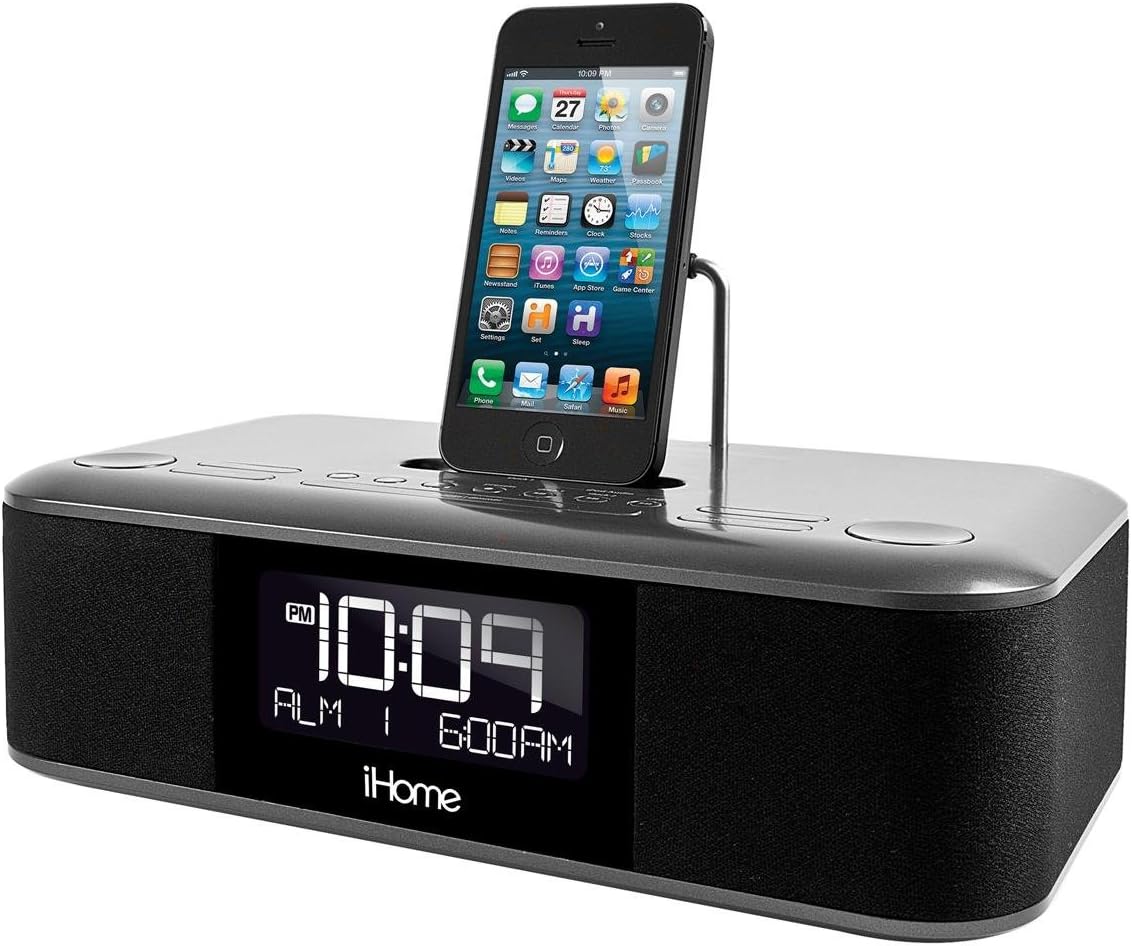
Figure 3: Close-up of the top controls and a single iPhone docked.

Figure 4: The adjustable Lightning connector in one of the docks.
3. 설정
3.1 전원 연결
- Connect the supplied AC adapter to the DC jack on the back of the iDL100.
- AC 어댑터를 작동하는 벽면 콘센트에 꽂으세요.
- 기기의 전원이 켜지고 디스플레이에 불이 들어옵니다.
3.2 시간 설정
The iDL100 features an auto-sync function to set the time automatically when a compatible iPhone is docked.
- 자동 동기화: Dock your iPhone into one of the Lightning docks. The iDL100 will automatically synchronize its time with your iPhone's time.
- 수동 시간 설정: Refer to the included quick start guide for detailed instructions on manually setting the time and switching between 12/24-hour formats using the dedicated buttons.
3.3 알람 설정
The iDL100 allows for two independent alarms with a 7-5-2 day setting feature.
- Press and hold the desired Alarm button (Alarm 1 or Alarm 2) to enter alarm setting mode.
- Use the navigation buttons to adjust the alarm time.
- Select your desired alarm source: docked device (iPad, iPhone, iPod), custom playlist, or FM radio.
- Choose the 7-5-2 setting for daily, weekday, or weekend alarms.
- Confirm your settings by pressing the Alarm button again.
4. 사용 설명서
4.1 충전 장치
The iDL100 offers triple charging options:
- Lightning Docks: Place your compatible iPhone, iPad, or iPod onto one of the two flexible Lightning docks. Ensure the device is properly seated for charging to begin.
- USB 포트: Connect any USB-powered device (e.g., smartphone, tablet, earbuds) to the USB port located on the back of the unit using its charging cable.
4.2 FM 라디오 작동
- Press the FM Radio button to turn on the radio.
- 튜닝 버튼을 사용하여 방송국을 검색하거나 주파수를 수동으로 조정하세요.
- To save a station as a preset, press and hold a preset button until the display flashes, then release.
4.3 Audio Playback from Docked Devices
Once your Apple device is docked, you can play audio through the iDL100's speakers.
- Start playback on your docked device.
- Use the volume controls on the iDL100 or your device to adjust the audio level.
- Track navigation buttons on the iDL100 may control playback on your device.
4.4 디스플레이 밝기 조정
Adjust the display brightness to your preference using the dedicated dimmer button, typically located on the top panel or rear of the unit.
5. 유지관리
- 부드럽고 마른 천으로 제품을 닦으십시오. 액체 세척제나 연마성 재료는 사용하지 마십시오.
- 직사광선, 열원 및 과도한 습기로부터 제품을 멀리하십시오.
- 장치 주변의 적절한 환기를 확인하십시오.
6. 문제 해결
- 전원 없음: AC 어댑터가 본체와 작동하는 벽면 콘센트에 제대로 꽂혀 있는지 확인하십시오.
- 알람이 울리지 않음: Verify that the alarm is set correctly, enabled, and the volume is not set to minimum. Check the alarm source.
- 장치가 충전되지 않음: Ensure your device is properly seated on the Lightning dock or securely connected to the USB port. Check for any debris in the connectors.
- FM 수신 불량: FM 안테나를 완전히 펼친 후 위치를 조정하여 신호 수신 상태를 개선해 보세요.
7. 사양
- 모델: IDL100GC
- 제품 크기: 12.1 x 9.8 x 6.2 인치
- 품목 무게: 4.94파운드
- 힘: Universal 100-240V AC adaptor
- 충전 포트: 2 x Lightning Docks, 1 x USB Port (5V Input)
- 하드웨어 인터페이스: USB
- 호환 장치: iPad, iPhone, iPod (Lightning connector models)
- 색상: 검은색
8. 공식 제품 영상
Video: A user demonstrates the iHome iDL100, highlighting its features and functionality.
9. 보증 및 지원
보증 정보 및 고객 지원은 제품에 동봉된 설명서를 참조하거나 iHome 공식 웹사이트를 방문하십시오. web대지. 보증 청구를 위해 구매 영수증을 보관하십시오.


