1. 서론
This manual provides comprehensive instructions for the installation, configuration, operation, and maintenance of the Planet IGS-10020HPT Industrial 8-Port 10/100/1000T 802.3at PoE + 2-Port 100/1000X SFP Managed Switch. Please read this manual thoroughly before operating the device to ensure proper usage and to prevent damage.
1.1개 제품 이상view
The Planet IGS-10020HPT is a robust industrial-grade managed Ethernet switch designed for demanding environments. It features 8 Gigabit Ethernet ports with Power over Ethernet Plus (PoE+) capabilities and 2 Gigabit SFP ports for fiber optic connections. This switch supports advanced management functions and operates reliably across a wide temperature range.
1.2 주요 특징
- 8 x 10/100/1000BASE-T Gigabit Ethernet ports with 802.3at PoE+ capability
- 2 x 100/1000BASE-X SFP slots for fiber optic uplink
- Supports IEEE 1588v2 Transparency for precise time synchronization
- ERPS Ring support for network redundancy
- DIDO (Digital Input/Digital Output) for external device monitoring and control
- Integrated Cybersecurity Features for enhanced network security
- Wide operating temperature range: -40 to 75°C (-40 to 167°F)
- Dual 12~48V DC power input with 52V Power Boost for PoE
- Managed switch capabilities for advanced network control
- e-Mark Certified for vehicle applications
2. 패키지 내용
Please verify the contents of your package. If any items are missing or damaged, contact your vendor immediately.
- Planet IGS-10020HPT Industrial Managed PoE+ Switch
- 빠른 설치 가이드(포함된 경우)
- Mounting Kit (DIN-rail or wall-mount brackets)
- Terminal Block Connector for Power Input and DIDO
3. 물리적 설명
3.1 전면 패널 레이아웃
The front panel of the IGS-10020HPT features the Ethernet ports, SFP slots, console port, and LED indicators.

그림 3.1: 앞면과 측면 view of the Planet IGS-10020HPT Industrial Managed PoE+ Switch. This image shows the device from an angled perspective, highlighting the 8 PoE+ Gigabit Ethernet ports, 2 SFP slots, console port, and LED indicators on the front panel. The ribbed metal casing for heat dissipation is also visible.
- 콘솔 포트: 로컬 관리 액세스를 위한 RJ45 포트입니다.
- PoE 포트(1-8): 10/100/1000BASE-T ports with 802.3at PoE+ capability.
- SFP 포트(9-10): 100/1000BASE-X SFP slots for fiber optic transceivers.
- LED 표시등: Power (P1, P2), Fault, Ring, PoE status, Link/Act for each port.
- 재설정 버튼: For resetting the device to factory defaults.
3.2 Top Panel Layout
The top panel provides connections for power input and digital input/output.

그림 3.2: 맨 위 view of the Planet IGS-10020HPT. This image displays the two green terminal block connectors on the top surface. The top connector is labeled for "2 Digital Input" and "2 Digital Output" (DI0, DI1, DO0, DO1, GND, GND). The bottom connector is for dual DC power input (DC1, Fault, Input DC 48V, DC2).
- Power Input (DC1, DC2): Dual redundant DC power inputs (12~48V DC).
- Fault Relay: Output for alarm signaling.
- Digital Input (DI0, DI1): For connecting external sensors or switches.
- Digital Output (DO0, DO1): For controlling external devices or alarms.
3.3 Side Panel with Mounting Brackets
The side panels are designed for heat dissipation and feature mounting points for DIN-rail or wall-mount brackets.
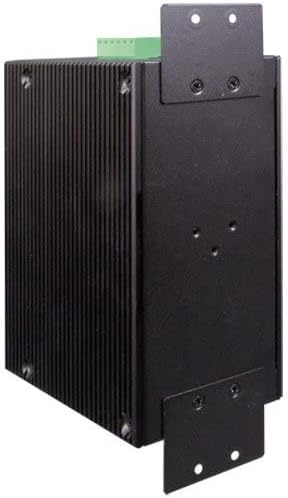
그림 3.3: 옆 view of the Planet IGS-10020HPT. This image shows the ribbed metal casing and the attached L-shaped mounting brackets, indicating options for installation.
4. 설치
4.1 안전 예방 조치
- Ensure the power is disconnected before installation or maintenance.
- 환기가 잘 되는 곳에 장치를 설치하십시오.
- Avoid exposing the device to moisture or extreme temperatures outside its operating range.
- 전기적 위험을 방지하기 위해 장치를 올바르게 접지하십시오.
4.2 스위치 장착
The IGS-10020HPT can be mounted on a DIN-rail or directly to a wall using the provided brackets.
4.2.1 DIN 레일 장착
- Attach the DIN-rail clip to the rear of the switch using the screws.
- Hook the top edge of the DIN-rail clip over the top of the DIN-rail.
- Push the bottom of the switch towards the DIN-rail until it snaps into place.
4.2.2 벽면 장착
- Attach the wall-mount brackets to the sides of the switch using the screws.
- Mark the desired mounting points on the wall using the brackets as a template.
- 필요한 경우 드릴로 파일럿 구멍을 뚫고 적절한 벽 앵커를 삽입하십시오.
- Secure the switch to the wall using screws through the bracket holes.
4.3 전원 연결
Connect the power source to the terminal block connector on the top panel.
- Ensure the power source is within the specified range (12~48V DC).
- Connect the positive (+) and negative (-) wires from your DC power supply to the corresponding terminals (DC1 or DC2) on the terminal block.
- For redundant power, connect a second power supply to the other DC input.
- Securely tighten the terminal block screws.
4.4 네트워크 연결
이더넷 포트 4.4.1 개
Connect standard RJ45 Ethernet cables from your network devices (e.g., IP cameras, access points, computers) to the 10/100/1000BASE-T ports (1-8) on the front panel. These ports will automatically detect the speed and duplex mode of the connected device. PoE-enabled devices will receive power automatically.
4.4.2개의 SFP 포트
Insert compatible 100BASE-FX or 1000BASE-X SFP transceivers into the SFP slots (9-10). Connect fiber optic cables from your fiber network to the installed SFP transceivers.
5. 스위치 작동
5.1 전원 켜기
After connecting the power supply, the switch will power on automatically. Observe the P1 and P2 LEDs on the front panel. They should illuminate to indicate active power input.
5.2 LED 표시등
스위치의 상태를 파악하려면 전면 패널의 LED 표시등을 모니터링하세요.
- P1/P2 (Power): On when power input 1/2 is active.
- 결점: 시스템 오류가 감지되면 켜집니다.
- 반지: Indicates the status of the ERPS ring.
- PoE (per port): 연결된 장치에 PoE 전원이 공급될 때 켜집니다.
- Link/Act (per port): On when a valid network link is established, blinks during data activity.
5.3 관리 액세스
The IGS-10020HPT is a managed switch, offering various methods for configuration and monitoring:
- Web기반 관리: 스위치에 액세스하세요 web 표준을 통한 인터페이스 web IP 주소를 입력하여 브라우저.
- 콘솔 포트: Connect a console cable from your computer to the RJ45 console port for command-line interface (CLI) access.
- SNMP: 이 스위치는 네트워크 관리 시스템과의 통합을 위해 SNMP를 지원합니다.
Refer to the full software user manual (available on the Planet Technology website) for detailed instructions on configuring advanced features such as VLANs, QoS, security settings, and ERPS ring management.
6. 유지관리
6.1 청소
부드럽고 마른 천으로 스위치 외부를 정기적으로 청소하세요. 액체 또는 에어로졸 세척제는 사용하지 마세요. 통풍구에 먼지나 이물질이 없는지 확인하세요.
6.2 펌웨어 업데이트
플래닛 테크놀로지를 확인해 보세요 website regularly for firmware updates. Keeping the firmware up-to-date ensures optimal performance, security, and access to new features. Follow the instructions provided with the firmware update package carefully.
6.3 공장 기본값으로 재설정
To reset the switch to its factory default settings, press and hold the Reset button on the front panel for approximately 5-10 seconds until the LEDs indicate a reset sequence. Use this function with caution as it will erase all custom configurations.
7. 문제 해결
이 섹션에서는 일반적으로 발생할 수 있는 문제에 대한 해결책을 제공합니다.
| 문제 | 가능한 원인 | 해결책 |
|---|---|---|
| 스위치의 전원이 켜지지 않습니다. | 전원 입력 없음; 전원 공급 장치 불량; 배선 오류. | Verify power connections and power supply functionality. Check P1/P2 LEDs. |
| No link on an Ethernet port. | Faulty cable; incorrect cable type; connected device is off or faulty. | Check cable integrity; ensure connected device is powered on and functioning. Try a different port or cable. |
| PoE 장치에 전원이 공급되지 않습니다. | Device not 802.3af/at compliant; cable too long; power budget exceeded. | Verify device PoE compatibility; check cable length; ensure total PoE power consumption does not exceed switch capacity. Check PoE LED for the port. |
| 접근할 수 없습니다 web 관리 인터페이스. | 잘못된 IP 주소; 네트워크 구성 문제; 방화벽 차단. | Verify the switch's IP address and your computer's network settings. Try connecting via the console port. |
If the problem persists after attempting these solutions, please contact Planet Technology technical support.
8. 사양
| 특징 | 설명 |
|---|---|
| 모델 | IGS-10020HPT |
| 포트 | 8 x 10/100/1000BASE-T (PoE+), 2 x 100/1000BASE-X SFP |
| PoE 표준 | IEEE 802.3af/at Power over Ethernet Plus |
| Max Watts/Port | 30W (depends on power input) |
| 데이터 전송 속도 | 10/100/1000Mbps |
| 전원 입력 | Dual 12~48V DC (52V Power Boost for PoE) |
| 작동 온도 | -40 ~ 75°C (-40 ~ 167°F) |
| 케이스 소재 | 금속 |
| 치수(길이x너비x높이) | 5.98 x 4.21 x 2.83인치(15.19 x 10.69 x 7.19cm) |
| 품목 무게 | 2.42파운드(1096그램) |
| 인증 | e-Mark Certified (among others) |
| 특징 | IEEE 1588v2 Transparency, ERPS Ring, DIDO, Cybersecurity Features |
9. 보증 및 지원
Planet Technology products are backed by a manufacturer's warranty. For specific warranty terms and conditions, please refer to the warranty card included with your product or visit the official Planet Technology web대지.
For technical support, product documentation, or firmware updates, please visit the Planet Technology official website or contact their customer service department. When contacting support, please have your product model number (IGS-10020HPT) and serial number ready.
공식적인 Web대지: www.planet.com.tw


