소개
This manual provides essential information for the safe and efficient operation of your Pioneer PDR-D5 CD Recorder. Please read it thoroughly before using the unit and keep it for future reference.
안전 예방 조치
- 전원 공급 장치: Ensure the unit is connected to an AC 100V, 50/60Hz power source.
- 통풍: 환기구를 막지 마십시오. 공기가 원활하게 흐르도록 장치 주변에 충분한 공간을 확보하십시오.
- 수분: 화재나 감전을 방지하기 위해 장치를 비나 습기에 노출시키지 마십시오.
- 이물질: 제품의 구멍에 어떠한 물건도 넣지 마십시오.
- 서비스: 모든 서비스는 자격을 갖춘 서비스 담당자에게 의뢰하세요.
패키지 내용
패키지에 모든 품목이 들어 있는지 확인하세요.
- Pioneer PDR-D5 CD Recorder unit
- 원격 제어
- 전원 코드
- RCA 오디오 케이블
- 사용 설명서(본 문서)

설정
1. 배치
Place the PDR-D5 on a stable, level surface away from direct sunlight, heat sources, and excessive dust or vibrations. Ensure adequate ventilation around the unit.
2. 연결
Before making any connections, ensure the unit and all connected components are powered off.
- 오디오 입력: Connect the audio output of your source component (e.g., amplifier, tuner) to the 라인 입력(좌/우) jacks on the rear panel of the PDR-D5 using RCA audio cables.
- 오디오 출력: 연결하다 라인 아웃(좌/우) jacks on the rear panel of the PDR-D5 to an available audio input on your amp수신자 또는 수신자.
- Digital Input (Optional): For digital recording, connect a digital audio source (e.g., CD player, DAT player) to the DIGITAL IN (OPTICAL or COAXIAL) 터미널.
- Digital Output (Optional): For digital playback to a compatible receiver, connect the DIGITAL OUT (OPTICAL or COAXIAL) 터미널.
- 전원 연결: 전원 코드를 AC 입력 terminal on the rear panel, then plug the other end into a wall outlet.

작동 지침
1. 전원 켜기/끄기
를 누르세요 힘 button on the front panel to turn the unit on or off. The display will illuminate when powered on.
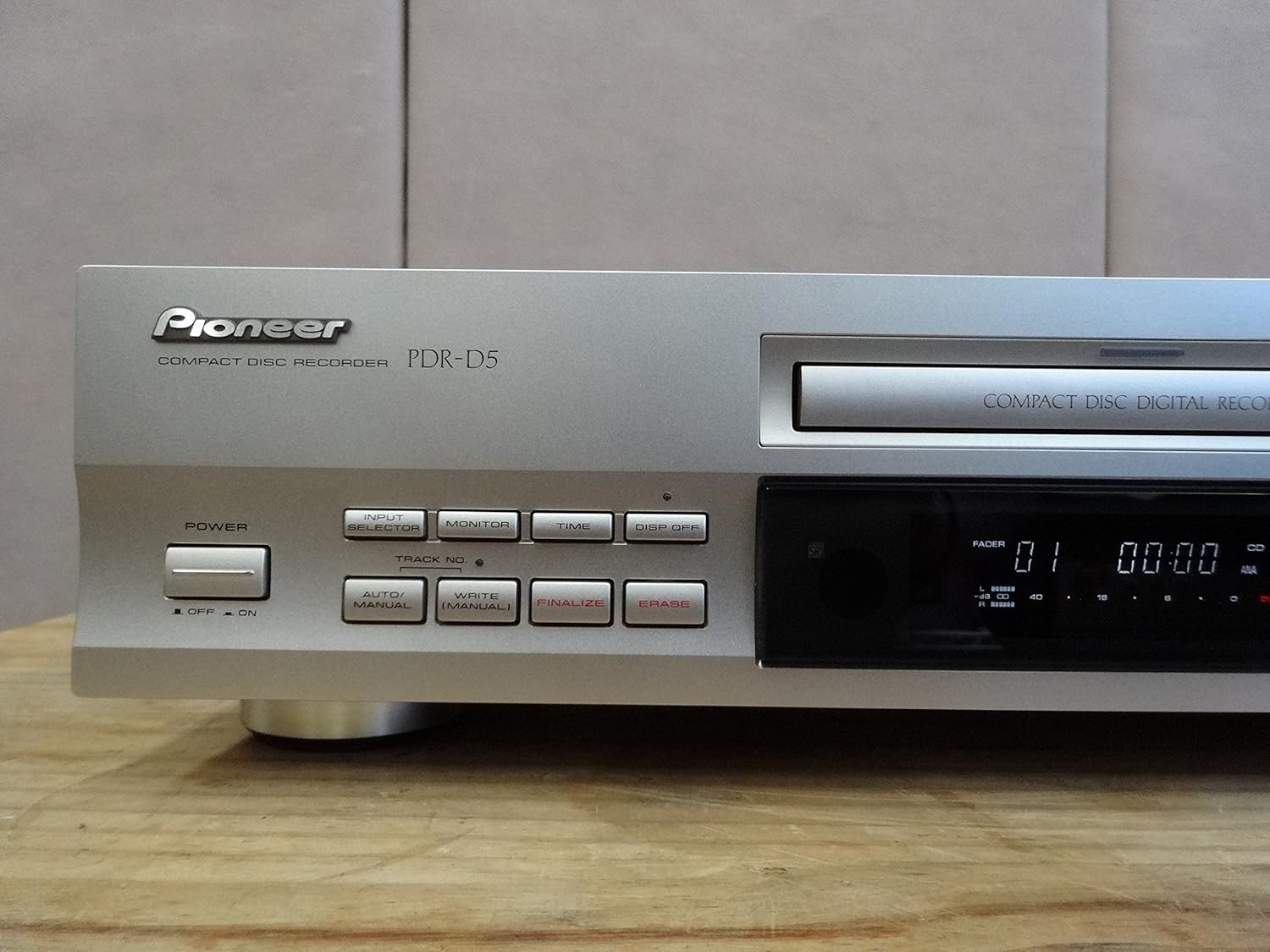
2. CD 재생
- 를 누르세요 열기/닫기 버튼을 눌러 디스크 트레이를 엽니다.
- Place a CD (CD-DA format) onto the disc tray with the label side up.
- 를 누르세요 열기/닫기 버튼을 다시 눌러 트레이를 닫으세요. 기기가 디스크를 읽습니다.
- 를 누르세요 재생 (►) 버튼을 눌러 재생을 시작합니다.
- 사용하세요 건너뛰기 (◀◀ / ►►) 트랙 사이를 탐색하는 버튼입니다.
- 를 누르세요 PAUSE (▐▐) button to temporarily stop playback, and 정지 (■) to stop completely.

3. CD Recording
The PDR-D5 can record to CD-R (recordable) and CD-RW (rewritable) discs.
- 를 누르세요 열기/닫기 button and insert a blank CD-R or CD-RW disc. Close the tray.
- 입력 소스를 선택하세요 입력 선택기 button (e.g., Analog, Digital).
- Adjust the recording level using the ANALOG REC LEVEL or DIGITAL REC LEVEL knobs. Monitor the level indicators on the display to avoid distortion.
- 를 누르세요 기록 (●) button to enter record-pause mode.
- Start playback on your source component, then press the 재생 (►) button on the PDR-D5 to begin recording.
- 녹음을 중지하려면 정지 (■) 단추.
4. Finalizing a Disc (CD-R)
After recording to a CD-R disc, it must be finalized to be playable on standard CD players.
- Ensure the recorded CD-R disc is in the tray.
- 를 누르세요 마무리하다 단추.
- Follow the on-screen prompts to confirm finalization. This process is irreversible.
5. 에르asing a Disc (CD-RW)
CD-RW discs can be erased and re-recorded.
- Ensure the CD-RW disc is in the tray.
- 를 누르세요 지우다 단추.
- Follow the on-screen prompts to confirm erasure.
유지
장치 청소
- 부드럽고 마른 천으로 장치 외부를 닦으세요.
- Do not use abrasive cleaners, solvents, or chemical cloths, as they may damage the finish.
- 디스크 트레이를 깨끗하고 먼지가 없는 상태로 유지하세요.
디스크 취급
- 디스크의 가장자리를 잡고 다루면 기록 표면에 지문이 남지 않습니다.
- Store discs in their cases when not in use to protect them from dust and scratches.
- Do not expose discs to direct sunlight or high temperatures.
문제 해결
If you experience problems with your PDR-D5, refer to the following common issues before seeking service.
| 문제 | 가능한 원인 | 해결책 |
|---|---|---|
| 장치의 전원이 켜지지 않습니다. | 전원 코드가 제대로 연결되지 않았습니다. | 전원 코드가 장치와 벽면 콘센트에 연결되어 있는지 확인하세요. |
| "NO DISC" or "CHECK DISC" error displayed. | Disc is inserted incorrectly, dirty, scratched, or incompatible. | Ensure disc is inserted correctly. Clean the disc. Try a different, known-good disc. Ensure it's a standard CD-DA, CD-R, or CD-RW. |
| 재생 중에 소리가 나지 않습니다. | Audio cables are not connected correctly or input selector is wrong. | Check RCA audio cable connections. Ensure your amplifier/receiver is set to the correct input. |
| Recording fails or sound is distorted. | Recording levels are too high/low, or disc is faulty/full. | Adjust recording levels. Use a new, blank CD-R/RW. Ensure the disc is not scratched. |
| Disc cannot be finalized. | Disc is not a CD-R, or there is insufficient space. | Ensure you are using a CD-R disc. Finalization requires some disc space. |
명세서
| 특징 | 사양 |
|---|---|
| 상표 | 개척자 |
| 제조업체 | 개척자 |
| 호환 가능한 미디어 | CD, CD-R, CD-RW |
| 품목 무게 | 600g |
| 패키지 크기 | 48.2 x 28.4 x 14.2cm |
| 배터리 포함 | 아니요 |
| 필요한 배터리 | 아니요 |
| ASIN | B00ESY7I72 |
| Amazon.co.jp에서 첫 출시일 | 2013/8/27 |
| 평가 | 2.5점 만점에 5점 (13개 평가) |
| 아마존 베스트셀러 순위 | Electronics - 405,242nd; Disc Players/Recorders - 437th |
보증 및 지원
Pioneer products are designed for reliability and performance. For specific warranty details, please refer to the warranty card included with your purchase or visit the official Pioneer web귀하의 지역에 대한 사이트.
For technical support, troubleshooting assistance beyond this manual, or service inquiries, please contact Pioneer customer support through their official web사이트 또는 제품 설명서에 제공된 연락처 정보를 참조하세요.


