1. 서론
Thank you for choosing the Antec HCG-850M 850W Power Supply. This manual provides essential information for the safe and efficient installation, operation, and maintenance of your power supply unit. Please read this manual thoroughly before installation and retain it for future reference.
2. 안전 정보
부상이나 시스템 손상을 방지하기 위해 항상 다음 안전 수칙을 준수하십시오.
- 하지 마세요 open the power supply casing. 고용량tag전원 플러그가 뽑혀 있어도 내부에는 es가 존재합니다.
- 하지 마세요 insert any objects into the power supply's ventilation openings.
- 전원 공급 장치는 통풍이 잘 되는 곳에 설치하십시오.
- Use only the modular cables provided with this power supply. Using incompatible cables can cause damage.
- Disconnect the AC power cord from the wall outlet before installing or removing the power supply.
- This product is designed for use in personal computers only.
3. 패키지 내용
패키지에 모든 품목이 들어 있는지 확인하세요.
- Antec HCG-850M 850W 파워 서플라이
- Modular Cable Set (PCI-E, SATA, Peripheral, CPU)
- AC 전원 코드
- 장착 나사
- 사용 설명서 (본 문서)
4. 제품 오버view
The Antec HCG-850M is an 850-watt, 80 PLUS Bronze certified, semi-modular power supply designed for high-performance personal computers. It features a quiet 135mm fan for efficient cooling and robust protection circuits to ensure stable power delivery.
4.1 주요 특징
- 850 Watts Continuous Power
- 80 PLUS Bronze Certified Efficiency
- Semi-Modular Cable Management
- 135mm 무소음 팬
- ATX 폼 팩터
- Multiple Protection Circuits (OCP, OVP, UVP, SCP, OPP, OTP)
4.2 전원 공급 장치
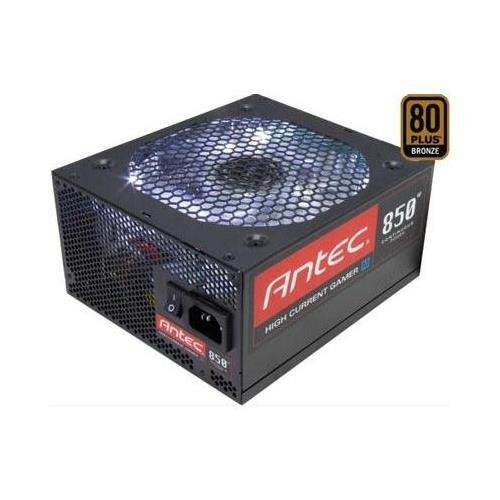
이미지 1: 앞면 view of the Antec HCG-850M 850W Power Supply, showing the fan grille and modular cable connectors. This unit provides stable power to your computer components.
5. 설정 및 설치
Follow these steps to install your Antec HCG-850M power supply:
- 시스템 준비: 컴퓨터의 전원이 완전히 꺼져 있고 벽면 콘센트에서 플러그가 뽑혀 있는지 확인하십시오. 컴퓨터 케이스를 여십시오.
- 기존 파워서플라이를 제거하십시오(해당되는 경우): 기존 파워서플라이에서 모든 케이블을 분리하세요. 나사를 풀고 기존 파워서플라이를 케이스에서 제거하세요.
- 새 파워서플라이를 장착하세요: Carefully place the Antec HCG-850M into the power supply bay of your computer case. Secure it with the provided mounting screws. Ensure the fan is oriented correctly for optimal airflow (typically facing down if there's a bottom vent, or up if not).
- 필수 케이블 연결:
- 24핀 ATX 마더보드 전원 케이블을 연결합니다.
- Connect the 4+4-pin or 8-pin EPS/CPU power cable to your motherboard.
- 모듈형 케이블 연결: Attach the necessary modular cables for your components (e.g., PCI-E for graphics cards, SATA for hard drives/SSDs, Peripheral for fans/accessories). Connect them securely to both the power supply and the respective components.
- 케이블 관리 : 공기 흐름과 미관을 개선하기 위해 케이블을 깔끔하게 정리하십시오.
- 케이스를 닫고 전원을 켜세요: Close your computer case. Connect the AC power cord to the power supply and then to a wall outlet. Flip the power switch on the PSU to the 'ON' position. Power on your computer.
6. 사용 설명서
Once installed, the Antec HCG-850M operates automatically. Here are some general operating guidelines:
- 전원 켜기/끄기: Use your computer's power button to turn the system on or off. The switch on the power supply itself should generally remain in the 'ON' position during normal operation.
- 시스템 안정성: Ensure your system is stable. If you experience unexpected shutdowns or reboots, refer to the troubleshooting section.
- 통풍: Maintain good airflow around your computer case to prevent overheating of components, including the power supply.
7. 유지관리
Proper maintenance can extend the lifespan of your power supply:
- 먼지 청소: Periodically clean dust from the power supply's fan grille and the interior of your computer case using compressed air. 청소하기 전에는 항상 AC 전원 코드를 뽑으십시오.
- 케이블 점검: Occasionally check that all power cables are securely connected to the power supply and components.
- 환경: Operate the power supply in a clean, dry environment with stable temperatures.
8. 문제 해결
If you encounter issues with your power supply, try the following steps:
8.1 No Power to System
- Ensure the AC power cord is securely plugged into both the wall outlet and the power supply.
- Check that the power supply's ON/OFF switch is in the 'ON' position.
- Verify all internal power cables (24-pin ATX, CPU, PCI-E) are correctly and firmly connected.
- 벽면 콘센트에 다른 기기로 전원이 공급되는지 테스트해 보세요.
- 가능하다면, 정상 작동하는 다른 시스템에서 전원 공급 장치를 테스트하거나 전원 공급 장치 테스터를 사용하여 테스트해 보십시오.
8.2 System Instability or Random Shutdowns
- 시스템의 전원 요구 사항이 PSU의 850W 용량을 초과하지 않는지 확인하세요.
- Check for overheating components. Ensure proper case ventilation and clean any dust buildup.
- Verify all power connections are secure. Loose connections can cause intermittent power delivery.
- If the issue persists, it may indicate a fault with the power supply or another component. Consider professional diagnosis.
9. 사양
| 특징 | 세부 사항 |
|---|---|
| 모델 번호 | HCG-850M |
| 출력 와트tage | 850 와트 |
| 효율성 인증 | 80PLUS 브론즈 |
| 폼 팩터 | 에이티엑스 |
| 냉각 방식 | Air (135mm Fan) |
| 모듈식 | 세미 모듈러 |
| 호환 장치 | 개인용 컴퓨터 |
| 품목 무게 | 9파운드(약 4.08kg) |
| ASIN | B00ESAI3M0 |
10. 보증 및 지원
Antec 제품은 제조업체 보증이 적용됩니다. 구체적인 보증 조건은 제품에 동봉된 보증 카드를 참조하거나 Antec 공식 웹사이트를 방문하십시오. website. For technical support or customer service, please contact Antec directly through their official support channels.
공식 Antec Web대지: www.antec.com


