1. 서론
The Juniper Networks SRX210 Services Gateway is an 8-Port GigE Secure Services Gateway designed for enhanced VPN firewall and security appliance functionalities. This device provides comprehensive security, routing, switching, and WAN connectivity in a single, high-performance platform. It is ideal for securing small to medium-sized branch offices and distributed enterprises.
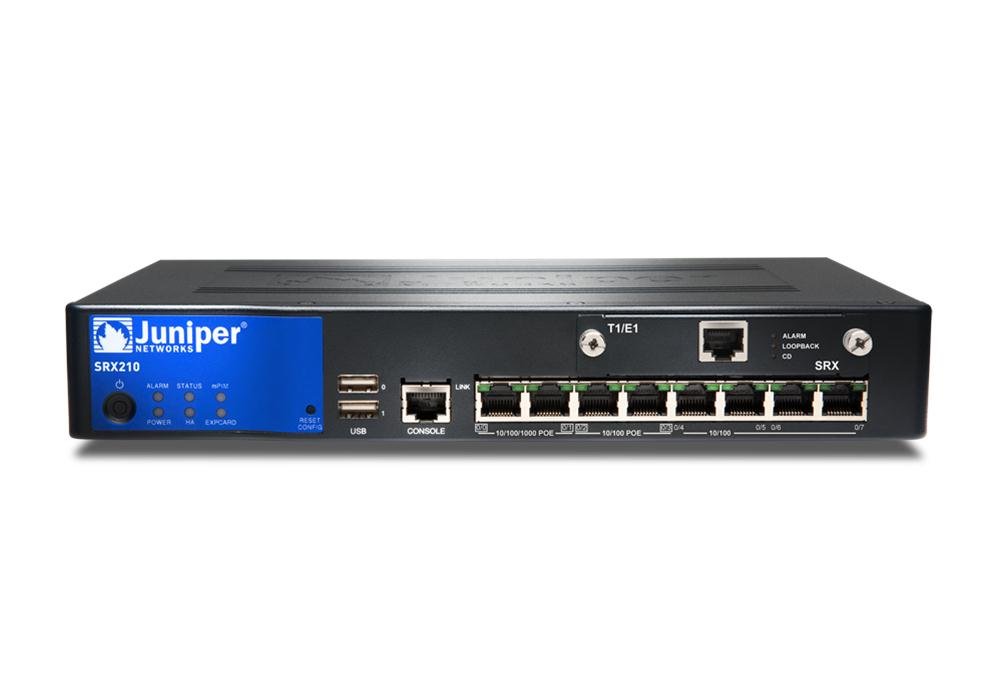
Figure 1: Juniper Networks SRX210 Services Gateway. This image displays the front view of the SRX210 device, highlighting its compact form factor and port layout.
This manual provides essential information for the setup, operation, maintenance, and troubleshooting of your SRX210 Services Gateway. For detailed configuration guides and advanced features, please refer to the official Juniper Networks documentation.
2. 설정
Follow these steps for the initial physical setup of your SRX210 Services Gateway:
- 장치 포장 풀기: Carefully remove the SRX210 Services Gateway from its packaging. Verify that all components listed in the packing slip are present.
- 위치를 선택하세요: Select a stable, level surface in a well-ventilated area. Ensure adequate space around the device for proper airflow and cable management. Avoid placing it near heat sources or in direct sunlight.
- 전원 연결:
- Connect the provided power cord to the power input on the rear panel of the SRX210.
- 전원 코드의 다른 쪽 끝을 접지된 전기 콘센트에 꽂습니다.
- The device will power on automatically. Observe the power indicator LED on the front panel.
- 네트워크 케이블을 연결합니다:
- Connect your WAN (Internet) cable to the appropriate WAN port (e.g.,
ge-0/0/0orfe-0/0/0, consult port labels). - Connect your LAN (internal network) devices to the available GigE ports.
- Connect your WAN (Internet) cable to the appropriate WAN port (e.g.,
- 초기 구성 접근 권한:
- For initial configuration, connect a console cable (RJ-45 to DB-9) from your management workstation to the console port on the SRX210.
- 터미널 에뮬레이션 소프트웨어(예: PuTTY, Tera Term)를 다음과 같이 설정하십시오. 전송 속도 9600보드, 데이터 비트 8개, 패리티 없음, 정지 비트 1개, 흐름 제어 없음.
- Log in using default credentials (if applicable) or follow the Junos OS initial setup wizard.
Refer to the Juniper Networks documentation for specific port assignments and initial configuration procedures for your network environment.
3. Operating the SRX210 Services Gateway
The SRX210 Services Gateway operates on Juniper Networks' Junos OS, a command-line interface (CLI) based operating system. Basic operation involves configuring security policies, routing, and network services.
- Junos OS CLI: Access the device via the console port or SSH for configuration and monitoring. Familiarize yourself with basic Junos OS commands for configuration mode, operational mode, and commit operations.
- 보안 정책: Configure firewall filters and security policies to control traffic flow between different network zones (e.g., trust, untrust, DMZ).
- 네트워크 주소 변환(NAT): Implement NAT to allow internal network devices to access the internet using a limited number of public IP addresses.
- VPN 구성: Set up Virtual Private Networks (VPNs) for secure remote access or site-to-site connectivity. The SRX210 supports IPsec VPNs.
- Routing and Switching: Configure static routes, dynamic routing protocols (e.g., OSPF, BGP), and VLANs as required by your network topology.
- 모니터링: Use operational commands to monitor system status, interface statistics, security logs, and active sessions.
For detailed instructions on specific configurations, consult the Juniper Networks Junos OS documentation available on their official web대지.
4. 유지관리
Regular maintenance ensures the optimal performance and security of your SRX210 Services Gateway.
- 펌웨어 업데이트: 주기적으로 Juniper Networks 지원을 확인하세요. website for the latest Junos OS releases. Apply updates to benefit from new features, bug fixes, and security patches. Follow the recommended upgrade procedures carefully.
- 구성 백업: Regularly back up your device configuration. This allows for quick recovery in case of accidental changes or system failures. Store backups securely off-device.
- 시스템 모니터링: Monitor system logs, CPU utilization, memory usage, and interface statistics. Address any anomalies promptly.
- 환경 점검: Ensure the operating environment remains within specified temperature and humidity ranges. Keep ventilation openings clear of obstructions.
- 물리적 검사: Periodically inspect cables and connections for wear or damage. Ensure all connections are secure.
5. 문제 해결
This section provides guidance for common issues you might encounter with your SRX210 Services Gateway.
- 전원 없음:
- Verify the power cord is securely connected to both the device and the electrical outlet.
- 콘센트가 정상적으로 작동하는지 다른 기기를 사용하여 확인하십시오.
- Ensure the power switch (if present) is in the ON position.
- 네트워크 연결 없음:
- Check physical cable connections to the SRX210 ports and connected devices.
- Verify interface status using Junos OS operational commands (e.g.,
show interfaces terse). - Review firewall policies to ensure traffic is permitted between zones.
- Check routing tables for correct routes to destinations.
- Cannot Access CLI via Console:
- Ensure the console cable is correctly connected.
- Verify terminal emulation software settings (baud rate, data bits, parity, stop bits, flow control).
- 다른 콘솔 케이블이나 USB-직렬 어댑터를 사용해 보세요.
- 성능 문제:
- Monitor CPU and memory usage (
show system processes extensive,show system memory). - Check for high traffic loads on interfaces.
- Review security policies for complex rules that might impact performance.
- Monitor CPU and memory usage (
If issues persist, consult the Juniper Networks knowledge base or contact technical support.
6. 사양
Key technical specifications for the Juniper Networks SRX210 Services Gateway:
| 상표 | 주니퍼 네트웍스 |
| 모델 번호 | M20-FPC-E (SRX210 Series) |
| 설명 | 8-Port GigE Secure Services Gateway High Memory Enhanced VPN Firewall Security Appliance |
| 포트 수 | 8 |
| 품목 무게 | 6.2파운드(2.81kg) |
| 제품 크기(LxWxH) | 8.31 x 6.97 x 0.39인치(21.11 x 17.70 x 0.99cm) |
| 한국어: | 832938067479 |
| ASIN | B00CPNATCE |
| 첫 번째 이용 가능 날짜 | 9년 2013월 XNUMX일 |
Note: Specifications are subject to change without notice. For the most current information, please refer to the official Juniper Networks product documentation.
7. 보증 및 지원
This section outlines general information regarding warranty and support for your Juniper Networks SRX210 Services Gateway.
보증 정보:
Juniper Networks products typically come with a standard manufacturer's warranty. For specific warranty terms and conditions applicable to your SRX210 device, please refer to the official warranty statement provided with your purchase or visit the Juniper Networks website. It is important to note that the manufacturer has announced end-of-life for the SRX210 series, with support generally extending until 2020. Please verify current support status directly with Juniper Networks.
Important: Returns for non-defective items are generally not accepted and may incur a restocking fee if returned for repair and found not defective by technicians. This policy is subject to the vendor from whom the product was purchased. Additional warranty length may be available from certain resellers; contact your vendor for details.
기술 지원:
For technical assistance, software downloads, and documentation, please visit the official Juniper Networks Support website. You will typically need your product serial number to register and access support resources.
- 온라인 리소스: Juniper Networks provides extensive online documentation, knowledge bases, and community forums.
- 지원팀에 문의: If you have an active support contract, you can contact Juniper Networks technical support directly via phone or web 문.
Keeping your device's Junos OS up-to-date is crucial for security and performance, and access to updates is typically tied to a support contract.


