1. 서론
Welcome to the Teknetics EuroTek Metal Detector user manual. This guide provides essential information for the proper assembly, operation, maintenance, and troubleshooting of your new metal detector. The EuroTek is designed for both beginners and experienced hobbyists, offering precise target identification and versatile performance in various environments.
Please read this manual thoroughly before using your detector to ensure optimal performance and longevity of the device.
2. 안전 정보
Always prioritize safety when using your metal detector. Adhere to the following guidelines:
- Respect Property Rights: 사유지에서 수색 작업을 하기 전에 반드시 허가를 받으십시오.
- Avoid Hazardous Areas: Do not use the detector near underground cables, gas lines, or other utilities. Be aware of your surroundings.
- 눈 보호: Wear appropriate eye protection when digging to prevent injury from debris.
- 배터리 안전: Use only recommended batteries. Do not mix old and new batteries, or different types of batteries. Dispose of batteries responsibly.
- 날씨 조건: Avoid using the control housing in heavy rain. The search coil is waterproof, but the control unit is not.
3. 패키지 내용
Upon opening your Teknetics EuroTek package, please verify that all the following components are present:
- Teknetics EuroTek Control Housing
- 8-Inch Concentric Waterproof Search Coil
- 팔걸이가 있는 상단 스템
- 하부 스템
- Stem Locking Collars
- Search Coil Bolt and Wing Nut
- 사용자 설명서
4. 조립 설명서
Follow these steps to assemble your Teknetics EuroTek Metal Detector:
- 검색 코일을 부착하세요: Insert the lower stem into the search coil yoke. Align the holes and secure with the provided bolt and wing nut. Ensure it is snug but allows for slight angle adjustment.
- Connect Stems: Slide the lower stem into the upper stem. Adjust the length to a comfortable position and secure it with the locking collar.
- 컨트롤 하우징을 장착하십시오: Slide the control housing onto the upper stem. Ensure it clicks securely into place.
- 배터리 설치: Open the battery compartment on the back of the control housing. Insert one 9V alkaline battery, observing the polarity markings. Close the compartment securely.
- 케이블을 감싸세요: Carefully wrap the search coil cable around the stem, leaving enough slack near the coil for angle adjustment. Plug the coil connector into the corresponding port on the control housing.
- 팔걸이 조절하기: Position the armrest for comfortable use.

Figure 1: Fully assembled Teknetics EuroTek Metal Detector.
5. 컨트롤 및 디스플레이view
The Teknetics EuroTek features an intuitive control panel and LCD display for easy operation.
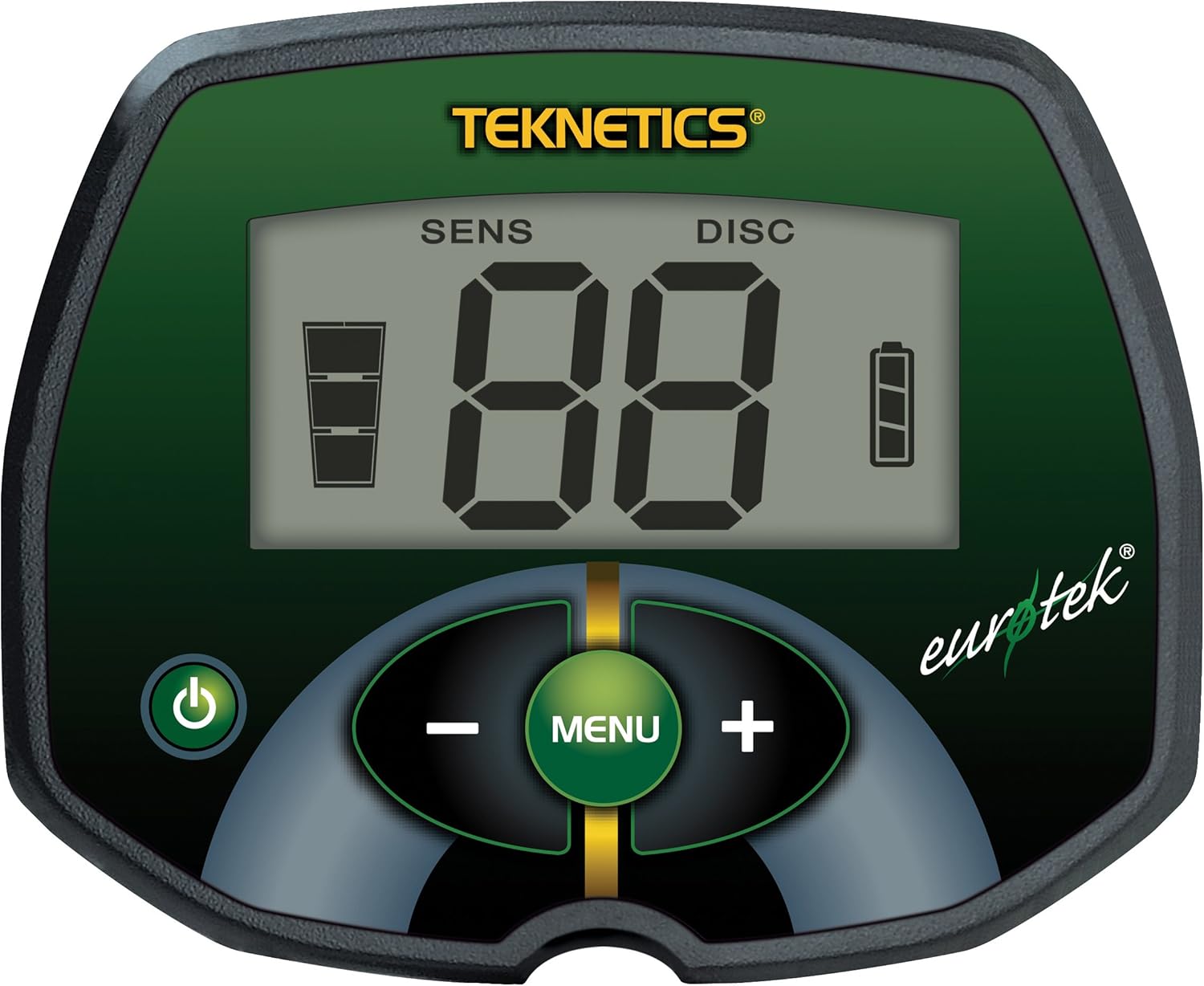
그림 2: 클로즈업 view of the EuroTek control panel.
5.1. LCD 디스플레이
- SENS(민감도): Indicates the current sensitivity level. Higher sensitivity increases detection depth but can also increase interference.
- DISC(차별): Shows the current discrimination level. This setting allows you to filter out unwanted metals (e.g., iron).
- Target ID (VDI Numbers): A two-digit number (0-99) that helps identify the probable type of metal detected. Different metals produce different VDI ranges.
- 배터리 표시기: Displays the remaining battery life. Replace batteries when the indicator shows low power.
5.2. 제어 버튼
- 전원 버튼 (⏻): 감지기를 켜거나 끄려면 누르십시오.
- 메뉴 버튼: Used to cycle through adjustable settings (Sensitivity, Discrimination).
- 플러스(+) 버튼: Increases the value of the selected setting.
- 마이너스(-) 버튼: Decreases the value of the selected setting.
6. 사용 설명서
6.1. 전원 켜기 및 초기 설정
- 전원 버튼 (⏻) to turn on the detector.
- The detector will perform a brief self-test.
- 감도 조정(SENS): Press the MENU button until SENS is displayed. Use the PLUS (+) and MINUS (-) buttons to adjust the sensitivity. Start with a moderate level and increase it gradually until you hear occasional false signals, then reduce it slightly.
- Adjust Discrimination (DISC): Press the MENU button until DISC is displayed. Use the PLUS (+) and MINUS (-) buttons to set the discrimination level. A higher DISC setting will filter out more ferrous (iron) targets, but may also cause you to miss some desirable targets.
6.2. Understanding Target Identification
The EuroTek provides a two-digit VDI (Visual Discrimination Indicator) number on the LCD display to help identify detected targets. Lower numbers typically indicate ferrous metals, while higher numbers suggest non-ferrous metals like coins or jewelry. Familiarize yourself with common VDI ranges for targets you wish to find.
6.3. 오디오 톤
The detector produces distinct audio tones for different types of metals. Generally, low tones indicate ferrous targets, and higher tones indicate non-ferrous targets. Pay attention to these audio cues as they provide valuable information about the detected object.
6.4. Sweeping Technique
Hold the detector with the search coil parallel to the ground, approximately 1-2 inches above the surface. Sweep the coil slowly from side to side in overlapping arcs. Maintain a consistent speed and height for best results. When a target is detected, the VDI number will appear, and an audio tone will sound.

Figure 3: The waterproof search coil allows for detection in shallow water.
6.5. Using the Waterproof Search Coil
The 8-inch concentric search coil is waterproof, allowing for detection in shallow water, wet sand, and other damp environments. Ensure the control housing remains dry, as it is not waterproof. After use in water, rinse the coil with fresh water and dry thoroughly.
7. 유지관리
Proper maintenance will extend the life and performance of your Teknetics EuroTek Metal Detector.
- 청소: Wipe down the search coil and stem with a damp cloth after each use. Avoid harsh chemicals. Keep the control housing clean and dry.
- 배터리 관리 : 장기간 사용하지 않을 경우 누액을 방지하기 위해 배터리를 제거하십시오.
- 저장: 탐지기를 서늘하고 건조한 곳에 보관하십시오. 극한의 온도 변화를 피하십시오.
- 케이블 검사: 탐색 코일 케이블에 마모나 손상 흔적이 있는지 주기적으로 점검하십시오.
8. 문제 해결
If you encounter issues with your Teknetics EuroTek, refer to the following common problems and solutions:
| 문제 | 가능한 원인 | 해결책 |
|---|---|---|
| 감지기가 켜지지 않습니다. | 배터리가 방전되었거나 잘못 설치되었습니다. | Replace with a fresh 9V alkaline battery, ensuring correct polarity. |
| Erratic signals or false alarms. | High sensitivity setting, electromagnetic interference (EMI), mineralized ground. | Reduce sensitivity. Move away from power lines, cell phones, or other electronic devices. Sweep slower. |
| 탐지 깊이가 부족합니다. | Low sensitivity, incorrect sweep speed, small target size. | Increase sensitivity. Ensure consistent, slow sweep. Target size affects depth. |
| 볼륨이 너무 큽니다. | The EuroTek does not have a built-in volume control. | Use headphones with their own volume control for comfortable listening. |
| Inaccurate depth indicator. | Depth indicators are approximations and can vary based on target size, shape, and ground conditions. | Use the depth indicator as a general guide. Practice with known targets to understand its behavior. |
If the problem persists after attempting these solutions, please contact Teknetics customer support.
9. 사양
Key technical specifications for the Teknetics EuroTek Metal Detector (Model ETEK-SKD):
| 특징 | 세부 사항 |
|---|---|
| 상표 | Teknetics |
| 모델 번호 | ETEK-SKD |
| 코일 검색 | 8-inch Concentric, Waterproof |
| 전원 | 1 x 9V 배터리(필수) |
| 품목 무게 | 2.4파운드(약 1.09kg) |
| 제품 치수 | 가로 50.5인치 x 세로 8인치 x 높이 5인치 (약 128.3cm x 20.3cm x 12.7cm) |
| 가변 길이 | 예 |
| 재료 | ABS 플라스틱 |
| 국제 보호 등급 | IP65 (Control housing is not waterproof) |
10. 보증 및 고객 지원
Teknetics products are known for their quality and reliability. The Teknetics EuroTek Metal Detector typically comes with a 5-year limited warranty, covering defects in materials and workmanship under normal use. Please refer to the warranty card included with your product for specific terms and conditions.
For technical assistance, warranty claims, or general inquiries, please contact Teknetics customer support through their official website or the contact information provided in your product packaging. When contacting support, please have your model number (ETEK-SKD) and purchase date available.


