1. 서론
구매해주셔서 감사합니다asing the Fonestar AS-170RU Hi-Fi Amplifier. This device is designed to provide high-fidelity stereo audio amplification, featuring a built-in USB/MP3 player, AM/FM digital tuner, and multiple audio inputs. This manual provides detailed instructions for safe installation, operation, and maintenance of your amp앰프입니다. 사용 전에 이 설명서를 꼼꼼히 읽고 나중에 참조할 수 있도록 보관하십시오.
2. 안전 지침
- 전원 공급 장치: 확인하십시오 amp앰프는 볼륨에 맞는 전원 공급 장치에 연결됩니다.tage specified on the unit. Disconnect the power cord from the outlet if the unit will not be used for an extended period.
- 통풍: 환기구를 막지 마십시오. 과열을 방지하기 위해 공기가 원활하게 흐르도록 장치 주변에 충분한 공간을 확보하십시오.
- 물과 습기: 본 제품을 비, 습기 또는 액체가 떨어지거나 튀는 곳에 노출시키지 마십시오. 꽃병 등 액체가 담긴 물건을 제품 위에 올려놓지 마십시오.
- 열원: 라디에이터, 난방 장치, 스토브 또는 기타 장치(예: 열원)에서 장치를 멀리 두십시오. amp열을 생성하는 발전기.
- 청소: 마른 천으로만 청소하십시오. 액체 세제나 에어로졸 세제를 사용하지 마십시오.
- 서비스: 이 제품을 직접 수리하려고 하지 마십시오. 모든 서비스는 자격을 갖춘 서비스 담당자에게 문의하십시오.
- 놓기: 제품을 안정적이고 평평한 표면에 놓으십시오. 직사광선이나 강한 자기장 근처에 두지 마십시오.
3. 패키지 내용
다음 품목이 패키지에 포함되어 있는지 확인하세요.
- Fonestar AS-170RU Hi-Fi Amp리퍼
- 원격 제어
- AM 안테나
- FM 안테나
- 사용 설명서 (본 문서)
4. 제품 오버view
4.1 전면 패널
The front panel provides access to essential controls and the display.
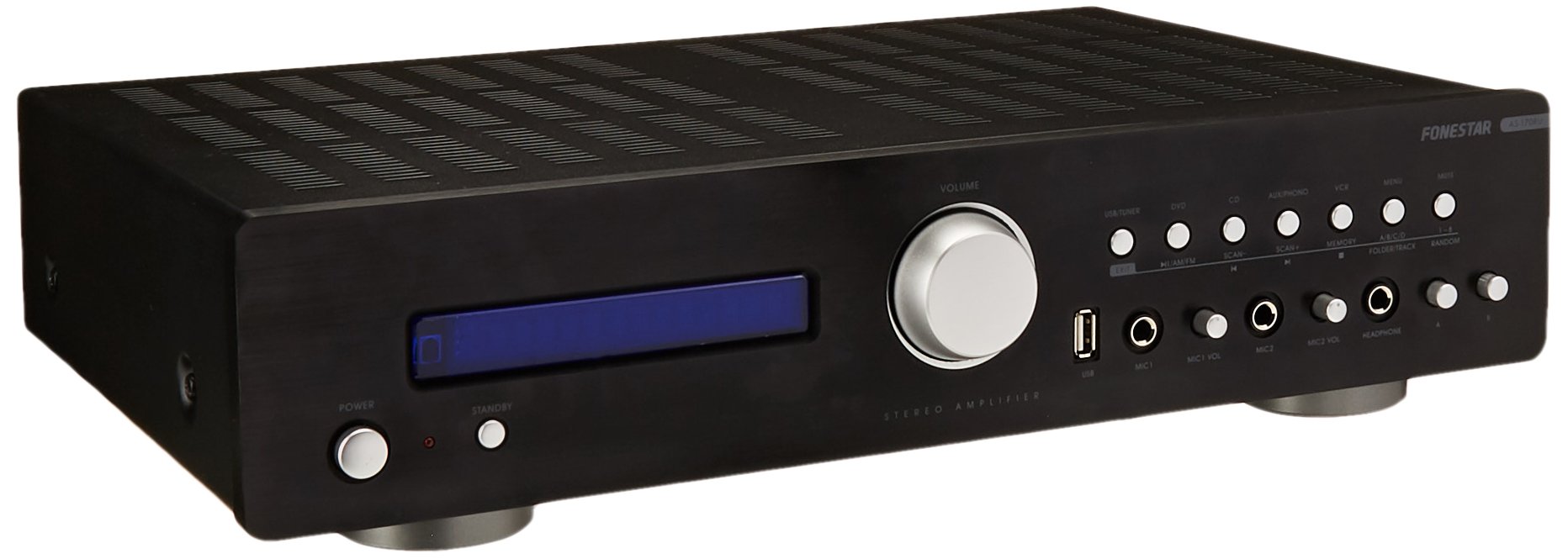
Image: Fonestar AS-170RU Front Panel. 이 이미지는 앞면을 표시합니다. view 의 amplifier, showing the VFD display, USB port, headphone output, input selectors, volume knob, and other control buttons.
- 전원 버튼: 회전합니다 ampliifier를 켜거나 끕니다.
- VFD 디스플레이: Shows current input, volume level, tuner information (frequency, RDS), and USB/MP3 track details (ID3 tag).
- USB 포트: For connecting USB storage devices to play MP3 files.
- 헤드폰 출력: 헤드폰 연결용 6.3mm 잭.
- 입력 선택기: Buttons for choosing audio sources (CD, DVD, VCR, AUX/Phono, USB/Tuner).
- 볼륨 조절: Rotary knob to adjust the master volume level.
- 마이크 입력 : Two 6.3mm microphone jacks with independent volume control.
- 톤 컨트롤: Buttons or menu options for adjusting Bass, Treble, and Balance.
4.2 후면 패널
The rear panel contains all the necessary connections for your audio sources, speakers, and antennas.

Image: Fonestar AS-170RU Rear Panel. This image illustrates the rear connections of the amplifier, including speaker terminals (A/B), various RCA input jacks (CD, DVD, VCR, AUX/Phono), REC OUT, PRE OUT, AMP IN, and antenna connections (FM COAX, AM LOOP ANT).
- 스피커 출력(A/B): Terminals for connecting two pairs of speakers. Supports 4-16 ohms for A or B, or 8-16 ohms for A+B.
- 오디오 입력(RCA):
- CD 입력: CD 플레이어를 연결하는 데 사용합니다.
- DVD 입력: For connecting a DVD player or other audio source.
- VCR Input: For connecting a VCR or other audio source.
- AUX/PHONO Input: For connecting auxiliary devices or a turntable (Phono input may require a pre-amplifier if your turntable does not have one built-in).
- 녹음: RCA output for connecting to a recording device.
- 사전 아웃: 외부 전원 연결을 위한 RCA 출력 단자 amp리퍼.
- AMP 안에: RCA input for connecting an external pre-amp리퍼.
- 안테나 연결:
- FM COAX 75Ω: For connecting an FM antenna.
- AM LOOP ANT: For connecting the supplied AM loop antenna.
4.3 리모컨
The included remote control allows convenient operation of the amp멀리서 Lifier.

Image: Fonestar AS-170RU Remote Control. This image shows the remote control unit with various buttons for power, input selection, volume, mute, tuner functions, USB playback controls, and tone adjustments.
- 대기 : 전원 켜기 / 끄기.
- 입력 선택기: Buttons for CD, DVD, VCR, AUX/PHONO, USB/TUNER.
- 볼륨 업/다운(VOL +/-): 마스터 볼륨을 조정합니다.
- 음소거: 오디오 출력을 음소거합니다.
- 오전/FM: Switches between AM and FM tuner modes.
- 주사: 라디오 방송국 검색.
- 기억: 라디오 방송국 프리셋을 저장합니다.
- USB 재생 컨트롤: Play/Pause, Stop, Skip Track, Folder/Track navigation.
- EQ OFF / BASS / TREBLE: Access tone controls.
- RDS / ID3: Displays RDS information for radio or ID3 tag MP3 용 files.
5. 설정
5.1 스피커 연결하기
- 확인하십시오 amp라이터의 전원을 끄고 전원 콘센트에서 플러그를 뽑습니다.
- Connect your speakers to the "SPEAKERS OUTPUT" terminals on the rear panel.
- Match the positive (+) terminal of the amplifier (red) to the positive (+) terminal of your speaker, and the negative (-) terminal (black) to the negative (-) terminal.
- The AS-170RU supports two groups of speakers (A and B). You can connect one pair to "SPEAKERS A" and another to "SPEAKERS B".
- 스피커의 임피던스가 일치하는지 확인하십시오. amplifier's specifications: 4-16 ohms for A or B, or 8-16 ohms for A+B.
5.2 오디오 소스 연결
Use RCA cables to connect your audio components to the corresponding input jacks on the rear panel.
- CD 플레이어: "CD" 입력에 연결합니다.
- DVD 플레이어: Connect to the "DVD" input.
- VCR : Connect to the "VCR" input.
- Auxiliary Device (e.g., smartphone, tablet): Connect to the "AUX/PHONO" input.
- 턴테이블: Connect to the "AUX/PHONO" input. If your turntable does not have a built-in pre-amplifier, you may need an external phono pre-amp리퍼.
5.3 안테나 연결
- FM 안테나: Connect the supplied FM wire antenna to the "FM COAX 75Ω" terminal. Extend the wire for optimal reception.
- AM 안테나: Connect the supplied AM loop antenna to the "AM LOOP ANT" terminals. Position the loop for best reception.
5.4 전원 연결
Once all audio and speaker connections are made, plug the amplifier's power cord into a suitable AC power outlet.
6. 사용 설명서
6.1 기본 작업
- 전원 켜기/끄기: Press the Power button on the front panel or the STANDBY button on the remote control to turn the ampliifier를 켜거나 끕니다.
- 입력 소스 선택: Press the desired input selector button on the front panel (CD, DVD, VCR, AUX/PHONO) or the remote control (CD, DVD, VCR, AUX/PHONO, USB/TUNER).
- 볼륨 조절: 전면 패널의 볼륨 노브를 돌리거나 리모컨의 VOL +/- 버튼을 사용하여 사운드 레벨을 조절하세요.
- 무음: Press the MUTE button on the remote control to temporarily silence the audio. Press it again to restore sound.
6.2 USB/MP3 재생
- Insert a USB storage device (flash drive) into the USB port on the front panel.
- Select "USB/TUNER" as the input source. The amplifier will automatically detect and begin playing MP3 files.
- Use the playback controls on the remote control (Play/Pause, Stop, Skip Track, Folder/Track) to navigate and control your music.
- The VFD display will show track information, including ID3 tags 가능하다면.
- 그만큼 amplifier supports up to 65,000 indexable folders and files, with a maximum of 8 folder levels.
6.3 AM/FM Tuner Operation
- Select "USB/TUNER" as the input source, then press the AM/FM button on the remote control to switch between AM and FM bands.
- 자동 스캔: Press the SCAN button on the remote control to automatically search for and store available radio stations.
- 수동 조정 : Use the tuning buttons (usually arrow keys) on the remote control to manually adjust the frequency.
- 사전 설정된 방송국: 그만큼 amplifier supports 64 presets. Use the MEMORY button to store and recall your favorite stations.
- RDS 기능: If available, press the RDS button on the remote control to display Radio Data System information (e.g., station name, program type).
6.4개의 마이크 입력
- Connect microphones to the 6.3mm MIC 1 and MIC 2 jacks on the front panel.
- Adjust the independent volume controls for each microphone to achieve the desired level.
6.5 톤 및 밸런스 제어
그만큼 amplifier allows adjustment of bass, treble, and balance through its menu system or dedicated buttons on the remote control. Refer to the remote control section for specific buttons like EQ OFF, BASS, TREBLE.
7. 유지관리
- 청소: 청소하기 전에 전원을 분리하세요. 부드럽고 마른 천으로 외부 표면을 닦으세요. 연마성 세제, 왁스 또는 용제는 사용하지 마세요.
- 통풍: 주기적으로 환기구에 먼지나 이물질이 없는지 확인하세요.
- 저장: 장기간 보관할 경우 전원 콘센트에서 플러그를 뽑고 직사광선과 극한 온도 변화를 피해 서늘하고 건조한 곳에 보관하십시오.
8. 문제 해결
If you encounter problems with your amp증폭기 관련해서는 다음 표에서 가능한 해결책을 참조하십시오.
| 문제 | 가능한 원인 | 해결책 |
|---|---|---|
| 전원이 없습니다 | 전원 코드가 연결되지 않았습니다. 전원 콘센트에 결함이 있습니다. Amp대기 모드에 있는 라이저입니다. | Ensure power cord is securely plugged in. Test the outlet with another device. Press the Power/STANDBY button. |
| 소리가 나지 않습니다 | 잘못된 입력이 선택되었습니다. 볼륨이 너무 낮습니다. 스피커가 제대로 연결되지 않았습니다. 음소거 기능이 활성화되어 있습니다. | Select the correct input source. Increase volume. Check speaker connections. Deactivate MUTE. |
| 라디오 수신 불량 | 안테나가 연결되지 않았거나 위치가 잘못되었습니다. 간섭이 발생할 수 있습니다. | Connect and adjust the position of the AM/FM antennas. Move the amp앰프를 다른 전자 기기에서 멀리 떨어뜨려 놓으십시오. |
| USB 재생이 작동하지 않습니다 | USB 장치가 올바르게 삽입되지 않았습니다. 호환되지 않습니다. file format; USB device faulty. | USB 장치가 완전히 삽입되었는지 확인하십시오. file이 파일은 MP3 형식입니다. 다른 USB 장치를 사용해 보세요. |
| Amplifier turns off unexpectedly or cycles power | Overheating; Short circuit in speaker wiring; Internal fault. | Ensure adequate ventilation. Check speaker wires for frayed strands causing short circuits. If the problem persists, disconnect power and contact qualified service personnel. |
9. 사양
- 모델: AS-170RU
- 전력 출력: 80 + 80 W RMS at 4 Ω
- 스피커 임피던스: 4-16 Ω (A or B), 8-16 Ω (A+B)
- 보호: 3 circuits (short circuits, overload, overvoltage)
- USB 플레이어: MP3 file 재생, ID3 tag support. Max 65,000 indexable folders/files, max 8 folder levels.
- 조율사: Digital AM/FM, 64 presets, RDS.
- 입력: 2 x Microphone (6.3mm), 4 x RCA (CD, DVD, VCR, AUX/Phono), 1 x RCA (AMP 에).
- 출력: 1 x RCA (REC OUT), 1 x RCA (PRE OUT), Headphone (6.3mm).
- 표시하다: Blue VFD.
- 톤 컨트롤: Bass, Treble, Balance (via menu/remote).
- 치수: 40 x 40 x 60cm (약 15.7 x 15.7 x 23.6인치)
- 무게: 7.2kg(약 15.87파운드)
10. 보증 및 지원
For warranty information and technical support, please refer to the warranty card included with your product or contact your authorized Fonestar dealer. Do not attempt to repair the unit yourself, as this may void your warranty.


