1. 서론
Thank you for choosing the JetBeam DDR-26 XM-L2 Rechargeable Digital Display LED Flashlight. This manual provides detailed instructions for the proper use, setup, operation, and maintenance of your new flashlight. Please read this manual thoroughly before using the product to ensure optimal performance and longevity.
2. 제품 오버view
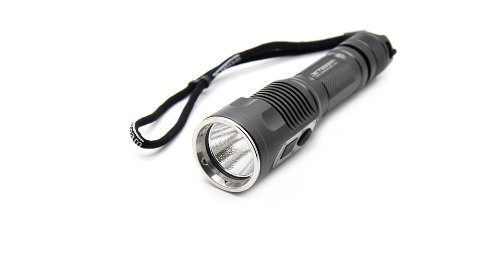
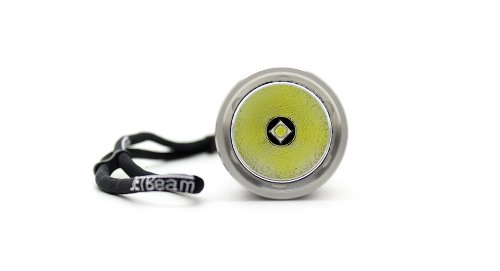
The JetBeam DDR-26 is a high-performance, rechargeable LED flashlight featuring an advanced XM-L2 LED and a convenient digital display. Its robust design and versatile functionality make it suitable for various applications.

3. 설정
3.1 배터리 설치
The JetBeam DDR-26 requires 1 CR123A battery (or compatible rechargeable battery). To install the battery:
- 손전등의 꼬리 캡을 시계 반대 방향으로 돌려서 풉니다.
- 배터리의 양극(+)이 손전등 머리쪽을 향하도록 삽입하세요.
- 꼬리 캡을 시계 방향으로 돌려 단단히 조이십시오. 방수 기능을 유지하려면 O링이 제대로 장착되었는지 확인하십시오.
3.2 충전 중
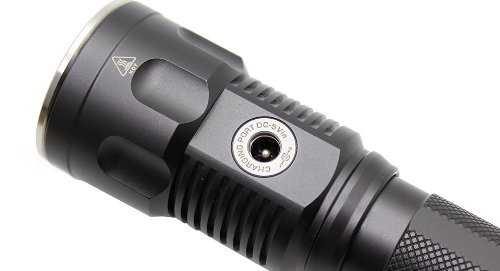
The DDR-26 features a built-in charging port (refer to Figure 2.5). To charge the flashlight:
- Locate the charging port cover on the side of the flashlight and gently lift it to expose the port.
- Connect the appropriate charging cable (not specified in product data, assume standard DC 5V) to the port and a compatible power source.
- The digital display will typically indicate the charging status.
- Once charging is complete, disconnect the cable and securely close the charging port cover to protect it from dust and water.
4. 사용 설명서
4.1 전원 켜기/끄기
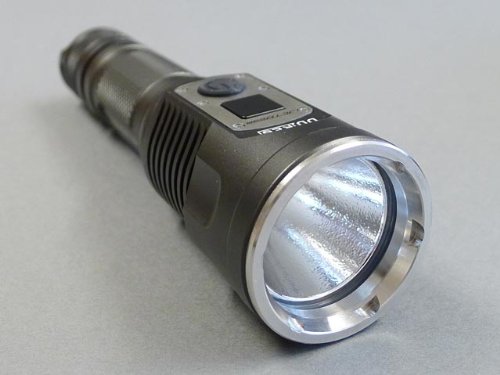
To turn the flashlight on or off, press the main power button located near the digital display (refer to Figure 2.3).
4.2 모드 선택
While the flashlight is on, press the power button repeatedly to cycle through different brightness modes (e.g., Low, Medium, High) and special modes (e.g., Strobe, SOS), if available. The digital display may show the current brightness level or mode.
4.3 Digital Display Functionality
The digital display provides real-time information, which may include:
- 배터리 용량tage or remaining battery life.
- Current brightness level or output.
- Charging status when connected to a power source.
5. 유지관리
5.1 청소
손전등 본체를 부드러운 천으로 정기적으로 닦아주세요.amp 천을 사용하십시오. 연마성 세제나 용제는 사용하지 마십시오. 최적의 광 출력을 위해 렌즈를 깨끗하게 유지하십시오.
5.2 O링 윤활
To maintain water resistance, periodically inspect and lubricate the O-rings with silicone grease. Replace O-rings if they appear damaged or worn.
5.3 보관
If the flashlight will not be used for an extended period, remove the battery to prevent leakage and store the flashlight in a cool, dry place.
6. 문제 해결
- 손전등이 켜지지 않음: Check if the battery is installed correctly with the positive end facing the head. Ensure the battery is charged. Tighten the tail cap securely.
- 빛이 어둡거나 깜빡거립니다. The battery may be low; recharge or replace it. Ensure battery contacts are clean.
- 디지털 디스플레이가 작동하지 않습니다: Ensure the battery is properly installed and charged. If the issue persists, contact customer support.
- 충전 문제: Verify the charging cable is properly connected to both the flashlight and the power source. Ensure the power source is active.
7. 사양
| 특징 | 사양 |
|---|---|
| 부품 번호 | JetBeam DDR-26 |
| 키 | 2 인치 |
| 길이 | 5.5 인치 |
| 너비 | 2 인치 |
| 무게 | 159g |
| 필요한 배터리 | 예 |
| 배터리 수 | CR1A 배터리 123개 필요 |
| 품목 치수(LxWxH) | 14 x 5.1 x 5.1 센티미터 |
| ASIN | B00C91YPEA |
| 첫 번째 이용 가능 날짜 | 9년 2016월 XNUMX일 |
8. 보증 및 지원
For warranty information or technical support, please refer to the warranty card included with your product or visit the official JETBeam web사이트. 구매 증빙 자료로 구매 영수증을 보관하세요.


