1. 서론
This manual provides detailed instructions for the setup, operation, and maintenance of your Sungale PF1501 14-Inch Digital Photo Frame. This device is designed to display digital photos, play videos, and play music, offering a versatile way to enjoy your media.
제품의 올바른 작동과 최상의 사용자 경험을 위해 사용 전에 본 설명서를 꼼꼼히 읽어 주십시오.
2. 패키지 내용
아래 나열된 모든 품목이 패키지에 포함되어 있는지 확인하세요.
- Sungale PF1501 14-Inch Digital Photo Frame
- AC 전원 어댑터
- 원격 제어
- 빠른 시작 가이드
- Limited Warranty Card
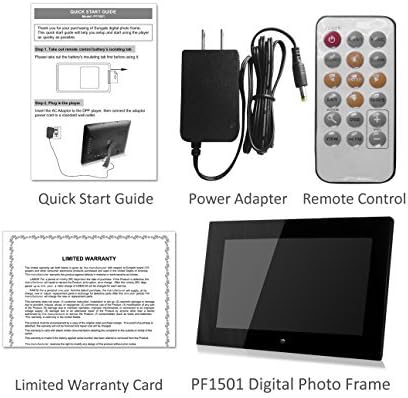
Image 2.1: Included accessories and the digital photo frame.
3. 제품 오버view
3.1 정면 View

이미지 3.1: 앞면 view of the digital photo frame.
3.2 후면 View 및 포트

이미지 3.2: 후면 view with labeled ports and controls.
The rear of the frame features various ports and controls for connectivity and operation:
- 기능 키: Buttons for navigation and control (Enter, Left, Right, Up, Down, Exit).
- 벽걸이 가능: Mounting points for wall installation.
- 내장 스피커: 오디오 재생용.
- DC 12V 전원 포트: 여기에 AC 전원 어댑터를 연결합니다.
- Removable Bracket: Stand for desktop placement.
- 전원 버튼: To turn the frame on or off.
- USB 호스트 포트: USB 플래시 드라이브 연결용입니다.
- SD/SDHC 카드 슬롯: For inserting SD or SDHC memory cards.
- USB 장치 포트: 컴퓨터에 연결하기 위해.
4. 설정
4.1 초기 전원 켜기
- 전원 연결: Insert the AC power adapter into the DC 12V Power Port on the back of the frame. Plug the other end into a standard electrical outlet.
- 전원 켜기: Press the Power button located on the back of the frame. The frame will power on and display the initial setup screen or default content.
4.2 메모리 카드 또는 USB 드라이브 삽입
The frame supports SD/SDHC cards and USB flash drives (up to 32GB). It also has 4GB of internal memory.
- SD/SDHC 카드용: Gently insert an SD or SDHC card into the SD/SDHC Card Slot until it clicks into place. Ensure the card is inserted in the correct orientation.
- USB 플래시 드라이브용: Insert a USB flash drive into the USB Host Port.
The frame should automatically detect the inserted media and begin displaying content or prompt you to select a source.
4.3 벽면 장착(선택 사항)
The frame can be wall-mounted using the designated mounting points on the rear. Ensure appropriate wall anchors and screws are used for secure installation.
5. 사용 설명서
The digital photo frame can be operated using the function keys on the back or the included remote control.
5.1 리모콘 기능
The remote control provides convenient access to all features. Point the remote control directly at the frame's sensor.
5.2 메뉴 탐색
Use the directional buttons (Up, Down, Left, Right) to navigate through menu options. Press the "Enter" button to confirm a selection. The "Exit" button typically returns to the previous screen or the main menu.
5.3 사진 표시
The frame supports JPG and BMP photo file 형식.
- 소스 선택: From the main menu, select the desired media source (Internal Memory, SD Card, or USB Drive).
- Choose Photo Mode: Select "Photo" to enter photo display mode.
- 슬라이드쇼: The frame can automatically start a slideshow of all photos on the selected source. You can adjust transition effects and interval times in the settings.
- 사진 한 장 표시: Navigate to a specific photo and press "Enter" to display it individually.
- Zoom and Rotate: Use the remote control or function keys to zoom in/out or rotate displayed photos.
5.4 비디오 재생
The frame supports video playback. Note that some users have reported compatibility primarily with .AVI video files.
- 소스 선택: From the main menu, select the desired media source.
- Choose Video Mode: Select "Video" to enter video playback mode.
- Select Video: 원하는 동영상으로 이동 file and press "Enter" to begin playback.
5.5 음악 재생
The frame can play background music during photo slideshows or as standalone audio.
- 소스 선택: From the main menu, select the desired media source.
- Choose Music Mode: Select "Music" to enter music playback mode.
- 오디오를 선택하십시오 File: Navigate to the desired audio file and press "Enter" to begin playback.
- 배경 음악: In photo settings, you can enable background music to play during slideshows.
5.6 Calendar and Alarm Clock
Access the calendar and alarm clock functions through the main menu. Follow on-screen prompts to set the date, time, and alarm preferences.
6. 유지관리
6.1 화면 청소
- Turn off and unplug the frame before cleaning.
- Use a soft, lint-free cloth, such as a microfiber cloth, to gently wipe the screen.
- 완고한 얼룩의 경우 가볍게 damp천에 물이나 전자 제품용 화면 세척액을 묻혀 닦으세요. 화면에 직접 액체를 뿌리지 마세요.
- Avoid using abrasive cleaners, solvents, or alcohol-based solutions, as these can damage the screen surface.
6.2 일반 관리
- 액자를 직사광선, 열원 및 과도한 습기로부터 멀리하십시오.
- 프레임을 떨어뜨리거나 강한 충격을 가하지 마십시오.
- Do not block the ventilation openings on the back of the frame.
- Unplug the frame during lightning storms or when unused for extended periods.
7. 문제 해결
If you encounter issues with your digital photo frame, refer to the following common problems and solutions:
| 문제 | 가능한 원인 / 해결책 |
|---|---|
| 프레임의 전원이 켜지지 않습니다. |
|
| "File not supported" error or media not displaying. |
|
| 원격 제어가 작동하지 않습니다. |
|
| Photos are stretched or distorted. |
|
| Slideshow not playing randomly. |
|
8. 사양
| 특징 | 세부 사항 |
|---|---|
| 모델 번호 | 피에프1501 |
| 화면 크기 | 14 인치 |
| 해결 | 1366x768 픽셀 |
| 내부 메모리 | 4GB |
| 외부 메모리 지원 | SD/SDHC Card (up to 32GB), USB Flash Drive (up to 32GB) |
| 지원되는 사진 형식 | JPG, BMP |
| 지원되는 비디오 형식 | Primarily AVI (as reported by users) |
| 오디오 출력 | 2 Channel Stereo Speakers |
| 제품 치수 | 13.8 x 1 x 9.5 인치 |
| 품목 무게 | 2파운드 |
| 색상 | 검은색 |
| 제조업체 | 썬갈레 |
9. 보증 및 지원
9.1 제한 보증
This product comes with a Limited Warranty. Please refer to the "Limited Warranty Card" included in your package for detailed terms and conditions, including coverage period and claim procedures. Keep your proof of purchase for warranty claims.
9.2 고객 지원
For technical assistance, troubleshooting beyond this manual, or warranty inquiries, please contact Sungale customer support.
- 제조업체: 썬갈레
- Web대지: Visit the Sungale Store on Amazon (브랜드 일반 정보용)
- Specific contact information (phone, email) may be found on the warranty card or the official Sungale web대지.


