제품 끝view
The VTech VTCS6629 DECT 6.0 Expandable Speakerphone with Caller ID & Call Waiting is a single-handset system designed for clear communication. It features DECT 6.0 technology for superior sound quality and range, and is expandable with additional handsets.
주요 특징은 다음과 같습니다.
- Backlit Keypad and Display for easy visibility in various lighting conditions.
- Eco Mode Power-conserving Technology to optimize battery life.
- Quiet Mode to silence ringers for undisturbed periods.
- 50 Name and Number Phonebook Directory for convenient contact storage.
- Digital Answering System with up to 15 minutes of recording capacity.
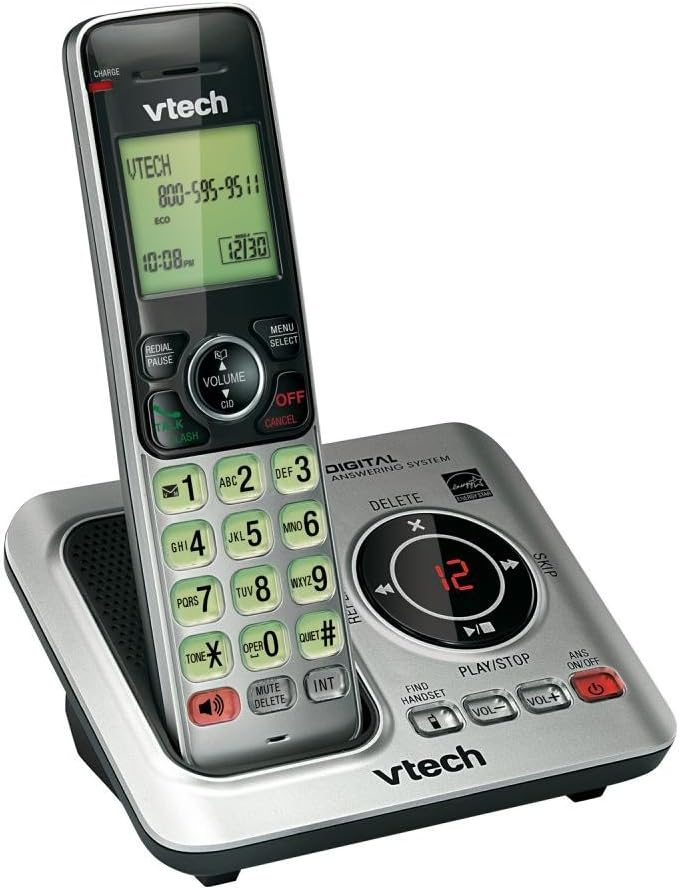
Image: The VTech CS6629 cordless phone handset resting in its charging base. The handset features a backlit display showing "VTECH 800-595-9511" and the time "10:08 PM". The base includes controls for the digital answering system, such as Play/Stop, Skip, Delete, and volume adjustments, along with a message counter displaying "12".
설치 가이드
- 배터리 설치:
The handset requires 1 AAA battery (included). Open the battery compartment cover on the back of the handset, insert the battery according to the polarity markings, and close the cover. Place the handset in the charging cradle to charge for at least 10 hours before initial use.
- 베이스 유닛 연결:
Connect the small end of the power adapter to the POWER jack on the back of the telephone base. Plug the large end of the power adapter into a wall outlet not controlled by a wall switch.
- 전화선 연결:
Plug one end of the telephone line cord into the TEL LINE jack on the back of the telephone base. Plug the other end of the telephone line cord into a telephone wall jack.
- 초기 설정 :
Once powered on and charged, the handset display will prompt you to set the date and time. Follow the on-screen instructions using the navigation and SELECT buttons.
작동 지침
전화 걸기 및 받기
- 전화를 걸려면: 누르다 토크 / 플래시 or 스피커, 전화번호를 누르세요.
- 전화를 받으려면: 누르다 토크 / 플래시 or 스피커 전화가 울릴 때.
- 통화를 종료하려면: 누르다 끄기/취소 또는 핸드셋을 충전 거치대에 다시 놓으세요.
스피커폰 기능
통화 중에 스피커 button to switch between handset and speakerphone mode. Press it again to return to handset mode.
발신자 ID 및 통화 대기
When a call comes in, the caller's name and number will appear on the handset display if you subscribe to Caller ID service. If you have Call Waiting, a tone will indicate an incoming call while you are on the phone. Press 토크 / 플래시 새로운 통화로 전환합니다.
전화번호부 디렉토리
The phonebook can store up to 50 names and numbers. To add an entry, press 메뉴/선택, navigate to "Phonebook", and follow the prompts to add a new entry. To dial from the phonebook, press 디렉터 (Directory) and scroll to the desired entry, then press 토크 / 플래시.
디지털 응답 시스템
The integrated digital answering system can record up to 15 minutes of messages. The message counter on the base unit displays the number of new messages.
- 메시지를 재생하려면: 누르다 재생/정지 기본 장치에.
- 메시지를 삭제하려면: 메시지 재생 중 삭제 기본 장치에.
- 자동응답 시스템을 켜거나 끄려면: 누르다 ANS 켜기/끄기 기본 장치에.
조용한 모드
Activate Quiet Mode to silence all ringers on the telephone base and all handsets for a set period. This feature is useful for undisturbed periods. Refer to the handset menu for activation and duration settings.
볼륨 조절
통화 중에 누르세요 볼륨 ▲ or 볼륨 ▼ on the handset to adjust the earpiece volume. On the base unit, use 볼륨+ 그리고 권 to adjust speaker volume during message playback or speakerphone calls.
Intercom Function (INT)
If you have multiple VTech CS6629 handsets, you can use the intercom feature to communicate between them. Press 국제 수화기에서 통화할 수화기를 선택하세요.
Find Handset
핸드셋을 분실한 경우, 핸드셋 찾기 on the telephone base. All registered handsets will ring, allowing you to locate them.
유지
- 청소: Clean the telephone and base unit with a soft, slightly damp 천으로 닦으세요. 세척용 스프레이나 강한 화학 약품을 사용하지 마세요.
- 배터리 관리 : To maintain optimal battery performance, fully charge the handset battery for 10 hours before first use. If the phone will not be used for an extended period, remove the battery to prevent leakage.
- 환경 조건: 휴대전화를 극한의 온도, 직사광선 또는 습기에 노출시키지 마세요.
문제 해결
| 문제 | 해결책 |
|---|---|
| 발신음이 없습니다. | Ensure the telephone line cord is securely plugged into both the telephone base and the wall jack. Check if other phones on the same line are working. |
| Handset does not charge or hold a charge. | Ensure the power adapter is securely connected. Clean the charging contacts on the handset and base with a dry cloth. The battery may need replacement after extended use (typically 1-2 years). |
| Poor sound quality (static, muffled). | Move the handset closer to the base unit. Avoid placing the base unit near other electronic devices (TVs, microwaves, computers) that may cause interference. Check the telephone line cord for damage. |
| 전화를 걸거나 받을 수 없습니다. | Verify the telephone line is active. Ensure the handset is registered to the base. If the issue persists, try resetting the phone by unplugging the power adapter from the base for a few minutes, then plugging it back in. |
| 응답 시스템이 메시지를 기록하지 않습니다. | Ensure the answering system is turned ON. Check if the memory is full; delete old messages to free up space. |
명세서
| 특징 | 세부 사항 |
|---|---|
| 제품 치수 | 6.7 x 4.7 x 3.8 인치 |
| 품목 무게 | 0.317 온스 |
| 모델 번호 | CS6629 |
| 배터리 | AAA 배터리 1개 필요(포함) |
| 제조업체 | VTECH |
| 원산지 | 미국 |
| 색상 | 흰색/회색 |
| 전화 유형 | 무선 |
| 전원 | 배터리 구동 |
| 다이얼러 유형 | 단일 키패드 |
| 응답 시스템 유형 | 디지털 |
| 호환 장치 | VTech CS6609 accessory handset, up to 5 handsets |
| 기록 용량 | 15 분 |
보증 및 지원
This VTech product is manufactured by VTech. For warranty information and technical support, please refer to the documentation included with your purchase or visit the official VTech support web사이트. 구매 증빙 자료로 구매 영수증을 보관하세요.
법적 고지사항:
이 제품에는 캘리포니아주에서 암과 선천적 결함 또는 기타 생식적 피해를 일으키는 것으로 알려진 화학 물질이 포함되어 있습니다.


