소개
This manual provides comprehensive instructions for the setup, operation, and maintenance of your A4tech G11-570HX-1 Rechargeable Wireless Mouse. Please read this manual thoroughly before using the device to ensure optimal performance and longevity.
패키지 내용
- A4tech G11-570HX-1 Wireless Mouse
- USB 무선 수신기
- Rechargeable Lithium-Ion Battery (included, may be pre-installed)
설치 지침
- 마우스 충전: Ensure the mouse is fully charged before first use. Connect the mouse to a USB power source using the appropriate charging cable (not explicitly listed in package contents, but implied for rechargeable devices). The charging status indicator will provide feedback. The battery stops charging automatically when fully charged.
- USB 무선 수신기를 삽입하세요: Locate an available USB port on your computer. Insert the A4tech USB wireless receiver into the USB port. Your operating system should automatically detect and install the necessary drivers.
- 마우스 전원 켜기: 마우스 아랫면에 있는 전원 스위치를 찾아 '켜짐' 위치로 밀어주세요.
- 테스트 연결: Move the mouse to confirm cursor movement on your screen. If the mouse does not respond, ensure the receiver is securely plugged in and the mouse is powered on.

Image: The A4tech G11-570HX-1 wireless mouse shown alongside its compact USB wireless receiver, ready for connection to a computer.
작동 지침
The A4tech G11-570HX-1 mouse features 7 buttons for enhanced functionality and an operating range of up to 15 meters from the USB receiver.
- 좌 클릭: Primary function, typically for selecting items or activating commands.
- 마우스 오른쪽 버튼으로 클릭: Secondary function, typically for opening context menus.
- 스크롤 휠: Scroll documents or web pages vertically. The scroll wheel may also function as a clickable button.
- 추가 버튼: The mouse includes additional programmable buttons. Refer to the manufacturer's software (if available) for customization options.
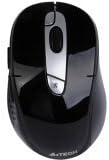
이미지: 상단 view of the A4tech G11-570HX-1 wireless mouse, highlighting its ergonomic design and button layout.
충전 지침
Your A4tech G11-570HX-1 mouse is equipped with a long-life, rechargeable lithium-ion battery. To charge the mouse:
- Connect the charging cable (typically a standard USB cable, not included in package contents) to the charging port on the mouse.
- Plug the other end of the charging cable into a powered USB port (e.g., on your computer or a USB wall adapter).
- Observe the charging status indicator. The indicator will show the charging progress.
- The battery stops charging automatically when it reaches full capacity, preventing overcharge and extending battery life.
사용자 정의 가능한 기능
The A4tech G11-570HX-1 features a customizable shuttle key, allowing users to assign various functions for enhanced productivity. For detailed customization options, please refer to the official A4tech software or support resources.
Multi-Link Receiver Functionality
The included USB wireless receiver is a multi-link receiver, capable of connecting up to 3 sets of compatible A4tech keyboards and mice simultaneously. This feature allows for a streamlined setup, using a single receiver for multiple wireless peripherals.
유지
- 청소: 부드럽고 마른 천을 사용하여 마우스를 닦으세요. 강한 화학 물질이나 연마재는 사용하지 마세요.
- 배터리 관리 : 배터리 수명을 연장하려면 마우스를 자주 완전히 방전시키지 마세요. 장시간 사용하지 않을 때는 마우스를 서늘하고 건조한 곳에 보관하세요.
- 저장: When transporting or storing the mouse, ensure the power switch is in the 'OFF' position to conserve battery.
문제 해결
- 마우스가 응답하지 않음:
- USB 무선 수신기가 작동하는 USB 포트에 단단히 꽂혀 있는지 확인하세요.
- 마우스 전원이 켜져 있는지 확인하십시오.
- 배터리 잔량을 확인하고 필요한 경우 재충전하십시오.
- 수신기를 다른 USB 포트에 꽂아보세요.
- 간헐적인 연결:
- 마우스가 수신기의 15미터 작동 범위 내에 있는지 확인하십시오.
- 다른 무선 장치(예: Wi-Fi 라우터, 무선 전화기)의 간섭을 최소화합니다.
- 충전 문제:
- Confirm the charging cable is properly connected to both the mouse and the power source.
- 다른 USB 포트나 충전 어댑터를 사용해 보세요.
If you continue to experience issues, please refer to the A4tech official support web추가 지원은 사이트를 참조하세요.
명세서
| 모델 번호 | G11-570HX-1 |
| 무선형 | 2.4GHz 무선 주파수 |
| 연결 기술 | 무선 전화 |
| 움직임 감지 기술 | 광학 |
| 버튼의 수 | 7 |
| 작동 범위 | 최대 15미터 |
| 전원 | 배터리 구동 |
| 배터리 유형 | 1개의 리튬 이온 배터리(포함) |
| 하드웨어 플랫폼 | PC |
| 색상 | 검은색 |
| 품목 무게 | 5.6 온스(약 158.76그램) |
| 제품 크기(LxWxH) | 7.25 x 5 x 2.75인치(약 18.4 x 12.7 x 7cm) |
| 제조업체 | A4Tech |
보증 및 지원
A4tech products typically come with a limited warranty. For specific warranty terms, registration, and technical support, please visit the official A4tech web해당 사이트를 방문하거나 고객 서비스에 문의하세요. 구매 증빙 자료로 구매 영수증을 보관하세요.
Official A4tech Web대지: www.a4tech.com


