1. 이상view
The Canon EF-M 22mm f/2 STM is a moderate wide-angle lens designed for the EOS M Digital Camera series. Its ultra-slim and compact form factor makes it highly portable. Featuring a bright f/2.0 aperture, this lens excels in low-light conditions and produces attractive background blur (bokeh). An aspheric lens element contributes to high resolution and contrast. The built-in Stepping Motor (STM) ensures smooth and quiet continuous autofocus, particularly beneficial for video recording. With a short minimum focusing distance, it allows for close-up photography.

그림 1: 전면 view of the Canon EF-M 22mm f2 STM Compact System Lens.
2. 상자 안에 무엇이 들어있나요?
- EF-M22mm 1:2 STM Lens
- 렌즈 캡 E-43
- 렌즈 더스트 캡 EB
- 사용 설명서
- 보증 카드
3. 주요 특징
- Moderate Wide-Angle: Equivalent to 35mm on a full-frame camera, offering a versatile field of view.
- 부드럽고 조용한 자동 초점: Built-in Stepping Motor (STM) provides silent and fluid continuous autofocus, ideal for video recording.
- Bright f/2.0 Aperture: Excellent for low-light performance and creating beautiful, soft background blur with its 7-blade circular aperture.
- 높은 이미지 품질: An aspheric lens element ensures high resolution and contrast.
- Close-Up Capabilities: Minimum focusing distance of 5.9 inches (0.15 meters) allows for detailed close-up shots.
- 컴팩트한 디자인: Ultra-slim and lightweight, making it easy to carry and suitable for travel.
4. 설정 및 설치
렌즈 부착하기
- 카메라의 전원이 꺼져 있는지 확인하세요.
- Remove the rear lens cap from the EF-M 22mm f/2 STM lens and the body cap from your EOS M camera.
- 렌즈의 빨간색 점을 카메라 렌즈 마운트의 빨간색 점에 맞춥니다.
- 렌즈를 카메라 마운트에 삽입하고 딸깍 소리가 나면서 제자리에 고정될 때까지 시계 방향으로 돌리십시오.
렌즈 분리
- 카메라의 전원이 꺼져 있는지 확인하세요.
- 카메라 본체의 렌즈 분리 버튼을 누른 상태에서 렌즈가 멈출 때까지 시계 반대 방향으로 돌립니다.
- 카메라에서 렌즈를 조심스럽게 분리하세요.
- Attach the rear lens cap to the removed lens and the body cap to the camera to protect the sensor.

그림 2: 측면 view of the Canon EF-M 22mm f2 STM lens, showing the mount.
5. 렌즈 작동
자동 초점(AF) 및 수동 초점(MF)
The EF-M 22mm f/2 STM lens supports both autofocus and manual focus. The STM (Stepping Motor) technology provides exceptionally smooth and quiet autofocus, which is particularly advantageous when shooting video, as it minimizes distracting focus motor noise. For precise control, switch to manual focus mode on your camera.
Aperture and Low-Light Performance
With a wide maximum aperture of f/2.0, this lens allows a significant amount of light to reach the camera's sensor. This makes it highly effective for shooting in challenging low-light conditions without needing to drastically increase ISO sensitivity. The wide aperture also enables shallow depth of field, creating a pleasing background blur that isolates your subject.
클로즈업 사진
The lens features a minimum focusing distance of just 0.15 meters (5.9 inches). This allows you to get very close to your subjects, capturing intricate details and achieving a near-macro effect. Experiment with this feature for creative close-up shots.
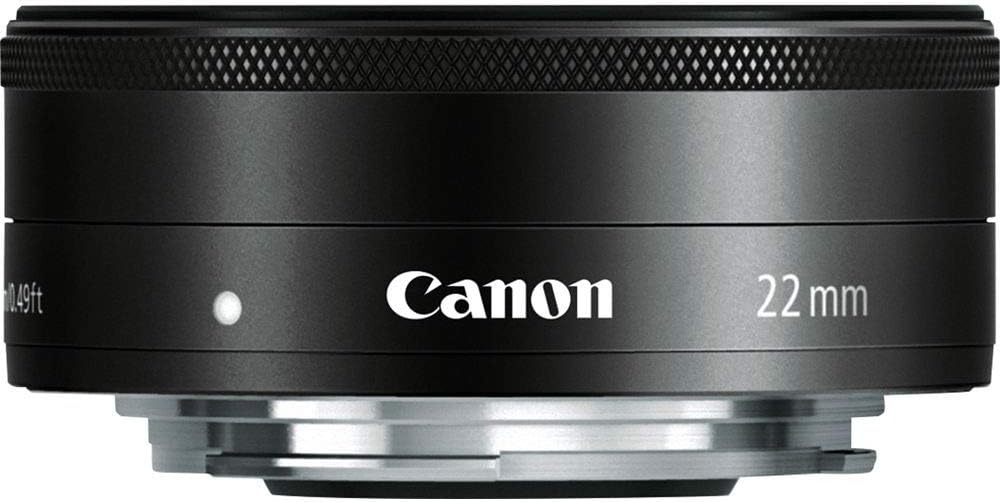
그림 3: 전면 view of the Canon EF-M 22mm f2 STM lens, illustrating the aperture blades.
Understanding STM Lenses
The Stepping Motor (STM) is a type of autofocus motor designed by Canon to provide smooth and quiet focusing, especially during video recording. Unlike traditional ultrasonic motors (USM) which can be noisy, STM lenses are optimized for silent operation, preventing unwanted audio interference in your videos.
비디오 1: 오버view of Canon STM Lenses, explaining their benefits for smooth and quiet autofocus.
6. 유지관리 및 관리
- 렌즈 청소: Use a soft, lint-free cloth or a lens brush to remove dust. For smudges, use a lens cleaning solution and a microfiber cloth. Avoid touching the glass elements directly with your fingers.
- 저장: When not in use, keep the lens attached to the camera or with both front and rear caps on. Store in a cool, dry place away from direct sunlight and extreme temperatures.
- 충격 방지: Protect the lens from drops or impacts, which can damage internal components.
- 습기 보호: Avoid exposing the lens to excessive moisture or humidity. If it gets wet, dry it immediately with a soft cloth.
7. 문제 해결
- 자동 초점이 작동하지 않음: Ensure the lens is securely mounted to the camera. Check the camera's focus mode settings (AF/MF). Clean the electrical contacts on both the lens and camera body with a clean, dry cloth.
- 이미지 품질 문제: Ensure the lens elements are clean and free from dust or smudges. Check camera settings for appropriate aperture, ISO, and shutter speed.
- 렌즈를 인식할 수 없습니다: Power off the camera, detach and reattach the lens, then power on the camera again. Ensure camera firmware is up to date.
8. 사양
| 특징 | 사양 |
|---|---|
| 초점 거리 및 최대 조리개 | 22mm, f / 2 |
| 렌즈 구성 | 7개 그룹의 6개 원소 |
| 대각선 각도 View | 63°30' |
| 초점 조정 | Inner Focusing System |
| 가장 가까운 초점 거리 | 0.49피트/0.15m |
| 필터 크기 | 43mm |
| 최대 직경 x 길이 | 2.4 x 0.9인치 / 60.9 x 23.7mm |
| 무게 | 3.7온스 / 105g |
| 품목 모델 번호 | 5985B002 |
| ASIN | B008NF8BRI |
9. 보증 및 지원
This product is subject to a 14-day return policy. For detailed warranty information and customer support, please refer to the Warranty Card included in the product packaging or visit the official Canon support website. Ensure you register your product to activate any applicable warranties.


