소개
This user manual provides comprehensive instructions for the installation, operation, and maintenance of your RCA RTS736W 30-Inch Streaming Soundbar. Please read this manual thoroughly before using the product to ensure proper functionality and to prevent damage.
The RCA RTS736W is designed to enhance your home audio experience with its 3.0 channel sound and integrated Wi-Fi for streaming online content.
주요 특징
- Wi-Fi Built-In for streaming video content to a TV.
- 3.0 Channel Left/Center/Right audio configuration.
- HDMI 1080p Output for high-definition connectivity.
- Includes 1 Rear Analog Audio-in Jack and 1 Side Line-in Jack for various audio sources.
- Flexible placement options: includes table or wall mounting brackets.
패키지 내용
패키지에 모든 품목이 들어 있는지 확인하세요.
- RCA RTS736W 30-Inch Streaming Soundbar
- 원격 제어
- 전원 어댑터
- Table or Wall Mounting Brackets
- 사용 설명서 (본 문서)
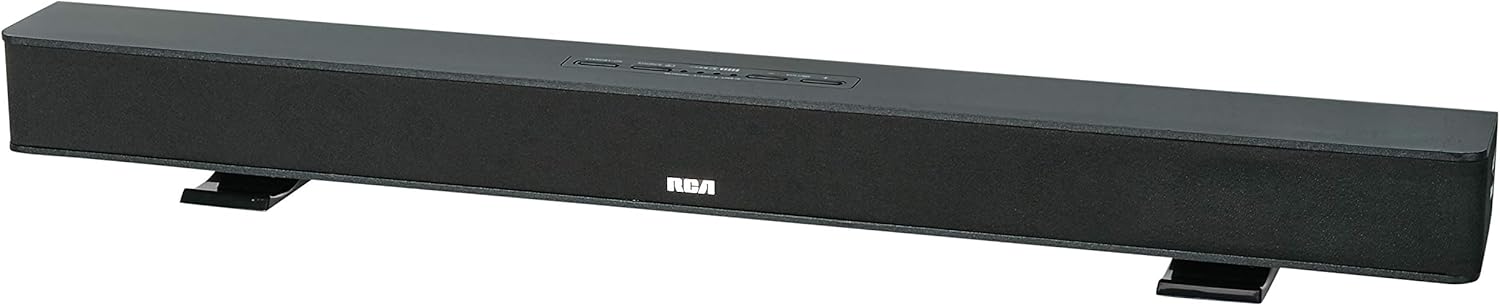
Image: The RCA RTS736W 30-Inch Streaming Soundbar, shown with its sleek black design and integrated controls.
설정
1. 배치 옵션
The soundbar offers flexible placement:
- 탁상 배치: Place the soundbar on a flat, stable surface in front of your television. Ensure there is adequate ventilation around the unit.
- 벽면 장착: Use the included wall mounting brackets to secure the soundbar to a wall. Refer to the separate wall mounting template (if provided) for detailed instructions. Ensure the wall can support the weight of the soundbar.

Image: The RCA RTS736W soundbar positioned on a TV stand, demonstrating a typical home theater setup with various streaming service icons displayed on the television screen.
2. 전원에 연결
- Connect the power adapter to the DC IN 13.5V port on the back of the soundbar.
- 전원 어댑터의 다른 쪽 끝을 벽면 콘센트에 꽂습니다.
3. 오디오 연결
Choose one of the following methods to connect the soundbar to your audio source:
- HDMI 출력: Connect an HDMI cable from the HDMI OUT port on the soundbar to an HDMI input on your television. This connection supports 1080p video output from the soundbar's streaming functions.
- Analog Audio-in (AUX 1 / AUX 2): Use RCA audio cables to connect your TV or other audio devices to the AUX 1 or AUX 2 input jacks on the back of the soundbar. Match the red and white connectors.
- Side Line-in Jack: For portable devices like smartphones or tablets, connect a 3.5mm audio cable from your device's headphone jack to the Line-in jack located on the side of the soundbar.

이미지: 클로즈업 view of the rear panel of the RCA RTS736W soundbar, highlighting the AUX 1, AUX 2, DC IN 13.5V, HDMI OUT, and VIDEO OUT ports for various connections.
4. 네트워크 연결(Wi-Fi)
To utilize the streaming features, connect the soundbar to your home Wi-Fi network. This process is typically guided by on-screen prompts when the soundbar is first powered on and connected to a TV via HDMI.
- Ensure your TV is connected to the soundbar via HDMI and powered on.
- 화면의 안내에 따라 Wi-Fi 네트워크를 선택하고 비밀번호를 입력하세요.
작동 지침
1. 전원 켜기/끄기
를 누르세요 힘 사운드바 또는 리모컨의 버튼을 눌러 장치를 켜거나 끕니다.
2. 입력 선택
를 누르세요 입력 button on the remote control or the soundbar to cycle through available audio sources: HDMI, AUX 1, AUX 2, Line-in, and Wi-Fi streaming.
3. 볼륨 조절
사용하세요 볼륨 + 그리고 볼륨- 리모컨이나 사운드바의 버튼을 눌러 오디오 레벨을 조절합니다.
를 누르세요 무음 오디오를 일시적으로 음소거하는 버튼입니다.
4. 스트리밍 콘텐츠
Once connected to Wi-Fi and your TV via HDMI, you can access various streaming applications. Navigate using the directional buttons and OK 리모컨의 버튼을 누르세요.
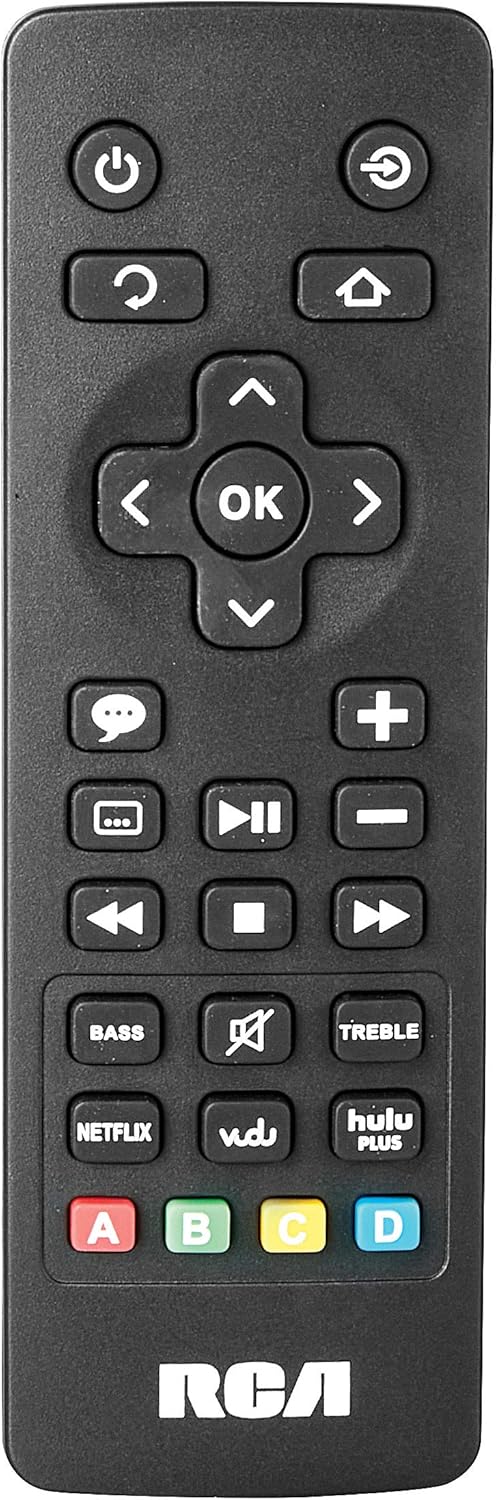
Image: The remote control for the RCA RTS736W soundbar, featuring dedicated buttons for power, volume, input selection, navigation, and direct access to streaming services like Netflix, Vudu, and Hulu Plus.
Dedicated buttons for services like Netflix, Vudu, and Hulu Plus may be available on the remote for direct access.
5. 오디오 조정
사용하세요 베이스 그리고 고음부 buttons on the remote control to fine-tune the audio output to your preference.
유지
- 청소: Disconnect the soundbar from the power outlet before cleaning. Use a soft, dry cloth to wipe the exterior surfaces. Do not use liquid cleaners or abrasive materials.
- 통풍: 사운드바의 통풍구가 막히지 않았는지 확인하세요. 적절한 공기 흐름은 과열을 방지합니다.
- 저장: 사운드바를 장기간 보관할 경우 전원을 차단하고 직사광선과 극한 온도 변화를 피해 서늘하고 건조한 곳에 보관하십시오.
문제 해결
전원이 없습니다
- 전원 어댑터가 사운드바와 작동하는 벽면 콘센트에 안전하게 연결되어 있는지 확인하세요.
- 다른 기기를 사용하여 콘센트가 제대로 작동하는지 확인하십시오.
소리가 나지 않습니다
- 사운드바에서 올바른 입력 소스가 선택되었는지 확인하십시오.
- Check all audio cable connections between the soundbar and your audio source (TV, etc.).
- Ensure the volume on both the soundbar and the connected audio source is turned up and not muted.
- If using HDMI, confirm that your TV's audio output settings are configured to send audio to the soundbar.
Streaming Issues (Buffering, Freezing)
- Check your Wi-Fi network connection. Ensure the signal strength is adequate.
- 가정용 공유기와 모뎀을 재시작하세요.
- Restart the soundbar by unplugging it from the power outlet for a few minutes, then plugging it back in.
- Ensure your internet service is active and performing correctly.
리모컨이 작동하지 않음
- 리모컨의 배터리를 교체하세요.
- 리모컨과 사운드바 센서 사이에 장애물이 없는지 확인하세요.
- 리모컨을 사운드바에 직접 대세요.
명세서
| 모델 번호 | RTS736W |
| 스피커 유형 | 사운드바 |
| 채널 | 3.0 (Left/Center/Right) |
| 연결성 | HDMI, RCA, Wi-Fi |
| 무선 기술 | 와이파이 |
| HDMI 출력 | 1080p |
| 오디오 입력 | 2x Analog Audio-in (RCA), 1x Side Line-in (3.5mm) |
| 스피커 크기 | 30 인치 |
| 최대 출력 전력 | 150 와트 |
| 임피던스 | 8옴 |
| 전원 | 코드식 전기 |
| 제품 크기(L x W x H) | 33.5 x 6.5 x 5.5 인치 |
| 품목 무게 | 5.55파운드 |
| 제조업체 | Alco Electronics Ltd. |
보증 정보
Specific warranty details for the RCA RTS736W Soundbar are typically provided with the product packaging or can be found on the official RCA web사이트. 보증 청구를 위해 구매 증빙 자료를 보관하세요.
For warranty service, contact RCA customer support with your model number and purchase date.
고객 지원
For further assistance, technical support, or service inquiries, please refer to the contact information provided in your product's original documentation or visit the official RCA support web대지.
온라인 리소스: 아마존에서 RCA 스토어를 방문하세요.
관련 문서 - RTS736W
 |
RCA Ultra HD 스마트 TV 안전 예방 조치 및 시작 가이드 RCA Ultra HD 스마트 TV에 대한 포괄적인 안전 예방 조치, 중요 지침, 액세서리 목록 및 시작 가이드(리모컨 및 배터리 정보 포함)가 들어 있습니다. |
 |
RCA RNSMU5836 58인치 4K UHD 스마트 TV 사용 설명서 RCA RNSMU5836 58인치 4K UHD 스마트 TV에 대한 종합적인 사용 설명서입니다. 최적의 사용자 경험을 위한 설정, 연결, 스마트 기능, 메뉴 옵션 및 문제 해결 방법을 다룹니다. |
 |
RCA SBT17015B 사운드바 사용 설명서 및 설치 가이드 RCA SBT17015B 사운드바의 설치, 연결, 블루투스 페어링, 오디오 조정, 안전 주의 사항 및 보증 정보를 자세히 설명하는 종합 사용자 설명서입니다. |
 |
RCA RPJ135 표준 HD 프로젝터 (Roku 스트리밍 스틱 포함) - 사용 설명서 RCA RPJ135 스탠다드 HD 프로젝터 사용 설명서입니다. 프로젝터 및 내장형 Roku 스트리밍 스틱의 설치, 작동, 문제 해결 및 보증 정보를 포함합니다. |
 |
RCA RS32H2-EU 32인치 LED HD LCD TV 사용 설명서 RCA RS32H2-EU 32인치 LED HD LCD TV의 안전 지침, 설치, 작동, 사양 및 문제 해결 방법을 모두 포함하는 종합 사용자 설명서입니다. |
 |
RCA RENO 사용 설명서 RCA RENO 스마트폰에 대한 포괄적인 사용자 가이드로, Android 10(Go 에디션)의 설정, 기능, 통신, 도구, 안전 및 유지 관리에 대한 자세한 내용을 설명합니다. |