1. 서론
This manual provides detailed instructions for the installation, operation, and maintenance of your Gewiss GW10701 Programmable Thermostat. This device is designed to control heating and air conditioning systems, allowing you to manage room temperature efficiently and comfortably. Please read this manual thoroughly before installation and use to ensure proper functionality and safety.
2. 안전 정보
부상이나 기기 손상을 방지하기 위해 항상 다음 안전 수칙을 준수하십시오.
- 설치는 해당 지역의 전기 규정 및 규정에 따라 자격을 갖춘 인력만이 수행해야 합니다.
- Disconnect power to the heating/cooling system at the main circuit breaker before installing or servicing the thermostat.
- 온도 조절 장치를 물이나 과도한 습기에 노출시키지 마십시오.
- 지정된 배터리 유형만 사용하고 설치하는 동안 올바른 극성을 확인하세요.
- Keep batteries out of reach of children. Do not dispose of batteries in fire.
- Do not attempt to open or repair the thermostat yourself. Contact qualified service personnel.
3. 제품 오버view
The Gewiss GW10701 is a wall-mounted programmable thermostat featuring an LCD display and intuitive controls for temperature management.
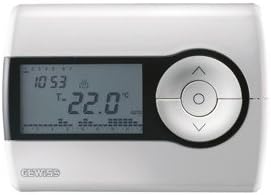
그림 1: 앞쪽 view of the Gewiss GW10701 Thermostat. It features a clear LCD screen displaying time and temperature, alongside a circular control panel with directional buttons and a central confirmation button for easy navigation and setting adjustments.
3.1. 구성 요소
- LCD 디스플레이: Shows current time, temperature, operating mode, and programming settings.
- 제어 버튼: Typically include UP/DOWN arrows for temperature adjustment, MODE button for selecting operating modes (e.g., Heat, Cool, Auto, Off), and a SET/PROG button for accessing programming menus. (Note: Specific button functions may vary slightly; refer to on-screen prompts.)
- 배터리 칸: Located on the rear or side, houses the power supply batteries.
- 장착 판 : 벽에 안전하게 설치하기 위함입니다.
4. 설치
4.1. 위치 선택
Select a central location on an interior wall, approximately 1.5 meters (5 feet) above the floor. Avoid locations near heat sources (lamps, direct sunlight, fireplaces), drafts (windows, doors), or areas with poor air circulation.
4.2. 온도 조절 장치 장착
- 전원 분리: 난방/냉방 시스템의 전원을 메인 차단기에서 끄십시오.
- 분리형 베이스 플레이트: Carefully detach the front cover of the thermostat from its base plate.
- 표시 및 연습: Hold the base plate against the wall at your chosen location. Mark the drilling points. Drill holes and insert wall anchors if necessary.
- 고정식 베이스 플레이트: Fasten the base plate to the wall using the provided screws.
- 배선(해당되는 경우): Connect the system wires to the appropriate terminals on the base plate. Refer to the wiring diagram provided with your heating/cooling system or consult a qualified electrician. Note: While the thermostat is battery-powered, it controls a 230V system. Ensure correct wiring.
- 배터리 설치: Insert the required batteries into the battery compartment, observing correct polarity (+/-).
- 온도 조절 장치 부착: Carefully reattach the thermostat front cover to the base plate, ensuring it clicks securely into place.
- 복원력 : Turn on the power to your heating/cooling system at the main circuit breaker.
5. 운영
5.1. 초기 설정
Upon first power-up or after battery replacement, you may need to set the current time and date. Follow the on-screen prompts or refer to the programming section.
5.2. 온도 설정
사용하세요 UP 그리고 아래에 arrow buttons to adjust the desired temperature. The display will show the set temperature temporarily, then revert to the current room temperature.
5.3. 작동 모드
를 누르세요 방법 button (or similar) to cycle through available operating modes:
- 열: 실내 온도가 설정 온도보다 낮아지면 온도 조절기가 난방 시스템을 작동시킵니다.
- 멋있는: The thermostat will activate the air conditioning system when the room temperature rises above the set temperature.
- 자동 : 온도 조절기는 설정된 온도 범위를 유지하기 위해 난방과 냉방을 자동으로 전환합니다.
- OFF : 난방 및 냉방 시스템이 꺼져 있습니다.
6. 프로그래밍
The Gewiss GW10701 allows you to create custom heating/cooling schedules for different times of the day and days of the week. This feature helps optimize energy consumption and comfort.
6.1. 시간 및 날짜 설정
- 를 누르세요 세트 or 음식물 버튼을 눌러 설정 메뉴로 들어갑니다.
- Navigate using the arrow buttons to find "Time" or "Date" settings.
- Use the arrow buttons to adjust the values (hour, minute, day, month, year).
- Confirm each setting with the 세트 or central button.
6.2. Creating a Program Schedule
The thermostat typically offers daily or weekly programming options. You can set different temperatures for various periods (e.g., Wake, Day, Evening, Sleep).
- 를 누르세요 음식물 버튼을 눌러 프로그래밍 모드로 들어갑니다.
- 원하는 요일 또는 요일 그룹을 선택하세요(예: 월-금, 토-일 또는 개별 요일).
- For each period (e.g., "Wake"), set the desired start time and temperature using the arrow buttons.
- Advance to the next period and repeat the process.
- Save your program and exit programming mode.
Consult the on-screen menu and specific button labels on your device for precise programming steps, as interfaces can vary.
7. 유지관리
7.1. 배터리 교체
The thermostat is powered by batteries. When the battery indicator appears on the display, replace the batteries promptly to ensure continuous operation. Typically, 2x AA or AAA alkaline batteries are required.
- 온도 조절기의 앞면 덮개를 조심스럽게 제거하십시오.
- 오래된 배터리를 제거하고 책임감 있게 폐기하십시오.
- 새 배터리를 삽입하고 극성이 올바른지 확인하십시오.
- 전면 덮개를 다시 부착합니다.
7.2. 청소
Clean the thermostat's exterior with a soft, dry cloth. Do not use abrasive cleaners, solvents, or spray cleaners directly onto the device, as this can damage the display or internal components.
8. 문제 해결
| 문제 | 가능한 원인 | 해결책 |
|---|---|---|
| 디스플레이가 비어 있거나 어둡습니다. | 배터리가 부족하거나 방전되었습니다. | 배터리를 새것으로 교체하세요. |
| 난방/냉방 시스템이 응답하지 않습니다. |
|
|
| 온도 측정값이 부정확한 것 같습니다. | 온도 조절 장치의 위치가 통풍이나 열원의 영향을 받습니다. | Ensure thermostat is not exposed to direct sunlight, drafts, or heat-emitting appliances. |
9. 사양
- 제조업체: 게비스
- 모델 번호: GW10701 (Chorus)
- 치수(길이 x 너비 x 높이): 13 x 2.3 x 9.2cm
- 무게: 9.07g
- 색상: 하얀색
- 재료: 플라스틱
- 전원 공급 장치: 배터리 구동
- 스위칭 볼륨tage: 230 Volt (for controlled system)
- 디스플레이 유형: LCD 또는 LED
- 장착 유형: 벽걸이형
- 제어 기능: Programmable, Button control
- 용법: Heating systems, Air conditioning systems
10. 보증 및 지원
For warranty information, technical support, or service inquiries regarding your Gewiss GW10701 Thermostat, please refer to the warranty card included with your product or visit the official Gewiss website. You may also contact your local Gewiss distributor or retailer for assistance.
Gewiss Official Web대지: www.gewiss.com


