1. 서론
This manual provides essential instructions for the safe and effective use of your OKI C822 Magenta Toner Cartridge. Please read this manual thoroughly before installation and retain it for future reference. Proper installation and handling ensure optimal print quality and cartridge longevity.
2. 안전 정보
- 토너 카트리지는 어린이의 손이 닿지 않는 곳에 보관하십시오.
- Do not attempt to open, disassemble, or modify the toner cartridge. Toner powder can be harmful if inhaled or ingested.
- 토너 가루와 직접 접촉하지 않도록 하십시오. 만약 접촉했을 경우에는 비누와 물로 깨끗이 씻어내십시오.
- 카트리지는 원래 포장 상태로 서늘하고 건조한 곳에 직사광선과 극한 온도 변화를 피해 보관하십시오.
- Dispose of used cartridges according to local environmental regulations.
3. 설정 및 설치
Follow these steps to correctly install the OKI C822 Magenta Toner Cartridge into your compatible OKI printer.
3.1 카트리지 개봉
- 새 토너 카트리지를 포장에서 조심스럽게 꺼내십시오.
- Avoid touching the green drum surface or electrical contacts on the cartridge.
- 카트리지를 수평으로 여러 번 가볍게 흔들어 토너가 내부에 고르게 분포되도록 합니다.
3.2 프린터 준비
- 프린터 전원이 켜져 있는지 확인하십시오.
- Open the front cover or access panel of your printer to expose the toner cartridge slots. Refer to your printer's specific manual for exact instructions on accessing the toner area.
- Locate the magenta toner slot.
3.3 카트리지 설치
- Remove any protective covers or seals from the new toner cartridge as indicated on the cartridge itself.
- Align the new magenta toner cartridge with the corresponding slot in the printer.
- Gently slide the cartridge into the slot until it clicks securely into place. Do not force the cartridge.
- Close the printer's front cover or access panel. The printer will typically perform a self-test or calibration after installation.
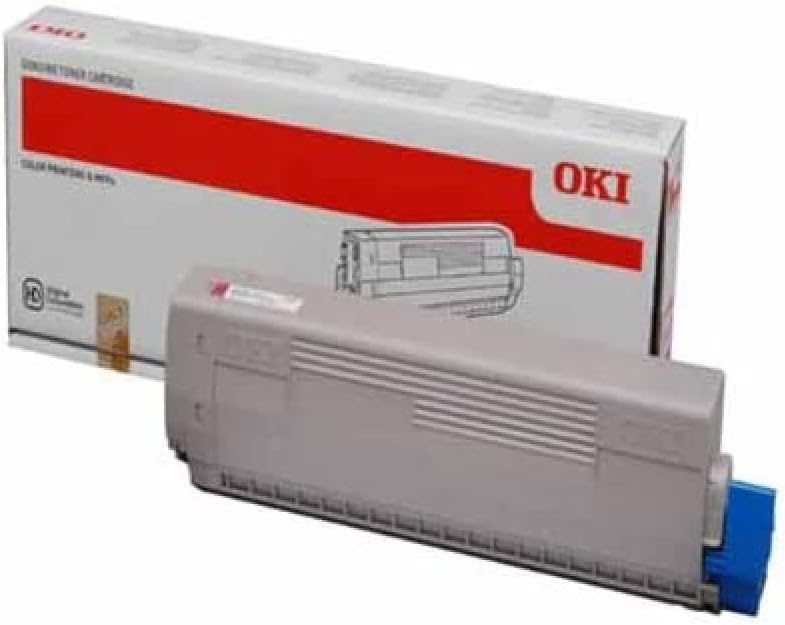
이미지 1: OKI C822 Magenta Toner Cartridge. This image displays the OKI C822 Magenta Toner Cartridge alongside its retail packaging. The cartridge is gray with a blue end cap, and the box is white with a prominent red band and the 'OKI' logo.
4. 사용 설명서
Once the toner cartridge is installed, your printer is ready for use. The printer's control panel or software will indicate toner levels and any necessary actions.
- 인쇄 품질: For best results, use genuine OKI paper and ensure printer settings are appropriate for your document type.
- 토너 잔량 모니터링: Monitor toner levels through your printer's utility software or control panel. Replace the cartridge when the printer indicates low toner or print quality degrades significantly.
- Print Yield: The cartridge is designed to provide a specific page yield under standard printing conditions. Actual yield may vary based on print content, paper type, and environmental factors.
5. 유지관리
Proper maintenance ensures consistent performance and extends the life of your printer and toner cartridge.
- 저장: Store unused toner cartridges in their sealed packaging in a cool, dark, and dry environment. Avoid exposure to direct sunlight or extreme temperatures.
- 손질: Always handle cartridges carefully to prevent damage. Do not shake or drop them excessively.
- 처분: When the cartridge is empty, remove it from the printer and place it in a sealed bag to prevent toner leakage. Recycle the cartridge through an authorized OKI recycling program or local electronic waste disposal facilities. Do not incinerate used cartridges.
6. 문제 해결
If you encounter issues after installing your toner cartridge, refer to the following common problems and solutions.
- Poor Print Quality (Faded, Streaky, or Incomplete Prints):
- Gently remove the cartridge and rock it horizontally a few times to redistribute toner. Reinstall it.
- Check the printer's toner level indicator. The cartridge may be nearing its end of life.
- Ensure the printer's print settings are appropriate for the document and paper type.
- Clean the printer's drum unit or fuser unit if recommended by your printer's manual.
- 카트리지가 인식되지 않음:
- Remove the cartridge and check for any protective seals or tapes that may not have been fully removed.
- Ensure the cartridge is seated correctly and clicks into place.
- Turn the printer off, wait 30 seconds, then turn it back on.
- Inspect the electrical contacts on the cartridge and in the printer for any debris or damage.
- 토너 누출:
- If toner is leaking, carefully remove the cartridge, place it in a plastic bag, and contact OKI support or your supplier.
7. 사양
Key specifications for the OKI C822 Magenta Toner Cartridge (OEM: 44844614).
| 특징 | 세부 사항 |
|---|---|
| 상표 | 오키 |
| 모델 번호 | 44844614 |
| 제조업체 부품 번호 | 1784193 |
| 색상 | Magenta (Ink Color: Pink) |
| 페이지 수율 | 약 1200페이지 |
| 품목 무게 | 1.32파운드(600그램) |
| 제품 치수 | 0.17 x 0.06 x 0.03 인치 |
| 포함된 구성 요소 | 토너 카트리지 |
| 호환 장치 | Printer (OKI C822 series) |
8. 보증 및 지원
OKI toner cartridges are manufactured to high-quality standards. For information regarding product warranty, please refer to the official OKI website or the warranty documentation included with your printer.
For technical support, troubleshooting assistance, or to inquire about recycling programs, please contact OKI customer service through their official website or the contact information provided with your printer documentation.
OKI Official Web대지: www.오키닷컴


