1. 서론
The Genius GX-Gaming SW-G2.1 3000 is a 2.1 channel speaker system designed to enhance audio experiences for gaming, music, and movies. It features a powerful subwoofer for deep bass and two satellite speakers for clear mid and high-range sounds. The system includes a dedicated control box for convenient adjustments and multiple input options for various devices.
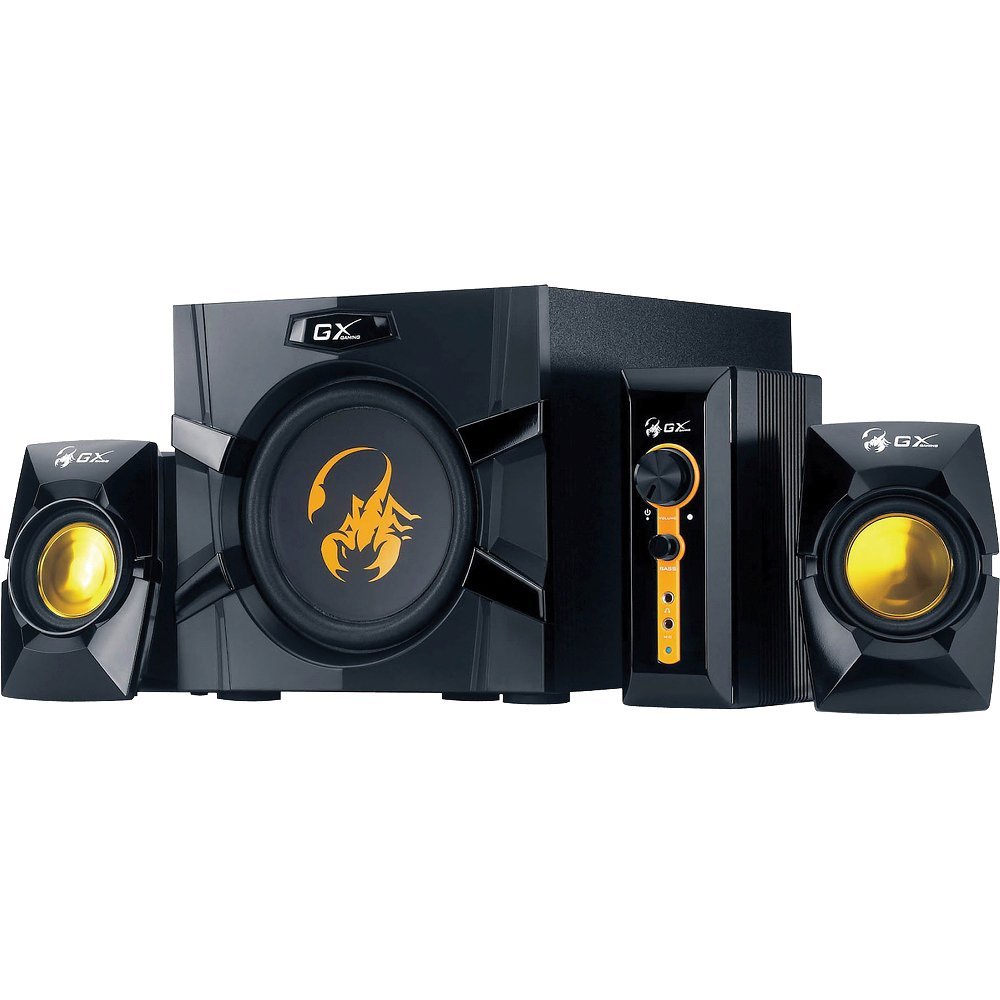
An image showing the Genius GX-Gaming SW-G2.1 3000 speaker system, featuring the subwoofer, two satellite speakers, and the control unit.
2. 패키지 내용
아래 나열된 모든 품목이 패키지에 포함되어 있는지 확인하세요.
- One (1) Wooden Cabinet Subwoofer
- 위성 스피커 2개
- One (1) Control Box
- One (1) Stereo RCA to 3.5mm Audio Cable
- One (1) 3.5mm Plug Audio Cable
- One (1) Microphone Jack Cable
- One (1) Headphone Jack Cable
- One (1) Multi-language User Manual
3. 제품 특징
- 총 출력 전력 : 70와트(RMS)
- 서브 우퍼 : Wooden cabinet with a 6.5-inch driver for deep bass
- 위성 스피커: Two curvaceous speakers with 3-inch metal drivers for clear mid and high tones
- 제어기: Independent controls for volume and bass adjustment
- 연결성: Two input jacks (3.5mm standard and two RCA) for PC, TV, DVD, and game devices
- 오디오 잭: Dedicated microphone jack for online communication and headphone jack for private listening
- 주파수 응답: 35 Hz ~ 20K Hz
- 신호 대 잡음비 : 85데시벨
- 절전 모드: Automatically enters sleep mode after 1 minute of inactivity. To resume, ensure audio input device volume is at least 50%.
4. 설정 지침
- 스피커 위치: Place the subwoofer on a stable surface, preferably on the floor, for optimal bass. Position the satellite speakers on either side of your listening area, facing you.
- 위성 스피커 연결: Connect the cables from the two satellite speakers to the corresponding output ports on the subwoofer.
- 연결 제어 박스: Plug the control box cable into the designated port on the subwoofer.
- 오디오 소스 연결:
- For PC, MP3/CD players: Use the 3.5mm audio cable to connect your device's audio output to the 3.5mm input on the control box.
- For Game Consoles, DVD Players, TV: Use the stereo RCA to 3.5mm cable. Connect the RCA ends to your device's audio output and the 3.5mm end to the corresponding input on the control box.
- 전원 연결: Plug the subwoofer's power cord into a standard electrical outlet (110V or 220V AC, depending on your region).
- 전원 켜기: Turn on the power switch, usually located on the subwoofer. The system is now ready for use.
5. 사용 설명서
- 볼륨 조절: Use the large knob on the control box to adjust the overall volume of the speaker system.
- 베이스 컨트롤: Use the dedicated bass knob on the control box to increase or decrease the subwoofer's bass output.
- 마이크 사용법: Connect a microphone to the MIC jack on the control box for online communication.
- 헤드폰 사용법: Plug your headphones into the headphone jack on the control box for private listening. This will mute the speakers.
- 절전 모드: If the system enters sleep mode due to inactivity, ensure your audio input device's volume is set to 50% or higher, then adjust the system's volume using the control box to resume audio.
6. 유지관리
- 청소: Use a soft, dry cloth to clean the surfaces of the speakers and control box. Avoid using liquid cleaners or abrasive materials.
- 놓기: 스피커를 직사광선, 열원 및 과도한 습기로부터 멀리하십시오. 서브우퍼 주변에 적절한 환기가 이루어지도록 하십시오.
- 케이블 관리 : Ensure all cables are securely connected and not tangled or pinched to prevent damage.
- 저장: 시스템을 장기간 보관할 경우 전원을 차단하고 서늘하고 건조한 곳에 보관하십시오.
7. 문제 해결
- 소리 없음:
- Ensure the power cable is securely plugged in and the power switch is on.
- Check all audio cables are correctly connected between the source device, control box, and subwoofer.
- Verify the volume knob on the control box is turned up.
- Ensure the audio source device (PC, TV, etc.) is playing audio and its volume is not muted or too low.
- If in Power Saving Mode, increase the audio source device's volume to at least 50%.
- 왜곡된 소리:
- Reduce the volume on both the speaker system and the audio source device.
- Adjust the bass level on the control box.
- 스피커 케이블이 손상되었거나 연결이 헐거워지지 않았는지 확인하십시오.
- 스피커 하나가 작동하지 않습니다.
- 작동하지 않는 위성 스피커와 서브우퍼의 연결 상태를 확인하십시오.
- Test with another audio source or swap the satellite speaker connections (if possible) to isolate the issue.
8. 기술 사양
| 총 출력 전력 | 70와트(RMS) |
| Satellite Power | 2 x 15W |
| 서브우퍼 전원 | 40 와트 |
| 드라이버 유닛 | Satellites: 2 x 3 inches, Subwoofer: 1 x 6.5 inches |
| 주파수 응답 | 35 Hz ~ 20K Hz |
| 신호 대 잡음 비율 | 85데시벨 |
| 서브우퍼 크기(WxHxD) | 230 x 314 x 215mm(약 9 x 12.4 x 8.5인치) |
| 위성 크기(가로x세로x깊이) | 99 x 115 x 143mm |
| Controller Dimensions (WxHxD) | 60 x 154 x 170mm |
| 시스템 무게 | 4.66kg(약 10.27파운드) |
| 전원 | 110V 또는 220V AC |
| 호환 장치 | Personal Computer, Television, DVD Players, Game Consoles, MP3/CD players |
| 입력 잭 | 3.5mm standard input, two RCA jacks |
| 제어 방법 | Knobs/Buttons (listed as 'Touch' in some specifications) |
9. 보증 및 지원
This Genius GX-Gaming SW-G2.1 3000 speaker system comes with a 한정 보증. For specific details regarding warranty coverage, duration, and terms, please refer to the warranty card included in your product packaging or visit the official Genius web대지.
For technical support, troubleshooting assistance, or service inquiries, please contact Genius customer support through their official website or the contact information provided in your product documentation. When contacting support, please have your product model number (SW-G2.1 3000) and purchase information readily available.


