1. 서론
This manual provides essential information for the safe and efficient operation of your Cen-Tech 750W Continuous/1500W Peak Power Inverter. This device converts 12V DC battery power into 115V AC household power, allowing you to operate various electronics and small appliances from your vehicle or other 12V power sources. Please read this manual thoroughly before installation and use, and retain it for future reference.
2. 중요한 안전 정보
경고: Failure to follow these instructions may result in electric shock, fire, serious injury, or death. Always exercise extreme caution when working with electrical equipment.
- 감전 위험: 인버터 c를 열지 마십시오.asing. There are no user-serviceable parts inside. Contact qualified service personnel for repairs.
- 화재 위험: 가연성 물질, 가스 또는 증기 근처에서 인버터를 작동하지 마십시오. 인버터 주변에 충분한 환기가 이루어지도록 하십시오.
- 적절한 환기: The inverter generates heat during operation. Ensure it is placed in a well-ventilated area, away from direct sunlight or heat sources.
- 올바른 극성: Always connect the inverter to a 12V DC battery with the correct polarity (red to positive, black to negative). Incorrect connection can damage the inverter and battery.
- 과부하 보호: Do not exceed the inverter's continuous power rating (750W) or peak power rating (1500W). Overloading can cause damage and fire.
- 수분 노출: Do not expose the inverter to rain, moisture, or water. This can cause electric shock or damage.
- 어린이와 애완동물: 인버터를 어린이와 반려동물의 손이 닿지 않는 곳에 보관하십시오.
- 의료 기기: This inverter is not designed for use with life-support systems or other medical devices.
3. 제품 특징
The Cen-Tech 750W Power Inverter is designed for reliable performance and includes the following key features:
- 지속적인 힘: Provides up to 750 watts of continuous power.
- 피크 파워 : Capable of handling up to 1500 watts for starting products with high surge requirements.
- 수정된 사인파 출력: Efficiently converts 12V DC to 115V AC with up to 87% efficiency.
- 여러 콘센트: Features two 115V AC power outlets for connecting various devices.
- USB 충전 포트 : Includes a 5V/500mA USB port for charging compatible devices.
- 종합 보호: Built-in safeguards against low/high voltage, low/high temperatures, low/high currents, short circuits, and overloads.
- 쉬운 연결: Comes with heavy-duty input cables equipped with alligator clips for direct battery connection.
- 상태 표시기: An LED indicator light provides operational status.
4. 패키지 내용
다음 품목이 패키지에 포함되어 있는지 확인하세요.
- Cen-Tech 750W Continuous/1500W Peak Power Inverter
- Heavy-duty input cables with alligator clips
- 사용 설명서 (본 문서)
5. 설정 및 설치
Follow these steps to properly set up your power inverter:
- 위치를 선택하세요: 인버터는 건조하고 통풍이 잘 되는 곳에 설치하십시오. 직사광선, 열원 및 인화성 물질로부터 멀리 떨어진 곳에 설치해야 합니다. 인버터는 안정적이고 평평한 표면에 놓아야 합니다.
- 배터리 준비: Ensure the 12V DC battery is fully charged and in good condition. Turn off any loads connected to the battery.
- Connect Input Cables:
- 연결하다 빨간색 alligator clip cable to the 긍정적인 (+) 12V 배터리의 단자.
- 연결하다 검은색 alligator clip cable to the 네거티브(-) 12V 배터리의 단자.
중요한: Ensure connections are secure and correct polarity is observed to prevent damage to the inverter or battery. A loose connection can cause overheating.
- 전원 켜기: Once the battery connections are secure, turn on the inverter using its power switch (if applicable). The LED indicator light should illuminate.
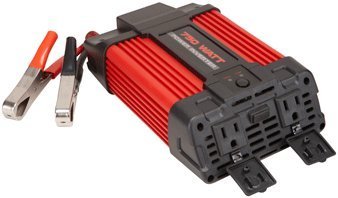
Image 1: Cen-Tech 750W Power Inverter connected to a 12V battery using the provided alligator clips. The image shows the compact design and the input/output ports.
6. 사용 설명서
After successful setup, you can begin using your power inverter:
- 인버터를 켜세요: Ensure the inverter's power switch is in the "ON" position. The LED indicator should confirm it is powered.
- AC 기기를 연결하세요: 115V AC 기기를 인버터의 AC 콘센트에 연결하세요. 총 전력량을 확인하세요.tage of all connected devices does not exceed 750 watts continuously or 1500 watts peak.
- USB 장치 연결: For charging USB-powered devices, plug them into the 5V/500mA USB port.
- 배터리 수준 모니터링: Keep an eye on your 12V battery's charge level. Prolonged use can drain the battery. The inverter has low voltage protection and will shut down if the battery voltage가 너무 낮게 떨어집니다.
- 전원 끄기 : When finished, first disconnect all AC and USB devices from the inverter. Then, turn off the inverter's power switch. Finally, disconnect the alligator clips from the battery, starting with the black (negative) clip, then the red (positive) clip.
메모: Some sensitive electronic devices may not operate correctly with a modified sine wave inverter. Consult your device's manufacturer for compatibility if issues arise.
7. 유지관리
정기적인 유지보수는 인버터의 최적 성능과 수명 연장을 보장합니다.
- 청소: Keep the inverter clean and free of dust and debris. Use a dry cloth to wipe the exterior. Do not use liquid cleaners.
- 통풍: Periodically check that the ventilation openings are not blocked. Clear any obstructions to ensure proper airflow.
- 케이블 연결: Regularly inspect the input cables and alligator clips for any signs of wear, damage, or corrosion. Ensure connections remain tight and secure.
- 저장: When not in use for extended periods, store the inverter in a cool, dry place, away from direct sunlight and extreme temperatures. Disconnect it completely from the battery.
8. 문제 해결
인버터에 문제가 발생하면 다음의 일반적인 문제와 해결 방법을 참조하세요.
| 문제 | 가능한 원인 | 해결책 |
|---|---|---|
| 전원 출력 없음 / 인버터가 켜지지 않음 |
|
|
| 인버터가 예기치 않게 꺼졌습니다 |
|
|
| AC devices not working correctly |
|
|
9. 사양
| 특징 | 세부 사항 |
|---|---|
| 모델 번호 | CT-750-12 |
| 연속 전력 | 750 와트 |
| 피크 파워 | 1500 와트 |
| 입력 Voltage | 12V 직류 |
| 출력 볼륨tage | 115V 교류 |
| 출력파형 | 수정된 사인파 |
| 능률 | 최대 87% |
| AC 콘센트 | 2 |
| USB 포트 | 5V / 500mA |
| 보호 기능 | 저/고볼륨tage, Low/High Temperature, Low/High Current, Short Circuit, Overload |
| 품목 무게 | 2.11파운드 |
| 크기(대략) | 제공된 데이터에 명시되지 않음 |
10. 보증 및 지원
Information regarding product warranty and customer support was not provided in the available product data. For warranty details or technical assistance, please refer to the product packaging or contact the manufacturer directly.


