1. 서론
This manual provides essential information for the safe and efficient installation, operation, and maintenance of your Antec MT-352 Micro ATX Power Supply. Please read this manual thoroughly before installation and retain it for future reference. The Antec MT-352 is a 350W Micro ATX power supply designed for personal computer systems, offering 88% efficiency and compatibility with 110V AC and 220V AC input voltag에스.
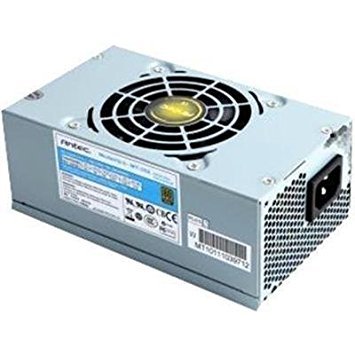
Figure 1: Antec MT-352 Micro ATX Power Supply unit.
2. 안전 정보
부상 및 장비 손상을 방지하기 위해 항상 다음 안전 수칙을 준수하십시오.
- 전기적 위험: 전원 공급 장치를 열지 마십시오. 고전압tages are present inside, even when the system is turned off and unplugged. There are no user-serviceable parts inside.
- 전원 차단: Always disconnect the power cord from the wall outlet before installing, removing, or servicing the power supply or any other system components.
- 적절한 접지: Ensure your system is properly grounded. Use only the power cord provided with the unit or a suitable replacement that meets local safety standards.
- 통풍: 전원 공급 장치 주변에 적절한 공기 흐름이 확보되도록 하십시오. 통풍구를 막지 마십시오.
- Moisture and Temperature: Do not operate the power supply in high humidity environments or near water. Avoid extreme temperatures.
- 과부하 : 정격 와트 수를 초과하여 전원 공급 장치에 과부하를 걸지 마십시오.tage.
3. 패키지 내용
Verify that all items are present in your Antec MT-352 package:
- Antec MT-352 Micro ATX Power Supply Unit
- AC 전원 코드
- 장착 나사
- 사용 설명서 (본 문서)
4. 설정 및 설치
Follow these steps carefully to install your Antec MT-352 power supply:
- 준비: Turn off your computer and disconnect the power cord from the wall outlet. Open your computer case. If replacing an existing power supply, disconnect all cables from the old PSU and remove it.
- PSU 장착: Carefully slide the Antec MT-352 into the power supply bay of your Micro ATX case. Ensure the fan faces the correct direction for optimal airflow (typically facing downwards or towards the rear vent, depending on case design). Secure the power supply to the case using the provided mounting screws. (An image showing the PSU being mounted into a case would be helpful here.)
- Connecting the Motherboard:
- 20+4 Pin ATX Connector: Connect the main 20+4 pin ATX power connector to the corresponding socket on your motherboard. Ensure both parts of the connector are securely latched. (An image illustrating the 20+4 pin ATX connector connection would be helpful here.)
- 4-Pin ATX 12V (CPU) Connector: Connect the 4-pin ATX 12V connector to the CPU power socket on your motherboard. This is usually located near the CPU socket. (An image showing the 4-pin ATX 12V connector connection would be helpful here.)
- 주변 장치 연결: Connect the SATA power connectors to your hard drives, SSDs, and optical drives. Use the 4-pin Molex connectors for older peripherals or case fans if needed. Ensure all connections are firm. (An image demonstrating SATA and Molex connections would be helpful here.)
- 케이블 관리 : 공기 흐름과 미관을 개선하기 위해 케이블을 깔끔하게 정리하십시오. 필요한 경우 케이블 타이를 사용하십시오.
- 최종 점검: 모든 연결이 제대로 되었는지 다시 한번 확인하십시오. 컴퓨터 케이스를 닫으십시오.
5. 운영
설치가 완료되면 다음 단계를 따라 시스템을 작동하십시오.
- 전원 연결: Plug the AC power cord into the power supply's AC inlet and then into a grounded wall outlet.
- 전원 켜기: Press the power button on your computer case. The system should boot up normally.
- 전원 끄기 : To turn off your system, use the operating system's shutdown procedure. For a hard shutdown, press and hold the power button on your case for several seconds. Always ensure the system is fully shut down before disconnecting the power cord.
6. 유지관리
적절한 유지 관리는 전원 공급 장치의 수명 연장과 최적의 성능을 보장합니다.
- 먼지 제거: Periodically clean the power supply's fan and vents to prevent dust buildup, which can impede airflow and cause overheating. Use compressed air to gently blow dust out of the unit. Ensure the system is powered off and unplugged before cleaning.
- 공기 흐름: Ensure that your computer case has good airflow. Avoid placing the computer in enclosed spaces that restrict ventilation.
- 케이블 관리 : Maintain tidy cable routing to prevent obstruction of airflow within the case.
7. 문제 해결
If you encounter issues with your Antec MT-352 power supply, refer to the following common problems and solutions:
| 문제 | 가능한 원인 | 해결책 |
|---|---|---|
| 시스템 전원이 켜지지 않습니다. | 전원 케이블이 헐거워졌거나, 파워서플라이 스위치가 꺼져 있거나, 부품에 결함이 있을 수 있습니다. | Check AC power cord connection. Ensure PSU switch (if present) is ON. Verify all internal power connectors are secure. Test with a different power outlet. |
| 시스템 전원이 켜지지만 바로 꺼집니다. | Overload, short circuit, overheating, faulty component. | Disconnect non-essential peripherals to check for overload. Inspect for any loose screws or components causing a short. Ensure adequate ventilation. |
| 파워서플라이에서 이상한 소음이 납니다. | Fan obstruction, faulty fan bearing. | Power off and unplug the system. Carefully inspect the fan for obstructions (e.g., loose cables). If noise persists, contact support. |
| System instability or random reboots. | Insufficient power, faulty PSU, other component issues. | Ensure your system's power requirements do not exceed 350W. Check for other faulty components (RAM, GPU). |
If troubleshooting steps do not resolve the issue, contact Antec customer support for further assistance.
8. 사양
The following are the technical specifications for the Antec MT-352 Micro ATX Power Supply:
- 모델: MT-352
- 폼 팩터: 마이크로 ATX
- 출력 와트tage: 350 와트
- 능률: 88%
- 입력 Voltage: 110V AC - 220V AC (Minimum Input Voltage: 110 Volts, Maximum Input Voltage: 220볼트)
- 냉각 방식: 공기
- 커넥터 유형: ATX (20+4 Pin, 4-Pin ATX 12V, SATA, Molex)
- 호환 장치: 개인용 컴퓨터
- 품목 무게: 3.1파운드(약 1.4kg)
- 제조업체: 안텍
- ASIN: B0065OD10G
- 첫 이용 가능 날짜: 10년 2011월 XNUMX일
9. 보증 및 지원
Antec 제품은 제조업체 보증이 적용됩니다. 구체적인 보증 조건은 제품에 동봉된 보증 카드를 참조하거나 Antec 공식 웹사이트를 방문하십시오. web사이트. 보증 청구를 위해 구매 증빙 자료를 보관하세요.
For technical support, troubleshooting assistance, or warranty inquiries, please contact Antec customer service through their official web사이트 또는 제품 포장에 제공된 연락처 정보를 참조하세요.
참고: 제공된 데이터에서 임베드 가능한 공식 제품 동영상을 찾을 수 없었습니다.


