1. 서론
The ZIPRO Treadmill (Model 5941329 L) is a versatile and compact fitness machine designed for home use, offering a comprehensive range of features for effective cardiovascular training, jogging, and walking. Its foldable design makes it ideal for small spaces, allowing for easy storage when not in use.
This treadmill is equipped with a powerful 1.96 HP motor, providing a speed range of 1 to 16 km/h. It features 12 adjustable incline levels to increase workout intensity and engage different muscle groups. The integrated LED display and heart rate sensors provide real-time data on time, speed, distance, calories burned, and heart rate, helping you monitor your progress effectively.
For an enhanced training experience, the treadmill supports connectivity with compatible fitness applications like Kinomap and FitShow, allowing for interactive workouts and data tracking. It also includes a smartphone holder, MP3 function, and built-in speakers for entertainment during your exercise sessions. Designed with user comfort in mind, it features a spacious running surface (45 x 125 cm) and a joint-friendly cushioning system to minimize impact.

Image: The ZIPRO Treadmill in an unfolded state, with a user actively running on it. A smartphone with fitness app icons is shown in the background, highlighting the app connectivity feature.
2. 안전 정보
런닝머신을 사용하기 전에 모든 지침을 주의 깊게 읽어 주십시오. 나중에 참조할 수 있도록 이 설명서를 보관하십시오.
- 최대 중량 용량: Do not exceed the maximum user weight of 130 kg (286 lbs). Exceeding this limit can cause damage to the treadmill and lead to injury.
- 놓기: Place the treadmill on a flat, stable surface. Ensure there is at least 2 meters (6.5 feet) of clear space behind the treadmill and 0.6 meters (2 feet) on each side.
- 전원 연결: Connect the treadmill to a grounded electrical outlet. Do not use extension cords or adapters.
- 안전 열쇠: Always attach the safety key clip to your clothing before starting the treadmill. In case of an emergency or if you fall, the safety key will detach, immediately stopping the machine.
- 어린이와 애완동물: Keep children and pets away from the treadmill, especially when it is in operation. This equipment is not a toy.
- 건강 상태: 운동 프로그램을 시작하기 전에, 특히 기존 질환이 있는 경우에는 의사와 상담하십시오.
- 적절한 복장: Wear appropriate athletic footwear and clothing that will not get caught in the moving parts of the treadmill.
- 유지: Perform regular maintenance as described in this manual to ensure safe and optimal operation.

Image: A user exercising on the ZIPRO treadmill, illustrating the safe and versatile training environment provided by the machine, including its adjustable speed range.
3. 패키지 내용
Upon unpacking, please verify that all the following components are included in your package:
- ZIPRO Treadmill (Main Unit)
- 사용 설명서 (본 문서)
- 조립 및 유지보수용 공구 키트
- Lubricant for treadmill belt maintenance
- 안전 키
- 전원 코드
부품이 누락되었거나 손상된 경우 즉시 고객 지원팀에 문의하세요.
4. 설치 및 조립
The ZIPRO Treadmill is designed for minimal assembly. Follow these steps for initial setup:
4.1 러닝머신 펼치기
- 러닝머신을 포장에서 조심스럽게 꺼내세요.
- 러닝머신을 평평하고 수평인 표면에 놓으세요.
- Lift the console/handlebar assembly until it locks into the upright position. Ensure it is securely locked before proceeding.
- Lower the running deck gently until it rests flat on the floor.
4.2 전원 연결
Plug the power cord into the treadmill's power input, then into a grounded electrical outlet. Ensure the power switch (usually located near the power cord input) is in the 'ON' position.
4.3 보관을 위한 접기
런닝머신을 접어서 보관하려면:
- 런닝머신이 꺼져 있고 플러그가 뽑혀 있는지 확인하세요.
- Carefully lift the running deck until it clicks into the vertical locked position.
- The treadmill can then be moved using the transport wheels and stored vertically, requiring minimal space (approx. 31.5 cm high when folded flat, or 150 cm high when stored vertically).

Image: A user demonstrating the folding mechanism of the ZIPRO treadmill, highlighting its compact design and ease of vertical storage to save space.
5. 사용 설명서
5.1 제어판 이상view
The treadmill features an intuitive LED display and control buttons on the console and handlebars. The display shows key metrics such as time, speed, distance, calories, and heart rate.
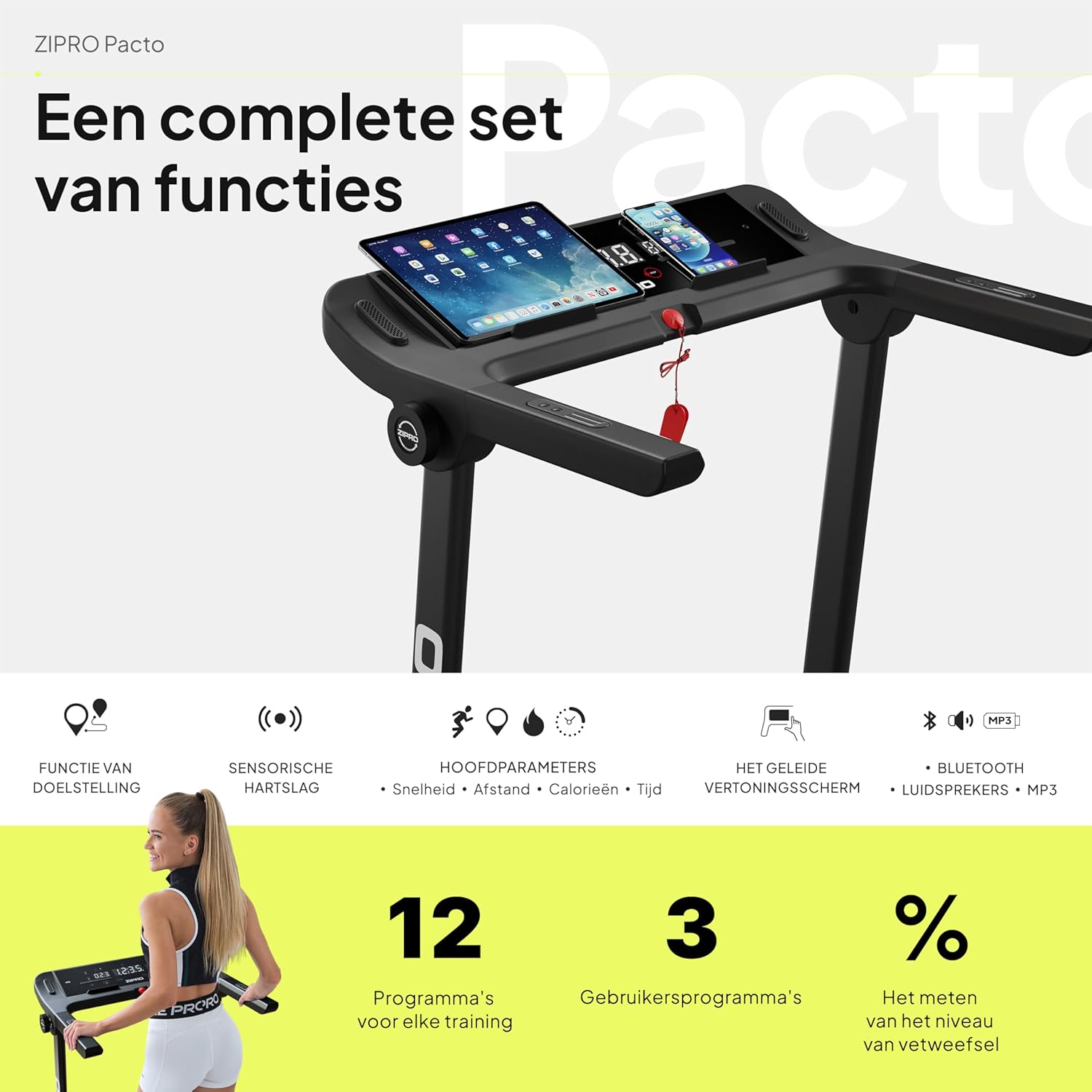
이미지: 자세한 view of the ZIPRO treadmill's control panel, featuring a tablet and smartphone in their respective holders, illustrating the comprehensive set of functions available.
5.2 운동 시작하기
- 안전 키가 콘솔과 옷에 제대로 부착되어 있는지 확인하십시오.
- Press the 'START' button. The treadmill will typically begin with a short countdown before the belt starts moving at a low speed.
5.3 속도 및 경사 조절
- 속도: Use the '+' and '-' buttons on the console or handlebars to adjust the speed from 1 km/h to 16 km/h. Quick speed buttons (e.g., 3, 6, 9, 12 km/h) may also be available for rapid adjustments.
- 경사: Use the 'INCLINE +' and '-' buttons to adjust the incline level. The treadmill offers 12 adjustable incline levels to simulate uphill walking or running.
5.4 사전 설정 프로그램 사용
The treadmill comes with 12 pre-set workout programs and 3 customizable user programs. Refer to the specific program section in your detailed manual for instructions on selecting and using these programs.
5.5 심박수 모니터링
Grasp the heart rate sensors on the handlebars to display your current heart rate on the LED screen. For accurate readings, ensure your hands are clean and firmly placed on the sensors.
5.6 App Connectivity (Kinomap & FitShow)
Enhance your workout experience by connecting your smartphone or tablet to the treadmill via Bluetooth and using compatible fitness apps like Kinomap and FitShow. These apps offer interactive training, virtual routes, and detailed workout tracking.
- Download the Kinomap or FitShow app from your device's app store.
- 기기에서 Bluetooth를 활성화하세요.
- Open the app and follow the on-screen instructions to connect to your ZIPRO treadmill.

Image: A smartphone displaying the logos for Kinomap and FitShow applications, illustrating the treadmill's compatibility with these popular fitness apps for interactive training.
5.7 MP3 Function and Speakers
Connect your audio device to the treadmill's MP3 input to play music through the built-in speakers, making your workouts more enjoyable.
5.8 운동 중단
Press the 'STOP' button to gradually slow down and stop the treadmill belt. Alternatively, pulling the safety key will immediately stop the treadmill.
6. 유지관리
Regular maintenance is crucial for the longevity and optimal performance of your ZIPRO treadmill.
6.1 청소
- 콘솔과 기타 표면을 부드러운 천으로 닦으십시오.amp 사용 후에는 천으로 닦아 땀과 먼지를 제거하세요.
- 연마성 세제나 용제는 마감재를 손상시킬 수 있으므로 사용하지 마십시오.
- Vacuum underneath the treadmill regularly to prevent dust and debris from accumulating.
6.2 벨트 윤활
The running belt requires periodic lubrication to reduce friction and extend its lifespan. Use the provided lubricant or a silicone-based treadmill lubricant.
- 런닝머신을 끄고 플러그를 뽑으세요.
- 벨트를 들어 올리려면 뒤쪽 롤러 볼트를 약간 풀어주세요.
- Apply a thin line of lubricant evenly under the center of the belt.
- 뒷쪽 롤러 볼트를 조이세요.
- Run the treadmill at a low speed (e.g., 3 km/h) for a few minutes to distribute the lubricant.
Frequency of lubrication depends on usage: every 3-6 months for moderate use, or more frequently for heavy use.
6.3 벨트 장력 및 정렬
Check the belt tension and alignment periodically. If the belt slips or drifts to one side, adjust the rear roller bolts using the tool kit provided. Refer to the detailed manual for precise adjustment instructions.
7. 문제 해결
This section addresses common issues you might encounter with your treadmill. If the problem persists, please contact customer support.
| 문제 | 가능한 원인 | 해결책 |
|---|---|---|
| 러닝머신의 전원이 켜지지 않습니다. | 전원 코드가 꽂혀 있지 않음; 전원 스위치가 꺼져 있음; 차단기가 작동함. | Ensure power cord is securely plugged in. Check if the power switch is ON. Reset the circuit breaker if necessary. |
| 벨트가 움직이지 않습니다. | Safety key not in place; motor overload; loose belt. | Ensure the safety key is correctly inserted. Reduce user weight if exceeding capacity. Check belt tension and adjust if loose. |
| 디스플레이가 제대로 작동하지 않습니다. | Loose cable connection; software glitch. | Check all cable connections to the console. Try turning the treadmill off and on again. |
| 작동 중 비정상적인 소음이 발생합니다. | Lack of lubrication; loose parts; foreign object. | Lubricate the running belt. Inspect for any loose screws or foreign objects under the belt. |
| 벨트가 미끄러지거나 망설여집니다. | Belt too loose; lack of lubrication. | Adjust belt tension. Lubricate the running belt. |
8. 사양
| 특징 | 세부 사항 |
|---|---|
| 상표 | 지프로 |
| 모델 번호 | 5941329 |
| 색상 | Pacto |
| 크기 | L |
| 디스플레이 유형 | 주도의 |
| 디스플레이 크기 | 2.4인치 |
| 모터 마력 | 1.96마력 |
| 최대 속도 | 16km/h |
| 최대 중량 용량 | 130kg |
| 주행 표면 치수 | 45 x 125cm |
| 펼친 치수(L x W x H) | 154 x 77.4 x 114cm |
| 접힌 높이 | 31.5 cm (when folded flat) |
| 품목 무게 | 41.9kg |
| 사전 설정 프로그램 | 12 |
| Customizable Programs | 3 |
| Adjustable Incline Levels | 12 |
| 전원 | 코드식 전기 |
| 주요 특징 | Touchscreen, Adjustable Height, Bottle Holder, Timer, Heart Rate Monitor |
| 재료 유형 | 합금강, 플라스틱, 알루미늄 |
| 포함된 구성 요소 | User Manual, Tool Kit, Lubricant, Safety Key, Power Cord |
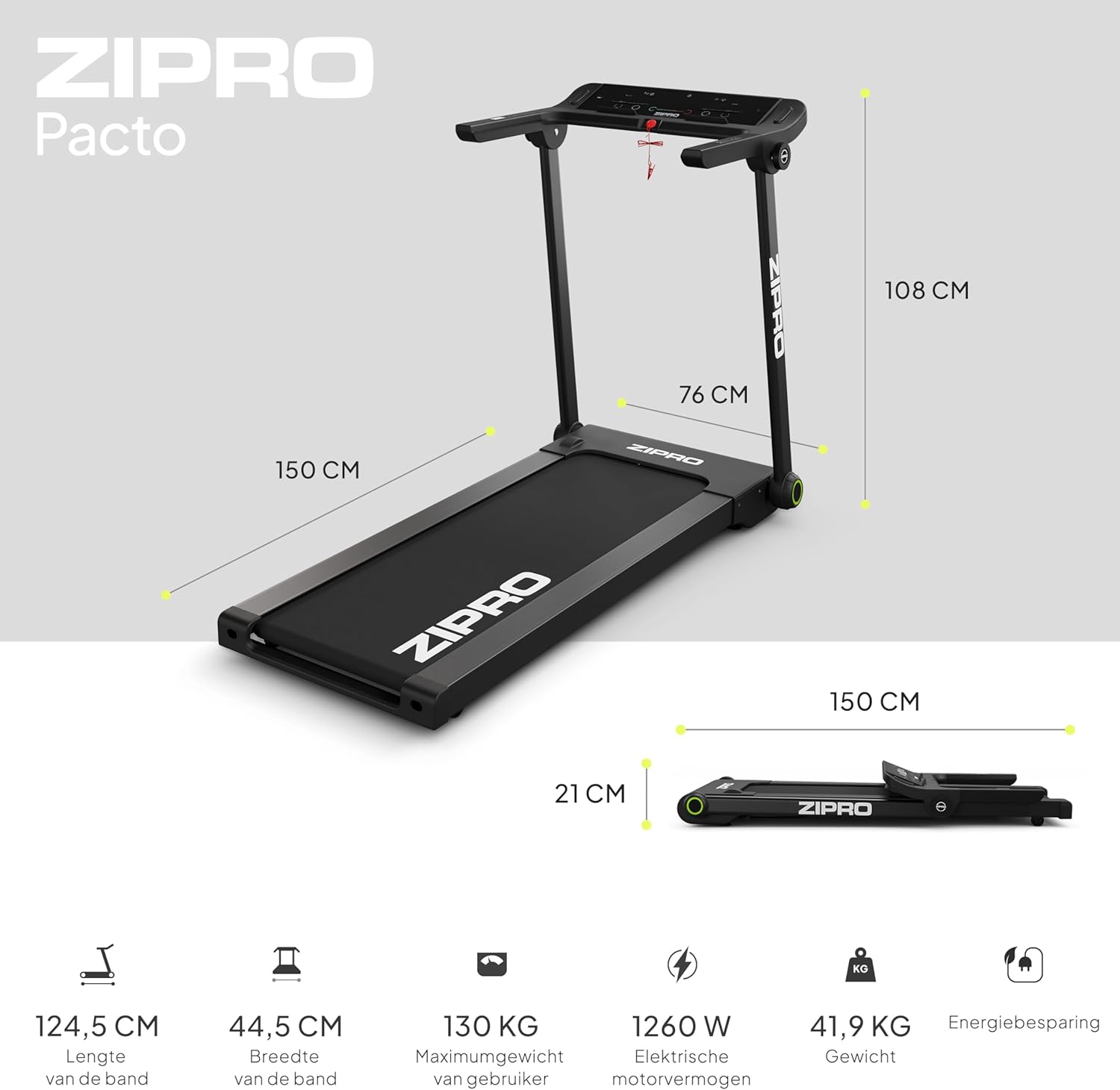
Image: A visual representation of the ZIPRO treadmill's dimensions when unfolded and folded, accompanied by key specifications such as belt length, width, maximum user weight, motor power, and item weight.

이미지: 자세한 view of the ZIPRO treadmill's cushioning system, highlighting the shock absorbers designed to provide a comfortable and joint-friendly workout experience.
9. 보증 및 지원
Your ZIPRO Treadmill is covered by a manufacturer's warranty against defects in materials and workmanship. Please refer to the warranty card included in your package for specific terms and conditions, including the warranty period and coverage details.
For technical assistance, troubleshooting beyond this manual, or to inquire about warranty claims, please contact ZIPRO customer support. Contact information can typically be found on the product packaging, the warranty card, or the official ZIPRO web대지.
When contacting support, please have your model number (5941329 L) and proof of purchase readily available to expedite the service process.


