1. 서론
This manual provides essential information for the safe and efficient operation of your Datalogic PowerScan M8300-AR910RB Handheld Laser Bar Code Reader. Please read this manual thoroughly before using the device to ensure proper setup, operation, and maintenance. Keep this manual for future reference.
2. 안전 정보
부상이나 장치 손상을 방지하려면 항상 다음 안전 예방 조치를 준수하세요.
- 레이저 안전 : This device emits a laser beam. Do not stare directly into the laser beam or point it at others. Avoid direct eye exposure.
- 배터리 안전: Use only Datalogic-approved batteries and charging accessories. Do not expose batteries to extreme temperatures, puncture, or disassemble them. Dispose of batteries according to local regulations.
- 환경 조건: Do not operate the device in explosive atmospheres or near flammable materials. Keep the device dry and away from extreme temperatures.
- 유지: Refer all servicing to qualified service personnel. Do not attempt to open or modify the device.
3. 패키지 내용
패키지에 모든 품목이 들어 있는지 확인하세요.
- Datalogic PowerScan M8300-AR910RB Handheld Laser Bar Code Reader
- 탈착식 배터리
- Charging/Communication Cradle (may be sold separately depending on configuration)
- USB or Serial Cable (for cradle connection, may be sold separately)
- Power Supply (for cradle, may be sold separately)
- 빠른 시작 가이드
4. 제품 오버view
The Datalogic PowerScan M8300 is a robust, cordless handheld laser bar code reader designed for industrial applications. It features a durable casing and a 910MHz radio for reliable wireless communication.
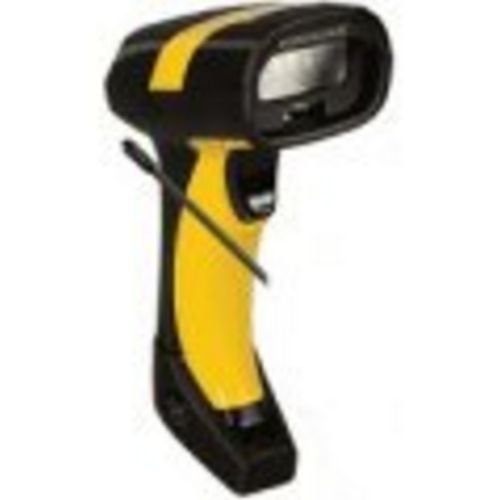
이미지 1: Datalogic PowerScan M8300 Handheld Laser Bar Code Reader. This image displays the front view of the scanner, highlighting its ergonomic design, scan window, and trigger button.
주요 구성 요소:
- 스캔 창: Located at the front, where the laser beam exits to read barcodes.
- 방아쇠: 스캐닝을 위해 레이저를 활성화합니다.
- 표시등: Provide feedback on scan status, battery level, and communication.
- 배터리 칸: Located at the base of the handle, housing the removable battery.
- 통신 인터페이스: For wireless data transmission via the 910MHz radio.
5. 설정
5.1. 배터리 설치
- 스캐너의 전원이 꺼져 있는지 확인하세요.
- 손잡이 아래쪽에 있는 배터리함 덮개를 찾으세요.
- Open the cover and insert the removable battery, ensuring correct polarity.
- 배터리 덮개를 단단히 닫으세요.
5.2. 배터리 충전
- Place the scanner into its charging cradle. Ensure the contacts on the scanner align with those on the cradle.
- Connect the power supply to the charging cradle and plug it into an electrical outlet.
- 스캐너의 표시등은 충전 상태를 보여줍니다(일반적으로 충전 중일 때는 주황색, 완전히 충전되었을 때는 녹색).
- 처음 사용하기 전에 배터리를 완전히 충전하십시오(약 4시간).
5.3. Connecting to a Host System
The PowerScan M8300 uses a 910MHz radio for wireless communication. It typically connects to a host system (e.g., PC, laptop) via a base station or cradle connected by a USB or serial cable.
- Connect the communication cable (USB or serial) from the charging/communication cradle to your host system.
- Connect the power supply to the cradle and plug it in.
- Place the scanner in the cradle. The scanner and cradle will automatically establish a wireless link.
- Install any necessary drivers or software on your host system as prompted or as instructed by Datalogic documentation for your specific cradle model.
6. 사용 설명서
6.1. 전원 켜기 / 끄기
- 전원을 켜려면: 스캐너는 일반적으로 거치대에서 분리하거나 트리거를 누르면 자동으로 전원이 켜집니다.
- 전원을 끄려면: The scanner will enter a low-power sleep mode after a period of inactivity. To fully power off, remove the battery.
6.2. 바코드 스캐닝
- Aim the scan window at the barcode you wish to read.
- 트리거 버튼을 길게 누르세요. 레이저 선이 나타납니다.
- 레이저 빔을 바코드 전체에 걸쳐 위치시키십시오.
- Once the barcode is successfully read, the scanner will emit an audible beep and/or an indicator light will illuminate.
- Release the trigger. The scanned data will be transmitted to the connected host system.
6.3. 데이터 전송
The PowerScan M8300 transmits scanned data wirelessly to its paired base station/cradle. Ensure the scanner is within range of its base station for successful data transfer. Out-of-range scanning capabilities may vary by configuration; refer to advanced programming guides for details.
7. 유지관리
7.1. 장치 청소
- 부드럽고 깨끗한 천을 사용하세요.amp물 또는 순한 세척액으로 세척하십시오.
- 연마성 세척제, 용제 또는 강한 화학 물질을 사용하지 마십시오.
- 스캔 창과 스캐너 외부를 부드럽게 닦아주세요.
- 액체가 장치 개구부로 들어가지 않도록 주의하세요.
7.2. 배터리 관리
- 배터리를 정기적으로 충전하십시오.
- 배터리를 자주 완전히 방전시키지 마세요.
- Store the scanner and spare batteries in a cool, dry place when not in use.
7.3. 보관
When storing the scanner for extended periods, ensure the battery is partially charged (around 50%) and remove it from the device if possible. Store in a temperature-controlled environment.
8. 문제 해결
If you encounter issues with your PowerScan M8300, refer to the following common problems and solutions:
| 문제 | 가능한 원인 | 해결책 |
|---|---|---|
| 스캐너의 전원이 켜지지 않습니다. | 배터리가 방전되었거나 제대로 설치되지 않았습니다. | Check battery installation. Charge the battery. Replace battery if necessary. |
| 스캐너가 바코드를 읽지 못합니다. | Barcode damaged or poorly printed; scan window dirty; incorrect symbology enabled. | Try scanning a different barcode. Clean the scan window. Refer to the programming guide to enable/disable symbologies. |
| No data transmitted to host. | Scanner out of range; base station not connected; communication issue. | Move scanner closer to the base station. Verify base station connection to host. Check base station power. |
| 배터리 수명이 짧습니다. | Battery nearing end of life; frequent use; improper charging. | Replace battery. Ensure full charges. Reduce backlight/power settings if configurable. |
If the problem persists, contact Datalogic technical support.
9. 사양
The following specifications apply to the Datalogic PowerScan M8300-AR910RB model:
- 모델 번호: PM8300-AR910RB
- 제품 크기: 2.72 x 4.49 x 8.15 인치
- 품목 무게: 13.9 온스
- 제조업체: Datalogic ADC
- 전원: 배터리 구동
- 연결 기술 : 무선(910MHz)
- 호환 장치: 데스크탑, 노트북
- 한국어: 053926383351
10. 보증 정보
Datalogic products are covered by a limited warranty against defects in materials and workmanship. The specific terms and duration of the warranty may vary by region and product. Please refer to the warranty card included with your product or visit the official Datalogic web자세한 보증 정보와 등록 절차는 해당 사이트를 참조하세요.
11. 지원
For technical assistance, product inquiries, or to report issues, please contact Datalogic customer support:
- Web대지: Visit the official Datalogic web지원 자료, FAQ 및 드라이버 다운로드를 위한 사이트입니다.
- 연락하다: Refer to the 'Contact Us' section on the Datalogic web해당 지역의 전화번호와 이메일 주소를 찾을 수 있는 사이트입니다.
When contacting support, please have your product model number (PM8300-AR910RB) and serial number ready.


