1. 서론
구매해주셔서 감사합니다asing the RCA DHT235A 3.5-Inch LED-lit 720p 60Hz TV. This portable television is designed to provide digital television viewing on a compact screen. This manual provides instructions for the proper setup, operation, and maintenance of your device.
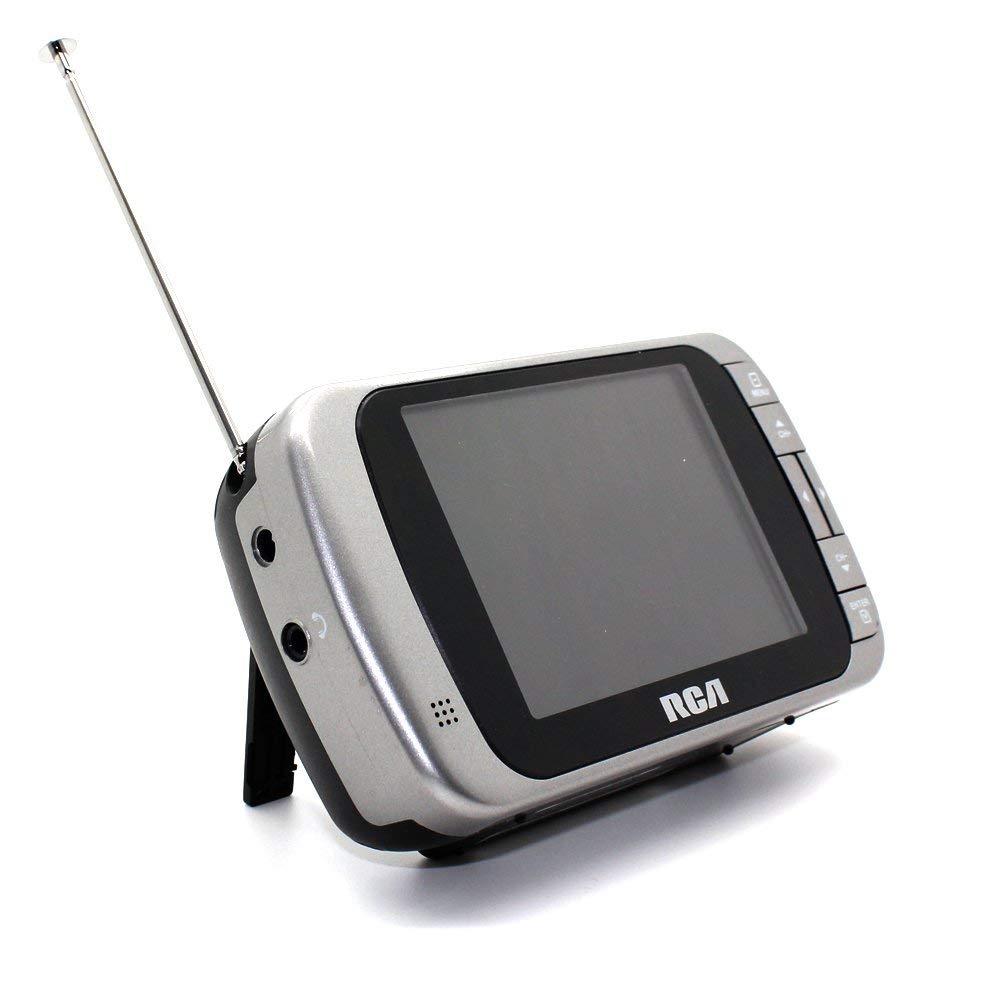
Image 1.1: The RCA DHT235A portable television, featuring its 3.5-inch screen and compact design.
2. 안전 정보
- 장치를 작동하기 전에 모든 지침을 읽으십시오.
- 화재나 감전을 방지하기 위해 장치를 비나 습기에 노출시키지 마십시오.
- 환기구를 막지 마십시오. 공기가 원활하게 흐르도록 장치 주변에 충분한 공간을 확보하십시오.
- Use only specified power sources (4 AA batteries or compatible AC adapter).
- 기기를 떨어뜨리거나 강한 충격을 주지 마십시오.
- 이 제품을 직접 수리하려고 하지 마십시오. 모든 서비스는 자격을 갖춘 서비스 담당자에게 문의하십시오.
- 배터리는 현지 규정에 따라 올바르게 폐기하세요.
3. 패키지 내용
패키지에 모든 품목이 들어 있는지 확인하세요.
- RCA DHT235A Portable TV Unit
- 서다
- 빠른 사용 설명서 (자세한 지침은 이 설명서를 참조하십시오)
- 사용 설명서(이 문서)
4. 제품 오버view
The RCA DHT235A features a 3.5-inch LED-lit display, designed for portable digital television reception. Key components include:
- 3.5-Inch LED Backlit LCD Display: Provides clear visual output.
- 내장 스피커: 오디오 출력용.
- 헤드폰 잭: 개인적으로 듣기 위한 것입니다.
- Embedded Monopole Antenna: For receiving terrestrial ATSC and NTSC signals.
- 배터리 칸: AA 배터리 4개용.
- AC Adapter Input (9-24VDC): For external power.
- 제어 버튼: For power, channel, volume, and menu navigation.
5. 설정
5.1 Powering the TV
The TV can be powered by 4 AA batteries or an optional AC adapter.
배터리 사용:
- Locate the battery compartment on the back of the TV.
- 배터리 덮개를 엽니다.
- AA 배터리 4개를 올바른 극성(+/-)에 맞춰 넣으세요.
- 배터리 덮개를 단단히 닫으세요.
Using AC Adapter (Optional):
- Connect a compatible 9-24VDC AC adapter (not included) to the DC input jack on the TV.
- AC 어댑터를 표준 벽면 콘센트에 꽂습니다.
5.2 안테나 설정
Extend the embedded monopole antenna fully for optimal signal reception. For improved reception, especially in areas with weak signals, an external antenna may be connected to the dedicated RCA connector input.
6. 사용 설명서
6.1 전원 켜기/끄기
를 누르세요 힘 TV를 켜거나 끄는 버튼입니다.
6.2 초기 채널 스캔
Upon first use or after moving to a new location, perform an auto channel scan to find available digital and analog channels.
- 를 누르세요 메뉴 단추.
- Navigate to the "Channel" or "Setup" menu using the arrow buttons.
- Select "Auto Scan" or "Auto Program" and confirm.
- TV가 사용 가능한 채널을 검색합니다. 이 과정은 몇 분 정도 소요될 수 있습니다.
6.3 채널 선택
- 사용하세요 CH+ 그리고 CH- buttons to cycle through available channels.
- For direct channel input, use the numeric keypad (if available on your model) or the "Direct Channel Changing" option in the menu.
6.4 볼륨 조절
사용하세요 볼륨+ 그리고 권 음량을 조절하는 버튼입니다.
6.5 메뉴 탐색
를 누르세요 메뉴 button to access settings. Use the arrow buttons to navigate and the OK or 입력하다 선택 사항을 확인하려면 버튼을 누르세요. 메뉴 again or an EXIT 메뉴를 나가려면 이 버튼을 누르세요.
Available menu options include:
- 사진 설정: Adjust brightness, contrast, color.
- 사운드 설정: Adjust audio mode, balance.
- 채널 설정: Auto scan, manual scan, channel editing.
- 시간 설정: Auto time setting, time zone.
- 언어: Select menu language (English, Spanish).
- 폐쇄형 자막: Enable/disable digital closed captioning (E1A-708B compliant).
7. 유지관리
7.1 청소
- Before cleaning, ensure the TV is powered off and disconnected from any external power source.
- 부드럽고 마른 천을 사용하여 화면과 외부 표면을 닦으세요.
- 완고한 자국의 경우 가볍게 damp천을 물에 적셔주세요. 연마성 세제, 왁스 또는 용제를 사용하지 마세요.
- 화면이나 구멍에 액체를 직접 분사하지 마십시오.
7.2 보관
When storing the TV for an extended period, remove the batteries to prevent leakage. Store the unit in a cool, dry place away from direct sunlight and extreme temperatures.
8. 문제 해결
| 문제 | 가능한 해결책 |
|---|---|
| 전원이 없습니다 | Ensure batteries are correctly inserted and not depleted. If using AC adapter, verify it is properly connected and the outlet is functional. |
| No Picture/Weak Signal | Extend the antenna fully. Perform an auto channel scan. Try repositioning the TV or antenna. Consider using an external antenna for better reception. Check signal strength display in the menu. |
| 소리가 나지 않습니다 | Increase the volume. Check if headphones are plugged in. Ensure the Mute function is not active. |
| 버튼이 응답하지 않음 | Turn the TV off and then on again. If the issue persists, remove and reinsert batteries or disconnect/reconnect the AC adapter. |
| Screen Scratches Easily | Handle the screen with care. Use a screen protector if desired (not included). |
| 짧은 배터리 수명 | Use fresh, high-quality alkaline or rechargeable batteries. Consider using the AC adapter for extended view주고받음. |
| Low Audio Volume | Ensure volume is set to maximum. For better audio, consider connecting external speakers to the headphone jack. |
9. 사양
- 모델: DHT235A
- 디스플레이 크기: 3.5인치(대각선)
- 디스플레이 유형: LED 백라이트 LCD
- 해결: 320 x 240 digital RGB (720p compatible)
- 새로 고침 빈도: 60Hz
- 비디오 디코딩 : MPEG-2 (MP at ML, MP at HL)
- 오디오 디코딩 : Dolby Digital Audio, Digital multi-lingual
- 조율사: Terrestrial ATSC 8VSB, Terrestrial NTSC CH2 - CH69
- 전원: 4 AA Batteries or 9-24VDC AC Adapter (optional)
- 배터리 수명: Approximately 2+ hours of DTV playback on 4 AA batteries
- 오디오 출력: Headphone jack, Built-in speaker
- 추가 기능: Real-time signal strength display, On-screen program information, Direct channel changing, Channel editing, Time zone setting, Auto channel scan, Digital Closed Captioning (E1A-708B compliant), Menu languages (English, Spanish).
- 치수: 약 4.84 x 1.34 x 2.83인치
- 무게: 약 5.6온스
10. 보증 정보
This product is covered by a limited warranty. For detailed warranty terms and conditions, please refer to the warranty card included with your purchase or visit the official RCA web사이트. 보증 청구를 위해 구매 증빙 자료를 보관하세요.
11. 고객 지원
If you encounter any issues or have questions not covered in this manual, please contact RCA customer support. You can find contact information on the official RCA web사이트나 제품과 함께 제공된 설명서를 통해 확인하세요.
온라인 지원: Visit the official RCA webFAQ 및 지원 리소스를 위한 사이트입니다.
전화 지원: 제품 포장 또는 RCA 설명서를 참조하십시오. web현재 연락처 정보는 사이트에서 확인하세요.


