1. 서론
This manual provides essential information for the safe and efficient installation, operation, and maintenance of your Airflow iCon ECO 15 Extractor Fan. Please read these instructions thoroughly before installation and retain them for future reference. The Airflow iCon ECO 15 is a stylish, compact, low-profile fan designed for discreet ventilation in various domestic applications.
2. 안전 정보
중요 안전 지침:
- Ensure the power supply is disconnected before installation, maintenance, or servicing.
- 설치는 국가 배선 규정 및 지역 건축 법규에 따라 자격을 갖춘 전기 기술자가 수행해야 합니다.
- 본 기기는 신체적, 감각적 또는 정신적 능력이 저하된 사람(어린이 포함)이나 경험 및 지식이 부족한 사람이 사용하도록 의도된 것이 아니며, 안전을 책임질 사람으로부터 기기 사용에 관한 감독이나 지시를 받은 경우에만 사용할 수 있습니다.
- 어린이가 이 제품을 가지고 놀지 않도록 감독해야 합니다.
- Do not install the fan directly above a shower or bath unless it is protected by a suitable enclosure.
- 공기 흡입구와 배기구가 막히지 않았는지 확인하십시오.
- The fan must not be connected to a chimney flue or any other appliance flue.
3. 제품 오버view
The Airflow iCon ECO 15 is a 100mm (4-inch) axial extractor fan featuring an intelligent iris shutter design for efficient and quiet operation. Its low-profile aesthetic integrates seamlessly into modern interiors.
3.1 주요 특징
- Iris Shutter Technology: Intelligent, award-winning design with a delayed shutter that opens and closes over up to 2 minutes. This avoids unnecessary operation for energy efficiency and prevents unwanted backdraughts.
- 로우 프로file 설계: 절제되고 심미적으로 만족스러운asing.
- Modular Versatility: Compatible with various control modules (sold separately) for enhanced functionality.
- 조용한 작동: 소음 수준을 낮추도록 설계되었습니다.


4. 사양
| 사양 | 값 |
|---|---|
| 상표 | 공기 흐름 |
| 모델 번호 | iCON ECO 15 |
| 팬 유형 | 축 |
| Air Flow (m³/h / l/s) | 69 / 19 |
| 장착 위치 | 벽 / 천장 |
| Sound Pressure @ 3m (dB(A)) | 28.8 |
| 전력(W) | 9.4 |
| Duct Diameter (mm) | 100 |
| 공급량tage | 230 V / 1ph / 50 Hz |
| 침투 방지 등급 | IPX4 |
| 최대 주변 온도(°C) | 40 |
| 무게(kg) | 0.74 |
| 치수 H x W x D(mm) | 197 x 197 x 108.5 |


5. 설치
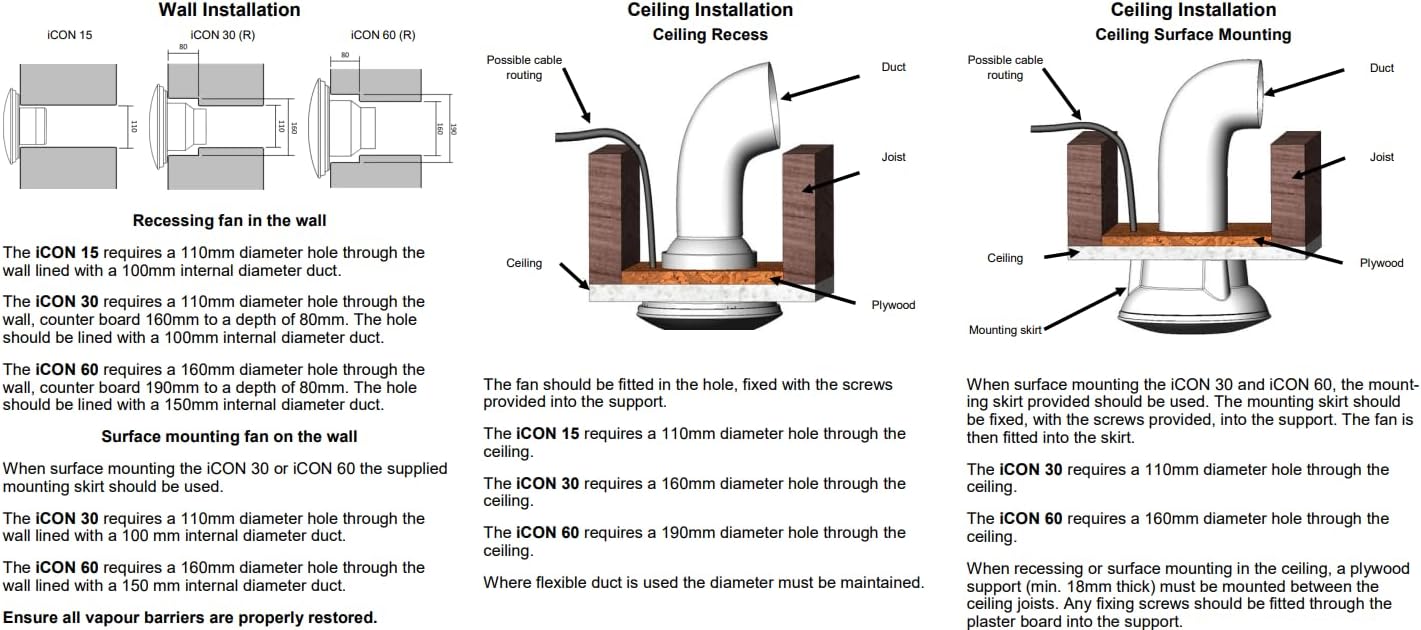
The Airflow iCon ECO 15 fan is designed for installation in walls or ceilings. Always ensure the power supply is isolated before commencing any installation work.
5.1 일반 설치 지침
- The fan requires a 110mm diameter hole for installation.
- For wall installations, the hole should be lined with a 100mm internal diameter duct.
- When using flexible ducting, ensure the diameter is maintained throughout the run.
- 설치 후 모든 방습막이 제대로 복원되었는지 확인하십시오.
5.2 Wall Installation (Recessing Fan)
The iCon 15 requires a 110mm diameter hole through the wall. This hole should be lined with a 100mm internal diameter duct.
5.3 Ceiling Installation (Recess)
The fan should be fitted in the hole, secured with the screws provided into the support structure. The iCon 15 requires a 110mm diameter hole through the ceiling.
5.4 Ceiling Installation (Surface Mounting)
When surface mounting, the fan is fitted into the mounting skirt (if supplied). The iCon 15 requires a 110mm diameter hole through the ceiling. When recessing or surface mounting in the ceiling, a plywood support (min. 18mm thick) must be mounted between the ceiling joists. Any fixing screws should be fitted through the plasterboard into this support.


6. 사용 설명서
The Airflow iCon ECO 15 operates automatically based on its intelligent iris shutter technology. When activated (e.g., by a light switch or an optional control module), the iris shutter will slowly open, and the fan will begin to extract air. Upon deactivation, the fan will continue to run for a set period (if a timer module is installed) before the shutter slowly closes, preventing backdraughts.
6.1 Control Modules (Sold Separately)
The iCon ECO 15 is designed to be upgraded with various 'snap-in' interchangeable control modules to suit specific ventilation needs. These modules offer functionalities such as:
- 기본 스위칭: Simple on/off operation.
- 지연 시작: Fan starts after a delay.
- 습도 센서: Activates based on room humidity levels.
- 모션 센서: Activates upon detecting movement.
- Pullcord: Manual activation via a pull cord.
- Room Refresh: Periodic ventilation.
- 선택: 안전 초저용량tage.
- 시간제 노동자: Fan runs for a set duration after activation.
- Two Speed: Allows selection between two fan speeds.
- 변하기 쉬운 속도 : 팬 속도 조절 가능.
Refer to the specific control module's instructions for detailed operating procedures.

7. 유지관리
Regular cleaning and maintenance will ensure the longevity and optimal performance of your Airflow iCon ECO 15 Extractor Fan.
- 전원 분리: Always ensure the power supply to the fan is disconnected before performing any maintenance.
- 커버 청소: The front cover can be gently wiped with a damp 천과 중성세제. 연마성 세제를 피하십시오.
- 선풍기 날개 청소하기: Carefully remove the front cover (refer to installation instructions for removal). Gently clean the fan blades and internal surfaces with a soft brush or damp cloth. Ensure no moisture enters electrical components.
- 재조립: Once clean and dry, reassemble the fan cover, ensuring it is securely fitted.
- 빈도: Cleaning should be performed periodically, depending on the environment and usage, typically every 3-6 months.
8. 문제 해결
If you experience issues with your Airflow iCon ECO 15 fan, consult the following common troubleshooting steps:
| 문제 | 가능한 원인 | 해결책 |
|---|---|---|
| 팬이 작동하지 않습니다. | No power supply; faulty wiring; fan motor failure; control module issue. | Check power supply at the switch and fuse box. Verify wiring connections (by a qualified electrician). If using a control module, check its functionality. |
| 팬이 시끄럽습니다. | Obstruction in ducting or fan blades; loose mounting; worn bearings. | Disconnect power and inspect fan blades and ducting for obstructions. Ensure the fan is securely mounted. If noise persists, professional inspection may be required. |
| 추출 성능이 좋지 않습니다. | Blocked ducting; dirty fan blades; incorrect fan size for room. | Clean fan blades and check ducting for blockages. Ensure ducting is correctly installed and not excessively long or restrictive. |
| Iris shutter not opening/closing. | Obstruction; motor fault; control module issue. | Disconnect power and check for any physical obstructions around the shutter mechanism. If using a control module, verify its operation. |
For issues not listed here or if solutions do not resolve the problem, please contact Airflow customer support or a qualified technician.
9. 보증 정보
Airflow Developments Ltd guarantees the iCon fan for 3년 from the date of purchase against faulty material or workmanship. This warranty is applicable to units installed and used in the United Kingdom.
You can register your warranty online for more information at www.airflow.com.
The warranty covers only the fan and does not include reinstallation if required. In the event of any defective parts being found, Airflow Developments Ltd reserves the right to repair or replace the unit at their discretion without charge, provided that:
- It has been installed and used in accordance with the fitting and wiring instructions supplied with each unit.
- It has not been connected to an unsuitable electrical supply.
- It has not been subjected to misuse, neglect, or damage.
- It has not been modified or repaired by any person not authorized by Airflow Developments Ltd.
- It has been installed in accordance with the latest Building Regulations and IET wiring regulations by a person who is recognized as a competent installer (e.g., NICEIC Ventilation Scheme).
Airflow Developments Ltd shall not be liable for any loss, injury, or other consequential damage arising from a failure of the equipment, except only that nothing in this condition shall be construed as to exclude or restrict liability for negligence.
This warranty does not affect any statutory or other consumer rights.
For detailed standard warranty terms and conditions, please visit the Airflow web사이트를 방문하거나 고객 서비스에 문의하십시오.

10. 지원 및 연락처
For further assistance, frequently asked questions (FAQs), and installation help, please visit the Airflow Knowledge Base:
airflow.com/useful-links/knowledge-base-faqs


