1. 서론
Thank you for choosing the Philips AJB3552/12 DAB+ FM Clock Radio. This manual provides essential information for setting up, operating, and maintaining your device. Please read it carefully to ensure optimal performance and safe use of your clock radio.
Key features of your Philips AJB3552/12 include:
- DAB+ (Digital Audio Broadcasting) for clear, noise-free radio reception.
- FM tuner for traditional radio stations.
- Dynamic Bass Boost for enhanced low-frequency sound.
- Integrated alarm with multiple wake-up options.
- Light sensor for automatic display brightness adjustment.
- Backlit LCD display for easy readability.
2. 안전 정보
Please observe the following safety precautions to prevent electric shock, fire, or damage to the device:
- 장치를 비나 습기에 노출시키지 마십시오.
- 기기 위에 꽃병과 같이 액체가 담긴 물건을 올려 놓지 마세요.
- 충분한 환기를 유지하세요. 환기구를 막지 마세요.
- 전원 코드가 밟히거나 끼지 않도록 보호하세요.
- 제조사가 지정한 부속품/액세서리만 사용하세요.
- 번개가 칠 때나 장기간 사용하지 않을 때에는 장치의 플러그를 뽑아두십시오.
- 모든 서비스는 자격을 갖춘 서비스 담당자에게 의뢰하세요.
3. 패키지 내용
패키지에 다음 품목이 포함되어 있는지 확인하십시오.
- Philips AJB3552/12 Clock Radio
- 사용 설명서 (본 문서)
- 빠른 시작 가이드
- 전원 공급 장치
- 보증서
4. 제품 오버view
Familiarize yourself with the components of your Philips AJB3552/12 Clock Radio.
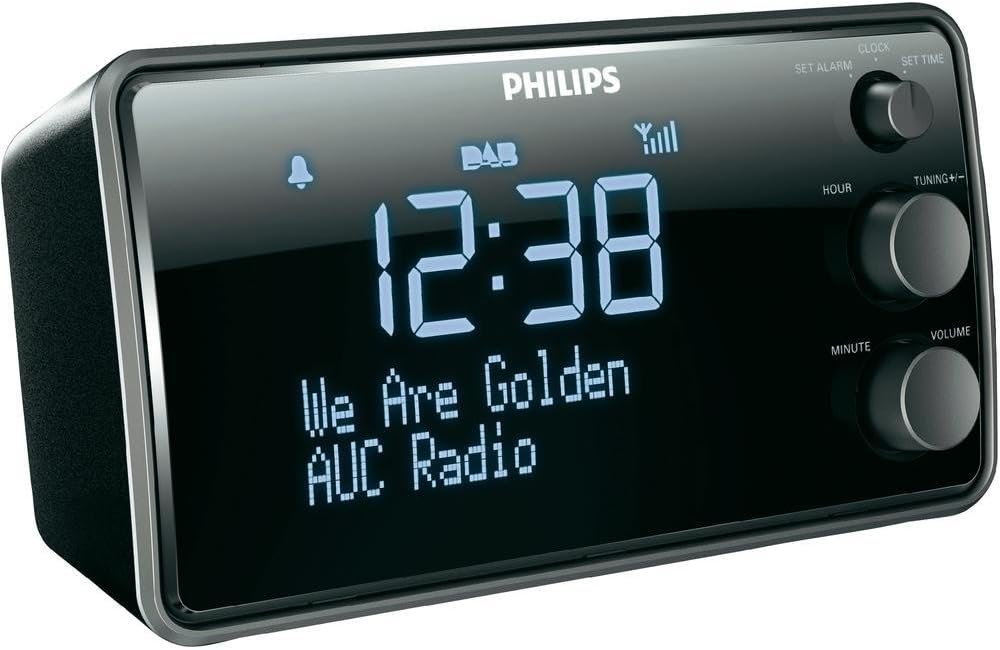
이미지 1: 앞쪽 view of the Philips AJB3552/12 Clock Radio, showing the digital display, Philips logo, and control knobs for setting time, tuning, and volume.
전면 패널
- 표시하다: Shows time, radio station information, and alarm status.
- SET ALARM knob: 알람 시간을 설정하는데 사용됩니다.
- SET TIME knob: 현재 시간을 설정하는 데 사용됩니다.
- HOUR button: 시간을 조정합니다.
- MINUTE button: 분을 조정합니다.
- TUNING +/- knob: For tuning radio frequencies or navigating menus.
- VOLUME 노브 : 오디오 출력 레벨을 조정합니다.
후면 패널
- 전원 입력: 제공된 전원 어댑터에 연결합니다.
- FM/DAB 안테나: 라디오 신호 수신용.
5. 설정
5.1 전원 연결
- Uncoil the FM/DAB antenna fully for optimal reception.
- Connect the power adapter to the DC IN socket on the rear of the clock radio.
- 전원 어댑터를 벽면 콘센트에 꽂으세요.
5.2 Initial Power On and Time Synchronization
Upon first connection, the clock radio will automatically attempt to synchronize the time via DAB+ signal. This process may take a few minutes.

이미지 2: The Philips AJB3552/12 Clock Radio positioned on a wooden bedside table next to a bed, illustrating a typical usage scenario.
5.3 Manual Time Setting (if automatic synchronization fails)
- 를 누르고 계세요 시간 설정 knob until the hour digits flash.
- 회전하다 시간 시간을 조정하려면 버튼을 누르세요. 시간 확인합니다.
- 회전하다 분 button to adjust the minute. Press 분 확인합니다.
- 이제 시간이 설정되었습니다.
6. 사용 설명서
6.1 전원 켜기/끄기
- To turn on the clock radio, press the 힘 button (usually integrated with the VOLUME knob).
- To turn off the clock radio, press the 힘 button again. The display will show the current time.
6.2 무선 작동
6.2.1 DAB+ 라디오
- 를 누르세요 방법 button (if available, or cycle through modes using the power button) to select DAB+ mode.
- The radio will automatically scan for available DAB+ stations. This may take a few moments.
- 스캔이 완료되면 회전시키세요. 튜닝 +/- knob to browse through the available stations.
- 를 누르세요 튜닝 +/- 채널을 선택하는 노브.
- To store a preset, press and hold a preset number button (if available) until the display confirms.
6.2.2 FM 라디오
- 를 누르세요 방법 FM 모드를 선택하려면 버튼을 누르세요.
- 회전하다 튜닝 +/- 주파수를 수동으로 조절할 수 있는 노브.
- 사용 가능한 다음 방송국을 자동으로 스캔하려면 다음을 길게 누릅니다. 튜닝 +/- 손잡이.
- To store a preset, press and hold a preset number button (if available) until the display confirms.
6.2.3 다이내믹 베이스 부스트
The Dynamic Bass Boost feature enhances low-frequency sounds for a richer audio experience. To activate or deactivate, press the DBB button (if available, or check menu options).
6.3 알람 설정
The Philips AJB3552/12 allows you to set an alarm to wake up to your preferred radio station or a buzzer.
- 를 누르고 계세요 알람을 설정하다 knob until the alarm time digits flash.
- 회전하다 시간 button to set the alarm hour. Press 시간 확인합니다.
- 회전하다 분 button to set the alarm minute. Press 분 확인합니다.
- Select the alarm source: Rotate the 튜닝 +/- knob to choose between 라디오 or 부저. Press the knob to confirm.
- Select the alarm frequency: Rotate the 튜닝 +/- knob to choose between 일일, 주중 (Mon-Fri), or 주말 (Sat-Sun). Press the knob to confirm.
- 알람을 활성화/비활성화하려면 다음을 누르세요. 알람 ON / OFF button (often located on top or integrated with the SET ALARM knob). An alarm icon will appear on the display when active.
6.3.1 스누즈 기능
알람이 울리면 버튼을 누르세요. 선잠 button (usually a large button on top) to temporarily silence the alarm. The alarm will sound again after a few minutes (default snooze time is typically 9 minutes).
6.3.2 슬립 타이머
수면 타이머를 사용하면 설정한 시간이 지나면 자동으로 꺼지는 라디오를 들으며 잠들 수 있습니다. 버튼을 누르세요. 잠 버튼을 반복해서 누르면 사용 가능한 수면 시간(예: 120, 90, 60, 30, 15분 또는 꺼짐)을 순환하며 선택할 수 있습니다.
6.4 디스플레이 설정
The clock radio features a light sensor that automatically adjusts the display brightness based on ambient light conditions. If manual adjustment is desired, consult the full user manual for specific steps, as this may vary.
7. 유지관리
7.1 청소
To clean the unit, use a soft, dry cloth. Do not use abrasive cleaners, alcohol, or benzene, as these can damage the surface. Ensure the device is unplugged before cleaning.
7.2 배터리 정보
The device requires 1 Lithium-ion battery for backup purposes (e.g., to retain time settings during a power outage). This battery is typically pre-installed and not user-replaceable. If the time is consistently lost after power interruptions, professional servicing may be required.
8. 문제 해결
If you encounter issues with your clock radio, refer to the following common problems and solutions:
| 문제 | 가능한 원인 | 해결책 |
|---|---|---|
| 전원이 없습니다 | 전원 코드가 제대로 연결되지 않았습니다. | 전원 코드가 본체와 벽면 콘센트에 제대로 꽂혀 있는지 확인하십시오. |
| 라디오 수신 불량(DAB+/FM) | Antenna not fully extended or positioned incorrectly. Interference from other electronic devices. | Fully extend and adjust the antenna. Move the unit away from other electronic devices. Try repositioning the unit. |
| 알람이 울리지 않습니다 | Alarm not activated. Alarm volume too low. | 경보기가 설정되어 있고 활성화되어 있는지 확인하십시오(경보기 아이콘이 보이는지 확인). 경보음량을 높이십시오. |
| 화면이 너무 밝거나 어둡습니다 | Automatic light sensor adjustment. | The light sensor adjusts brightness automatically. If manual override is desired, refer to the full user manual. |
9. 사양
Detailed technical specifications for the Philips AJB3552/12 Clock Radio:

이미지 3: 위에서 아래로 view of the Philips AJB3552/12 Clock Radio, indicating its dimensions: 9.2 cm depth and 6.3 cm height.
| 특징 | 사양 |
|---|---|
| 상표 | 필립스 |
| 모델 번호 | AJB3552/12 |
| 제조업체 | TP 비전 |
| 제품 치수 | 17.2 x 6.3 x 9.2cm(W x H x D) |
| 무게 | 658g |
| 색상 | 검은색 |
| 디스플레이 유형 | 디지털 |
| 특별 기능 | Integrated clock, Built-in speakers, Volume control, DAB+, Dynamic Bass Boost, Light sensor |
| 전원 | Battery (backup) / AC Power |
| 객실 유형 | 침실 |
| 폼 팩터 | 직사각형 프리즘 |
| 사용환경 | 실내 |
| 필요한 배터리 | 1 Lithium ion battery (for backup) |
10. 보증 및 지원
For warranty information and customer support, please refer to the warranty certificate included in your package or visit the official Philips support web사이트. 보증 청구를 위해 구매 증빙 자료를 보관하세요.


