1. 서론
This manual provides detailed instructions for the setup, operation, and maintenance of your Targus AKB32ES Wireless Keyboard. This device is designed to enhance your typing experience with compatible devices, such as iPads and smartphones, through Bluetooth connectivity. Please read this manual thoroughly before using the product.
2. 패키지 내용
- Targus AKB32ES Wireless Keyboard (Spanish QWERTY Layout)
- 사용 설명서 (본 문서)
메모: Batteries are not included and must be purchased separately. The iPad or other compatible device shown in product images is not included.
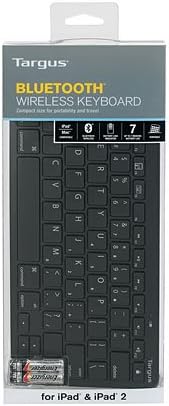
Image: The Targus AKB32ES Wireless Keyboard shown in its retail packaging. The packaging displays the Targus brand and indicates Bluetooth connectivity.
3. 설정
3.1 배터리 설치
The Targus AKB32ES keyboard requires Alkaline batteries for operation. Follow these steps to install them:
- 키보드 아랫부분에서 배터리 덮개를 찾으세요.
- 덮개를 살살 밀거나 들어 올려서 수납공간을 여세요.
- Insert the required Alkaline batteries, ensuring correct polarity (+/-) as indicated inside the compartment.
- 배터리 칸 덮개를 딸깍 소리가 나며 제자리에 단단히 고정될 때까지 다시 끼웁니다.
3.2 블루투스 페어링
To connect your keyboard to an iPad or other compatible device via Bluetooth:
- Ensure the keyboard has fresh batteries and is powered on. Look for a power switch or indicator light.
- Activate the Bluetooth pairing mode on the keyboard. This usually involves pressing a dedicated Bluetooth button or a combination of keys (refer to specific keyboard markings if available). An indicator light on the keyboard may flash to show it is in pairing mode.
- On your iPad or compatible device, navigate to 설정 > 블루투스.
- Bluetooth가 켜져 있는지 확인하세요 On.
- Your device will scan for available Bluetooth devices. Locate "Targus AKB32ES" or a similar name in the list of devices.
- Tap on the keyboard's name to initiate the pairing process.
- If prompted, enter the displayed pairing code on your Targus keyboard and press 입력하다.
- Once successfully paired, the keyboard's indicator light may change or turn off, and your device will show the keyboard as "Connected."

Image: The Targus AKB32ES Wireless Keyboard positioned next to an iPad, which is held upright in a separate stand. This illustrates a typical setup for use.
4. 키보드 작동
4.1 기본 타이핑
The Targus AKB32ES features a standard Spanish QWERTY layout. Simply open any text input application on your paired device and begin typing. The input will appear on your screen.
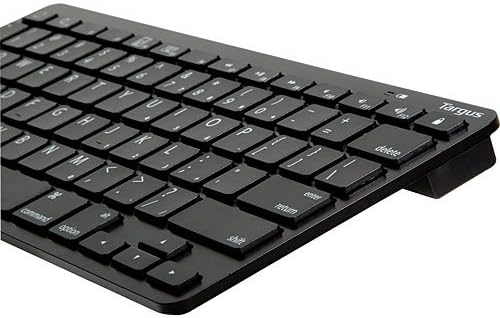
이미지: 클로즈업 view of the Targus AKB32ES keyboard, highlighting the Spanish QWERTY key layout, including special characters and function keys.
4.2 특수 기능 키
The keyboard includes dedicated function keys for enhanced control over your device. These keys may vary slightly in functionality depending on your operating system (e.g., iOS, Android). Common functions include:
- Home/Lock Screen: A key often depicted with a house icon or lock symbol, used to return to the home screen or lock/unlock the device.
- 볼륨 조절: Keys for increasing, 감소하다asing, or muting audio volume.
- 미디어 재생 : Keys for play/pause, skip track, or previous track.
- 밝기 조절: Keys to adjust screen brightness.
Refer to the keycap legends for specific icons and their corresponding functions.
5. 유지관리
5.1 청소
키보드의 외관과 기능을 유지하려면:
- 청소하기 전에 키보드의 전원이 꺼져 있는지 확인하세요.
- 부드럽고 털이 없는 천을 살짝 사용하세요.amp물이나 부드럽고 연마성이 없는 세척 용액으로 세척하세요.
- 키캡과 표면을 부드럽게 닦아주세요. 과도한 습기는 피해주세요.
- 키보드에 세척제를 직접 분사하지 마십시오.
- 키 사이의 이물질을 제거하려면 압축 공기를 사용하세요.
5.2 배터리 교체
When the keyboard's performance degrades or the indicator light signals low battery, replace the batteries following the steps in Section 3.1. Always use new Alkaline batteries of the specified type.
6. 문제 해결
If you encounter issues with your Targus AKB32ES keyboard, try the following solutions:
- 키보드 전원이 켜지지 않음: 배터리가 올바르게 설치되었는지, 충전량이 충분한지 확인하십시오. 필요한 경우 배터리를 교체하십시오.
- Bluetooth를 통해 페어링할 수 없습니다.
- 키보드가 페어링 모드인지 확인하십시오(표시등이 깜빡임).
- 기기에서 Bluetooth가 활성화되어 있는지 확인하세요.
- 키보드를 장치에 더 가까이 이동하십시오.
- 기기의 Bluetooth 설정에서 기기를 삭제하고 다시 페어링을 시도하세요.
- Restart both the keyboard (by turning off and on) and your device.
- 키가 응답하지 않음:
- 배터리 잔량을 확인하십시오.
- Ensure the keyboard is still connected via Bluetooth.
- 키보드를 다시 페어링해 보세요.
- 해당 키 주변의 이물질을 깨끗이 제거하십시오.
- Unexpected characters or layout issues: Ensure your device's language and keyboard settings are configured for a Spanish QWERTY layout.
7. 사양
| 상표 | 타르거스 |
| 모델 번호 | AKB32ES |
| 연결 기술 | 블루투스 |
| 키보드 레이아웃 | 스페인어 (QWERTY) |
| 색상 | 검은색 |
| 호환 장치 | iPad, Smartphone (Bluetooth-enabled devices) |
| 배터리 유형 | 알칼리성(포함되지 않음) |
| 제품 치수 | 약 34.2×13.2×3.4 cm |
| 제품 무게 | 약 381g |
| 특징 | 인체공학적 디자인 |

이미지: 각도가 있는 view of the Targus AKB32ES Wireless Keyboard, showcasin컴팩트하고 인체공학적인 디자인입니다.
8. 보증 및 지원
For information regarding warranty coverage, technical support, or to access additional resources, please visit the official Targus website. You can typically find contact information and support sections on their main page.
Targus Official Web대지: www.targus.com


