소개
This manual provides essential instructions for the safe and efficient operation of your I-TEC T2404 Universal Wireless Bluetooth Portable Sound System (Model BTO-SPEAKRST). Please read this manual thoroughly before using the device and retain it for future reference.
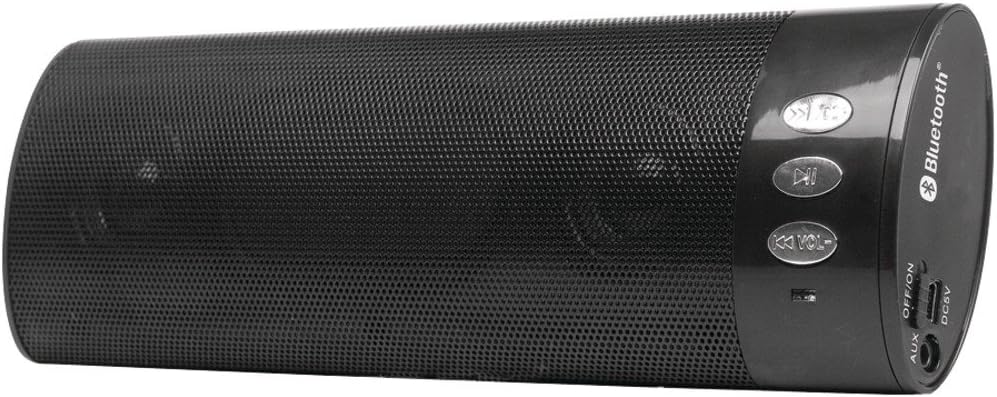
그림 1: I-TEC T2404 Universal Wireless Bluetooth Portable Sound System. This image shows the cylindrical black speaker with a perforated metal grille, control buttons on one end, and input/output ports on the other end.
설정
1. 풀기
Carefully remove the sound system from its packaging. Verify that all components are present. If any items are missing or damaged, contact your retailer.
2. 장치 전원 공급
The I-TEC T2404 is powered via a DC 5V input. Connect a standard USB power adapter (not included) to the DC5V port on the speaker using a compatible USB cable. Ensure the power source provides 5V DC.
3. 전원 켜기/끄기
Locate the "OFF/ON" switch on the side panel of the speaker. Slide the switch to the "ON" position to power on the device. Slide it to the "OFF" position to power off.
그림 2: Close-up of the control panel and ports. This image highlights the buttons for track control and volume, the Bluetooth logo, and the AUX, OFF/ON switch, and DC5V ports on the side of the speaker.
작동 지침
1. 블루투스 페어링
- Ensure the speaker is powered on. It will automatically enter Bluetooth pairing mode, indicated by a flashing LED light (location not specified in product data, assume standard behavior).
- Activate Bluetooth on your mobile device (smartphone, tablet, computer).
- 검색 available Bluetooth devices. The speaker will appear as "I-TEC T2404" or a similar name.
- 목록에서 페어링할 스피커를 선택하세요. 페어링이 완료되면 확인음이 울리거나 LED 표시등이 계속 켜져 있으면 됩니다.
- 페어링이 완료되면 기기의 오디오를 스피커를 통해 재생할 수 있습니다.
2. AUX 입력 작동
AUX 입력을 사용하려면:
- 3.5mm 오디오 케이블(포함되지 않음)의 한쪽 끝을 스피커의 AUX 포트에 연결합니다.
- 3.5mm 오디오 케이블의 다른 쪽 끝을 외부 오디오 장치의 헤드폰 잭 또는 오디오 출력 단자에 연결하십시오.
- The speaker should automatically switch to AUX mode. If not, ensure no Bluetooth device is actively connected or try cycling the power.
3. 제어 버튼
스피커에는 여러 개의 제어 버튼이 있습니다.
- 재생/일시 정지 버튼: 오디오 재생을 재생하거나 일시 정지하려면 누르세요.
- Previous Track / Volume Down (K<< VOL-): Press briefly to skip to the previous track. Press and hold to decrease the volume.
- Next Track / Volume Up (>>K VOL+): Press briefly to skip to the next track. Press and hold to increase the volume.
유지
1. 청소
Wipe the exterior of the speaker with a soft, dry cloth. Do not use abrasive cleaners, waxes, or solvents as they may damage the finish. Avoid getting moisture into any openings.
2. 보관
When not in use for extended periods, store the speaker in a cool, dry place, away from direct sunlight and extreme temperatures. Disconnect it from the power source.
문제 해결
| 문제 | 가능한 원인 | 해결책 |
|---|---|---|
| 전원이 없습니다 | Speaker is off; power cable not connected; power source issue. | Ensure the "OFF/ON" switch is in the "ON" position. Verify the DC5V power cable is securely connected to a working power source. |
| 블루투스로 페어링이 불가능합니다 | Speaker not in pairing mode; Bluetooth disabled on device; device too far; interference. | Ensure the speaker is on and in pairing mode (flashing LED). Enable Bluetooth on your device. Move the device closer to the speaker. Turn off other Bluetooth devices to reduce interference. |
| 소리가 나지 않습니다 | 볼륨이 너무 낮습니다. 입력 모드가 잘못되었습니다. 오디오 소스에 문제가 있습니다. | Increase the volume on both the speaker and your connected device. Ensure the correct input mode (Bluetooth or AUX) is active. Check if the audio source is playing correctly. |
| 음향 왜곡 | Volume too high; weak Bluetooth signal; damaged audio cable. | Reduce the volume. Move the Bluetooth device closer to the speaker. If using AUX, try a different audio cable. |
명세서
- 상표: 아이텍
- 모델: BTO-SPEAKRST (T2404 Series)
- 연결 기술 : 블루투스, 무선
- 스피커 연결: 블루투스
- 특별 기능: 가지고 다닐 수 있는
- 왓tage: 4 와트
- 장착 유형: 테이블탑
- 전원 입력: DC 5V (USB를 통해)
- 품목 무게: 268g
- 패키지 크기: 23.62 x 9.4 x 4.57cm
- 첫 번째 가능한 날짜: 29년 2022월 XNUMX일
보증 및 지원
For warranty information or technical support, please refer to the documentation provided with your purchase or visit the official i-tec web사이트. 보증 청구를 위해 구매 증빙 자료를 보관하세요.


