1. 서론
Welcome to the user manual for your HP EliteBook 2560p laptop. This document provides essential information for setting up, operating, maintaining, and troubleshooting your device. Please read this manual thoroughly to ensure proper use and to maximize the lifespan of your laptop.
2. 안전 정보
To prevent injury, damage to the product, or loss of data, observe the following safety precautions:
- 노트북과 함께 제공된 전원 어댑터만 사용하십시오.
- 노트북을 극한의 온도, 습도 또는 직사광선에 노출시키지 마십시오.
- 노트북 위에 무거운 물건을 올려놓지 마세요.
- 장치에서 액체를 멀리 두십시오.
- 노트북을 직접 분해하거나 수리하려고 하지 마십시오. 자격을 갖춘 서비스 담당자에게 문의하십시오.
- 과열을 방지하려면 적절한 환기를 유지하세요.
3. 패키지 내용
패키지에 모든 품목이 들어 있는지 확인하세요.
- HP 엘리트북 2560p 노트북
- AC 전원 어댑터 및 전원 코드
- 배터리 팩
- 문서(이 매뉴얼, 보증 정보)
4. 제품 오버view
Familiarize yourself with the components of your HP EliteBook 2560p.
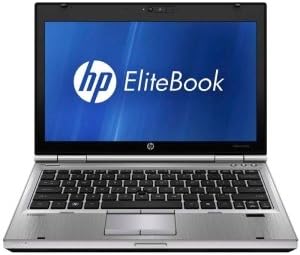
그림 4.1: 앞쪽 view of the HP EliteBook 2560p laptop. This image shows the laptop open, revealing the 12.5-inch display, keyboard, and touchpad. The screen displays the "HP EliteBook" logo.
4.1. Front and Top Components
- 12.5-inch HD Anti-Glare LED Display: For visual output.
- 건반: Standard QWERTY layout for text input.
- 터치패드: For cursor control and navigation.
- Web캠: Integrated for video conferencing and imaging.
- Fingerprint Reader (FPR): 보안 강화를 위해.
4.2. Side and Rear Components
- USB 2.0 포트: For connecting peripheral devices.
- DVD+/-RW Optical Drive: CD/DVD 읽기 및 쓰기용.
- 전원 커넥터 : AC 어댑터를 연결합니다.
- 이더넷 포트 : 유선 네트워크 연결용.
- 디스플레이 포트: 외부 모니터를 연결하는 데 사용됩니다.
- 오디오 잭: 헤드폰과 마이크용입니다.
5. 설정
5.1. 전원 어댑터 연결
- AC 전원 코드를 AC 어댑터에 연결합니다.
- AC 어댑터를 접지된 전기 콘센트에 꽂으세요.
- Connect the DC output plug of the AC adapter to the power connector on your laptop.
- Allow the battery to charge fully before initial use, or use the laptop while connected to power.
5.2. Initial Boot-Up and Operating System Setup
- 노트북 덮개를 엽니다.
- Press the power button, typically located above the keyboard.
- Follow the on-screen instructions to complete the Windows 7 Professional setup, including language selection, user account creation, and network configuration.
6. 사용 설명서
6.1. 전원 켜기 및 끄기
- 전원을 켜려면: 전원 버튼을 누르세요.
- 종료하려면: Click the Start button, then select "Shut Down."
- 재시작하기 위해: Click the Start button, then select "Restart."
- 잠들다: Close the lid or click the Start button and select "Sleep."
6.2. 터치패드 사용
The touchpad allows you to control the cursor on the screen.
- 수도꼭지: 한 번 탭하면 클릭, 두 번 탭하면 두 번 클릭됩니다.
- 견인: Tap and hold, then drag your finger across the touchpad.
- 스크롤: Use two fingers to scroll vertically or horizontally.
6.3. 무선 네트워크(Wi-Fi) 연결하기
- Click the network icon in the system tray (bottom-right corner of the screen).
- 목록에서 원하는 Wi-Fi 네트워크를 선택하세요.
- "연결"을 클릭하고 메시지가 나타나면 네트워크 보안 키(비밀번호)를 입력하세요.
6.4. Using the Optical Drive
The integrated DVD+/-RW drive allows you to read and write CDs and DVDs.
- 드라이브의 배출 버튼을 눌러 트레이를 여세요.
- Place a disc gently onto the tray, label side up.
- 트레이를 딸깍 소리가 나면서 닫힐 때까지 노트북 안쪽으로 밀어 넣으세요.
7. 유지관리
7.1. 노트북 청소
- 청소하기 전에는 항상 노트북의 전원을 끄고 플러그를 뽑으세요.
- 부드럽고 털이 없는 천을 살짝 사용하세요.amp물이나 디스플레이 전용 세척제로 닦아주세요.
- 키보드와 케이스에는 부드러운 천을 사용하세요. 강한 화학 물질은 피하세요.
- 압축 공기를 사용하여 통풍구와 키보드 틈새의 먼지를 제거합니다.
7.2. 배터리 관리
- 배터리를 자주 완전히 방전시키지 마세요.
- 장시간 사용하지 않을 경우 노트북을 서늘하고 건조한 곳에 보관하세요.
- If the battery is removable, ensure it is securely seated.
7.3. 소프트웨어 업데이트
HP 지원에서 운영 체제 업데이트(Windows 업데이트) 및 드라이버 업데이트를 정기적으로 확인하고 설치하세요. web최적의 성능과 보안을 보장하기 위해 사이트가 운영됩니다.
8. 문제 해결
| 문제 | 가능한 해결책 |
|---|---|
| 노트북의 전원이 켜지지 않습니다. | Ensure the AC adapter is securely connected and the power outlet is functional. Check battery charge. |
| Wi-Fi 연결이 없습니다. | Verify Wi-Fi is enabled (check physical switch or function key). Restart router and laptop. Re-enter Wi-Fi password. |
| 화면이 비어 있습니다. | Connect an external monitor to check if the display is faulty. Adjust brightness settings. Restart the laptop. |
| 시스템이 느리거나 응답하지 않습니다. | Close unnecessary applications. Check for malware. Ensure sufficient free disk space. Restart the laptop. |
더 복잡한 문제는 HP 지원을 참조하세요. web사이트를 방문하거나 고객 서비스에 문의하세요.
9. 사양
| 특징 | 세부 사항 |
|---|---|
| 모델 | HP EliteBook 2560p (LJ467UT#ABA) |
| 프로세서 | 인텔 코어 i5-2520M |
| 표시하다 | 12.5-inch HD Anti-Glare LED (1366 x 768 pixels) |
| 숫양 | 4GB DDR3(1333MHz) |
| 저장 | 320GB 하드디스크 |
| 광학 드라이브 | DVD+/-RW |
| 제도법 | 통합 인텔 그래픽 |
| 무선 전화 | 802.11a/b/g/n, 블루투스 |
| 포트 | USB 2.0 (x1), DisplayPort, VGA, Ethernet, Audio Jacks |
| 운영 체제 | 윈도우 7 프로페셔널 64비트 |
| Web캠 | 통합 Web캠 |
| 보안 | 지문 판독기 |
| 배터리 수명 | 최대 8.5시간(평균) |
| 치수(길이x너비x높이) | 16.5 x 13.5 x 4.5 인치 |
| 무게 | 6.8파운드 |
10. 보증 및 지원
For information regarding your product's warranty, please refer to the warranty document included with your purchase or visit the official HP support web대지.
HP provides various support resources, including online documentation, driver downloads, and customer service contact options.
- HP 지원 Web대지: www.hp.com/support
- 지원팀에 문의: HP를 참조하십시오 web지역별 연락처와 채팅 옵션을 제공하는 사이트입니다.


